Materials livescript test
PBRT scene materials are stored in a simple list attached to the scene recipe. A material can be used to describe multiple objects in the scene. Each object node (a leaf) has a slot that specifies the name of its material.
We read and write material properties using the usual set/get method
thisR.get('material',materialName,'parameter')
thisR.set('material',materialName,'parameter',value)
When you read a PBRT scene from Cinema4D it has a list of materials, including matte, glass and mirror. We are in the process of organizing the materials and adding more types so that we can read in pre-defined materials. With PBRT V4.0 the types of materials will grow.
Table of Contents
The base scene List the scene materials The material of an asset Material properties Set material color: RGB format Set material type: glass Set material type: mirror Set material spectral reflectance Delete unused material
A material has many properties that define the object's color, surface roughness, specularity, and opacity. The color properties are separated in diffusion reflectance (kd), specular reflectance (ks), and mirror reflectance (kr). We can specify the color in various ways, including RGB and spectral reflectance.
This tutorial illustrates how to set/get material properties and how to create new materials.
See also
t_materials.m, piMaterialCreate, t_assets, t_piIntro*
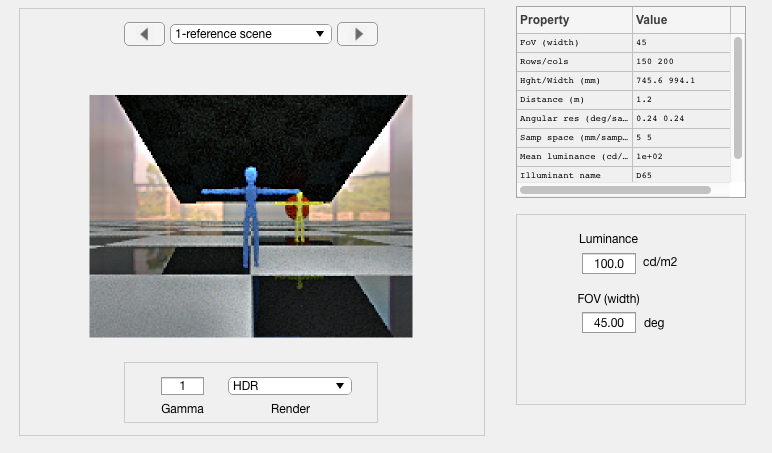
This is the low resolution simple scene. We will introduce a set of material changes
ieInit;
if ~piDockerExists, piDockerConfig; end
thisR = piRecipeDefault('scene name', 'SimpleScene');
Read 1 materials. Read 1 textures. ***Scene parsed.
thisR.set('film resolution',[200 150]);
thisR.set('rays per pixel',32);
thisR.set('fov',45);
thisR.set('nbounces',5);
piWrite(thisR);
Overwriting PBRT file /Users/zhenyi/git_repo/dev/iset3d/local/SimpleScene/SimpleScene.pbrt
scene = piRender(thisR, 'render type', 'radiance');
Docker container vistalab/pbrt-v3-spectral:latest Docker command docker run -ti --rm --workdir="/Users/zhenyi/git_repo/dev/iset3d/local/SimpleScene" --volume="/Users/zhenyi/git_repo/dev/iset3d/local/SimpleScene":"/Users/zhenyi/git_repo/dev/iset3d/local/SimpleScene" vistalab/pbrt-v3-spectral:latest pbrt --outfile /Users/zhenyi/git_repo/dev/iset3d/local/SimpleScene/renderings/SimpleScene.dat /Users/zhenyi/git_repo/dev/iset3d/local/SimpleScene/SimpleScene.pbrt *** Rendering time for SimpleScene: 3.5 sec *** Reading image h=150 x w=200 x 31 spectral planes.
scene = sceneSet(scene, 'name', 'reference scene');
sceneWindow(scene);
sceneSet(scene, 'render flag', 'hdr');
To list the materials in the scene, use this command
thisR.get('material print');
Scene materials: SimpleScene ------------------------------- name type _________ _____ 1 BODY uber 2 GLASS glass 3 Material uber 4 mirror uber 5 uber uber 6 uber_blue uber -------------------------------
Each asset (object node in the tree) has a material name. We find the material for an object this way.
% The material of the blue stick figure
assetName = '001_figure_3m_O';
thisR.get('asset',assetName,'material name')
ans = 'uber_blue'
% The material of the ceiling will become a mirror. For now it is the black surface at the
% ceiling.
assetName = '001_mirror_O';
thisR.get('asset',assetName,'material name')
ans = 'mirror'
We get a material from its name. We can also get just a specific property.
% Find a material and print its properties
matName = 'uber_blue';
thisMat = thisR.get('material', matName)
thisMat = struct with fields:
name: 'uber_blue' fluorescence: [1×1 struct] concentration: [1×1 struct] type: 'uber' kd: [1×1 struct] ks: [1×1 struct] kr: [1×1 struct] kt: [1×1 struct] roughness: [1×1 struct] uroughness: [1×1 struct] vroughness: [1×1 struct] eta: [1×1 struct] opacity: [1×1 struct] remaproughness: [1×1 struct]
% Check roughness
roughness = thisR.get('material', matName, 'roughness')
roughness = struct with fields:
type: 'float' value: 0.5000
% Check diffuse property
kd = thisR.get('material', matName, 'kd')
kd = struct with fields:
type: 'rgb' value: [0.0477 0.1075 0.3424]
% Check specular reflection property
ks = thisR.get('material', matName, 'ks')
ks = struct with fields:
type: 'rgb' value: [0.0331 0.0331 0.0331]
% Check mirror reflection property
kt = thisR.get('material', matName, 'kr')
kt = struct with fields:
type: 'rgb' value: [0.0331 0.0331 0.0331]
% Check the value of property kd
kdVal = thisR.get('material', matName, 'kd value')
kdVal = 1×3
0.0477 0.1075 0.3424
% Check property type
kdType = thisR.get('material', matName, 'kd type')
kdType = 'rgb'
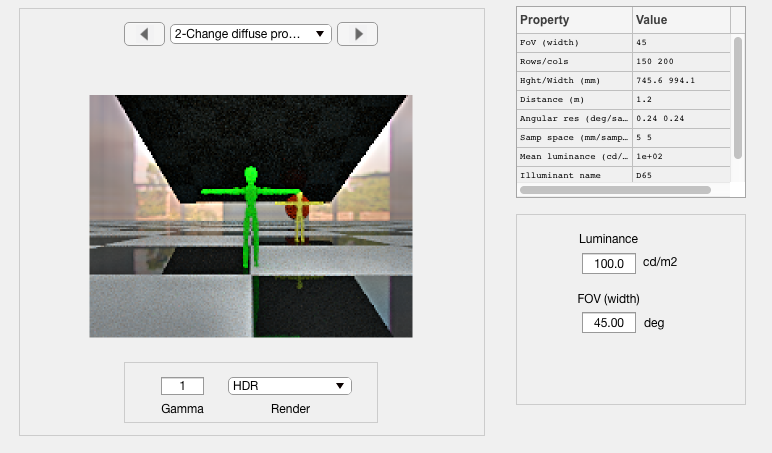
The blue guy wants to be green today.
% Change diffuse reflectance to be green
thisR.set('material', matName, 'kd value', [0 0.5 0]);
piWrite(thisR);
Overwriting PBRT file /Users/zhenyi/git_repo/dev/iset3d/local/SimpleScene/SimpleScene.pbrt
scene = piRender(thisR, 'render type', 'radiance');
Docker container vistalab/pbrt-v3-spectral:latest Docker command docker run -ti --rm --workdir="/Users/zhenyi/git_repo/dev/iset3d/local/SimpleScene" --volume="/Users/zhenyi/git_repo/dev/iset3d/local/SimpleScene":"/Users/zhenyi/git_repo/dev/iset3d/local/SimpleScene" vistalab/pbrt-v3-spectral:latest pbrt --outfile /Users/zhenyi/git_repo/dev/iset3d/local/SimpleScene/renderings/SimpleScene.dat /Users/zhenyi/git_repo/dev/iset3d/local/SimpleScene/SimpleScene.pbrt *** Rendering time for SimpleScene: 4.1 sec *** Reading image h=150 x w=200 x 31 spectral planes.
scene = sceneSet(scene, 'name', 'Change diffuse proerty');
sceneWindow(scene);
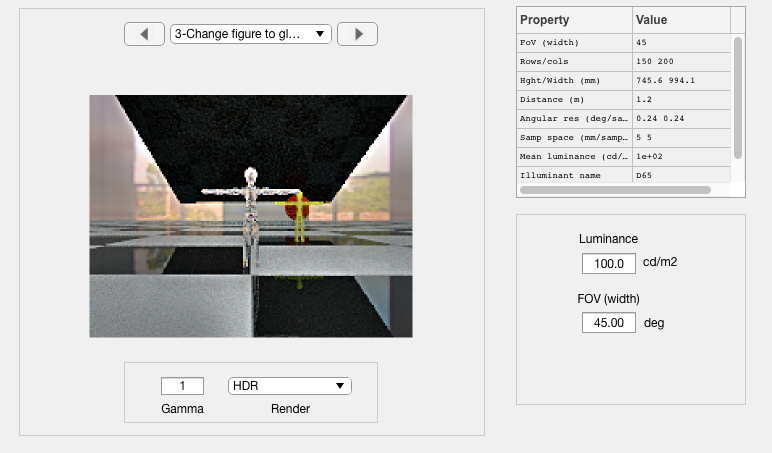
The blue guy is feeling like glass.
% We are going to turn the blue stick figure into a glass figure.
glass = 'blueGuyGlass';
newMat = piMaterialCreate(glass, 'type', 'glass');
thisR.set('material', 'add', newMat);
% Find the figure asset
% n = thisR.assets.names;
assetName = '001_figure_3m_O';
curName = thisR.get('asset', assetName, 'material name');
disp(['The current material is',curName]);
The current material isuber_blue
% We turn it into glass
thisR.set('asset', assetName, 'material name', glass);
piWrite(thisR);
Overwriting PBRT file /Users/zhenyi/git_repo/dev/iset3d/local/SimpleScene/SimpleScene.pbrt
scene = piRender(thisR, 'render type', 'radiance');
Docker container vistalab/pbrt-v3-spectral:latest Docker command docker run -ti --rm --workdir="/Users/zhenyi/git_repo/dev/iset3d/local/SimpleScene" --volume="/Users/zhenyi/git_repo/dev/iset3d/local/SimpleScene":"/Users/zhenyi/git_repo/dev/iset3d/local/SimpleScene" vistalab/pbrt-v3-spectral:latest pbrt --outfile /Users/zhenyi/git_repo/dev/iset3d/local/SimpleScene/renderings/SimpleScene.dat /Users/zhenyi/git_repo/dev/iset3d/local/SimpleScene/SimpleScene.pbrt *** Rendering time for SimpleScene: 3.8 sec *** Reading image h=150 x w=200 x 31 spectral planes.
scene = sceneSet(scene, 'name', 'Change figure to glass');
sceneWindow(scene);
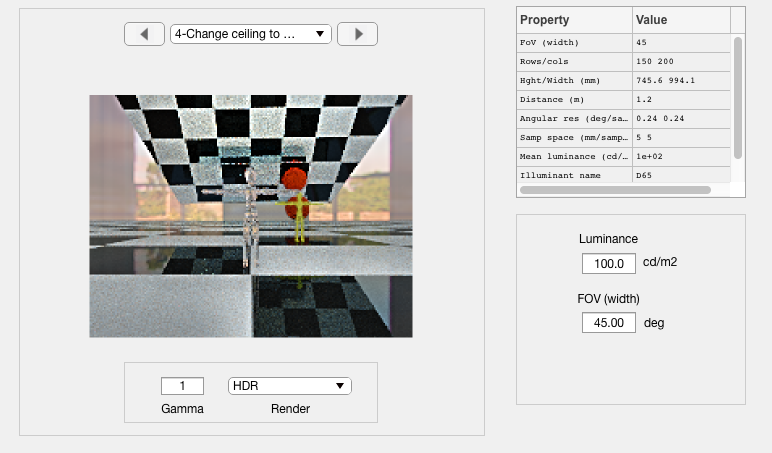
% Create a mirror material
materialName = 'newMirror';
newMat = piMaterialCreate(materialName, 'type', 'mirror');
thisR.set('material', 'add', newMat);
% This is the current black ceiling
assetName = '001_mirror_O';
curName = thisR.get('asset', assetName, 'material name');
% And now we change it.
thisR.set('asset', assetName, 'material name', materialName);
% And render it
piWrite(thisR);
Overwriting PBRT file /Users/zhenyi/git_repo/dev/iset3d/local/SimpleScene/SimpleScene.pbrt
scene = piRender(thisR, 'render type', 'radiance');
Docker container vistalab/pbrt-v3-spectral:latest Docker command docker run -ti --rm --workdir="/Users/zhenyi/git_repo/dev/iset3d/local/SimpleScene" --volume="/Users/zhenyi/git_repo/dev/iset3d/local/SimpleScene":"/Users/zhenyi/git_repo/dev/iset3d/local/SimpleScene" vistalab/pbrt-v3-spectral:latest pbrt --outfile /Users/zhenyi/git_repo/dev/iset3d/local/SimpleScene/renderings/SimpleScene.dat /Users/zhenyi/git_repo/dev/iset3d/local/SimpleScene/SimpleScene.pbrt *** Rendering time for SimpleScene: 3.6 sec *** Reading image h=150 x w=200 x 31 spectral planes.
scene = sceneSet(scene, 'name', 'Change ceiling to mirror');
sceneWindow(scene);
We can also specify the color using a spectral reflectance function
% This is still the ceiling
assetName = '001_mirror_O';
% Set the spectral reflectance of the matte material to the reflectance of
% the 10th chip in the MCC. It is very red.
wave = 400:10:700;
mccRefs = ieReadSpectra('macbethChart', wave);
thisRef = mccRefs(:, 10);
ieNewGraphWin;
plotReflectance(wave,thisRef);
redName = 'newMatte';
redMaterial = piMaterialCreate(redName, 'type', 'matte');
thisR.set('material', 'add', redMaterial);
% Convert the reflectance to the PBRT spd format. It is (wave, value) ...
spdRef = piMaterialCreateSPD(wave, thisRef);
% Store the spd reflectance as the diffuse reflectance of the newMatte
% material
thisR.set('material', redName, 'kd value', spdRef);
% Assign the material to the asset
thisR.set('asset', assetName, 'material name', redName);
% Render
piWrite(thisR);
[scene, res] = piRender(thisR, 'render type', 'radiance');
scene = sceneSet(scene, 'name', 'Board with spectral reflectance');
sceneWindow(scene);
sceneSet(scene, 'render flag', 'hdr');
The blue guy never wants to be blue any more.
thisR.get('materials print');
% Delete uber_blue material
deleteName = 'uber_blue';
thisR.set('material', 'delete', deleteName);
% Check it's really deleted.
disp('uber_blue is deleted.')
thisR.get('material print');