CodeExecute Overview
Multi-language code execution framework for Revit development.
Execute Python scripts and C# assemblies directly within Revit, with automatic dependency management, debugging support, and file watching.
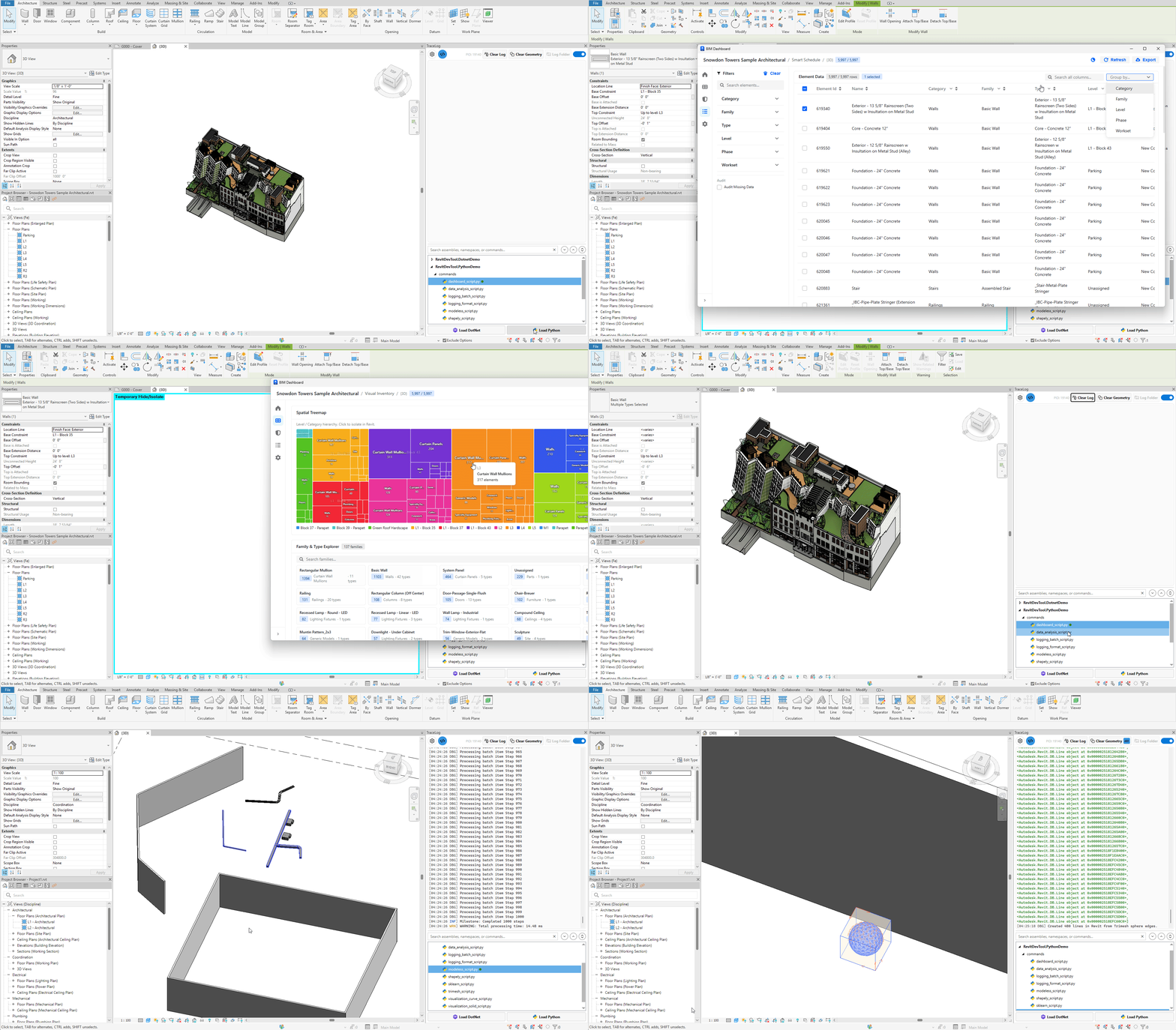
CodeExecute provides a unified framework for running code inside Revit:
- 🐍 Python Scripts - CPython 3.13 with full ecosystem access
- 🔧 C# Assemblies - IExternalCommand discovery and execution
Core capabilities:
- Automatic folder scanning and hierarchical organization
- File watching for instant reload on changes
- Unified tree model for consistent UI
- Output capture to Trace panel
Modern Python with zero-friction dependency management.
- CPython 3.13 - Latest Python with full ecosystem
- PEP 723 inline dependencies - No separate requirements.txt
- UV resolver - Automatic package installation (10-15x faster than pip)
- VSCode debugger - Full IDE debugging with breakpoints
- Module isolation - Clean cache between runs
# /// script
# dependencies = ["pandas==1.5.3"]
# ///

import pandas as pd
from Autodesk.Revit import DB

doc = __revit__.ActiveUIDocument.Document
walls = DB.FilteredElementCollector(doc).OfClass(DB.Wall).ToElements()

data = [{"Name": w.Name, "Level": w.LevelName} for w in walls]
df = pd.DataFrame(data)
print(df.groupby("Level").size())
What happens: System auto-installs pandas → executes script → outputs to Trace panel.
Learn more:
- Python Execution - Complete workflow and dependency management
- Python Debugging - VSCode debugger setup
- Stub Generation - IDE autocomplete
C# assembly execution inspired by RevitAddinManager.
- IExternalCommand discovery - Automatic command detection
- FileWatcher - Auto-reload on assembly changes
- Dependency loading - All referenced DLLs loaded automatically
- No temp folder - Direct execution for Revit 2024- (.NET 4.8)
| Feature | RevitDevTool | RevitAddinManager |
|---|---|---|
| FileWatcher | ✅ Automatic detection | ❌ Manual reload |
| Dependencies | ✅ Auto-loaded | |
| Temp folder (2024-) | ✅ No copy | ❌ Copies to temp |
| Unnecessary features | ✅ Removed |
Learn more: .NET Execution
Different target audiences:
| Aspect | RevitDevTool | pyRevit |
|---|---|---|
| Target User | Developers & researchers | End users |
| Primary Use | Code development & research | Ribbon automation |
| Python | CPython 3.13 | IronPython 2.7 (default) |
| Packages | Full ecosystem (pandas, numpy, AI/ML) | Limited (Revit API only) |
| Debugging | VSCode (full IDE) | pdb (command-line) |
| Dependencies | Automatic (PEP 723 + UV) | Manual pip install |
| Best For | Computational design, data science, AI | Automation buttons for teams |
Learn more: vs pyRevit
| Tool | Python | Auto-dependencies | VSCode Debugger | Best For |
|---|---|---|---|---|
| pyRevit | IronPython 2.7 | ❌ | ❌ | End-user automation |
| Dynamo | CPython 3.9 | ❌ | ❌ | Visual programming |
| RevitDevTool | CPython 3.13 | ✅ UV | ✅ debugpy | Development & research |
Learn more: Python Ecosystems
Scenario: Analyze building data with pandas
# /// script
# dependencies = ["pandas==1.5.3"]
# ///

import pandas as pd
# ... your code- Declare dependencies inline
- Click execute
- System auto-installs packages
- Script runs with full pandas support
Scenario: Debug complex algorithm
- Set breakpoints in VSCode
- Press F5 → Attach to Revit
- Execute script
- Debugger pauses at breakpoints
- Inspect variables, step through code
Scenario: Run custom IExternalCommand
- Build your C# project
- Load DLL in RevitDevTool
- FileWatcher detects commands
- Click command → Execute
For developers contributing to RevitDevTool or building custom providers, see architecture documentation in the repository:
Location: docs/CodeExecute/architecture/
- System design and patterns
- Provider and strategy patterns
- Tree model implementation
- Python.NET integration details
- Python Execution - Complete Python workflow
- .NET Execution - C# assembly execution
- Python Debugging - VSCode debugger
- Stub Generation - IDE autocomplete
- vs pyRevit - Target audience and use cases
- Python Ecosystems - All Python options for Revit
- Dashboard Example - WebView2 + Plotly
- Data Analysis Example - Polars analytics