CodeExecute StubGeneration
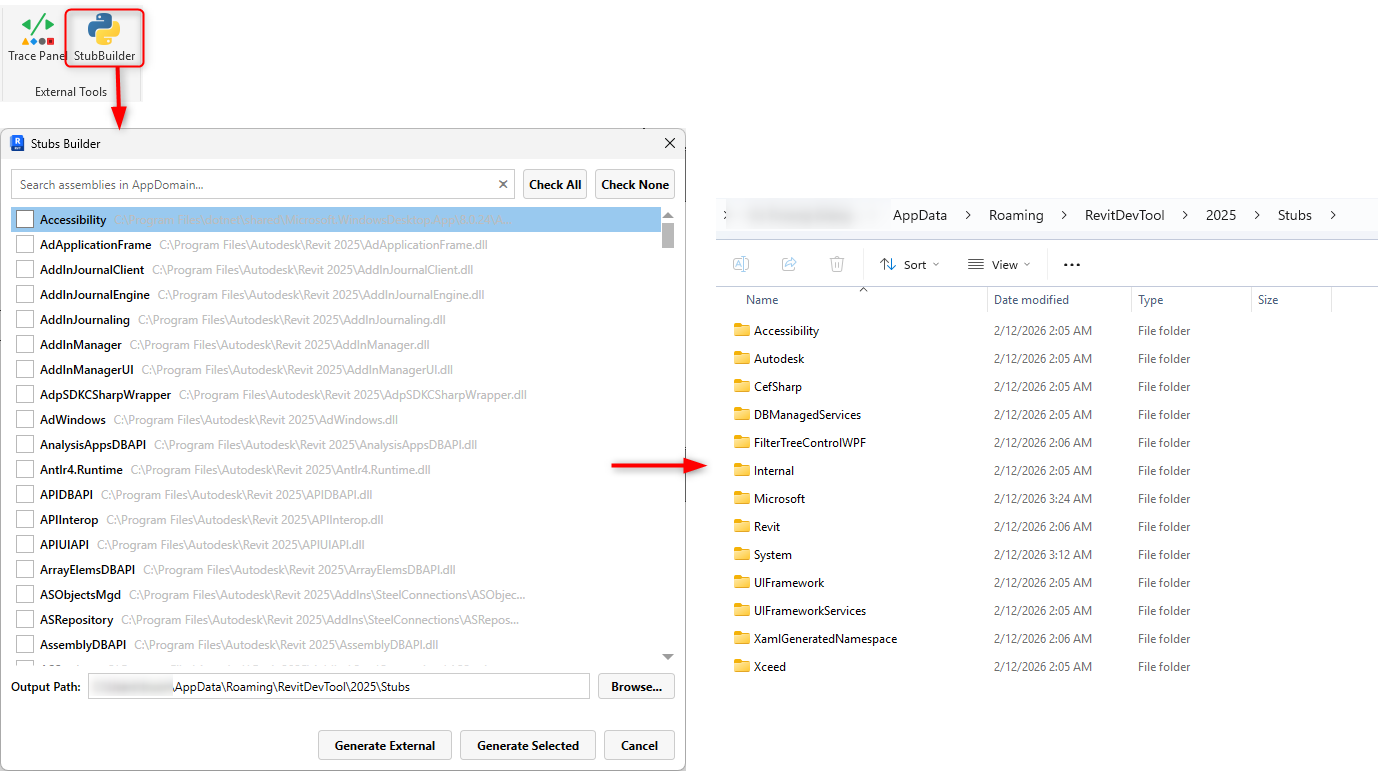
RevitDevTool includes PythonNetStubGenerator - generates Python type hints directly from .NET assemblies instead of relying on outdated community stubs.
Without stubs:
from Autodesk.Revit import DB

# IDE doesn't know what DB.Wall is
# No autocomplete
# No type hints
# No error detection
wall = DB.Wall  # What methods does Wall have?
Old approach: Use community stubs
- Often outdated
- Incomplete coverage
- Mismatches with current Revit versions
- Manual updates needed
RevitDevTool's generator reads .NET assemblies directly and creates accurate Python type stubs:
RevitAPI.dll + RevitAPIUI.dll
    ↓
PythonNetStubGenerator
    ├─ Reflection (read all types, methods, properties)
    ├─ XML docs (method descriptions)
    └─ Symbol resolution
    ↓
py.typed stub files (.pyi)
    ↓
IDE (PyCharm, VSCode)
    ├─ Autocomplete ✅
    ├─ Type hints ✅
    ├─ Error detection ✅
from Autodesk.Revit import DB

collector = DB.FilteredElementCollector(doc)
# IDE shows: OfClass, OfCategory, WherePasses, ToElements, etc.
walls = collector.OfClass(DB.Wall).ToElements()
# ✅ Autocomplete worksdef process_walls(walls: list[DB.Wall]) -> int:
# ↑ IDE knows this is Wall class
count = 0
for wall in walls:
# IDE knows wall has: GetName(), GetType(), LevelId, etc.
name = wall.Name
return countwall = collector.OfClass(DB.Wall).First()
# IDE knows First() doesn't exist on this type
# Error: "⚠️ Method not found" highlighted immediatelyGenerator reads assembly metadata:
- All public types (classes, interfaces, enums)
- All methods and properties
- Parameter types and return types
- XML documentation from DLL
Generates .pyi files (stub files):
# Generated: Autodesk/Revit/DB/__init__.pyi

class Wall:
    """Represents a wall element in Revit."""
    def get_name(self) -> str: ...
    def get_type(self) -> str: ...
    @property
    def Name(self) -> str: ...
    @property
    def LevelId(self) -> ElementId: ...
    def get_dependent_elements(self, relationship_type: RelationshipType) -> list[ElementId]: ...

class FilteredElementCollector:
    def __init__(self, document: Document) -> None: ...
    def of_class(self, class_type: Type) -> FilteredElementCollector: ...
    def where_passes(self, filter: ElementFilter) -> FilteredElementCollector: ...
    def to_elements(self) -> list[Element]: ...
def first(self) -> Element: ...- Not third-party maintained stubs
- Not outdated documentation
- Real assembly metadata
- Regenerate anytime Revit updates
- No waiting for community updates
- Match your Revit version exactly
- Every public type included
- Every method documented
- Every property typed
- Method descriptions from DLL XML docs
- Docstrings in generated stubs
- IDE shows full documentation
- Handles nested types
- Resolves generic types
- Cross-assembly references
- Removes duplicate signatures
- Handles overloads correctly
- Special methods (operators, special names)
- Extracts XML documentation
- Converts to Python docstrings
- Includes parameter descriptions
Stubs are generated during build and included in the project, enabling:
In your IDE:
- Open script
- Type:
from Autodesk.Revit import DB - Press Ctrl+Space → See all DB classes
- Hover over method → See documentation
- Type:
collector.→ Autocomplete shows all methods
Zero setup required - just use RevitDevTool and get full IDE support.
RevitDevTool default output path for generated stubs is %APPDATA%\RevitDevTool\{RevitVersion}\Stubs.
Point to AppData location - stubs work across all projects:
.vscode/settings.json: (example configuration)
{
    "python.autoComplete.extraPaths": [
        "~/AppData/Roaming/RevitDevTool/2025/Stubs",
        "~/AppData/Roaming/pyRevit-Master/pyrevitlib",
        "~/AppData/Roaming/pyRevit-Master/site-packages"
    ],
    "python.analysis.extraPaths": [
        "~/AppData/Roaming/RevitDevTool/2025/Stubs",
        "~/AppData/Roaming/pyRevit-Master/pyrevitlib",
        "~/AppData/Roaming/pyRevit-Master/site-packages"
    ]
}
Note: Replace 2025 with your Revit version (2024, 2026, etc.)
Benefits:
- ✅ Stubs available in all projects without copying
- ✅ Update once (generate in RevitDevTool), all projects get new stubs
- ✅ Works with pyRevit libraries side-by-side
- ✅ No workspace-specific paths to maintain
Copy stubs to project folder for portable projects:
{
    "python.analysis.extraPaths": [
        "${workspaceFolder}/stubs/Revit2025"
    ],
    "python.analysis.stubPath": "${workspaceFolder}/stubs"
}
When to use:
- Project shared across teams
- Different machines need identical structure
- No external dependencies preferred
For Cursor, Basedpyright, or other Pylance alternatives, configure all:
{
    "python.analysis.extraPaths": [
        "~/AppData/Roaming/RevitDevTool/2025/Stubs"
    ],
    "cursorpyright.analysis.extraPaths": [
        "~/AppData/Roaming/RevitDevTool/2025/Stubs"
    ],
    "basedpyright.analysis.extraPaths": [
        "~/AppData/Roaming/RevitDevTool/2025/Stubs"
    ],
    "basedpyright.importStrategy": "useBundled"
}
Note: ~ expands to user home directory (C:\Users\{username})
- Generate in Revit: Click "Generate Stubs" button in RevitDevTool UI
-
Stubs written to:
-
Default:
%APPDATA%\RevitDevTool\{RevitVersion}\Stubs - Custom: If you selected a different output path, stubs go there instead
-
Default:
-
Update IDE configuration: If using custom path, edit
.vscode/settings.jsonto point to your chosen location - IDE picks up: Restart language server (Ctrl+Shift+P → "Reload Window") or restart IDE
-
Autocomplete ready: Type
from Autodesk.Revit import DBand see instant IntelliSense
No manual copying required - IDE reads directly from configured location.
Test stub integration is working:
from Autodesk.Revit import DB

# Type this and press Ctrl+Space:
collector = DB.FilteredElementCollector(doc).
#                                            ↑ cursor here
# Should show: OfClass, OfCategory, WherePasses, ToElements, etc.
If autocomplete doesn't work:
- Check
extraPathspoints to correct directory - Verify stubs exist:
%APPDATA%\RevitDevTool\2025\Stubs\Autodesk\Revit\DB\__init__.pyi - Restart IDE or reload language server
- Check Output panel → Python Language Server for errors
| Aspect | Community Stubs | Generated Stubs |
|---|---|---|
| Currency | Often outdated | Always current (regenerate anytime) |
| Completeness | Partial (volunteer-maintained) | 100% (from assembly) |
| Maintenance | Delayed (need PR approval) | Automated (run generator) |
| Accuracy | May contain errors | Exact (from metadata) |
| Version matching | Mismatches possible | Exact match with your Revit DLLs |
| Documentation | Manual | Extracted from DLL XML docs |
from Autodesk.Revit import DB

# What methods does FilteredElementCollector have?
# Need to:
# 1. Check external documentation
# 2. Rely on memory
# 3. Runtime errors if wrong
collector = DB.FilteredElementCollector(doc)
result = collector.where_passes_filter(filter)  # IDE doesn't warn
                                      ↑ This method doesn't exist
# Runtime error discoveredfrom Autodesk.Revit import DB
collector = DB.FilteredElementCollector(doc)
result = collector.where_passes_filter(filter)
↑ IDE immediately shows error:
"Method 'where_passes_filter' not found.
Did you mean: 'WherePasses'?"- Faster coding - Autocomplete instead of memorizing
- Fewer bugs - Type checking catches errors early
- Better IDE support - Full IntelliSense
- Documentation inline - Hover to see docs
- Confidence - Know exactly what's available
- Team alignment - Everyone has same signatures
See Also:
- Python Runtime - Python.NET integration
- vs pyRevit - Comparison with pyRevit (which has no stub generation)