File format
Key Concepts: format, extension, compression
Files on the computer come in many different formats. File formats are different ways of encoding bits to be read by software. Some file formats are "proprietary"—for use by specific, paid-for software. Others are “free,” and thus more widely accessible and more widely used. To keep data accessible and useful, it is best not to use proprietary file formats.
It is standard for file formats to be given a "file extension:" This is the three or four-letter code you’ll often see following the file name. Some computers hide this information from the user. If you right-click on a file you can select “Properties” to view its properties, one of which is “File type.” Here we can see an image file that is a PNG file (.png), along with the file metadata the computer automatically tracks (like location, size, date created, etc.):
| Type of File | Other Metadata |
|---|---|
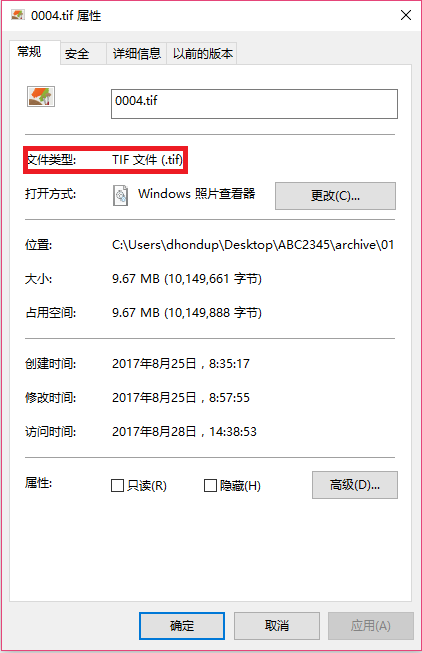 |
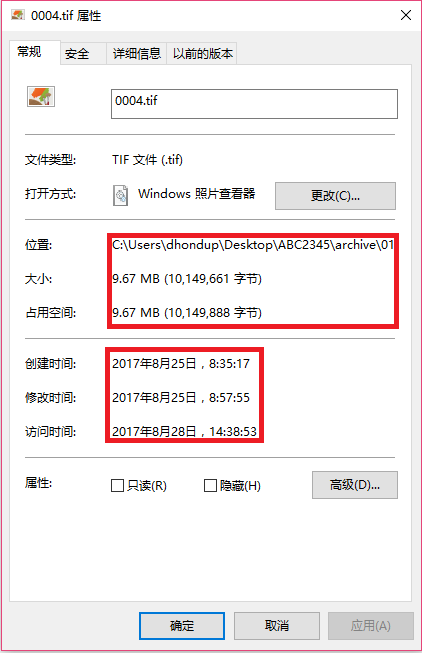 |
Not all digital images have the same file format. There are many different formats for encoding image information. Different formats have different strengths and weaknesses; which one is used will depend on what you want to do with the file. Some file formats are good for making a really high quality image; others are good for making images that don’t need to be high quality (because they will be viewed on a small screen, or uploaded online).
| File Format | File Extension(s) | Compression? | Pluses/Minuses |
| Tagged Image File Format | .tiff / .tif | No (lossless) / G4 (lossless) | High detail, but large file size (esp. for color) |
| Joint Photographic Experts Group | .jpeg / .jpg | Yes (lossy) | Full color range, but lossy compression (by various proprietary algorithms) |
| Graphic Interchange Format | .gif | Yes (lossless) | Lossless compression, but limited color range & proprietary |
| Portable Network Graphics | .png | Yes (lossy) | Free & full color range, but large file size |
Following international standards and best practices, BDRC collects only black and white .tiff format (for plain text and black and white images) and, only for color images, accepts .jpg file format. If the image is of black and white printed text or a B&W image, .jpg is not a suitable format, and the image will not be accepted. Other image formats are also not accepted.