Generating and Uploading Projector Patterns
To take into account projector lens distortion, we pre-distort the patterns before uploading them onto the Lightcrafter 4500.
- Generate the new patterns using the new projector.xml generated during the calibration procedure. Generated patterns can be found in the core/sl_sensor_codec/patterns folder
roslaunch sl_sensor_codec genertate_patterns.launch - Launch the Lightcrafter 4500 GUI and create a new firmware .bin file as shown in the image below.
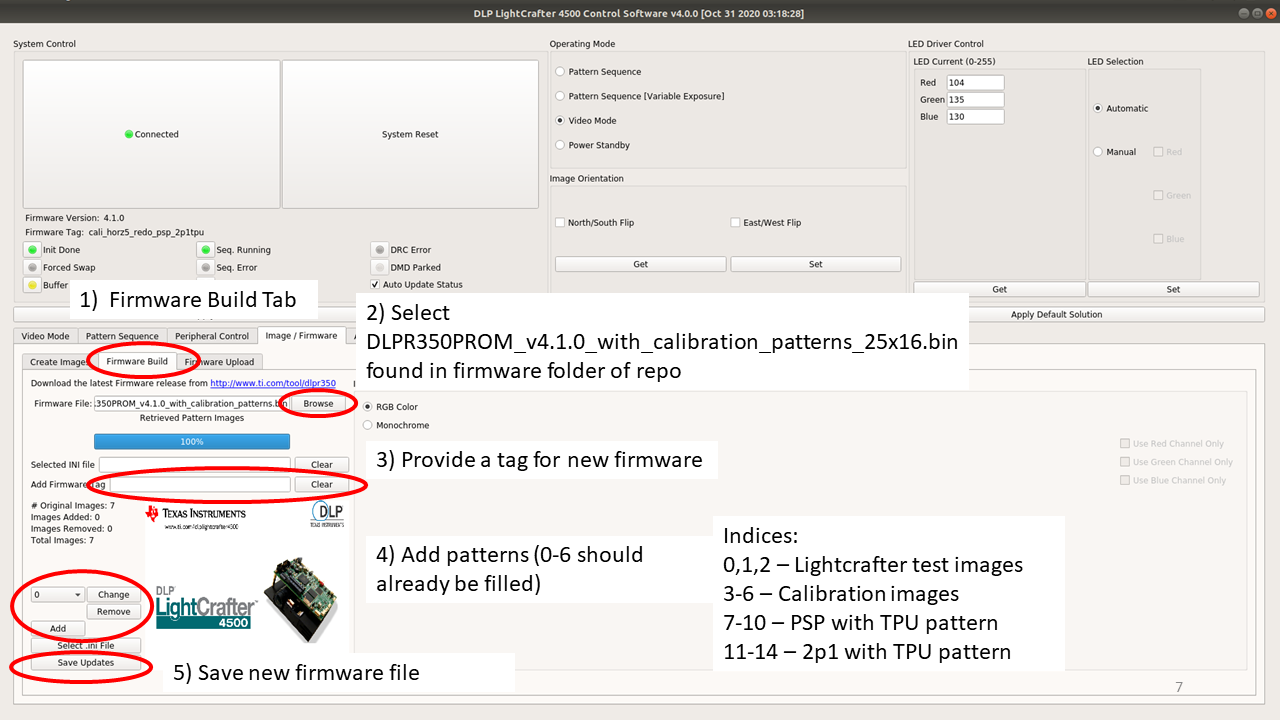
Make sure names of the .bmp images correspond to the correct image indices (index -> image name)
- 7 -> phase_shift_with_tpu_horizontal_1.bmp
- 8 -> phase_shift_with_tpu_horizontal_2.bmp
- 9 -> phase_shift_with_tpu_vertical_1.bmp
- 10 -> phase_shift_with_tpu_vertical_2.bmp
- 11 -> two_plus_one_with_tpu_horizontal_1.bmp
- 12 -> two_plus_one_with_tpu_horizontal_2.bmp
- 13 -> two_plus_one_with_tpu_vertical_1.bmp
- 14 -> two_plus_one_with_tpu_vertical_2.bmp
- Upload the new firmware onto the projector as documented here