Tomcat Server
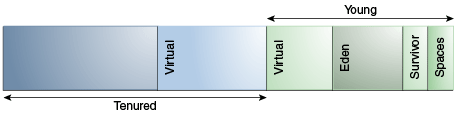
Memory management is all about allocation of objects. Java objects reside in an area called the heap. The heap is created when the JVM starts up and may increase or decrease in size while the application runs. the initial heap size, is allocated during JVM initialization. The heap size has an impact on the JVM’s performance, and thus also on the Java application’s performance.
When the heap becomes full, garbage is collected. During the garbage collection objects that are no longer used are cleared, thus making space for new objects.
Default Heap Size: Unless the initial and maximum heap sizes are specified on the command line, they are calculated based on the amount of memory on the machine.
For example, if your computer has 128 MB of physical memory, then the maximum heap size is 64 MB, and greater than or equal to 1 GB of physical memory results in a maximum heap size of 256 MB. You can use g or G for GB, m or M for MB, k or K for KB.
java -Xms:1g -Xmx:1g MyApplicationThis starts up the JVM with a heap size fixed to 1 GB.
If necessary, adjust the heap size to improve performance by Selecting a Collector:
Java Virtual Machine -XX Options
-XX:+HeapDumpOnOutOfMemoryError
-XX:+DisableExplicitGC-
If the application has a small data set (up to approximately 100 MB), then select the serial collector with the option
-XX:+UseSerialGC. -
If the application will be run on a single processor and there are no pause time requirements, then let the VM select the collector, or select the serial collector with the option
-XX:+UseSerialGC. -
If (a) peak application performance is the first priority and (b) there are no pause time requirements or pauses of 1 second or longer are acceptable, then let the VM select the collector, or select the parallel collector with
-XX:+UseParallelGC.
- If response time is more important than overall throughput and garbage collection pauses must be kept shorter than approximately 1 second, then select the concurrent collector with
-XX:+UseConcMarkSweepGCor-XX:+UseG1GC.
The java.lang.OutOfMemoryError: PermGen space message indicates that the Permanent Generation’s area in memory is exhausted.

The java.lang.OutOfMemoryError: Metaspace message indicates that the Metaspace area in memory is exhausted.

java -XX:MaxPermSize=512m -XX:MaxMetaspaceSize=512m

Tomcat:
set JAVA_OPTS=%JAVA_OPTS% -Xms512m -Xmx1g -XX:+UseParallelOldGC -XX:MaxMetaspaceSize=512m -XX:PermSize=128m -XX:MaxPermSize=512m
Java HotSpot(TM) Client VM warning: ignoring option PermSize=128m; support was removed in 8.0
Java HotSpot(TM) Client VM warning: ignoring option MaxPermSize=512m; support was removed in 8.0
###Increasing JVM Heap size to a Tomcat Instance(Catalina Daemon) for serving different Applications on Same PORT:
To increase java heap size in Tomcat :
Stop Tomcat server, set environment variable CATALINA_OPTS, and then restart Tomcat. In catalina.bat or catallina.sh, you may have noticed CATALINA_OPTS, JAVA_OPTS, or both can be used to specify Tomcat JVM options.
- CATALINA_OPTS is specific for Tomcat servlet container
	set CATALINA_OPTS=-Xms512m -Xmx512m  (Windows, no "" around the value)
	export CATALINA_OPTS="-Xms512m -Xmx512m"  (ksh/bash, "" around the value)
setenv CATALINA_OPTS "-Xms512m -Xmx512m" (tcsh/csh, "" around the value)- JAVA_OPTS may be used by other java applications (e.g., JBoss)
$JBOSS_HOME/bin/run.conf « JAVA_OPTS="-server -Xms128m -Xmx128m"java.lang.OutOfMemoryError:The parallel collector throws an OutOfMemoryError if too much time is being spent in garbage collection (GC): If more than 98% of the total time is spent in garbage collection and less than 2% of the heap is recovered, then an OutOfMemoryError is thrown.
- Large Applications « Check why it consumes that much memory
- After Several Requests « then you could have a memory leak - where objects are not being reclaimed by the garbage collector, use jprofiler
I prefer to use CATALINA_OPTS. Either you can change in catalina.bat/catalina.sh, but its recommended to maintain in new file setenv.bat/setenv.sh as per CATALINA Server.
NOTE: If you know how much heap your application needs to work well, you can set -Xms and -Xmx to the same value. If not, the JVM will start by using the initial heap size and will then grow the Java heap until it finds a balance between heap usage and performance. Examples are heap size, GC logging, JMX ports etc
rem   Do not set the variables in this script. Instead put them into a script
rem   setenv.bat in CATALINA_BASE/bin to keep your customizations separate.
Tomcat main class which accepts command line arguments like -Xmx, -Xms, -Xmn, -XX:PermSize ...
Setting the Heap Size Command line options: -Xms:<min size> -Xmx:<max size>
catalina.bat « Windows
	rem Tomcat server main class
	set MAINCLASS=org.apache.catalina.startup.Bootstrap

	rem Get standard environment variables
	if exist "%CATALINA_HOME%\bin\setenv.bat" call "%CATALINA_HOME%\bin\setenv.bat"


	if "%TITLE%" == "" set TITLE=MyLocalTomcat
	set _EXECJAVA=start "%TITLE%" %_RUNJAVA%
catalina.sh « Linux/Mac/Ubuntu
export CATALINA_OPTS="-Xms512M -Xmx1024M"setenv.bat - To increase tomcat's heap size to 1024MB & add environmental variables path.
rem   Their should be no spaces in between property and its value. Ex: property=value

rem  -XX:PermSize It’s used to set size for Permanent Generation. It is where class files are kept.

rem CATALINA_OPTS   (Optional) Java runtime options used when the "start", "run" or "debug" command is executed.
rem Include here and not in JAVA_OPTS all options, that should only be used by Tomcat itself,
rem Examples are heap size, GC logging, JMX ports etc.
set CATALINA_OPTS = "$CATALINA_OPTS -server -Xms256m -Xmx1024m"
		  ="-Xms512m -Xmx1024m"
		  =-server -Xmx1024m -Xmx1024m -XX:PermSize=512m -XX:MaxPermSize=512m
rem JAVA_OPTS (Optional) Java runtime options used when any command is executed.Most options should go into CATALINA_OPTS.
set JAVA_OPTS	=%JAVA_OPTS% -Xms256m -Xmx1100m -XX:+UseParallelOldGC -XX:PermSize=128m -XX:MaxPermSize=512m
		="-Djava.awt.headless=true -Xmx1280m -XX:+UseConcMarkSweepGC"

rem TITLE  (Optional) Specify the title of Tomcat window. The default TITLE is Tomcat if it's not specified.
set TITLE = LocalTomcat


REM Using CATALINA_BASE:   "D:\Yashwanth\Apache\apache-tomcat-7.0.37"
REM Using CATALINA_HOME:   "D:\Yashwanth\Apache\apache-tomcat-7.0.37"
REM Using CATALINA_TMPDIR: "D:\Yashwanth\Apache\apache-tomcat-7.0.37\temp"
REM Using JRE_HOME:        "C:\Program Files\Java\jdk1.6.0_45\jre"
REM Using CLASSPATH:       "D:\Yashwanth\Apache\apache-tomcat-7.0.37\bin\bootstrap.jar;D:\Yashwanth\Apache\apache-tomcat-7.0.37\bin\tomcat-juli.jar"
set CATALINA_HOME = "D:\Yashwanth\Apache\apache-tomcat-7.0.37"

set "JRE_HOME=%ProgramFiles%\Java\jdk1.6.0_45\jre"
set "JAVA_HOME=%ProgramFiles%\Java\jdk1.6.0_45"

rem setenv.sh
    export CATALINA_OPTS = "$CATALINA_OPTS -server -Xms512m -Xmx8192m -XX:MaxPermSize=256m"
From Windows « Advanced System Parameters « Environment Variables
KEY: CATALINA_OPTS
Val: -Xms512m -Xmx1024meclipse-home/eclipse.ini to be something like the following and restart Eclipse.
-vmargs
-Xms64m
-Xmx256m