Maven
| Options | Description |
|---|---|
-D,--define <arg> |
Define a system property |
-emp,--encrypt-master-password <arg> |
Encrypt master security password |
-ep,--encrypt-password <arg> |
Encrypt server password |
-f,--file <arg> |
Force the use of an alternate POM file (or directory with pom.xml). |
-gs,--global-settings <arg> |
Alternate path for the global settings file |
-s,--settings <arg> |
Alternate path for the user settings file |
-v,--version |
Display version information |
This quick write up will focus on where Maven stores all the local dependencies locally – which is in the Maven local repository.
Simply put, when we run a Maven build, all the dependencies of our project (jars, plugin jars, other artifacts) are all stored locally for later use.
C:\>mvn -version
Apache Maven 3.6.3 (cecedd343002696d0abb50b32b541b8a6ba2883f)

Single file download From Cenral Repo:
C:\>mvn dependency:get -Dartifact=org.json:json:20180130
-
groupId uniquely identifies your project across all projects. A group ID should follow Java's package name rules. This means it starts with a reversed domain name you control. For example,
org.apache.maven, org.apache.commons -
artifactId is the name of the jar without version. If you created it, then you can choose whatever name you want with lowercase letters and no strange symbols. If it's a third party jar, you have to take the name of the jar as it's distributed. eg.
maven, commons-math -
version if you distribute it, then you can choose any typical version with numbers and dots (1.0, 1.1, 1.0.1, ...). Don't use dates as they are usually associated with SNAPSHOT (nightly) builds. If it's a third party artifact, you have to use their version number whatever it is, and as strange as it can look. For example,
2.0, 2.0.1, 1.3.1
Although rarely, but sometimes you will have 3rd party JARs that you need to put in your local repository for use in your builds, since they don't exist in any public repository like Maven Central.
mvn install:install-file -Dfile=<path-to-file> -DgroupId=<group-id> \
    -DartifactId=<artifact-id> -Dversion=<version> -Dpackaging=<packaging>

Manual Downladed file, adding to local repo ${userhome}/.m2/repository  `be.elia.nxpro.NXPROB2BClient`
C:\>mvn install:install-file "-Dfile=D:/Yash/jars/ojdbc5.jar" "-DgroupId=org.json"
"-DartifactId=json" "-Dversion=20180130" "-Dpackaging=jar" StackPost: Due to Oracle license restriction, there are no public repositories that provide ojdbc jar. You need to download it and install in your local repository. download it from
ojdbc6.jar.zip 11.2.0
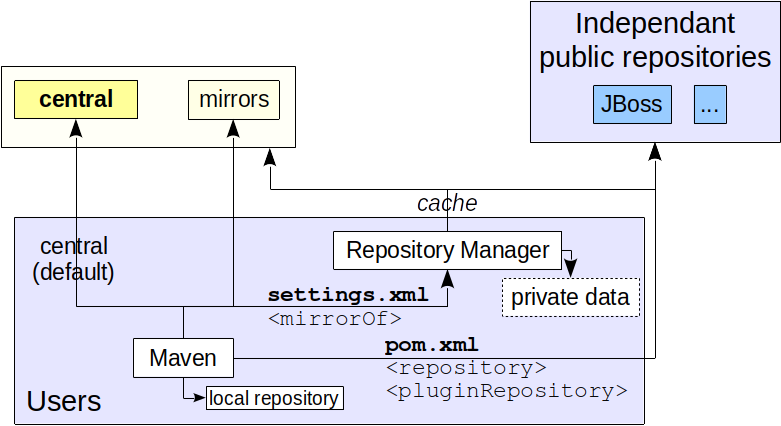
Also keep in mind that, beyond just this type of local repository, Maven does support 3 types of repos:
- Local – Folder location on the local Dev machine
- Central – Repository provided by Maven community
- Remote – Organization owned custom repository
The contents of the settings.xml:
    <settings xmlns="http://maven.apache.org/SETTINGS/1.0.0"
      xmlns:xsi="http://www.w3.org/2001/XMLSchema-instance"
      xsi:schemaLocation="http://maven.apache.org/SETTINGS/1.0.0
                          https://maven.apache.org/xsd/settings-1.0.0.xsd">
      <localRepository/>
      <interactiveMode/>
      <offline/>
      <pluginGroups/>
      <servers/>
      <mirrors/>
      <proxies/>
      <profiles/>
      <activeProfiles/>
    </settings>
Configuring a proxy in Setings.xml stack
Essentially you need to ensure the proxies section in either the global settings ([MAVEN_HOME]/conf/settings.xml), or user settings (${user.home}/.m2/settings.xml) is configured correctly. It is better to do this in your user settings to avoid storing the password in plain text in a public location.
Open the Maven settings.xml, find proxies tag :
<!-- proxies
   | This is a list of proxies which can be used on this machine to connect to the network.
   | Unless otherwise specified (by system property or command-line switch), the first proxy
   | specification in this list marked as active will be used.
   |-->
  <proxies>
    <!-- proxy
     | Specification for one proxy, to be used in connecting to the network.
     |
    <proxy>
      <id>optional</id>
      <active>true</active>
      <protocol>http</protocol>
      <username>proxyuser</username>
      <password>proxypass</password>
      <host>proxy.host.net</host>
      <port>80</port>
      <nonProxyHosts>local.net|some.host.com</nonProxyHosts>
    </proxy>
    -->
</proxies>Note: There is a high chance your company is set up an HTTP proxy server to stop user connecting to the Internet directly. If you are behind a proxy, Maven will fail to download the project dependencies.
There are two different ways that you can specify the use of multiple repositories. The first way is to specify in a POM which repositories you want to use:
Setting up the Internal Repository
<project>
...
  <repositories>
    <repository>
      <id>my-repo1</id>
      <name>your custom repo</name>
      <url>http://jarsm2.dyndns.dk</url>
    </repository>
    <repository>
      <id>maven central</id>
      <name>your custom repo</name>
      <url>https://repo1.maven.org/maven2</url>
		<releases>
			<enabled>true</enabled>
			<updatePolicy>never</updatePolicy>
		</releases>
		<snapshots>
			<enabled>false</enabled>
		</snapshots>
    </repository>
  </repositories>
...
</project>
If your internal repository requires authentication, the id element can be used in your settings file to specify login information.
The other way you can specify the use of multiple repositories by creating a profile in your ${user.home}/.m2/settings.xml file like the following:
<settings>
 ...
 <profiles>
   ...
   <profile>
     <id>myprofile</id>
     <repositories>
       <repository>
         <id>my-repo2</id>
         <name>your custom repo</name>
         <url>http://jarsm2.dyndns.dk</url>
       </repository>
     </repositories>
   </profile>
   ...
 </profiles>

 <activeProfiles>
   <activeProfile>myprofile</activeProfile>
 </activeProfiles>
 ...
</settings><settings xmlns="http://maven.apache.org/SETTINGS/1.0.0"
xmlns:xsi="http://www.w3.org/2001/XMLSchema-instance"
xsi:schemaLocation="http://maven.apache.org/SETTINGS/1.0.0
https://maven.apache.org/xsd/settings-1.0.0.xsd">
<localRepository>${user.home}/.m2/repository</localRepository>
<interactiveMode>true</interactiveMode>
<offline>false</offline>
<usePluginRegistry>false</usePluginRegistry>
<pluginGroups>
<pluginGroup>org.eclipse.jetty</pluginGroup>
<pluginGroup>org.mortbay.jetty</pluginGroup>
</pluginGroups>
<!-- The repositories for download and deployment are defined by the
repositories and distributionManagement elements of the POM -->
<servers>
<server>
<id>server001</id>
<username>my_login</username>
<password>my_password</password>
<filePermissions>664</filePermissions>
<directoryPermissions>775</directoryPermissions>
</server>
</servers>
<mirrors>
<mirror>
<id>planetmirror.com</id>
<name>PlanetMirror Australia</name>
<url>http://downloads.planetmirror.com/pub/maven2</url>
<mirrorOf>central</mirrorOf>
</mirror>
</mirrors>
<proxies>
<proxy>
<id>myproxy</id>
<active>true</active>
<protocol>http</protocol>
<host>proxy.somewhere.com</host>
<port>8080</port>
<username>proxyuser</username>
<password>somepassword</password>
<nonProxyHosts>*.google.com|ibiblio.org</nonProxyHosts>
</proxy>
</proxies>
<profiles>
<profile>
<id>env-test</id>
<repositories>
<repository>
<id>planetmirror.com</id>
<url>http://downloads.planetmirror.com/pub/maven2</url>
<releases><enabled>true</enabled></releases>
</repository>
</repositories>
<pluginRepositories>
<pluginRepository>
<id>planetmirror.com</id>
<url>http://downloads.planetmirror.com/pub/maven2</url>
<releases><enabled>true</enabled></releases>
</pluginRepository>
</pluginRepositories>
</profile>
</profiles>
<activeProfiles>
<activeProfile>env-test</activeProfile>
</activeProfiles>
</settings>The maven best practice for repository settings is to keep them in settings.xml instead of pom.xml.
- User's
settings.xmlfile located in~/.m2/settings.xml. Every user will have his own login profile, wher he has to keep his user specificsettings.xmlfile. - Every Maven Project has its own
pom.xmlfile related to that appliation. Which will be never changed for different user login profiles.
User's ~/.m2/settings.xml.
<mirrors>
  <mirror>
    <id>repository.jboss.org</id>
    <!-- Custom Central Repo -->
    <url>http://repository.jboss.org/maven2</url>
    <!-- Disabling central mirror -->
    <mirrorOf>central</mirrorOf>
  </mirror>
</mirrors>
Project pom.xml
<repositories>
  <repository>
    <id>central</id>
    <url>http://repository.jboss.org/maven2</url>

    <!--  Disabling snapshots -->
    <snapshots> <enabled>false</enabled> </snapshots>
    <releases> <enabled>true</enabled> </releases>
    </repository>
</repositories>
<pluginRepositories>
  <pluginRepository>
    <id>central</id>
    <url>http://repository.jboss.org/maven2</url>

    <snapshots> <enabled>false</enabled> </snapshots>
    <releases> <enabled>true</enabled> </releases>
  </pluginRepository>
</pluginRepositories>
Sample settings.xml file.
<?xml version="1.0" encoding="UTF-8"?>

<settings xmlns="http://maven.apache.org/SETTINGS/1.0.0"
          xmlns:xsi="http://www.w3.org/2001/XMLSchema-instance"
          xsi:schemaLocation="http://maven.apache.org/SETTINGS/1.0.0 http://maven.apache.org/xsd/settings-1.0.0.xsd">

  <!-- https://maven.apache.org/settings.html
  https://stackoverflow.com/questions/2941605/sample-settings-xml-for-maven -->

  <localRepository>${user.home}/.m2/repository</localRepository>
  <interactiveMode>true</interactiveMode>
  <usePluginRegistry>false</usePluginRegistry>
  <offline>false</offline>

  <pluginGroups>
    <pluginGroup>org.mortbay.jetty</pluginGroup>
    <!-- <pluginGroup>org.eclipse.jetty</pluginGroup> -->
  </pluginGroups>

  <!--  his is a list of proxies which can be used on this machine to connect to the network. -->
  <proxies>
    <proxy>
        <active>true</active>
        <protocol>http</protocol>
        <host>127.0.0.1</host> <!-- proxy.host.net -->
        <port>8080</port>
        <username>proxyuser</username>
        <password>proxypass</password>
        <nonProxyHosts>local.net|some.host.com</nonProxyHosts>
    </proxy>
  </proxies>

  <!-- Specifies the authentication information to use when connecting to a particular server -->
  <servers>
    <server>
        <id>deploymentRepo</id>
        <username>repouser</username>
        <password>repopwd</password>
        <filePermissions>664</filePermissions>
        <directoryPermissions>775</directoryPermissions>
    </server>
  </servers>

    <!-- Specifies a repository mirror site to use instead of a given repository.
     | The repository that this mirror serves has an ID that matches the mirrorOf element of this mirror.
     | IDs are used for inheritance and direct lookup purposes, and must be unique across the set of mirrors.
    -->

  <mirrors>
    <mirror>
      <id>mirrorId</id>
      <name>Human Readable Name for this Mirror.</name>
      <url>http://my.repository.com/repo/path</url>

      <mirrorOf>repositoryId which you want to avoid</mirrorOf>
    </mirror>
  </mirrors>

  <profiles>
    <profile>
        <id>alwaysActiveProfile</id>
        <repositories>
            <repository>
                <id>deploymentRepo</id>
                <url>http://my.repository.com/repo/path</url>
                <releases><enabled>true</enabled></releases>
            </repository>
        </repositories>

        <pluginRepositories>
            <pluginRepository>
                <id>deploymentRepo</id>
                <url>http://my.repository.com/repo/path</url>
                <releases><enabled>true</enabled></releases>
            </pluginRepository>
        </pluginRepositories>
    </profile>
  </profiles>

  <activeProfiles>
    <activeProfile>deploymentRepo</activeProfile>
    <activeProfile>alwaysActiveProfile</activeProfile>
    <activeProfile>anotherAlwaysActiveProfile</activeProfile>
  </activeProfiles>

</settings>
The repository you have configured requires authentication and Maven failed to provide the correct credentials to the server. In this case, make sure your
${user.home}/.m2/settings.xmlcontains a declaration whose matches the of the remote repository to use.See the Maven Settings Reference for more details.
Local Machine User profile permissions: Make sure that your user account has both read and write access to this directory and all its sub directories and files. If maven failed to save the files to your local repository then leads to LocalRepositoryNotAccessibleException.
<repository><url> = http://snapshots.maven.codehaus.org/maven2
<server>
  <username><password> = my_login, my_password
  <filePermissions><directoryPermissions> = 664,775
{
  "errors" : [ {
    "status" : 401,
    "message" : "Authentication is required"
  } ]
}
Bad Gateway: You were denied access because: Network Error Your requested host "snapshots.maven.codehaus.org" could not be resolved by DNS.
<!-- https://stackoverflow.com/questions/30522679/plugin-org-apache-maven-pluginsmaven-clean-plugin2-5-or-one-of-its-dependencie/ -->
<mirrors>
  <mirror> <!-- Jfrog central artifcatroy, Artifact Repository-->
    <id>UK</id>
    <name>UK Central</name>
    <url>http://uk.maven.org/maven2</url>
    <mirrorOf>central</mirrorOf>
  </mirror>
</mirrors>