Symbian
Starting from 2014, due to a Nokia Store Freeze, TAO Translator is distributed through AppList and Opera Mobile Store.
TAO Translator in the Nokia Store is OUTDATED. There were a lot of changes since version 0.3.1, so it is highly recommended to upgrade.
NOTE: If you installed The Advanced Online Translator from the Nokia Store, you have to remove it before proceeding with these instructions. Else, the installation will fail.
To install TAO Translator from AppList follow these steps:
-
Go to http://applist.schumi1331.de/download and follow the instructions on that page to install AppList application.
-
After you install AppList, open it and search for
taot. .
. -
Select TAO Translator from the list and press Download button.
 .
. -
After download finishes, the installation will start automatically. You'll have to confirm the security warning.
 .
. -
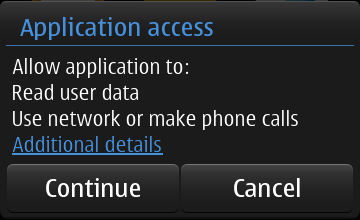
And then confirm application access rights.
-
Use network and make phone callspermission is needed to be able to connect to the Internet. -
Read user datapermission is needed to connect to translation services, protected by secure (SSL) connection.
-
-
The installation will now begin and might take some time. After it finishes, you'll have latest version of TAO Translator.
If you'd like to check for updates in future you can either open AppList application and check for updates from there, or add AppList widget to your home screen and be notified about updates automatically.
To install TAO Translator from Opera Mobile Store, you need to:
-
Go to http://symbian.apps.opera.com/the_advanced_online_translator.html on your phone and click Download button. This will start downloading
taot_<version>_installer.sisto your phone. -
After download finishes, start the installation and confirm the security warning.
Note: You'll have to confirm it twice.
-
Then confirm application access rights.
-
Use network and make phone callspermission is needed to be able to connect to the Internet. -
Read user datapermission is needed to connect to translation services, protected by secure (SSL) connection.
-
-
The installation will now begin and might take some time. After it finishes, you'll have latest version of TAO Translator.
You won't get automatic update notifications if you install TAO Translator this way, but there is Check for Updates feature in the application. You'll have to run it manually from time to time. If you'd like to get automatic update notifications, please, follow the Recommended Installation instructions.