Pop up
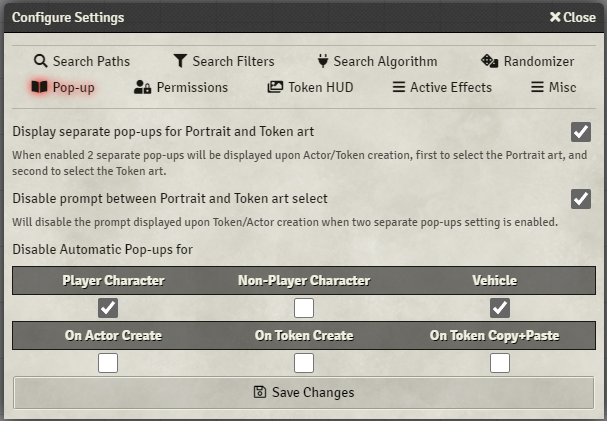
Here you can configure when and how automatic Art Select pop-ups will be shown.
When enabled two separate pop-ups will be displayed upon Actor/Token creation, first to select the Portrait art and second to select the Token art.
Will disable the prompt that is usually shown when Display separate pop-ups for Portrait and Token is enabled which prompts you on whether you'd like to apply the Portrait image you just selected to the Token as well.
With this setting enabled the module will instead always assume that you wish to see the second ArtSelect window for the Token.
This section will contain all the actor types for the current game system you're running this module on
e.g. DnD5e:
- Player Character
- Non-Player Character
- Vehicle
as well as 3 different events under which the module triggers automatic pop-ups:
- On Actor Create
- On Token Create
- On Token Copy+Paste
Enabling any of these check boxes will disable automatic pop-ups for those actors or particular events.