Using WIRE compatible compendiums
The module provides a way to make sure all the spells and abilities on a character are up to date as well as helping transition old characters to be WIRE compatible.
There are two modules provided that should over time come to contain most of the spells and abilities needed.
This module contains WIRE compatible versions of the SRD items that come with the dnd5e system. This module will be available through the Foundry module directory.
This module contains other helpful examples. This module you will need to install using the manifest link on the module's GitHub page.
In the sheet header is a button that looks like a plug.

This will open an item upgrade wizard.
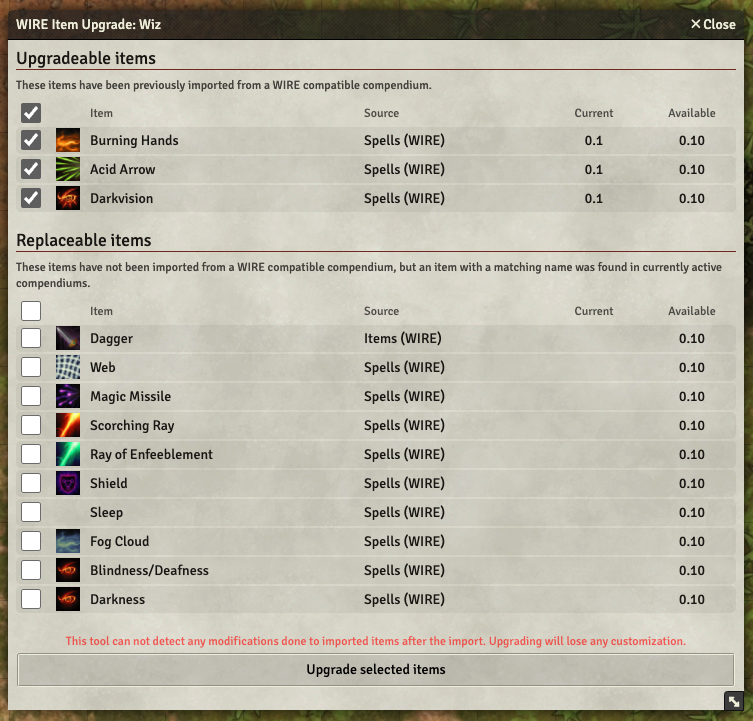
The top part of the list will contain all items that have previously been imported onto the character from the compendium (usually by drag and drop) that have a newer version available as a result of updating one of the modules to a new version.
The bottom part contains items found on the character that were not detected as having been imported as WIRE compatible. They are matched by name. Usually most spells and abilities can be imported using this method initially after which they move to the first category.
You can click on the version numbers of the items (current or available) to open the item sheet to the relevant version to see what it contains.
Please note that if any item has been modified after it was initially imported, the wizard is not aware of any modifications. If you choose to upgrade/import, any changes will be lost.
The tool works by deleting the item currently on the character and importing the selected item from a compendium in its place.
To make a WIRE compatible compendium yourself, create a module with a pack as usual. This process is documented elsewhere.
Then, add a flag called wireImport and give it a value of true to the pack in the module manifest file module.json. Below is an example.
{
    "name": "spells",
    "label": "Spells (WIRE)",
    "system": "dnd5e",
    "path": "./packs/spells.db",
    "type": "Item",
    "flags": {
        "wireImport": true
    }
}
After this, any items you add to the compendium will be flagged as originating from a WIRE compatible compendium and be tagged with the version number of the module.
When the module number of the module changes, any newly added items will automatically be given this latest version number. Old items will remain at their original creation time version. If you make any changes to the item in the compendium pack, you can update its version number using a similar icon in the header of the item sheet to open a version management view for the item.
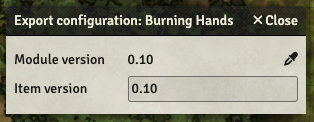
Here you can see the current version of the entire module as well as the version the item was tagged with when it was created. Update the version field by hand or use the dropper icon to make it match the latest module version.