Users: Login and Create Account
Most of the features and resources within the application require the user to pass through an authentication / authorization filter. The application uses Spring Security which offers a lot of options for integrating with other identity management systems in the future.
Assets that don't require authentication (basic html pages, JS, css to support initial login or account creation) are packaged in a folder named "open" to indicate that they are accessible without requiring a login. All other assets should be secured.
The system supports a self service user provisioning model. When visiting the login page, there is a link on the page for users to create an account if they don't already have one.
Clicking the create account link from the login page brings the user to the account creation page (createAccount.html) which prompts them for their First Name, Last Name, and Email.
Upon submission of this form, a new User entity is created for the user and an email is sent to the User with a welcome message and link to activate their account. The user should be redirected to a page that tells them to check their email.
- we should check for empty values in each of the fields, not being done (prob get a 409)
- the email could also already have been registered which will result in a 409
- application's connection to the email server could be down (500)
- email address could be rejected for delivery (unknown result)
The user receives an email with a brief welcome message and a link to activate their account. Clicking on the link brings them back to the application where they are shown the previously entered info (read-only) and a field for them to enter a password.
Upon submission of this form, the user should be directed to the login page (you get a blank page now). They are now registered and can login with that password.
- need to check for an empty password
- if we care, we should have password strength fields - I don't care ;)
- could be some JPA error updating the user account. This would be a 500.
- user forgets the password they just typed! Maybe a forgot password feature is needed?
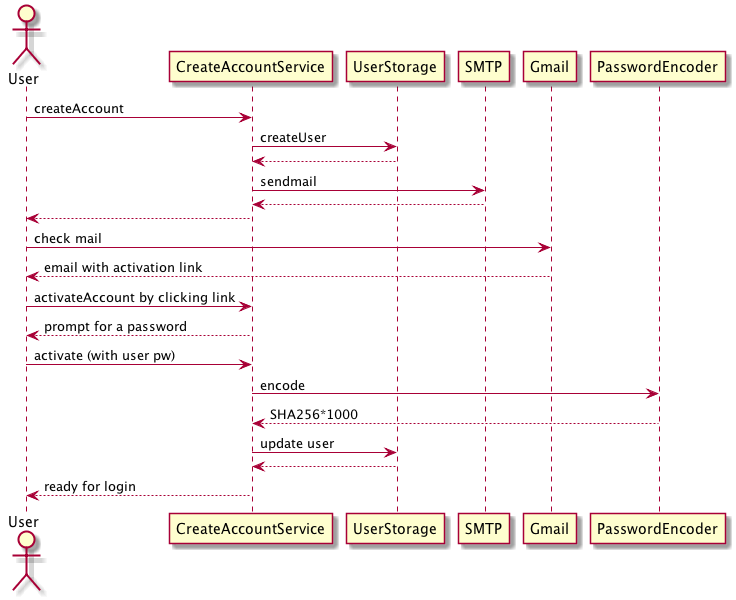
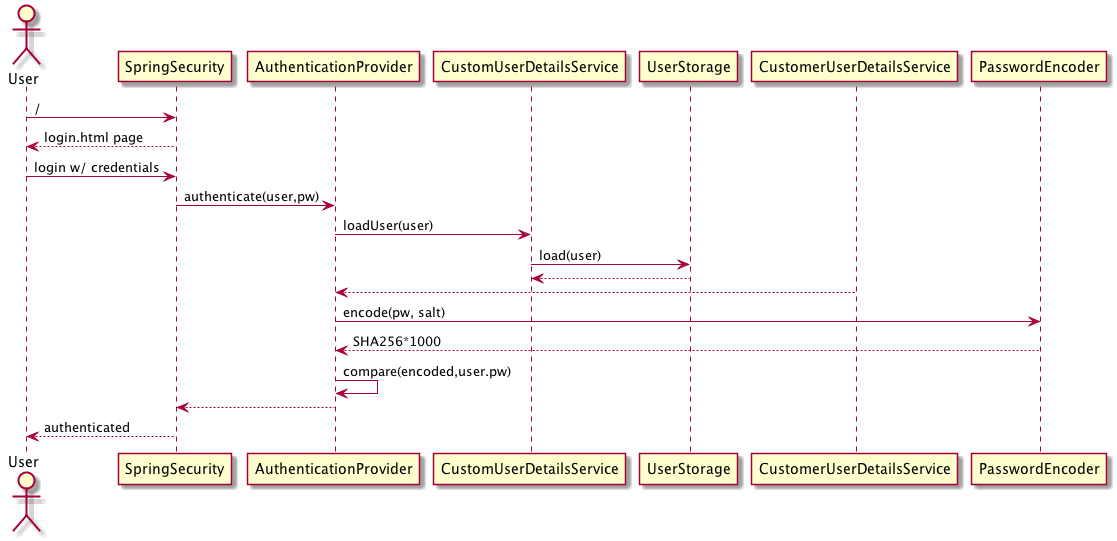
The user visits the login page and can now log in with their email and password.
The user's email must be unique within the system. This in contrast to some systems that provide the user with a "username." We'll assign a unique identifier for use within the internals of the system (primary key, foreign key, etc) but the visible unique identifier is their email.
The account creation process includes an Email Filter which is designed to limit the account creation process to users within a specific email domain. This will allow the admin to restrict new accounts to emails that satisfy the configured expression. By default, this filter allows all emails.
When entered, the user's password is salted with a unique value and passed through SHA-256 (1,000 iterations). This is standard practice and avoids storing the user's password in plain text within the system. The salt value is generated per user at the entity creation time using a UUID generator.
Note that the account creation process creates a User entity with a UUID password. This password is stored in plain text in their password field. Consider that in this state, the user will never be able to login via the conventional login page. This is prevented because the regular login captures the user's plain text password as entered in the challenge and then salts and SHA-256 encodes it. As a result, no value entered by the user at login time will ever hash to this temp password in their account. Instead, the user is forced to complete the account creation workflow which involves clicking on the link we sent them. This link includes the plain text UUID value from their password field and their email. These values uniquely identify a user entity in the db and demonstrates to us that they are in control of the email account they provided. During the completion of the account creation process, the user provides us with a real password to hash and store in this field instead of the UUID.
A more secure model would be to store a salted and hashed value of the UUID instead of the UUID itself. This would guard against an insider threat where someone had access to the db but not the email server to see the link itself.