Catalysts
To reduce randomness in enchanting, a new slot has been added to the enchanting table screen. It only shows up when an enchantable item is placed in the first slot.
By placing certain items in this slot, you can influence which enchantments will show up in your enchanting choices. A catalyst being applied to a choice is shown by a green crystal border around the corresponding button.
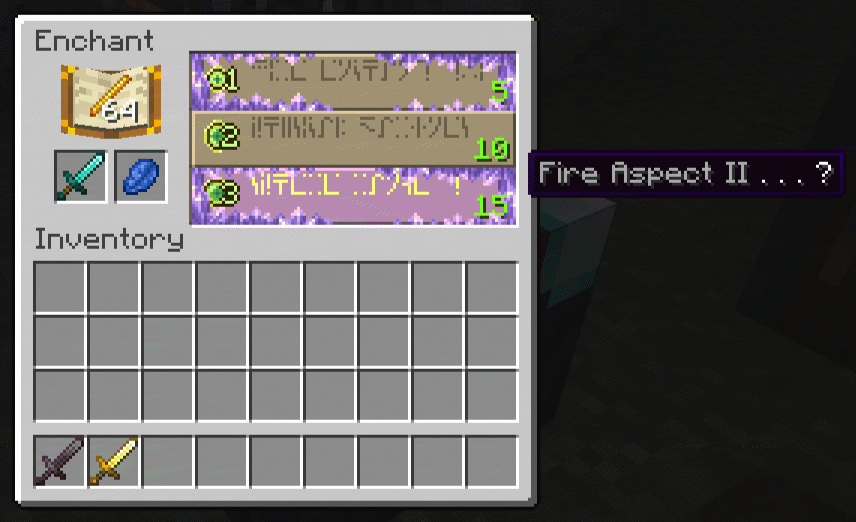
By default, only enchanted books can be placed here. They will add one of their enchantments to the ones you'd get otherwise, without consuming themselves.
enchantments.enchant_catalyst.override_default_enchanting
Boolean. If true, enchanting tables will not generate any enchantment possibilities for items put inside. To enchant things, you must use a catalyst (or an enchanted book), and only the enchantments it provides will be obtainable.
Not fully intended for regular gameplay, as no catalyst is included in Sortilege by default, aside from books.
If you wish to use this, it is recommended to define custom catalysts.
Config options:
-
enchantments.enchant_catalyst.catalyst_activation_chance: Number between 0 and 1. Chance for catalysts to activate in each enchanting choice. 0 means never, 1 means always, 0.5 means 50% chance, ... Keep in mind a different random number is generated for each of the 3 options, so you technically have thrice the chance to have at least one modified choice show up. -
enchantments.enchant_catalyst.allow_books: Boolean (trueorfalse). Whether or not books can be used as catalysts, with the aforementioned effect. Disabling this when no other catalyst is defined will effectively disable the feature and hide the slot. -
enchantments.enchant_catalyst.show_in_tooltip: Boolean. Whether or not catalysts should have a tooltip displaying the enchantements they provide.
Making any item be usable as a catalyst must be done via datapack files.
Add a file in data/<namespace>/recipes/ with the following format. The name of the file can technically be anything you want, but I recommend setting it to the name of the associated item (for example here, blaze_rod.json).
{
  "type": "sortilege:enchanting_catalyst",
  "item": "minecraft:blaze_rod",
  "enchantments": [
    "minecraft:fire_aspect",
    "minecraft:flame",
    "minecraft:fire_protection",
    "sortilege:brazier"
  ]
}
With this file, blaze rods will offer
Fire Aspect,Fire Protection,FlameandBrazier.
-
item: The id of the catalyst item. -
enchantments: a list of enchantment ids the catalyst can offer. Any non existing enchantment will be ignored.
Simply type /reload to load your fresh new catalyst in game. Data driven catalysts will consume their item on successful use.
If you are a resource pack maker and wish to change the look of the slot or choice border, the file is located at assets/sortilege/textures/gui/catalyst.png