Repository files navigation
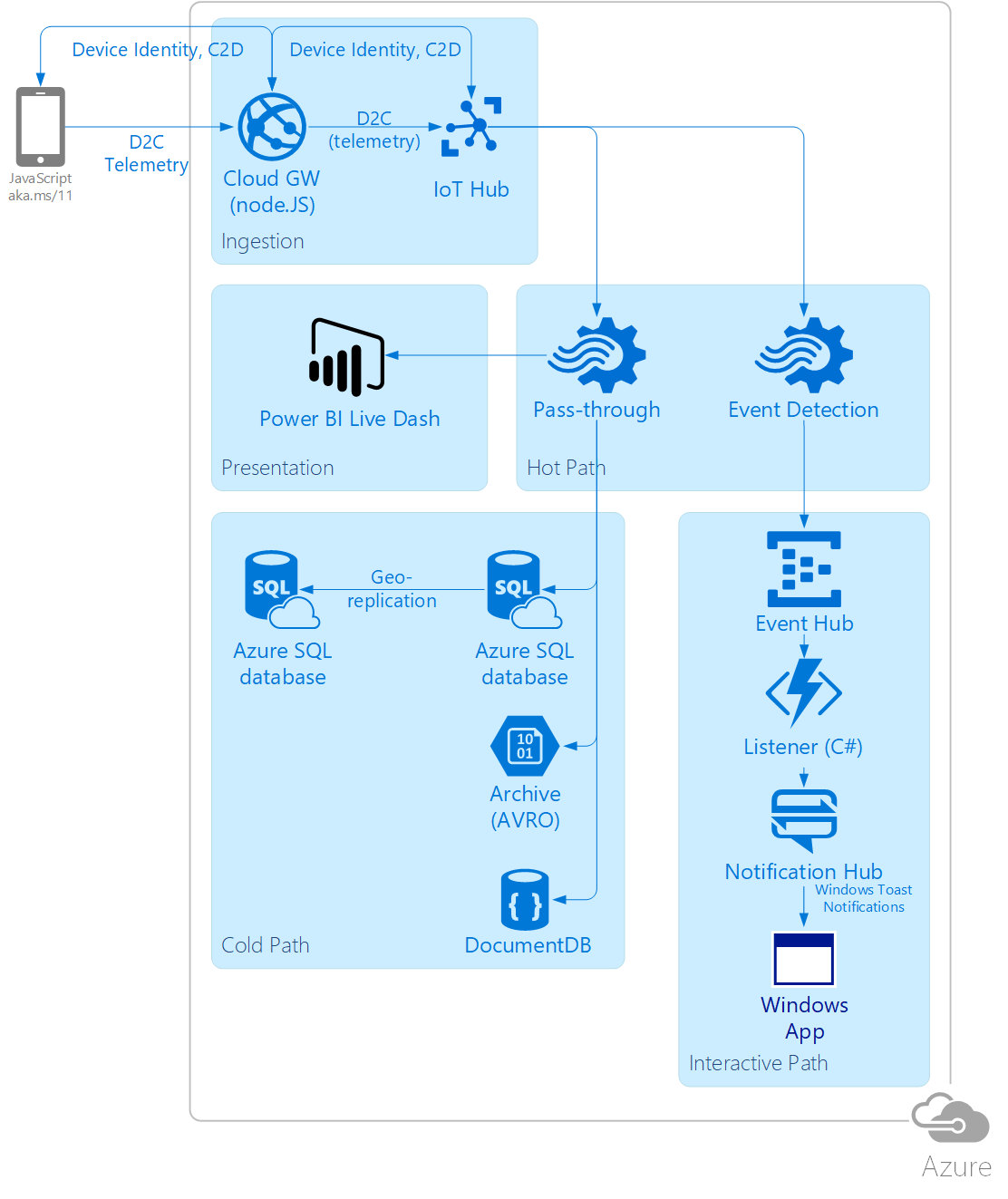
Create a Web App, IoT Hub, Storage Account, Azure SQL DB, Doc DB, Event Hub, Azure Function, Notification Hub
Either natively deploy a Web App from GitHub, dependencies will be installed automatically, alternatively copy ./Web/ to the web app root and run:
npm install -g bowernpm installbower install
Create the iotHubConnectionString web app setting with the connection string to the IoT Hub you created earlier
Create an ASA job with a script from the ./ASA/ folder and add the following outputs from step 0:
blobOutput: Blob Storage
docDBOutput: Document DB
notification-output: Event Hub
pbiAvgOutput: Power BI (it will show up as a streaming dataset for you to create a live dashboard on)
pbiRawOutput: Power BI
sqlDbOutput: SQL DB
add the voteInput input connecting the IoT Hub created in step 0 to your ASA job
Deploy a C# Azure Function using code from ./AzureFunction/ and set up a trigger on messages in the Event Hub created in step 0
make sure to upload all files since there are dependencies specified in project.json
To subscribe to your Notification Hub, you can use a walkthrough from https://docs.microsoft.com/en-us/azure/notification-hubs/notification-hubs-windows-store-dotnet-get-started-wns-push-notification
Hit the web endpoint from your mobile, each new device will be given a new identity in the IoT hub
Use /admin.html page to issue cloud-to-device messages using
There is a known bug in the way I'm submitting messages to the IoT Hub that can be fixed by erasing all device identities and bouncing the app
About
simple IoT app for Azure
Resources
Stars
Watchers
Forks
You can’t perform that action at this time.