Copyright (c) 2016, Michael Ogg
- Abstract
- Basic Methodology
- Components
- Installation
- Usage
- [Lisence] (#Lisence)
This Automatic Door Opener was designed by Dr. Michael Ogg with the intention of creating a hands-free method of entering or exiting one’s house. It was documented and is being managed by the Ryerson Chapter of Tetra. This door opener assumes the user has limited or no limb mobility but has wheelchair access. It is based around the use of a Raspberry Pi, an Internet of Things (Z-wave) Controller, RFID tags and pressure plates. The objective of having the code, as well as additional information, on Github is to allow users to copy and modify Dr. Ogg’s solution for their own purposes.
This project assumes you have a basic understanding of the following concepts: electrical work, Raspberry Pi , Internet of Things controllers, and Python. The files are designed so that you can copy and paste this solution almost directly with only minor changes to the config file, providing the hardware is laid out in the same manner.
We hope that for whatever reason, whether it be as an electronic hobbyist or as someone working in accessibility services, you can make use of Dr. Ogg’s solution. If you’d like to see a video of the Automatic Door Opener, please click here: https://www.youtube.com/watch?v=-B-Js19Npv0
- Brief description of method of operation
Raspberry Pi: Main controller that connects to Vera and all other components via USB.RFID Readerx2 : Device used to read RFID tagsDoor Strike Relay: Remote switch used to open or close the door latch. (Contained in relay box)Door Open Relay: Same device as the strike relay but used to turn the door lock on or off. (Contained in relay box)Vera: Z-Wave hub that connects the contact closures and switches.Z-Wave Compatible Contact Closure: a relay that allows the door to be opened and close via Z-wave.Push Platesx4 : In this project, four pushplates are used as switches to actuate the door open relay. One is installed at an average height and the other is installed at foot level height both inside and outside the house.
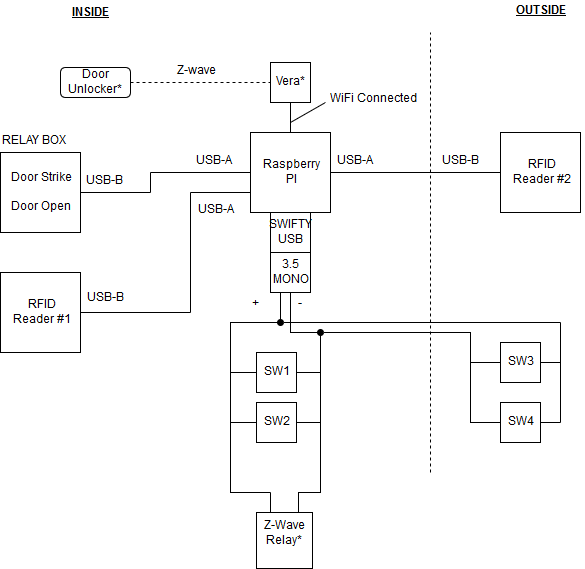
The Door Opener project is intended to be run on any Raspberry PI (with a minimum of 4 USB ports) and be used with any Vera and Alexa devices thus the following installation guide provided is for that specific intent, although the source code can be implemented on other devices but will not be covered in this installation guide.
Steps:
- Go to https://home.getvera.com/users/login and register your Vera controller (your home router must be enabled for port forwarding).
- Pair your z-wave door contact sensor to your vera hub using the following link https://support.getvera.com/customer/en/portal/articles/2949040-how-to-pair-z-wave-devices?b_id=712 and connect the sensor terminals to a usb connector and plug it into port ttyUSB3 of your Pi device.
- Follow the guide in the following link https://support.getvera.com/customer/portal/articles/2648086 to add your Alexa device of choice to the ecosystem.
- Connect the two RFID readers to ports ttyUSB0 and ttyUSB1 on your Pi device.
- Add the relay device to port ttyUSB2 on your Pi device and wire those relays accordingly to your pre-existing door automation system.
- Turn on your Raspberry Pi device, download the Door Opener source code and save it into your home directory.
- To initiate the Door Opener software one must run doormain.py and this can be done by opening a terminal windown on your Raspberry Pi and typing in the following commands:
cd /home/DoorOpener
python doormain.py
These commands will run the code once, if you would like to run the code continuisly and not have to retype these commands after each reboot you can use the follwing commans instead:
cd /home/DoorOpener
python doormain.py
followed by:
sudo reboot
to reboot the device.
The Door Opener system is intended to be used in conjuction with your current push plate hardware in your automated door system. It only requires the addition of a Z-Wave compatible door lock, your Alexa devide of choice, 2 RFID readers and RFID key tags, an iPad (opional), a Vera hub and a Raspberry Pi.
The Door Opener software is self contained and complete and those not need additional code to work and can be used as is. In the case where the timining of relay triggers and open delays are not optimal for use or do not function as wanted, the CONFIG file can be edited in the following lines:
strikeRelay /dev/ttyUSB2 1 4    # relay 1, hold 4 sec
doorRelay   /dev/ttyUSB2 2 4    # relay 1, hold 1 sec
openDelay   1.5         # time delay for door to open
The hold time for each relay and the delay time can be changed for better performance.
All valid RFID key tags are stored in the rfid.db file and it can be opened in any plane text editior to add or remove key tags.
This file is part of DoorOpener. DoorOpener is free software: you can redistribute it and/or modify it under the terms of the GNU General Public License as published by the Free Software Foundation, either version 3 of the License, or (at your option) any later version.
DoorOpener is distributed in the hope that it will be useful, but WITHOUT ANY WARRANTY; without even the implied warranty of MERCHANTABILITY or FITNESS FOR A PARTICULAR PURPOSE. See the GNU General Public License for more details.
You should have received a copy of the GNU General Public License along with DoorOpener. If not, see http://www.gnu.org/licenses/.