Docker Birthday 3 Tutorial
先確認運行在一台 docker 主機上
$ docker-machine ls
NAME      ACTIVE   DRIVER       STATE     URL                         SWARM   DOCKER    ERRORS
default   *        virtualbox   Running   tcp://192.168.99.100:2376           v1.10.3
載入 alpine 的映像 (image)
$ docker pull alpine
Using default tag: latest
latest: Pulling from library/alpine

4d06f2521e4f: Pull complete
Digest: sha256:7739b19a213f3a0aa8dacbd5898c8bd467e6eaf71074296a3d75824e76257396
Status: Downloaded newer image for alpine:latest
查看目前系統上有那些 image
$ docker images
REPOSITORY          TAG                 IMAGE ID            CREATED             SIZE
alpine              latest              70c557e50ed6        3 weeks ago         4.798 MB
hello-world latest 690ed74de00f 5 months ago 960 B如何操作 docker container
$ docker run alpine ls -l
total 48
drwxr-xr-x    2 root     root          4096 Mar  2 16:20 bin
drwxr-xr-x    5 root     root           360 Mar 25 21:09 dev
drwxr-xr-x   13 root     root          4096 Mar 25 21:09 etc
drwxr-xr-x    2 root     root          4096 Mar  2 16:20 home
drwxr-xr-x    5 root     root          4096 Mar  2 16:20 lib
lrwxrwxrwx    1 root     root            12 Mar  2 16:20 linuxrc -> /bin/busybox
drwxr-xr-x    5 root     root          4096 Mar  2 16:20 media
drwxr-xr-x    2 root     root          4096 Mar  2 16:20 mnt
dr-xr-xr-x  128 root     root             0 Mar 25 21:09 proc
drwx------    2 root     root          4096 Mar  2 16:20 root
drwxr-xr-x    2 root     root          4096 Mar  2 16:20 run
drwxr-xr-x    2 root     root          4096 Mar  2 16:20 sbin
dr-xr-xr-x   13 root     root             0 Mar 25 21:09 sys
drwxrwxrwt    2 root     root          4096 Mar  2 16:20 tmp
drwxr-xr-x    7 root     root          4096 Mar  2 16:20 usr
drwxr-xr-x   10 root     root          4096 Mar  2 16:20 var
當執行 run 時, Docker client 會尋找對應的映像 alpine, 產生 container, 運行指令 ls -l; 同樣, 在 alpine 上執行 echo 指令
$ docker run alpine echo "hello from alpine"
hello from alpine
接著再嘗試幾個指令, 目前 alpine 已運行的時間
$ docker run alpine uptime
 21:11:01 up 44 min,  load average: 0.00, 0.01, 0.04
/bin/sh 沒有反應, docker 在下完指令後即結束
$ docker run alpine /bin/sh若不想立刻結束, 則需使用互動模式, -it 會進入終端機的互動模式, 結束離開 exit 即可
$ docker run -it alpine /bin/shdocker ps 會列出目前尚在運行中的 container
$ docker ps
CONTAINER ID        IMAGE               COMMAND             CREATED             STATUS              PORTS               NAMES
因為沒有在運行的 container, 加上 -a 查看所有的容器
$ docker ps -a
CONTAINER ID        IMAGE               COMMAND                  CREATED             STATUS                      PORTS               NAMES
14d1e5c4b10a        alpine              "/bin/sh"                17 minutes ago      Exited (0) 46 seconds ago                       goofy_sammet
f5142e01ff3f        alpine              "/bin/sh"                20 minutes ago      Exited (0) 3 minutes ago                        nauseous_heisenberg
35fe31adfb4d        alpine              "uptime"                 20 minutes ago      Exited (0) 3 minutes ago                        sleepy_brahmagupta
0db7bdffc4f5        alpine              "uptime"                 20 minutes ago      Exited (0) 3 minutes ago                        condescending_almeida
c57755d32a3e        alpine              "echo 'hello from alp"   20 minutes ago      Exited (0) 4 minutes ago                        condescending_gates
2524dcbf9e90        alpine              "ls -l"                  21 minutes ago      Exited (0) 5 minutes ago                        cranky_wing
af773d7c79e0        hello-world         "/hello"                 59 minutes ago      Exited (0) 43 minutes ago                       goofy_davinci
如果你是喜歡冒險的, 你可以試試看這麼做, 運行到互動模式中的容器下, 砍掉 bin/, ls 將無法工作, 結束離開容器
$ docker run -it alpine /bin/sh
/ # ls
bin      etc      lib      media    proc     run      sys      usr
dev      home     linuxrc  mnt      root     sbin     tmp      var
/ # rm -rf bin/
/ # ls
/bin/sh: ls: not found
/ # exit
重新建立一個新的容器, ls 又會正常工作, 這是因為每次 docker 都會建立新的容器 (那如何保存舊記錄或舊操作?)
$ docker run -it alpine /bin/sh
/ # ls
bin      etc      lib      media    proc     run      sys      usr
dev      home     linuxrc  mnt      root     sbin     tmp      var
/ #- Images - The Filesystem and configuration of our application which are used to create containers.
- 鏡像 - 一個已經設定好的應用或檔案系統, 用來產生容器
- Containers - Created using Docker images and run the actual application.
- 由鏡像產生的應用程式
- Docker client - The command line tool that allows the user to interact with the Docker daemon.
- 用來與 Docker daemon 互動的工具
- Docker Hub - A registry of Docker images.
- 存放 docker 鏡像的地方
範例將使用 seqvence/static-site 這個鏡像
$ docker run seqvence/static-site
Unable to find image 'seqvence/static-site:latest' locally
latest: Pulling from seqvence/static-site

fdd5d7827f33: Pull complete
a3ed95caeb02: Pull complete
716f7a5f3082: Pull complete
7b10f03a0309: Pull complete
aff3ab7e9c39: Pull complete
Digest: sha256:41b286105f913fb7a5fbdce28d48bc80f1c77e3c4ce1b8280f28129ae0e94e9e
Status: Downloaded newer image for seqvence/static-site:latest
由於我們系統上沒有 seqvence/static-site 鏡像, docker client 會自動 pull 鏡像回來並執行.
$ docker ps
CONTAINER ID        IMAGE                  COMMAND                  CREATED             STATUS              PORTS               NAMES
71aa855edc10        seqvence/static-site   "/bin/sh -c 'cd /usr/"   4 minutes ago       Up 5 seconds        80/tcp, 443/tcp     silly_engelbart
seqvence/static-site 確實已經運行, 但不曉得運行在那個 port, 也不知如何從主機存取容器中的 server, 所以接下來我們要先停掉並移除這個容器, 在令一個終端機視窗執行下列命令, 記得運行 eval $(docker-machine env default) 設定終端機的環境變數
$ docker stop 71aa855edc10
$ docker rm 71aa855edc10
命名容器名稱 --name static-site
$ docker run --name static-site -e AUTHOR="changwu" -d -P seqvence/static-site
6f66c6072b056e6f58a721b4268a127687f679cb31392a3566badfea6bd1fb4b-
-d: 讓容器運行在 background, 又稱detached mode -
-P: 讓容器的 port 能公開給 host -
-e: 允許傳遞環境變數給容器 -
--name: 指派容器新名稱
利用 docker port 查看目前容器有哪些公開的 port
$ docker port static-site
443/tcp -> 0.0.0.0:32768
80/tcp -> 0.0.0.0:32769
查看 docker 的 ip
$ docker-machine ip default
192.168.99.100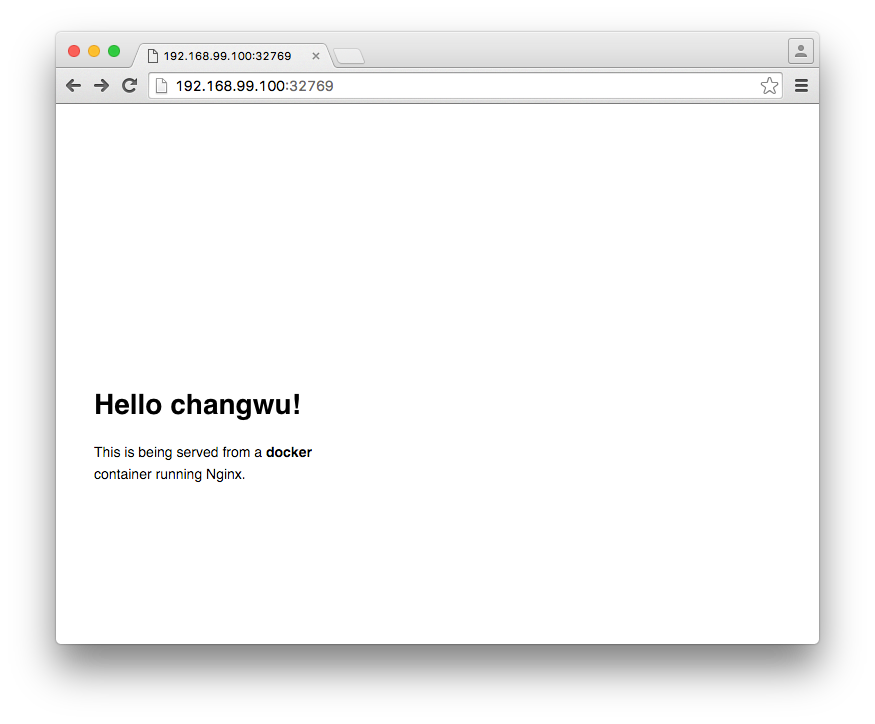
建立新容器跑第二個 server, 這次在使用 port 上, 自己指定而不靠容器隨機產生, 對應關係: 容器 80 <--> 主機 8888
-p: 設定 port 對應是用小寫的 p
$ docker run --name static-site-2 -e AUTHOR="changwu" -d -p 8888:80 seqvence/static-site
4190efe4a9b9701cec9e2caa8ccd6b39cf66c7d1b25f743ab983854f3f07e54d$ docker stop static-site static-site-2
$ docker rm static-site static-site-2這節, 我們會建立自己的 image, 並推送到 docker hub
$ docker images
REPOSITORY             TAG                 IMAGE ID            CREATED             SIZE
seqvence/static-site   latest              f589ccde7957        7 days ago          190.5 MB
alpine                 latest              70c557e50ed6        3 weeks ago         4.798 MB
hello-world            latest              690ed74de00f        5 months ago        960 B
鏡像主要分兩類:
- Base images: 沒有父鏡像, 一般像是 os images
- Child images: 通常是 os images + 其他的功能
目前在 Docker hub 上有許多不同的鏡像, 分屬 Base images 或 Child images
- Official images
- User images
這節我們要建立一個小型的 Flask 應用, 隨機展現貓的圖片 .gif
Dockerfile 是一個文字檔, 包含一系列執行的動作. 這個練習中, 將會建立一個 Docker image, 一個 Flask 的應用
建立 flask-app 資料夾, 建立以下檔案:
- Dockerfile
- app.py
- requirements.txt
- templates/index.html
app.py
from flask import Flask, render_template
import random

app = Flask(__name__)

# images
images = [
    "http://ak-hdl.buzzfed.com/static/2013-10/enhanced/webdr05/15/9/anigif_enhanced-buzz-26388-1381844103-11.gif",
    "http://ak-hdl.buzzfed.com/static/2013-10/enhanced/webdr01/15/9/anigif_enhanced-buzz-31540-1381844535-8.gif",
    "http://ak-hdl.buzzfed.com/static/2013-10/enhanced/webdr05/15/9/anigif_enhanced-buzz-26390-1381844163-18.gif",
    "http://ak-hdl.buzzfed.com/static/2013-10/enhanced/webdr06/15/10/anigif_enhanced-buzz-1376-1381846217-0.gif",
    "http://ak-hdl.buzzfed.com/static/2013-10/enhanced/webdr03/15/9/anigif_enhanced-buzz-3391-1381844336-26.gif",
    "http://ak-hdl.buzzfed.com/static/2013-10/enhanced/webdr06/15/10/anigif_enhanced-buzz-29111-1381845968-0.gif",
    "http://ak-hdl.buzzfed.com/static/2013-10/enhanced/webdr03/15/9/anigif_enhanced-buzz-3409-1381844582-13.gif",
    "http://ak-hdl.buzzfed.com/static/2013-10/enhanced/webdr02/15/9/anigif_enhanced-buzz-19667-1381844937-10.gif",
    "http://ak-hdl.buzzfed.com/static/2013-10/enhanced/webdr05/15/9/anigif_enhanced-buzz-26358-1381845043-13.gif",
    "http://ak-hdl.buzzfed.com/static/2013-10/enhanced/webdr06/15/9/anigif_enhanced-buzz-18774-1381844645-6.gif",
    "http://ak-hdl.buzzfed.com/static/2013-10/enhanced/webdr06/15/9/anigif_enhanced-buzz-25158-1381844793-0.gif",
    "http://ak-hdl.buzzfed.com/static/2013-10/enhanced/webdr03/15/10/anigif_enhanced-buzz-11980-1381846269-1.gif"
]


@app.route('/')
def index():
    url = random.choice(images)
    return render_template('index.html', url=url)


if __name__ == '__main__':
    app.run(host='0.0.0.0')
requirements.txt
Flask==0.10.1
templates/index.html
<html>
    <head>
        <style type="text/css">
            body {
                background: black;
                color: white;
            }
            div.container {
                max-width: 500px;
                margin: 100px auto;
                border: 20px solid white;
                padding: 10px;
                text-align: center;
            }
            h4 {
                text-transform: uppercase;
            }
        </style>
    </head>
    <body>
        <div class="container">
            <h4>Cat Gif of the day</h4>
            <img src="{{url}}" />
            <p><small>Courtesy: <a href="http://www.buzzfeed.com/copyranter/the-best-cat-gif-post-in-the-history-of-cat-gifs">Buzzfeed</a></small></p>
        </div>
    </body>
</html>
Dockerfile
# our base image
FROM alpine:latest

# Install python and pip
RUN apk add --update py-pip

# install Python modules needed by the Python app
COPY requirements.txt /usr/src/app/
RUN pip install --no-cache-dir -r /usr/src/app/requirements.txt

# copy files required for the app to run
COPY app.py /usr/src/app/
COPY templates/index.html /usr/src/app/templates/

# tell the port number the container should expose
EXPOSE 5000

# run the application
CMD ["python", "/usr/src/app/app.py"]
- 指定 base image
- 通常會撰寫檔案複製的相關指令或是安裝相依性的套件
- 複製 requirements.txt, 安裝 flask 應用需要的套件
- 複製應用程式的檔案
- 指定對應的外部 port, 由於 flask server 預設是跑在 5000, 所以在此開放 port 5000
- 將應用程式跑起來
接下來, 利用寫好的 Dockerfile, 來 build 我們的 image, 這時會用到 docker build 這個指令
$ cd ~/sandbox/docker-birthday/flask-app
$ docker build -t changwu/myfirstapp .
Sending build context to Docker daemon  7.68 kB
Step 1 : FROM alpine:latest
 ---> 70c557e50ed6
Step 2 : RUN apk add --update py-pip
 ---> Running in 53c4ae336186
fetch http://dl-cdn.alpinelinux.org/alpine/v3.3/main/x86_64/APKINDEX.tar.gz
fetch http://dl-cdn.alpinelinux.org/alpine/v3.3/community/x86_64/APKINDEX.tar.gz
(1/12) Installing libbz2 (1.0.6-r4)
(2/12) Installing expat (2.1.0-r2)
(3/12) Installing libffi (3.2.1-r2)
(4/12) Installing gdbm (1.11-r1)
(5/12) Installing ncurses-terminfo-base (6.0-r6)
(6/12) Installing ncurses-terminfo (6.0-r6)
(7/12) Installing ncurses-libs (6.0-r6)
(8/12) Installing readline (6.3.008-r4)
(9/12) Installing sqlite-libs (3.9.2-r0)
(10/12) Installing python (2.7.11-r3)
(11/12) Installing py-setuptools (18.8-r0)
(12/12) Installing py-pip (7.1.2-r0)
Executing busybox-1.24.1-r7.trigger
OK: 59 MiB in 23 packages
 ---> 7af9c558fce0
Removing intermediate container 53c4ae336186
Step 3 : COPY requirements.txt /usr/src/app/
 ---> cb05121de95b
Removing intermediate container 16360fe2945c
Step 4 : RUN pip install --no-cache-dir -r /usr/src/app/requirements.txt
 ---> Running in b00a71e15ca8
Collecting Flask==0.10.1 (from -r /usr/src/app/requirements.txt (line 1))
  Downloading Flask-0.10.1.tar.gz (544kB)
Collecting Werkzeug>=0.7 (from Flask==0.10.1->-r /usr/src/app/requirements.txt (line 1))
  Downloading Werkzeug-0.11.5-py2.py3-none-any.whl (305kB)
Collecting Jinja2>=2.4 (from Flask==0.10.1->-r /usr/src/app/requirements.txt (line 1))
  Downloading Jinja2-2.8-py2.py3-none-any.whl (263kB)
Collecting itsdangerous>=0.21 (from Flask==0.10.1->-r /usr/src/app/requirements.txt (line 1))
  Downloading itsdangerous-0.24.tar.gz (46kB)
Collecting MarkupSafe (from Jinja2>=2.4->Flask==0.10.1->-r /usr/src/app/requirements.txt (line 1))
  Downloading MarkupSafe-0.23.tar.gz
Installing collected packages: Werkzeug, MarkupSafe, Jinja2, itsdangerous, Flask
  Running setup.py install for MarkupSafe
  Running setup.py install for itsdangerous
  Running setup.py install for Flask
Successfully installed Flask-0.10.1 Jinja2-2.8 MarkupSafe-0.23 Werkzeug-0.11.5 itsdangerous-0.24
You are using pip version 7.1.2, however version 8.1.1 is available.
You should consider upgrading via the 'pip install --upgrade pip' command.
 ---> 525796417eeb
Removing intermediate container b00a71e15ca8
Step 5 : COPY app.py /usr/src/app/
 ---> 7e420ff1f73d
Removing intermediate container 6bd23e74a5c1
Step 6 : COPY templates/index.html /usr/src/app/templates/
 ---> 89446c3a1e32
Removing intermediate container a4c45024685f
Step 7 : EXPOSE 5000
 ---> Running in 7e3c396f02c3
 ---> 4b42d0844874
Removing intermediate container 7e3c396f02c3
Step 8 : CMD python /usr/src/app/app.py
 ---> Running in c8aafee706f1
 ---> 11db2f39c940
Removing intermediate container c8aafee706f1
Successfully built 11db2f39c940
執行 docker images 後, 可以看到 image 已經編好
$ docker images
REPOSITORY             TAG                 IMAGE ID            CREATED             SIZE
changwu/myfirstapp     latest              1bb5477538f7        3 seconds ago       55.04 MB
ubuntu                 latest              97434d46f197        7 days ago          188 MB
seqvence/static-site   latest              f589ccde7957        7 days ago          190.5 MB
alpine                 latest              70c557e50ed6        3 weeks ago         4.798 MB
hello-world            latest              690ed74de00f        5 months ago        960 B
建立新的容器
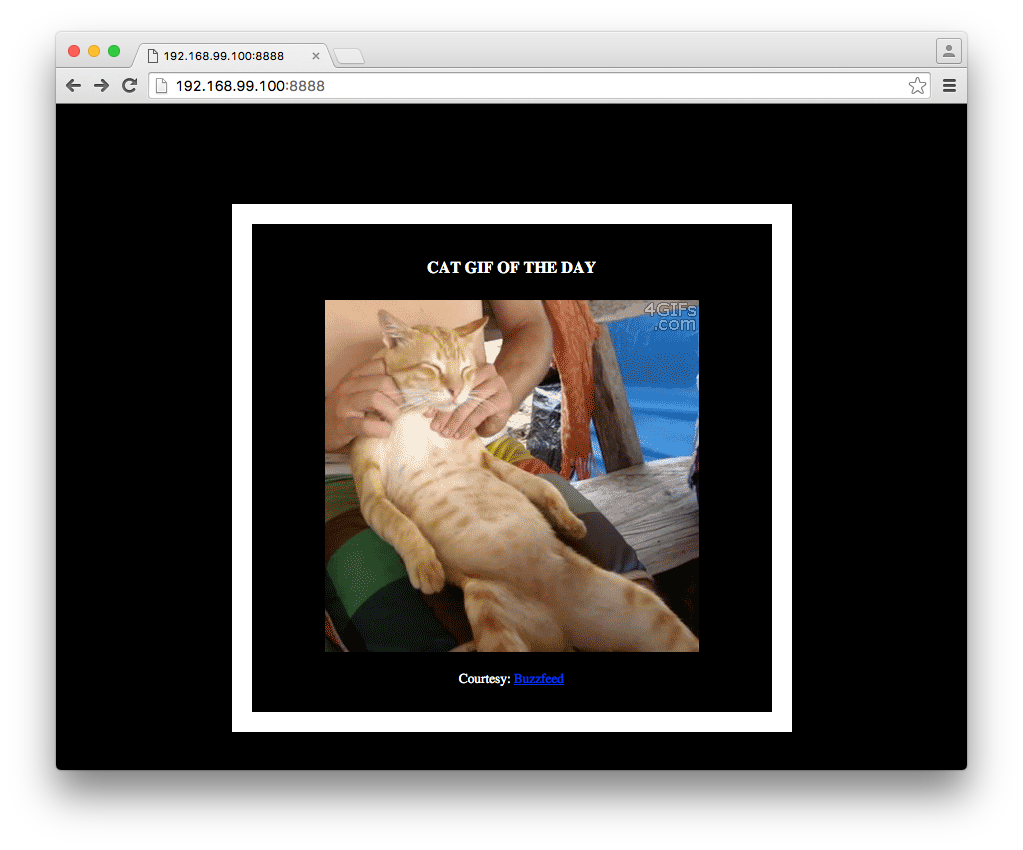
$ docker run -p 8888:5000 --name myfirstapp changwu/myfirstapp
 * Running on http://0.0.0.0:5000/ (Press CTRL+C to quit)
跟之前一樣, 連線到 docker 的 ip 以及本機對應到容器的 port
移除容器
$ docker stop myfirstapp
$ docker rm myfirstapp登入到 Docker Hub
$ docker login到此, 已經學會如何建立 image, 下一步要學習如何運行多個容器, docker-compose 會是最好的操作方式.
clone docker-birthday-3 到本機, 裡面含有 voting app
$ git clone https://github.com/docker/docker-birthday-3.git$ cd ~/sandbox/docker-birthday-3/example-voting-app- example-voting-app/voting-app/app.py
將這兩行改成喜歡的程式語言
option_a = os.getenv('OPTION_A', "Python")
option_b = os.getenv('OPTION_B', "Go")- example-voting-app/result-app/views/config.json
{
  "name":"changwu",
  "twitter":"@changwu_tw",
  "location":"Urbana, IL, USA",
  "repo":["changwu/votingapp_voting-app", "changwu/votingapp_result-app"],
  "vote":"Python"
}我們將使用 Docker Compose 來運行 app, Docker Compose 是用來運行多個容器的工具. 需要定義 .yml 的檔案, 包含各容器的描述, 大小, 容器之間的網路設定.
- docker-compose.yml
version: "2"

services:
  voting-app:
    build: ./voting-app/.
    volumes:
     - ./voting-app:/app
    ports:
      - "5000:80"
    links:
      - redis
    networks:
      - front-tier
      - back-tier

  result-app:
    build: ./result-app/.
    volumes:
      - ./result-app:/app
    ports:
      - "5001:80"
    links:
      - db
    networks:
      - front-tier
      - back-tier

  worker:
    image: manomarks/worker
    links:
      - db
      - redis
    networks:
      - back-tier

  redis:
    image: redis:alpine
    ports: ["6379"]
    networks:
      - back-tier

  db:
    image: postgres:9.4
    volumes:
      - "db-data:/var/lib/postgresql/data"
    networks:
      - back-tier

volumes:
  db-data:

networks:
  front-tier:
  back-tier:
.yml 定義:
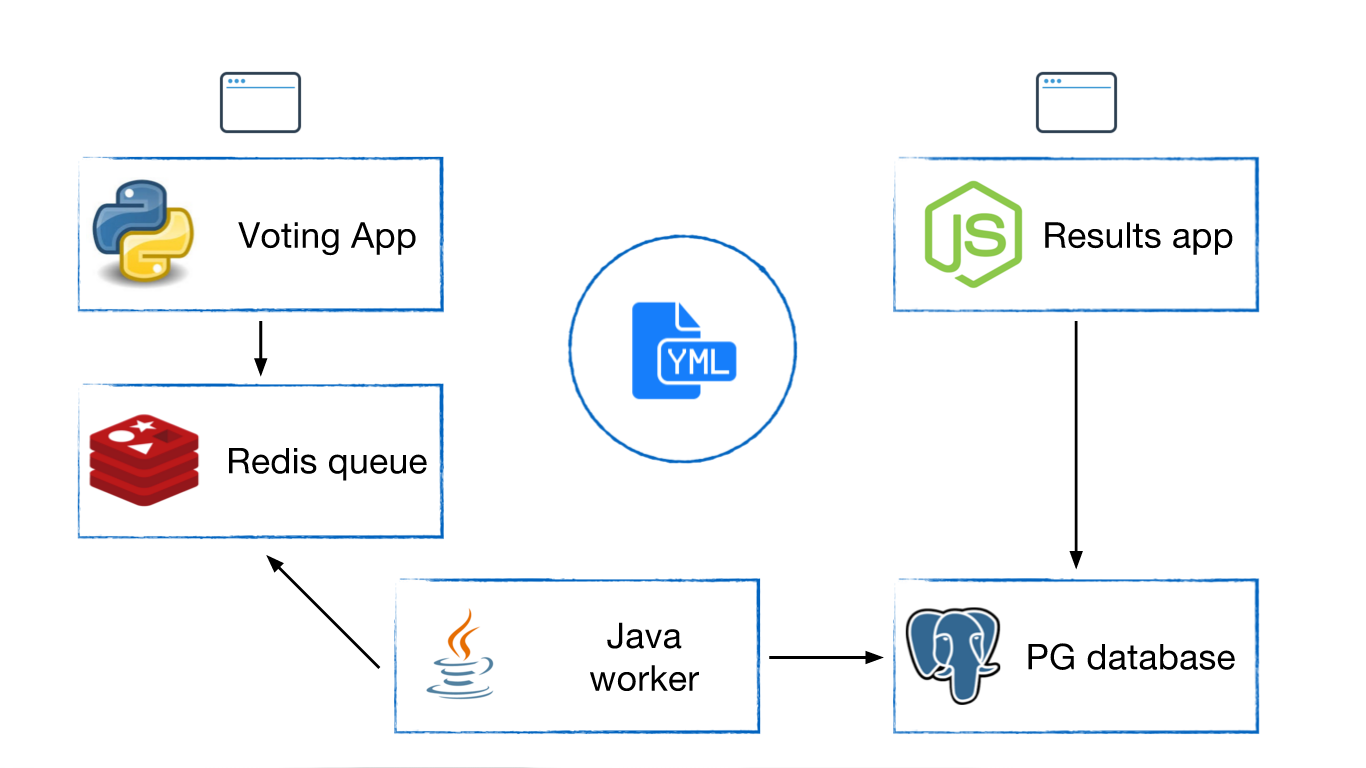
- A voting-app container based on a Python image
- A result-app container based on a Node.js image
- A redis container based on a redis image, to temporarily store the data.
- A Java based worker app based on a Java image
- A Postgres container based on a postgres image
其中有兩個 image 由 Dockerfile 所建立, 其餘三個 images 則是從 docker hub 上所拉下來
有關 Compose 如何設定網路, 可參考 Networking in Compose
運行 app
$ cd ~/sandbox/docker-birthday-3/example-voting-app
$ docker-compose up -d
Creating network "examplevotingapp_front-tier" with the default driver
Creating network "examplevotingapp_back-tier" with the default driver
Creating volume "examplevotingapp_db-data" with default driver
Pulling db (postgres:9.4)...
9.4: Pulling from library/postgres
fdd5d7827f33: Already exists
a3ed95caeb02: Pull complete
beb59dc2ad34: Pull complete
f42a5322ef13: Pull complete
f6719ae287c6: Pull complete
0dc08677d778: Pull complete
5f3b03c1dd66: Pull complete
de5fec809feb: Pull complete
0a442079a5a0: Pull complete
25d527ac5d9f: Pull complete
03619154d011: Pull complete
a2d55eea3342: Pull complete
Digest: sha256:06b73423e7c8130fa02406d55fd4d2f8195ca5b1c2f26bdc59516b967252377d
Status: Downloaded newer image for postgres:9.4
Creating examplevotingapp_db_1
Pulling redis (redis:alpine)...
alpine: Pulling from library/redis
4d06f2521e4f: Already exists
a790394eb78d: Pull complete
a3ed95caeb02: Pull complete
10d0b5c4aea4: Pull complete
514036a3f472: Pull complete
7eb566aca788: Pull complete
6fedafd6ed95: Pull complete
Digest: sha256:2eede5c553be583c6c55092614806aafcfd72518081a4dda49eb57f5fa6e3ab0
Status: Downloaded newer image for redis:alpine
Creating examplevotingapp_redis_1
Pulling worker (manomarks/worker:latest)...
latest: Pulling from manomarks/worker
4d06f2521e4f: Already exists
a3ed95caeb02: Pull complete
8e87dca72717: Pull complete
e7a6fe95a169: Pull complete
df64be00c9e1: Pull complete
6d820922175d: Pull complete
719eafdcdd1a: Pull complete
4d92605c39d9: Pull complete
420d3ff48587: Pull complete
bf959999c03d: Pull complete
aedabd85e754: Pull complete
Digest: sha256:f4461d17e31fa1d19bd49d7ee907a2c7aac17020e88b1e9228f99fbcb7b307de
Status: Downloaded newer image for manomarks/worker:latest
Creating examplevotingapp_worker_1
Building voting-app
Step 1 : FROM python:2.7-alpine
2.7-alpine: Pulling from library/python
4d06f2521e4f: Already exists
a3ed95caeb02: Pull complete
5a362500325d: Pull complete
Digest: sha256:a8aad4aff88fa9c375e8df23a4e446983d3ff8bbae58927a23bca44b500c6bed
Status: Downloaded newer image for python:2.7-alpine
 ---> dd22f748f304
Step 2 : WORKDIR /app
 ---> Running in c8e588ab1cf0
 ---> f618483a9d09
Removing intermediate container c8e588ab1cf0
Step 3 : ADD requirements.txt /app/requirements.txt
 ---> 09d1e3455dbd
Removing intermediate container 0f8f5cc2c3ff
Step 4 : RUN pip install -r requirements.txt
 ---> Running in f169d1bd33e5
Collecting Flask (from -r requirements.txt (line 1))
  Downloading Flask-0.10.1.tar.gz (544kB)
Collecting Redis (from -r requirements.txt (line 2))
  Downloading redis-2.10.5-py2.py3-none-any.whl (60kB)
Collecting Werkzeug>=0.7 (from Flask->-r requirements.txt (line 1))
  Downloading Werkzeug-0.11.5-py2.py3-none-any.whl (305kB)
Collecting Jinja2>=2.4 (from Flask->-r requirements.txt (line 1))
  Downloading Jinja2-2.8-py2.py3-none-any.whl (263kB)
Collecting itsdangerous>=0.21 (from Flask->-r requirements.txt (line 1))
  Downloading itsdangerous-0.24.tar.gz (46kB)
Collecting MarkupSafe (from Jinja2>=2.4->Flask->-r requirements.txt (line 1))
  Downloading MarkupSafe-0.23.tar.gz
Building wheels for collected packages: Flask, itsdangerous, MarkupSafe
  Running setup.py bdist_wheel for Flask: started
  Running setup.py bdist_wheel for Flask: finished with status 'done'
  Stored in directory: /root/.cache/pip/wheels/d2/db/61/cb9b80526b8f3ba89248ec0a29d6da1bb6013681c930fca987
  Running setup.py bdist_wheel for itsdangerous: started
  Running setup.py bdist_wheel for itsdangerous: finished with status 'done'
  Stored in directory: /root/.cache/pip/wheels/97/c0/b8/b37c320ff57e15f993ba0ac98013eee778920b4a7b3ebae3cf
  Running setup.py bdist_wheel for MarkupSafe: started
  Running setup.py bdist_wheel for MarkupSafe: finished with status 'done'
  Stored in directory: /root/.cache/pip/wheels/94/a7/79/f79a998b64c1281cb99fa9bbd33cfc9b8b5775f438218d17a7
Successfully built Flask itsdangerous MarkupSafe
Installing collected packages: Werkzeug, MarkupSafe, Jinja2, itsdangerous, Flask, Redis
Successfully installed Flask-0.10.1 Jinja2-2.8 MarkupSafe-0.23 Redis-2.10.5 Werkzeug-0.11.5 itsdangerous-0.24
 ---> 5e120b8822b1
Removing intermediate container f169d1bd33e5
Step 5 : ADD . /app
 ---> ee1167612166
Removing intermediate container f0291e680db4
Step 6 : EXPOSE 80
 ---> Running in 5cda23061e38
 ---> 186bc9692324
Removing intermediate container 5cda23061e38
Step 7 : CMD python app.py
 ---> Running in d2c4c0a4d5ca
 ---> 12eec7b3bebb
Removing intermediate container d2c4c0a4d5ca
Successfully built 12eec7b3bebb
Creating examplevotingapp_voting-app_1
Building result-app
Step 1 : FROM mhart/alpine-node
latest: Pulling from mhart/alpine-node
4d06f2521e4f: Already exists
0165ee796274: Pull complete
Digest: sha256:fdd893f01e18abffbc574716d1e77bcdc362561ae8974d0823f0ec79ccb7fad0
Status: Downloaded newer image for mhart/alpine-node:latest
 ---> d7e82cd9fae1
Step 2 : WORKDIR /app
 ---> Running in 0d194c2ed6dc
 ---> ec60621457de
Removing intermediate container 0d194c2ed6dc
Step 3 : ADD package.json /app/package.json
 ---> a7a2f7dcc9a5
Removing intermediate container 460cd14dc1a5
Step 4 : RUN npm config set registry http://registry.npmjs.org
 ---> Running in 4dda52e7b5b1
 ---> fffebd8cc782
Removing intermediate container 4dda52e7b5b1
Step 5 : RUN npm install && npm ls
 ---> Running in b2fe9dcc657e
result-app@1.0.0 /app
+-- async@1.5.2
+-- body-parser@1.15.0
| +-- bytes@2.2.0
| +-- content-type@1.0.1
| +-- debug@2.2.0
| | `-- ms@0.7.1
| +-- depd@1.1.0
| +-- http-errors@1.4.0
| | +-- inherits@2.0.1
| | `-- statuses@1.2.1
| +-- iconv-lite@0.4.13
| +-- on-finished@2.3.0
| | `-- ee-first@1.1.1
| +-- qs@6.1.0
| +-- raw-body@2.1.6
| | +-- bytes@2.3.0
| | `-- unpipe@1.0.0
| `-- type-is@1.6.12
|   +-- media-typer@0.3.0
|   `-- mime-types@2.1.10
|     `-- mime-db@1.22.0
+-- cookie-parser@1.4.1
| +-- cookie@0.2.3
| `-- cookie-signature@1.0.6
+-- express@4.13.4
| +-- accepts@1.2.13
| | `-- negotiator@0.5.3
| +-- array-flatten@1.1.1
| +-- content-disposition@0.5.1
| +-- cookie@0.1.5
| +-- escape-html@1.0.3
| +-- etag@1.7.0
| +-- finalhandler@0.4.1
| +-- fresh@0.3.0
| +-- merge-descriptors@1.0.1
| +-- methods@1.1.2
| +-- parseurl@1.3.1
| +-- path-to-regexp@0.1.7
| +-- proxy-addr@1.0.10
| | +-- forwarded@0.1.0
| | `-- ipaddr.js@1.0.5
| +-- qs@4.0.0
| +-- range-parser@1.0.3
| +-- send@0.13.1
| | +-- destroy@1.0.4
| | +-- http-errors@1.3.1
| | `-- mime@1.3.4
| +-- serve-static@1.10.2
| +-- utils-merge@1.0.0
| `-- vary@1.0.1
+-- method-override@2.3.5
+-- pg@4.5.1
| +-- buffer-writer@1.0.1
| +-- generic-pool@2.1.1
| +-- packet-reader@0.2.0
| +-- pg-connection-string@0.1.3
| +-- pg-types@1.10.0
| | +-- ap@0.2.0
| | +-- postgres-array@1.0.0
| | +-- postgres-bytea@1.0.0
| | +-- postgres-date@1.0.1
| | `-- postgres-interval@1.0.1
| |   `-- xtend@4.0.1
| +-- pgpass@0.0.3
| | `-- split@0.3.3
| |   `-- through@2.3.8
| `-- semver@4.3.6
+-- request-json@0.5.5
| +-- depd@1.0.0
| `-- request@2.53.0
|   +-- aws-sign2@0.5.0
|   +-- bl@0.9.5
|   | `-- readable-stream@1.0.33
|   |   +-- core-util-is@1.0.2
|   |   `-- string_decoder@0.10.31
|   +-- caseless@0.9.0
|   +-- combined-stream@0.0.7
|   | `-- delayed-stream@0.0.5
|   +-- forever-agent@0.5.2
|   +-- form-data@0.2.0
|   | +-- async@0.9.2
|   | `-- mime-types@2.0.14
|   |   `-- mime-db@1.12.0
|   +-- hawk@2.3.1
|   | +-- boom@2.10.1
|   | +-- cryptiles@2.0.5
|   | +-- hoek@2.16.3
|   | `-- sntp@1.0.9
|   +-- http-signature@0.10.1
|   | +-- asn1@0.1.11
|   | +-- assert-plus@0.1.5
|   | `-- ctype@0.5.3
|   +-- isstream@0.1.2
|   +-- json-stringify-safe@5.0.1
|   +-- mime-types@2.0.14
|   | `-- mime-db@1.12.0
|   +-- node-uuid@1.4.7
|   +-- oauth-sign@0.6.0
|   +-- qs@2.3.3
|   +-- stringstream@0.0.5
|   +-- tough-cookie@2.2.2
|   `-- tunnel-agent@0.4.2
`-- socket.io@1.4.5
  +-- engine.io@1.6.8
  | +-- accepts@1.1.4
  | | +-- mime-types@2.0.14
  | | | `-- mime-db@1.12.0
  | | `-- negotiator@0.4.9
  | +-- base64id@0.1.0
  | +-- engine.io-parser@1.2.4
  | | +-- after@0.8.1
  | | +-- arraybuffer.slice@0.0.6
  | | +-- base64-arraybuffer@0.1.2
  | | +-- blob@0.0.4
  | | +-- has-binary@0.1.6
  | | `-- utf8@2.1.0
  | `-- ws@1.0.1
  |   +-- options@0.0.6
  |   `-- ultron@1.0.2
  +-- has-binary@0.1.7
  | `-- isarray@0.0.1
  +-- socket.io-adapter@0.4.0
  | `-- socket.io-parser@2.2.2
  |   +-- debug@0.7.4
  |   `-- json3@3.2.6
  +-- socket.io-client@1.4.5
  | +-- backo2@1.0.2
  | +-- component-bind@1.0.0
  | +-- component-emitter@1.2.0
  | +-- engine.io-client@1.6.8
  | | +-- component-inherit@0.0.3
  | | +-- has-cors@1.1.0
  | | +-- parsejson@0.0.1
  | | +-- parseqs@0.0.2
  | | +-- xmlhttprequest-ssl@1.5.1
  | | `-- yeast@0.1.2
  | +-- indexof@0.0.1
  | +-- object-component@0.0.3
  | +-- parseuri@0.0.4
  | | `-- better-assert@1.0.2
  | |   `-- callsite@1.0.0
  | `-- to-array@0.1.4
  `-- socket.io-parser@2.2.6
    +-- benchmark@1.0.0
    +-- component-emitter@1.1.2
    `-- json3@3.3.2

npm WARN result-app@1.0.0 No description
npm WARN result-app@1.0.0 No repository field.
result-app@1.0.0 /app
+-- async@1.5.2
+-- body-parser@1.15.0
| +-- bytes@2.2.0
| +-- content-type@1.0.1
| +-- debug@2.2.0
| | `-- ms@0.7.1
| +-- depd@1.1.0
| +-- http-errors@1.4.0
| | +-- inherits@2.0.1
| | `-- statuses@1.2.1
| +-- iconv-lite@0.4.13
| +-- on-finished@2.3.0
| | `-- ee-first@1.1.1
| +-- qs@6.1.0
| +-- raw-body@2.1.6
| | +-- bytes@2.3.0
| | `-- unpipe@1.0.0
| `-- type-is@1.6.12
|   +-- media-typer@0.3.0
|   `-- mime-types@2.1.10
|     `-- mime-db@1.22.0
+-- cookie-parser@1.4.1
| +-- cookie@0.2.3
| `-- cookie-signature@1.0.6
+-- express@4.13.4
| +-- accepts@1.2.13
| | `-- negotiator@0.5.3
| +-- array-flatten@1.1.1
| +-- content-disposition@0.5.1
| +-- cookie@0.1.5
| +-- escape-html@1.0.3
| +-- etag@1.7.0
| +-- finalhandler@0.4.1
| +-- fresh@0.3.0
| +-- merge-descriptors@1.0.1
| +-- methods@1.1.2
| +-- parseurl@1.3.1
| +-- path-to-regexp@0.1.7
| +-- proxy-addr@1.0.10
| | +-- forwarded@0.1.0
| | `-- ipaddr.js@1.0.5
| +-- qs@4.0.0
| +-- range-parser@1.0.3
| +-- send@0.13.1
| | +-- destroy@1.0.4
| | +-- http-errors@1.3.1
| | `-- mime@1.3.4
| +-- serve-static@1.10.2
| +-- utils-merge@1.0.0
| `-- vary@1.0.1
+-- method-override@2.3.5
+-- pg@4.5.1
| +-- buffer-writer@1.0.1
| +-- generic-pool@2.1.1
| +-- packet-reader@0.2.0
| +-- pg-connection-string@0.1.3
| +-- pg-types@1.10.0
| | +-- ap@0.2.0
| | +-- postgres-array@1.0.0
| | +-- postgres-bytea@1.0.0
| | +-- postgres-date@1.0.1
| | `-- postgres-interval@1.0.1
| |   `-- xtend@4.0.1
| +-- pgpass@0.0.3
| | `-- split@0.3.3
| |   `-- through@2.3.8
| `-- semver@4.3.6
+-- request-json@0.5.5
| +-- depd@1.0.0
| `-- request@2.53.0
|   +-- aws-sign2@0.5.0
|   +-- bl@0.9.5
|   | `-- readable-stream@1.0.33
|   |   +-- core-util-is@1.0.2
|   |   `-- string_decoder@0.10.31
|   +-- caseless@0.9.0
|   +-- combined-stream@0.0.7
|   | `-- delayed-stream@0.0.5
|   +-- forever-agent@0.5.2
|   +-- form-data@0.2.0
|   | +-- async@0.9.2
|   | `-- mime-types@2.0.14
|   |   `-- mime-db@1.12.0
|   +-- hawk@2.3.1
|   | +-- boom@2.10.1
|   | +-- cryptiles@2.0.5
|   | +-- hoek@2.16.3
|   | `-- sntp@1.0.9
|   +-- http-signature@0.10.1
|   | +-- asn1@0.1.11
|   | +-- assert-plus@0.1.5
|   | `-- ctype@0.5.3
|   +-- isstream@0.1.2
|   +-- json-stringify-safe@5.0.1
|   +-- mime-types@2.0.14
|   | `-- mime-db@1.12.0
|   +-- node-uuid@1.4.7
|   +-- oauth-sign@0.6.0
|   +-- qs@2.3.3
|   +-- stringstream@0.0.5
|   +-- tough-cookie@2.2.2
|   `-- tunnel-agent@0.4.2
`-- socket.io@1.4.5
  +-- engine.io@1.6.8
  | +-- accepts@1.1.4
  | | +-- mime-types@2.0.14
  | | | `-- mime-db@1.12.0
  | | `-- negotiator@0.4.9
  | +-- base64id@0.1.0
  | +-- engine.io-parser@1.2.4
  | | +-- after@0.8.1
  | | +-- arraybuffer.slice@0.0.6
  | | +-- base64-arraybuffer@0.1.2
  | | +-- blob@0.0.4
  | | +-- has-binary@0.1.6
  | | `-- utf8@2.1.0
  | `-- ws@1.0.1
  |   +-- options@0.0.6
  |   `-- ultron@1.0.2
  +-- has-binary@0.1.7
  | `-- isarray@0.0.1
  +-- socket.io-adapter@0.4.0
  | `-- socket.io-parser@2.2.2
  |   +-- debug@0.7.4
  |   `-- json3@3.2.6
  +-- socket.io-client@1.4.5
  | +-- backo2@1.0.2
  | +-- component-bind@1.0.0
  | +-- component-emitter@1.2.0
  | +-- engine.io-client@1.6.8
  | | +-- component-inherit@0.0.3
  | | +-- has-cors@1.1.0
  | | +-- parsejson@0.0.1
  | | +-- parseqs@0.0.2
  | | +-- xmlhttprequest-ssl@1.5.1
  | | `-- yeast@0.1.2
  | +-- indexof@0.0.1
  | +-- object-component@0.0.3
  | +-- parseuri@0.0.4
  | | `-- better-assert@1.0.2
  | |   `-- callsite@1.0.0
  | `-- to-array@0.1.4
  `-- socket.io-parser@2.2.6
    +-- benchmark@1.0.0
    +-- component-emitter@1.1.2
    `-- json3@3.3.2

 ---> 93c6cff999f2
Removing intermediate container b2fe9dcc657e
Step 6 : RUN mv /app/node_modules /node_modules
 ---> Running in c53787a8cb49
 ---> 8e6855e936a7
Removing intermediate container c53787a8cb49
Step 7 : ADD . /app
 ---> 841a6df0ce14
Removing intermediate container a567069d9e2d
Step 8 : ENV PORT 80
 ---> Running in 2494410c7b30
 ---> 2e3b9af387b8
Removing intermediate container 2494410c7b30
Step 9 : EXPOSE 80
 ---> Running in 6310f40ed5a4
 ---> 70d17dc7a35a
Removing intermediate container 6310f40ed5a4
Step 10 : CMD node server.js
 ---> Running in 6f6fc1714434
 ---> 776219ad0deb
Removing intermediate container 6f6fc1714434
Successfully built 776219ad0deb
Creating examplevotingapp_result-app_1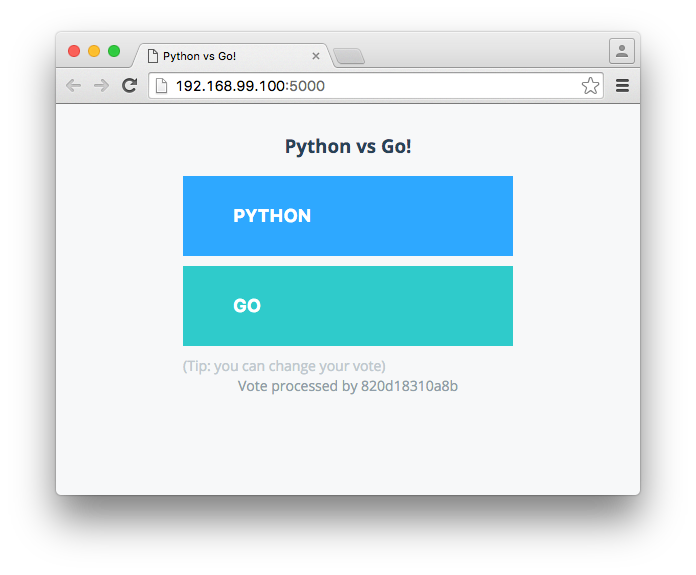
如果你的 docker 運行在 cloud 的機器上, 可以使用命令列來觀看結果
$ ssh -L 5000:localhost:5000 @<CLOUD_INSTANCE_IP_ADDRESS>
voting-app
$ cd ~/sandbox/docker-birthday-3/example-voting-app/voting-app
$ docker build --no-cache -t changwu/votingapp_voting-app .
Sending build context to Docker daemon 14.85 kB
Step 1 : FROM python:2.7-alpine
 ---> dd22f748f304
Step 2 : WORKDIR /app
 ---> Running in 51549c8315a3
 ---> 904eb7b6f351
Removing intermediate container 51549c8315a3
Step 3 : ADD requirements.txt /app/requirements.txt
 ---> 025df4aaad3c
Removing intermediate container 8c7d868d3e82
Step 4 : RUN pip install -r requirements.txt
 ---> Running in c0ec5de093bd
Collecting Flask (from -r requirements.txt (line 1))
  Downloading Flask-0.10.1.tar.gz (544kB)
Collecting Redis (from -r requirements.txt (line 2))
  Downloading redis-2.10.5-py2.py3-none-any.whl (60kB)
Collecting Werkzeug>=0.7 (from Flask->-r requirements.txt (line 1))
  Downloading Werkzeug-0.11.5-py2.py3-none-any.whl (305kB)
Collecting Jinja2>=2.4 (from Flask->-r requirements.txt (line 1))
  Downloading Jinja2-2.8-py2.py3-none-any.whl (263kB)
Collecting itsdangerous>=0.21 (from Flask->-r requirements.txt (line 1))
  Downloading itsdangerous-0.24.tar.gz (46kB)
Collecting MarkupSafe (from Jinja2>=2.4->Flask->-r requirements.txt (line 1))
  Downloading MarkupSafe-0.23.tar.gz
Building wheels for collected packages: Flask, itsdangerous, MarkupSafe
  Running setup.py bdist_wheel for Flask: started
  Running setup.py bdist_wheel for Flask: finished with status 'done'
  Stored in directory: /root/.cache/pip/wheels/d2/db/61/cb9b80526b8f3ba89248ec0a29d6da1bb6013681c930fca987
  Running setup.py bdist_wheel for itsdangerous: started
  Running setup.py bdist_wheel for itsdangerous: finished with status 'done'
  Stored in directory: /root/.cache/pip/wheels/97/c0/b8/b37c320ff57e15f993ba0ac98013eee778920b4a7b3ebae3cf
  Running setup.py bdist_wheel for MarkupSafe: started
  Running setup.py bdist_wheel for MarkupSafe: finished with status 'done'
  Stored in directory: /root/.cache/pip/wheels/94/a7/79/f79a998b64c1281cb99fa9bbd33cfc9b8b5775f438218d17a7
Successfully built Flask itsdangerous MarkupSafe
Installing collected packages: Werkzeug, MarkupSafe, Jinja2, itsdangerous, Flask, Redis
Successfully installed Flask-0.10.1 Jinja2-2.8 MarkupSafe-0.23 Redis-2.10.5 Werkzeug-0.11.5 itsdangerous-0.24
 ---> 2bdac86e9513
Removing intermediate container c0ec5de093bd
Step 5 : ADD . /app
 ---> 02f7e19a89b7
Removing intermediate container e42cd8cf002f
Step 6 : EXPOSE 80
 ---> Running in 1448e52c43d7
 ---> 27d6dc1f52a1
Removing intermediate container 1448e52c43d7
Step 7 : CMD python app.py
 ---> Running in 4ba0633b2d08
 ---> 947250abb597
Removing intermediate container 4ba0633b2d08
Successfully built 947250abb597
result-app
$ cd ~/sandbox/docker-birthday-3/example-voting-app/result-app
$ docker build --no-cache -t changwu/votingapp_result-app .
Sending build context to Docker daemon   192 kB
Step 1 : FROM mhart/alpine-node
 ---> d7e82cd9fae1
Step 2 : WORKDIR /app
 ---> Running in 909e8922388e
 ---> eaacae21f492
Removing intermediate container 909e8922388e
Step 3 : ADD package.json /app/package.json
 ---> f13d7c8caa18
Removing intermediate container 5e78c87f361f
Step 4 : RUN npm config set registry http://registry.npmjs.org
 ---> Running in 671964e413a3
 ---> 74056163c94a
Removing intermediate container 671964e413a3
Step 5 : RUN npm install && npm ls
 ---> Running in 54f3c6339e8b
result-app@1.0.0 /app
+-- async@1.5.2
+-- body-parser@1.15.0
| +-- bytes@2.2.0
| +-- content-type@1.0.1
| +-- debug@2.2.0
| | `-- ms@0.7.1
| +-- depd@1.1.0
| +-- http-errors@1.4.0
| | +-- inherits@2.0.1
| | `-- statuses@1.2.1
| +-- iconv-lite@0.4.13
| +-- on-finished@2.3.0
| | `-- ee-first@1.1.1
| +-- qs@6.1.0
| +-- raw-body@2.1.6
| | +-- bytes@2.3.0
| | `-- unpipe@1.0.0
| `-- type-is@1.6.12
|   +-- media-typer@0.3.0
|   `-- mime-types@2.1.10
|     `-- mime-db@1.22.0
+-- cookie-parser@1.4.1
| +-- cookie@0.2.3
| `-- cookie-signature@1.0.6
+-- express@4.13.4
| +-- accepts@1.2.13
| | `-- negotiator@0.5.3
| +-- array-flatten@1.1.1
| +-- content-disposition@0.5.1
| +-- cookie@0.1.5
| +-- escape-html@1.0.3
| +-- etag@1.7.0
| +-- finalhandler@0.4.1
| +-- fresh@0.3.0
| +-- merge-descriptors@1.0.1
| +-- methods@1.1.2
| +-- parseurl@1.3.1
| +-- path-to-regexp@0.1.7
| +-- proxy-addr@1.0.10
| | +-- forwarded@0.1.0
| | `-- ipaddr.js@1.0.5
| +-- qs@4.0.0
| +-- range-parser@1.0.3
| +-- send@0.13.1
| | +-- destroy@1.0.4
| | +-- http-errors@1.3.1
| | `-- mime@1.3.4
| +-- serve-static@1.10.2
| +-- utils-merge@1.0.0
| `-- vary@1.0.1
+-- method-override@2.3.5
+-- pg@4.5.1
| +-- buffer-writer@1.0.1
| +-- generic-pool@2.1.1
| +-- packet-reader@0.2.0
| +-- pg-connection-string@0.1.3
| +-- pg-types@1.10.0
| | +-- ap@0.2.0
| | +-- postgres-array@1.0.0
| | +-- postgres-bytea@1.0.0
| | +-- postgres-date@1.0.1
| | `-- postgres-interval@1.0.1
| |   `-- xtend@4.0.1
| +-- pgpass@0.0.3
| | `-- split@0.3.3
| |   `-- through@2.3.8
| `-- semver@4.3.6
+-- request-json@0.5.5
| +-- depd@1.0.0
| `-- request@2.53.0
|   +-- aws-sign2@0.5.0
|   +-- bl@0.9.5
|   | `-- readable-stream@1.0.33
|   |   +-- core-util-is@1.0.2
|   |   `-- string_decoder@0.10.31
|   +-- caseless@0.9.0
|   +-- combined-stream@0.0.7
|   | `-- delayed-stream@0.0.5
|   +-- forever-agent@0.5.2
|   +-- form-data@0.2.0
|   | +-- async@0.9.2
|   | `-- mime-types@2.0.14
|   |   `-- mime-db@1.12.0
|   +-- hawk@2.3.1
|   | +-- boom@2.10.1
|   | +-- cryptiles@2.0.5
|   | +-- hoek@2.16.3
|   | `-- sntp@1.0.9
|   +-- http-signature@0.10.1
|   | +-- asn1@0.1.11
|   | +-- assert-plus@0.1.5
|   | `-- ctype@0.5.3
|   +-- isstream@0.1.2
|   +-- json-stringify-safe@5.0.1
|   +-- mime-types@2.0.14
|   | `-- mime-db@1.12.0
|   +-- node-uuid@1.4.7
|   +-- oauth-sign@0.6.0
|   +-- qs@2.3.3
|   +-- stringstream@0.0.5
|   +-- tough-cookie@2.2.2
|   `-- tunnel-agent@0.4.2
`-- socket.io@1.4.5
  +-- engine.io@1.6.8
  | +-- accepts@1.1.4
  | | +-- mime-types@2.0.14
  | | | `-- mime-db@1.12.0
  | | `-- negotiator@0.4.9
  | +-- base64id@0.1.0
  | +-- engine.io-parser@1.2.4
  | | +-- after@0.8.1
  | | +-- arraybuffer.slice@0.0.6
  | | +-- base64-arraybuffer@0.1.2
  | | +-- blob@0.0.4
  | | +-- has-binary@0.1.6
  | | `-- utf8@2.1.0
  | `-- ws@1.0.1
  |   +-- options@0.0.6
  |   `-- ultron@1.0.2
  +-- has-binary@0.1.7
  | `-- isarray@0.0.1
  +-- socket.io-adapter@0.4.0
  | `-- socket.io-parser@2.2.2
  |   +-- debug@0.7.4
  |   `-- json3@3.2.6
  +-- socket.io-client@1.4.5
  | +-- backo2@1.0.2
  | +-- component-bind@1.0.0
  | +-- component-emitter@1.2.0
  | +-- engine.io-client@1.6.8
  | | +-- component-inherit@0.0.3
  | | +-- has-cors@1.1.0
  | | +-- parsejson@0.0.1
  | | +-- parseqs@0.0.2
  | | +-- xmlhttprequest-ssl@1.5.1
  | | `-- yeast@0.1.2
  | +-- indexof@0.0.1
  | +-- object-component@0.0.3
  | +-- parseuri@0.0.4
  | | `-- better-assert@1.0.2
  | |   `-- callsite@1.0.0
  | `-- to-array@0.1.4
  `-- socket.io-parser@2.2.6
    +-- benchmark@1.0.0
    +-- component-emitter@1.1.2
    `-- json3@3.3.2

npm WARN result-app@1.0.0 No description
npm WARN result-app@1.0.0 No repository field.
result-app@1.0.0 /app
+-- async@1.5.2
+-- body-parser@1.15.0
| +-- bytes@2.2.0
| +-- content-type@1.0.1
| +-- debug@2.2.0
| | `-- ms@0.7.1
| +-- depd@1.1.0
| +-- http-errors@1.4.0
| | +-- inherits@2.0.1
| | `-- statuses@1.2.1
| +-- iconv-lite@0.4.13
| +-- on-finished@2.3.0
| | `-- ee-first@1.1.1
| +-- qs@6.1.0
| +-- raw-body@2.1.6
| | +-- bytes@2.3.0
| | `-- unpipe@1.0.0
| `-- type-is@1.6.12
|   +-- media-typer@0.3.0
|   `-- mime-types@2.1.10
|     `-- mime-db@1.22.0
+-- cookie-parser@1.4.1
| +-- cookie@0.2.3
| `-- cookie-signature@1.0.6
+-- express@4.13.4
| +-- accepts@1.2.13
| | `-- negotiator@0.5.3
| +-- array-flatten@1.1.1
| +-- content-disposition@0.5.1
| +-- cookie@0.1.5
| +-- escape-html@1.0.3
| +-- etag@1.7.0
| +-- finalhandler@0.4.1
| +-- fresh@0.3.0
| +-- merge-descriptors@1.0.1
| +-- methods@1.1.2
| +-- parseurl@1.3.1
| +-- path-to-regexp@0.1.7
| +-- proxy-addr@1.0.10
| | +-- forwarded@0.1.0
| | `-- ipaddr.js@1.0.5
| +-- qs@4.0.0
| +-- range-parser@1.0.3
| +-- send@0.13.1
| | +-- destroy@1.0.4
| | +-- http-errors@1.3.1
| | `-- mime@1.3.4
| +-- serve-static@1.10.2
| +-- utils-merge@1.0.0
| `-- vary@1.0.1
+-- method-override@2.3.5
+-- pg@4.5.1
| +-- buffer-writer@1.0.1
| +-- generic-pool@2.1.1
| +-- packet-reader@0.2.0
| +-- pg-connection-string@0.1.3
| +-- pg-types@1.10.0
| | +-- ap@0.2.0
| | +-- postgres-array@1.0.0
| | +-- postgres-bytea@1.0.0
| | +-- postgres-date@1.0.1
| | `-- postgres-interval@1.0.1
| |   `-- xtend@4.0.1
| +-- pgpass@0.0.3
| | `-- split@0.3.3
| |   `-- through@2.3.8
| `-- semver@4.3.6
+-- request-json@0.5.5
| +-- depd@1.0.0
| `-- request@2.53.0
|   +-- aws-sign2@0.5.0
|   +-- bl@0.9.5
|   | `-- readable-stream@1.0.33
|   |   +-- core-util-is@1.0.2
|   |   `-- string_decoder@0.10.31
|   +-- caseless@0.9.0
|   +-- combined-stream@0.0.7
|   | `-- delayed-stream@0.0.5
|   +-- forever-agent@0.5.2
|   +-- form-data@0.2.0
|   | +-- async@0.9.2
|   | `-- mime-types@2.0.14
|   |   `-- mime-db@1.12.0
|   +-- hawk@2.3.1
|   | +-- boom@2.10.1
|   | +-- cryptiles@2.0.5
|   | +-- hoek@2.16.3
|   | `-- sntp@1.0.9
|   +-- http-signature@0.10.1
|   | +-- asn1@0.1.11
|   | +-- assert-plus@0.1.5
|   | `-- ctype@0.5.3
|   +-- isstream@0.1.2
|   +-- json-stringify-safe@5.0.1
|   +-- mime-types@2.0.14
|   | `-- mime-db@1.12.0
|   +-- node-uuid@1.4.7
|   +-- oauth-sign@0.6.0
|   +-- qs@2.3.3
|   +-- stringstream@0.0.5
|   +-- tough-cookie@2.2.2
|   `-- tunnel-agent@0.4.2
`-- socket.io@1.4.5
  +-- engine.io@1.6.8
  | +-- accepts@1.1.4
  | | +-- mime-types@2.0.14
  | | | `-- mime-db@1.12.0
  | | `-- negotiator@0.4.9
  | +-- base64id@0.1.0
  | +-- engine.io-parser@1.2.4
  | | +-- after@0.8.1
  | | +-- arraybuffer.slice@0.0.6
  | | +-- base64-arraybuffer@0.1.2
  | | +-- blob@0.0.4
  | | +-- has-binary@0.1.6
  | | `-- utf8@2.1.0
  | `-- ws@1.0.1
  |   +-- options@0.0.6
  |   `-- ultron@1.0.2
  +-- has-binary@0.1.7
  | `-- isarray@0.0.1
  +-- socket.io-adapter@0.4.0
  | `-- socket.io-parser@2.2.2
  |   +-- debug@0.7.4
  |   `-- json3@3.2.6
  +-- socket.io-client@1.4.5
  | +-- backo2@1.0.2
  | +-- component-bind@1.0.0
  | +-- component-emitter@1.2.0
  | +-- engine.io-client@1.6.8
  | | +-- component-inherit@0.0.3
  | | +-- has-cors@1.1.0
  | | +-- parsejson@0.0.1
  | | +-- parseqs@0.0.2
  | | +-- xmlhttprequest-ssl@1.5.1
  | | `-- yeast@0.1.2
  | +-- indexof@0.0.1
  | +-- object-component@0.0.3
  | +-- parseuri@0.0.4
  | | `-- better-assert@1.0.2
  | |   `-- callsite@1.0.0
  | `-- to-array@0.1.4
  `-- socket.io-parser@2.2.6
    +-- benchmark@1.0.0
    +-- component-emitter@1.1.2
    `-- json3@3.3.2

 ---> 257a7116f6af
Removing intermediate container 54f3c6339e8b
Step 6 : RUN mv /app/node_modules /node_modules
 ---> Running in b8539e330752
 ---> c88f91f31c20
Removing intermediate container b8539e330752
Step 7 : ADD . /app
 ---> 77ba2fcdf8a1
Removing intermediate container e67c57b5197d
Step 8 : ENV PORT 80
 ---> Running in b13d4556083a
 ---> 8485f1c767ba
Removing intermediate container b13d4556083a
Step 9 : EXPOSE 80
 ---> Running in a843981b04c1
 ---> 1e488c3a4176
Removing intermediate container a843981b04c1
Step 10 : CMD node server.js
 ---> Running in cead7a6b14c4
 ---> 8b0cd7572a78
Removing intermediate container cead7a6b14c4
Successfully built 8b0cd7572a78將 image 推送到 hub, 記得先做 docker login
voting-app
$ cd ~/sandbox/docker-birthday-3/example-voting-app/voting-app
$ docker push changwu/votingapp_voting-app
The push refers to a repository [docker.io/changwu/votingapp_voting-app]
6558fc103457: Pushed
3a7de7b8bf33: Pushed
6d50c979c9b6: Pushed
02676c845fac: Pushed
5f70bf18a086: Pushed
b2ffd636e40c: Pushed
8f045733649f: Pushed
latest: digest: sha256:65f57188da2257df6ce2ff7b384f64e259feb4c1f747bc2a399a4bd96130ac55 size: 9509
result-app
$ cd ~/sandbox/docker-birthday-3/example-voting-app/result-app
$ docker push changwu/votingapp_result-app
The push refers to a repository [docker.io/changwu/votingapp_result-app]
f221c212a279: Pushed
bc29dfb33fa8: Pushed
2fd1885f0237: Pushed
c28c918ab586: Pushed
6f85299488fd: Pushed
fd1d3a4f8206: Pushed
674f3aee7f00: Pushed
8f045733649f: Pushed
latest: digest: sha256:3d91a2cdc483d299eb621371b80d12df5cf891d42dc8db6627b456fdb193a2be size: 9144$ docker ps -a | grep votingapp_result-app
9e4632375993 examplevotingapp_result-app "node server.js" 10 minutes ago Up 10 minutes 0.0.0.0:5001->80/tcp examplevotingapp_result-app_1利用容器 id 存取 log 記錄
$ docker logs -f 9e4632375993
Sat, 26 Mar 2016 02:35:19 GMT body-parser deprecated bodyParser: use individual json/urlencoded middlewares at server.js:81:9
Sat, 26 Mar 2016 02:35:19 GMT body-parser deprecated undefined extended: provide extended option at ../node_modules/body-parser/index.js:105:29
App running on port 80
Connected to db
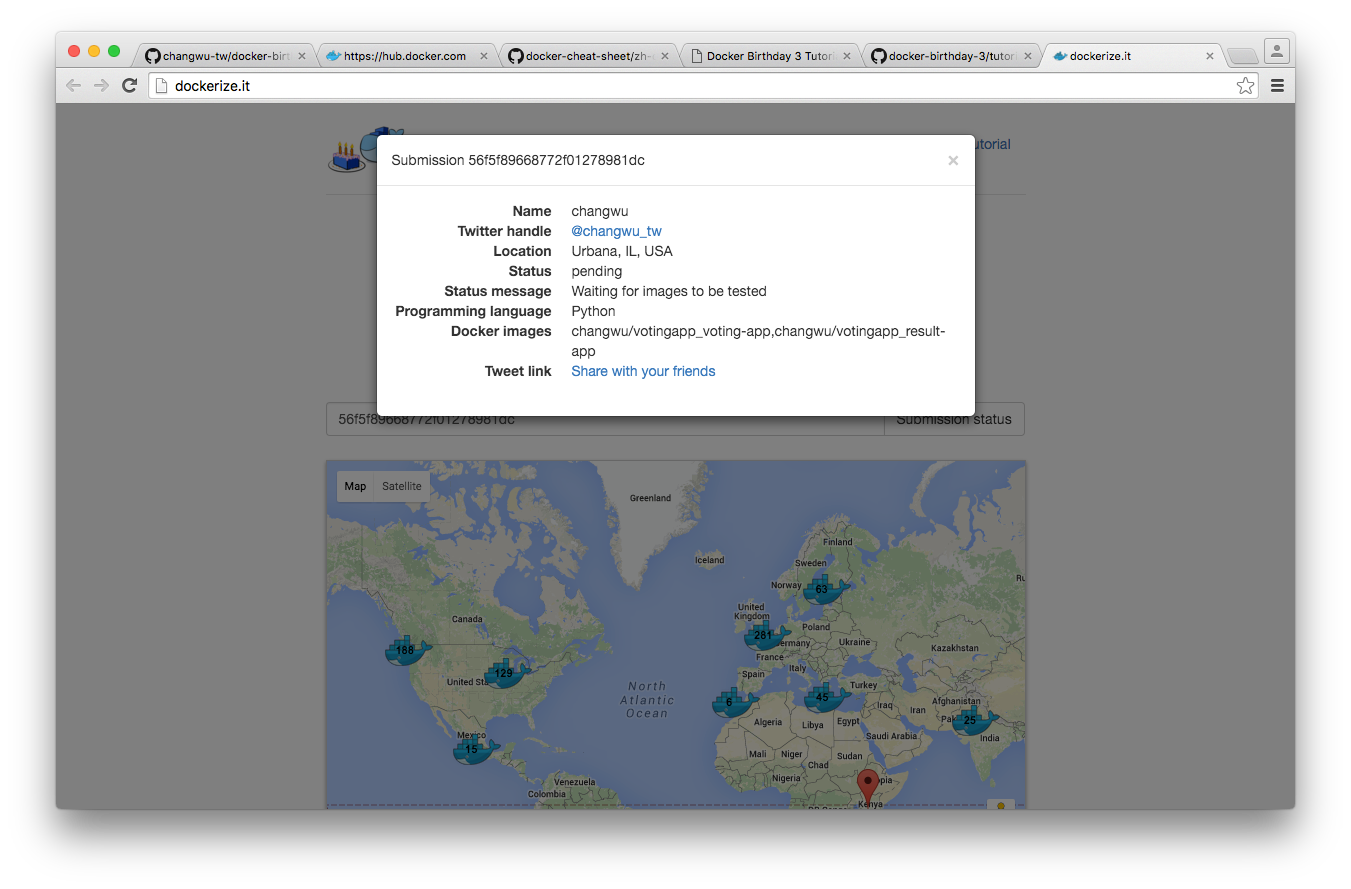
56f5f89668772f01278981dc
當一切都完成後, 開啟下列網頁
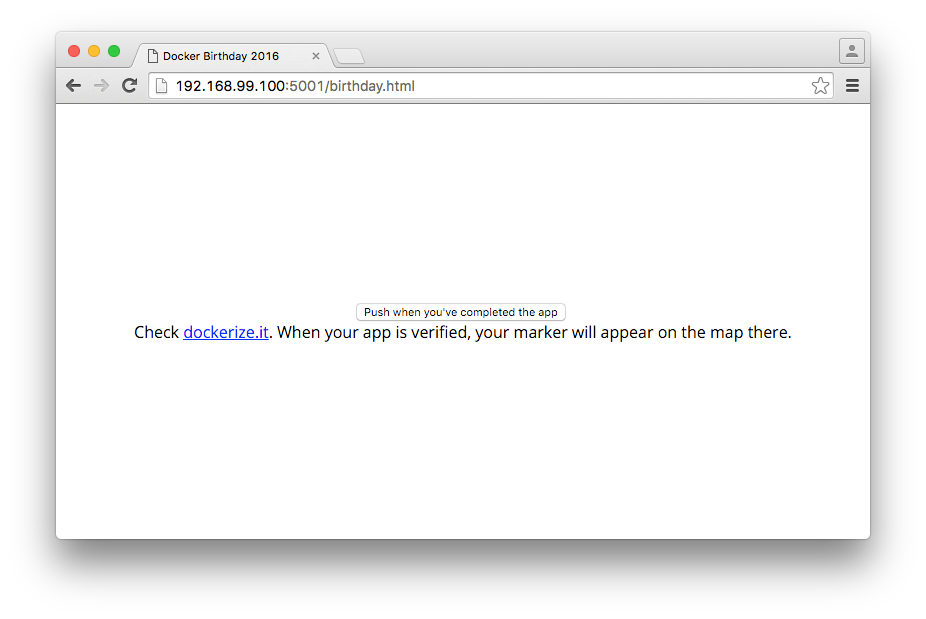
它會確認 app 是否順利完成, 並且生成一個 id 用來驗證是否完成 docker 三週年的活動, 將 id 貼到下列網站
砍掉目前在運作的 process
$ docker ps -a -q | xargs -n 1 -I {} docker rm {}