See what personal data sites share with third parties.
Exposed is a free Chrome extension that watches what websites do with your data and tells you in plain English. It doesn't block anything, it just shows you what's happening.
| Category | What it means |
|---|---|
| Your email address sent to ad networks or trackers | |
| Name | Your name passed to third parties through URLs |
| Device ID | Sites fingerprinting your device (canvas, WebGL, audio) |
| Location | GPS requests or IP based location lookups |
| Search Terms | What you searched for, forwarded to trackers |
| IP Address | Your IP shared with known tracking companies |
| Browsing History | The page you're on, shared via referer headers |
| Cross Site Tracking | Tracking cookies that follow you across websites |
Pending approval.
Chrome version 111 or newer. To check your version, go to chrome://settings/help.
-
Download Exposed.zip and unzip it
-
Open
chrome://extensionsand turn on Developer mode (top right corner) -
Click Load unpacked and select the folder called Exposed (Load this folder in Chrome)
-
Done. The Exposed icon appears in your toolbar. Browse to any website and click it to see what data is being shared.
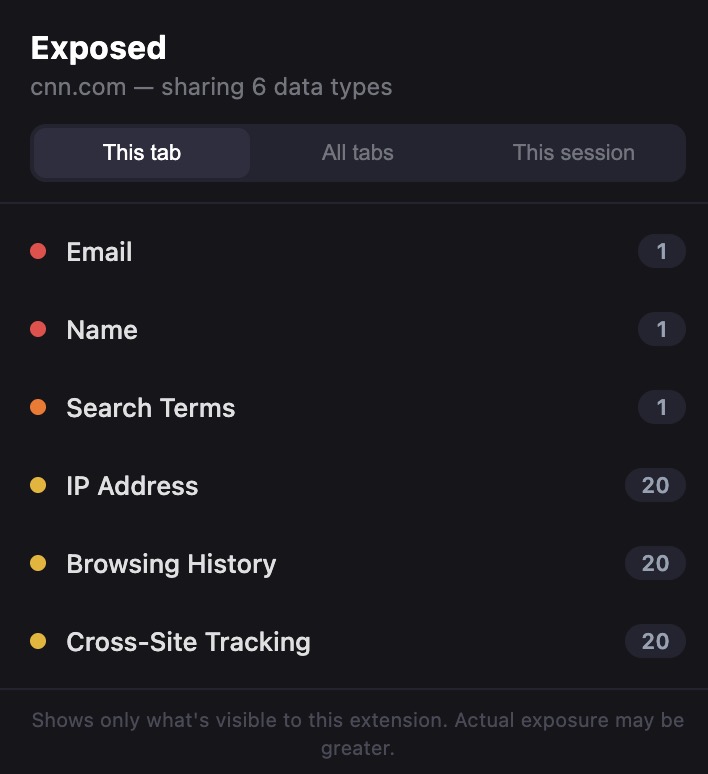
Click the icon on any website to see a list of data categories being shared.
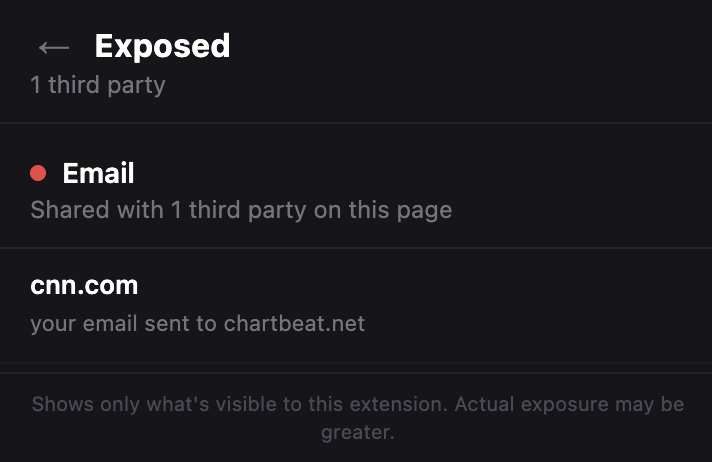
Click any category to see exactly which companies are getting your data.
Switch between views: This tab shows what the current page is sharing. All tabs shows what all your open tabs are sharing right now. This session shows everything shared since you opened Chrome.
The badge number on the icon shows how many types of data the current page is sharing.
Exposed is 100% local. It never sends your data anywhere.
Zero network requests. No server, no analytics, no telemetry. No accounts. No sign up, no login, nothing. Open source. You're looking at every line of code right now. Doesn't modify websites. It only watches and reports.
Full privacy policy: davisbrief.com/projects/exposed/privacy
A service worker uses Chrome's webRequest API to observe (not block) all network requests. It checks URLs for email addresses, names, and search terms being sent to third party domains. It checks headers for cookies and referer leaks. It compares request domains against a list of known trackers.
A content script (MAIN world) patches browser APIs that are commonly used for device fingerprinting (canvas, WebGL, AudioContext, and geolocation). When a page calls these APIs, it sends a notification.
A bridge script (ISOLATED world) relays those notifications from the page context to the service worker.
The popup fetches the current state from the service worker and displays it. It polls every 2 seconds.
No build step. No dependencies. No frameworks. Just 8 files.
manifest.json          Extension manifest (MV3)
service-worker.js      Request monitoring, state management
content-detect.js      Fingerprint API detection (MAIN world)
content-bridge.js      Message relay (ISOLATED world)
popup.html             Popup structure
popup.css              Popup styles
popup.js               Popup logic
tracker-domains.json   Known tracker domains
icons/                 Extension icons
GPL v3. See LICENSE for details.