AngularJS Life Cycle
Before we go with any framework in detail one should understand what happens in its life cycle. Understanding life-cycle of framework makes you to design and implement the application very easily.
AngularJS Life Cycle
AngularJS life cycle involves in three phases which happens on each time the webpage is loaded in to the browser.
| AngularJS Life Cycle | Concepts Startup |
|---|---|
|
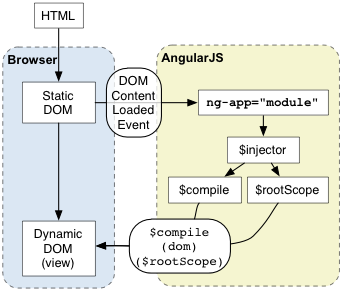 |
Bootstrap Phase is the initial phase:
There a few things to keep in mind regardless of automatic or manual bootstrapping:
Note: While it's possible to bootstrap more than one AngularJS application per page, we don't actively test against this scenario. It's possible that you'll run into problems, especially with complex apps, so caution is advised.
Note: Do not bootstrap the app on an element with a directive that uses
transclusion, such asngIf,ngIncludeandngView. Doing this misplaces the app$rootElementand the app'sinjector, causing animations to stop working and making the injector inaccessible from outside the app.
Use this function to manually start up AngularJS application.
Note: You should not use the
ng-appdirective when manually bootstrapping your app.
angular.bootstrap(element, [modules], [config]);Notice that angular.bootstrap will not create modules on the fly. You must create any custom modules before you pass them as a parameter. You should call angular.bootstrap() after you've loaded or defined your modules. You cannot add controllers, services, directives, etc after an application bootstraps.
<!doctype html>
<html>
<body>
<div ng-controller="WelcomeController">
  {{greeting}}
</div>

<script src="angular.js"></script>
<script>
  var app = angular.module('demo', [])
  .controller('WelcomeController', function($scope) {
      $scope.greeting = 'Welcome!';
  });
  angular.bootstrap(document, ['demo']);
</script>
</body>
</html>Place
ng-appto the root of your application, typically on the<html>tag if you want AngularJS to auto-bootstrap your application.
- Bootstrap phase occurs when the
angular.js scriptis downloaded to the browser or whenDOMContentLoaded eventis happened. - At this stage, angular JS initializes its own necessary components and then initializes all your own
moduleand and its dependencies, which the ng-app points to.
AngularJS teaches the browser how to do dependency injection
DIand inversion of controlIOC.
To manage the responsibility of dependency creation, each AngularJS application has an injector $inject. The injector is a service locator that is responsible for construction and lookup of dependencies.
Here is an example of using the injector service:
// Provide the wiring information in a module
var myModule = angular.module('myModule', []);

    myModule.controller('loginController', ['$rootScope', '$scope','$http', '$window', loginControllerFun]);
  (OR)
    myModule.controller( loginControllerFun );
    loginControllerFun.$inject = ['$rootScope', '$scope','$http', '$window'];

function loginControllerFun($rootScope, $scope, $http, $window) {
	// Controller Actions
}- When the webpage is loaded, a static DOM is loaded in to the browser. During this compilation phase static DOM is replaced with a dynamic DOM that represents the Angular view.
- Angular JS compilation phase starts once the static DOM is loaded into browser. This involves two step process.
-
Compile: Traverses the static DOM and collects all the directives.
The compilation is a process of walking the DOM tree and matching DOM elements to directives.
- Link: Links all the collected directives to appropriate functionality in the Angular built-in library or custom directive. The directives are combined with scope to produce the dynamic view.
-
Compile: Traverses the static DOM and collects all the directives.
It's important to note that AngularJS operates on DOM nodes rather than strings. Usually, you don't notice this restriction because when a page loads, the web browser parses HTML into the DOM automatically.
HTML compilation happens in three phases:
-
$compiletraverses the DOM and matches directives.
If the compiler finds that an element matches a directive, then the directive is added to the list of directives that match the DOM element. A single element may match multiple directives.
- Once all directives matching a DOM element have been identified, the compiler sorts the directives by their priority.
Each directive's compile functions are executed. Each compile function has a chance to modify the DOM. Each compile function returns a link function. These functions are composed into a "combined" link function, which invokes each directive's returned link function.
-
$compilelinks the template with the scope by calling the combined linking function from the previous step. This in turn will call the linking function of the individual directives, registering listeners on the elements and setting up $watchs with the scope as each directive is configured to do.
The result of this is a live binding between the scope and the DOM. So at this point, a change in a model on the compiled scope will be reflected in the DOM.
Below is the corresponding code using the $compile service. This should help give you an idea of what AngularJS does internally.
Note: Link means setting up listeners on the DOM and setting up $watch on the Scope to keep the two in sync.
var $compile = ...; // injected into your code
var scope = ...;
var parent = ...; // DOM element where the compiled template can be appended

var html = '<div ng-bind="exp"></div>';
var template = angular.element(html); // Step 1: parse HTML into DOM element

var linkFn = $compile(template); // Step 2: compile the template
var element = linkFn(scope); // Step 3: link the compiled template with the scope.

parent.appendChild(element); // Step 4: Append to DOM (optional)

// Smaple Confirm Password Directive
var compareTo = function() {
    return {
	    restrict: 'A',
		priority: 0,
        require: "ngModel",
        scope: { // https://docs.angularjs.org/api/ng/service/$compile#-scope-
            passwordAttribute: "=compareTo"
        },
		controller: function ($scope) {
            console.log("compareTo - Custom directive controller function called.");
        }
        link: function(scope, element, attributes, ngModel) {
            var modelValue = scope.passwordAttribute.$modelValue;
            ngModel.$validators.compareTo = function( confirmPassword ) {
                if( modelValue != 'undefined' && modelValue != null && scope.passwordAttribute.$valid ) {
                    console.log("Password : ", scope.passwordAttribute.$modelValue,"\t confirmPassword : ", confirmPassword);
                    return confirmPassword == modelValue;;
                } else {
                    console.log('Please enter valid password, before conforming the password.', scope.passwordAttribute);
                    return false;
                }
            };
            scope.$watch("passwordAttribute", function() {
                ngModel.$validate();
            });

        }
    };
};- This is the final phase of angular life cycle which exists until the user reloads or navigating away from webpage.
- At this phase, any changes made in scope are reflected in the view and any changes in the view are directly updated in the scope, making the scope as single source of data to the view.
Example:
https://www.slideshare.net/ArminVieweg/gettings-started-with-the-superheroic-javascript-library-angularjs
<!DOCTYPE html>
<html>
<script src="https://ajax.googleapis.com/ajax/libs/angularjs/1.6.4/angular.min.js"></script>
<body ng-app="myApp">
<script type="text/javascript">
var myApp = angular.module('myApp', []);
myApp.controller('myController', ['$scope', myControllerFun]);
function myControllerFun($scope) {
      $scope.text='';

      $scope.$watch('text', function (newValue) {
        console.log(newValue);
      });
    }
</script>
<style>
.myclass {
color:green;
}
</style>

<div>

<p>Input something in the input box:</p>
<p>Name : <input type="text" ng-model="name" placeholder="Enter name here" >
<h1 ng_show="(name=='Yash') || (name.indexOf('Yash')>=0)" ng-class="{myclass : name=='Yashwanth'}">Hi {{name}}</h1>
<h1 data-ng:hide="name=='Yash' || (name.indexOf('Yash')>=0)">Hello {{name}}</h1>
</p>

<p> Two way data binding: </p>
<p> Data : <input type="text" ng-model="name2" placeholder="Data to bind" >

<h1 ng-class="{myclass : (temp=='clicked')&&(temp2==name2) }">Data {{name2}}</h1>
<button ng:click="name2='Changed Val';temp='clicked'; temp2=name2">Onclick Change Scope Value </button>
</p>

<div ng-controller='myController'>
  <textarea name="" id="" cols="30" rows="10" ng-model='textData' ng-init="textData = 'TextArea'"></textarea>
  <div ng-if="textData != 'TextArea'">
	<pre>Data Binding : {{ textData }}</pre>
  </div>
</div>

</body>
</html>
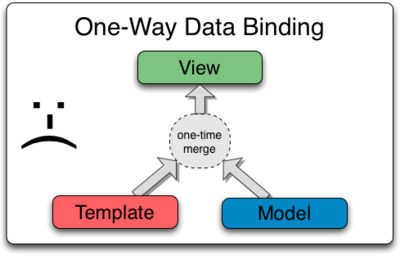
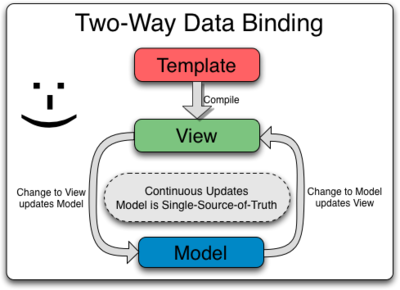
Data-binding in AngularJS apps is the automatic synchronization of data between the model and view components.
| Data Binding in Classical Template Systems | Data Binding in AngularJS Templates |
|---|---|
 |
 |
AngularJS is JavaScript MVC made easy and done right. (Well it is not really MVC, read on, to understand what this means.)
MVC, short for Model-View-Controller, is a design pattern
i.e. how the code should be organized and how the different parts of an application separated for proper readability and debugging.
- Model is the data and the database.
- View is the user interface and what the user sees.
- Controller is the main link between Model and View.
AJS automatically synchronizes data from your UI (view) with your JavaScript objects (model) through 2-way data binding.
ngBind Directive @restrict AC
The ngBind attribute tells AngularJS to replace the text content of the specified HTML element with the value of a given expression, and to update the text content when the value of that expression changes.
- only one new scope is createdIf multiple directives on the same element request a new scope, only one new scope is created.
<!DOCTYPE html>
<html>
<script src="https://ajax.googleapis.com/ajax/libs/angularjs/1.6.4/angular.min.js"></script>
<body>

<div ng-app="myApp" ng-controller="myCtrl">
    First Name: <input ng-model="fnameModel"><br>
    Last Name : <input ng-model="lnameModel">

    <div>
        <p>You can use double braces to display content from the data model.<b>View Content Repalce : {{fnameModel}}</b></p>

        <p>Use the ng-bind directive to bind the innerHTML of an element to a property in the data model.<b ng-bind="lnameModel">View innerHTML Replace : {{lnameModel}}</b></p>
    </div>

</div>

    <script>
	var app = angular.module('myApp', []);
	app.controller('myCtrl', function($scope) {
		$scope.fnameModel = "Yash";
		$scope.lnameModel = "M";
		$scope.$watch('fnameModel', function (newValue) {
			console.log(newValue);
		});
	});
    </script>
</body>
</html>AngularJS remembers the value and compares it to a previous value. This is basic dirty-checking. If there is a change in value, then it fires the change event.
The digest loop is responsible to update DOM elements with the changes made to the model as well as executing any registered watcher functions.
The $digest loop is fired when the browser receives an event that can be managed by the angular context. This loop is made up of two smaller loops. One processes the $evalAsync queue and the other one processes the $watch list.
The $digest loop keeps iterating until the $evalAsync queue is empty and the $watch list does not detect any changes in the model. The $evalAsync queue contains those tasks which are scheduled by $evalAsync() function from a directive or controller.
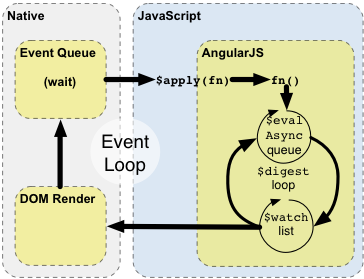
The $watch list contains watches correspondence to each DOM element which is bound to the $scope object. These watches are resolved in the $digest loop through a process called dirty checking. The dirty checking is a process which checks whether a value has changed, if the value has changed, it set the $scope as dirty. If the $scope is dirty, another $digest loop is triggered.
When you do the changes to the scope outside the angular context, you have to call $apply() function explicitly on the scope to trigger $digest cycle immediately.