Rendering ePub Metadata
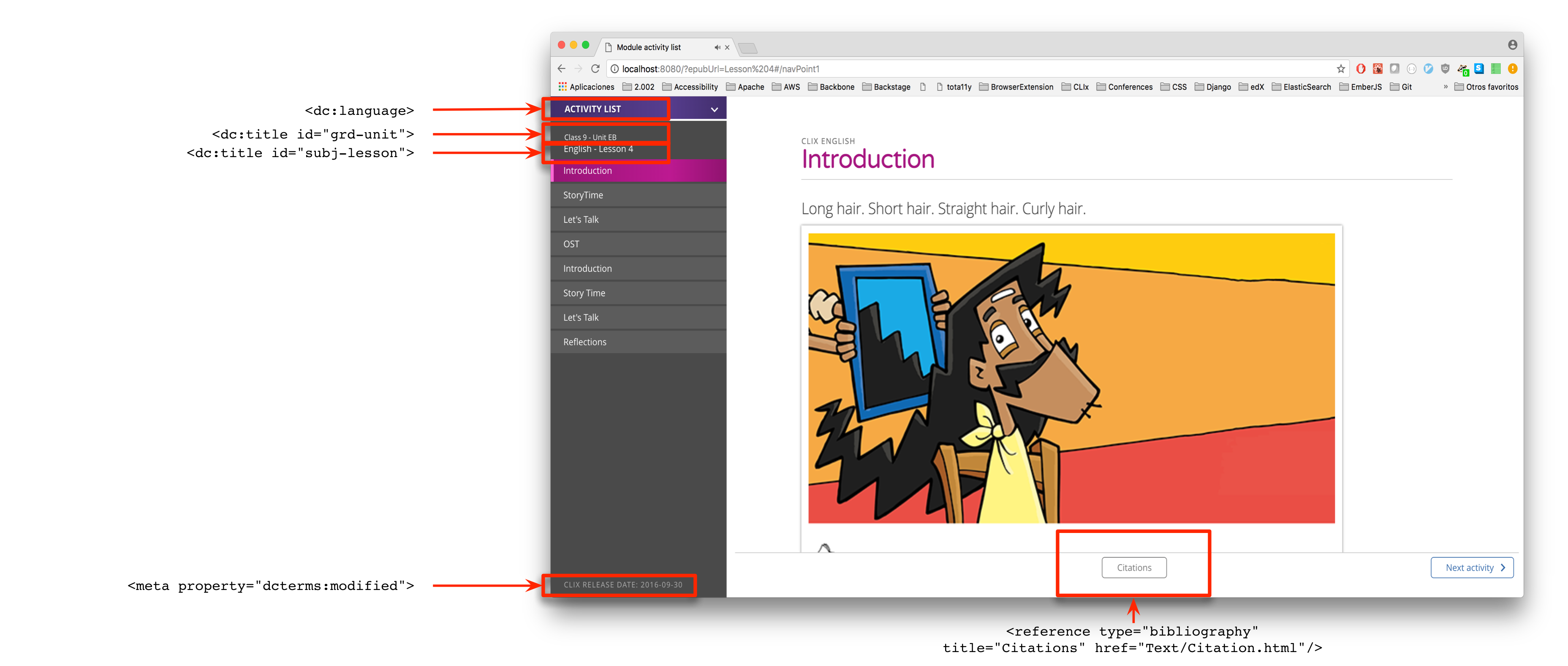
Several elements of an ePub's content.opf file are included in the content player. They are described in text format below, with a visual representation provided afterwards.
- In
<metadata>:-
<dc:language>is used to change the content player's UI betweenen,hi, andte. i.e.<dc:language>en</dc:language>. -
<dc:title id="grd-unit">sets the text in the first line of the sidebar sub-heading. i.e.<dc:title id="grd-unit">Class 9 - Unit EB</dc:title>. -
<dc:title id="subj-lesson">sets the text in the second line of the sidebar sub-heading. i.e.<dc:title id="subj-lesson">English - Lesson 4</dc:title>. -
<meta property="dcterms:modified">sets the timestamp shown at the bottom of the sidebar. i.e.<meta property="dcterms:modified">2016-09-30T12:55:55Z</meta>.
-
- In
<guide>:-
<reference type="bibliography" title="Citations" href="Text/Citation.html"/>identifies the page that theCitationsbutton in the footer nav will open, and also removes that page from the sidebar.
-