Hongjia Zhai · Hai Li · Zhenzhe Li · Xiaokun Pan · Yijia He · Guofeng Zhang
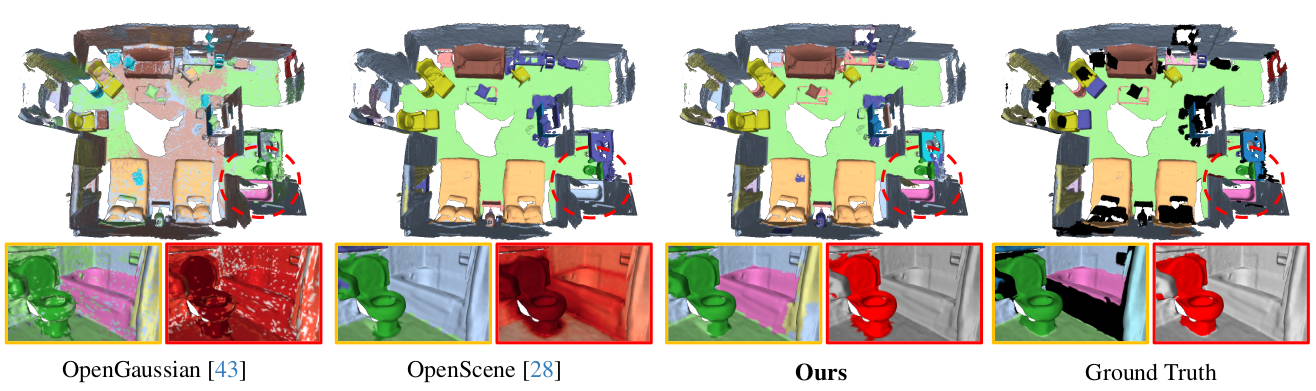
We present PanoGS, a novel and effective 3D panoptic open vocabulary scene understanding approach. Technically, to learn accurate 3D language features that can scale to large indoor scenarios, we adopt the pyramid tri-plane to model the latent continuous parametric feature space and use a 3D feature decoder to regress the multi-view fused 2D feature cloud. Besides, we propose language-guided graph cuts that synergistically leverage reconstructed geometry and learned language cues to group 3D Gaussian primitives into a set of super-primitives. To obtain 3D consistent instance, we perform graph clustering based segmentation with SAM-guided edge affinity computation between different super-primitives.
Clone the code:
git clone --recursive https://github.com/zhaihongjia/PanoGSSet rasterization dims:
- Change the NUM_CHANNELS (line 15) in
submodules/diff-gaussian-rasterization/cuda_rasterizer/config.hto 3. We don't raseterize additional language feature.
Then setup the environment:
cd PanoGS
conda env create -f environment.yml
conda activate PanoGS

cd submodules/diff-gaussian-rasterization
pip install -e .You need to set some paths in the config file:
config["Results"]["save_dir"]: The save path of resultsconfig["Dataset"]["dataset_path"]: The load path of datasetsconfig["Dataset"]["generated_floder"]: The save path of fused feature pointcloud and 2D instance mask
We use two indoor datasets, Replica and ScanNetV2, in our paper.
Please refer to Pre-process to download the datasets.
In this part, we first use 3DGS to reconstruct the indoor scene with following codes:
# ScanNetV2
CUDA_VISIBLE_DEVICES=0 python run_recon.py --config ./configs/scannet/scene0000_00.yaml

# Replica
CUDA_VISIBLE_DEVICES=0 python run_recon.py --config ./configs/replica/room0.yaml
After scene reconstruction, point_cloud and rendering directories will be saved in ["save_dir"]\dataset_name\["scene_id"].
point_cloud: The reconstructed 3DGS model.rendering: Rendered results for debug and visualization.
In this part, we use VLM and the Foundation 2D image segmentation model to process the data.
All preprocessed data will be saved in ["generated_floder"]\["scene_id"].
Please refer to Pre-process for more details.
In this part, we learn the 3D language features with fused multi-view feature from Part 2.
# ScanNetV2
CUDA_VISIBLE_DEVICES=0 python run_feat.py --config ./configs/scannet/scene0000_00.yaml

# Replica
CUDA_VISIBLE_DEVICES=0 python run_feat.py --config ./configs/replica/room0.yaml
After 3D language feature learning, decoder directory will be saved in ["save_dir"]\dataset_name\["scene_id"].
decoder: The reconstructed 3D feature decoder.
In this part, we use the geometric and language feature information obtained in Part 1 and Part 3 to perform 3D panoptic segmentation with following codes:
# ScanNetV2
CUDA_VISIBLE_DEVICES=0 python run_segment.py --config ./configs/scannet/scene0000_00.yaml

# Replica
CUDA_VISIBLE_DEVICES=0 python run_segment.py --config ./configs/replica/room0.yaml
After 3D panoptic segmentation, segmentation directory will be saved in ["save_dir"]\dataset_name\["scene_id"].
segmentation:init_seg.npy: Super-Gaussian (Graph node) for 1st clustering.final_seg.npy: Final instance segmentation results.
In this section, we conduct performance evaluation with following codes:
# ScanNetV2
python eval_scannet.py --pred_path your_results_path --gt_path ./datasets/ScanNet/3d_sem_ins

# Replica
python eval_replica.py --pred_path your_results_path --gt_path ./datasets/replica/3d_sem_inspred_path: Your results save path, it should be["save_dir"]\dataset_name. e.g. ,/mnt/nas_10/group/hongjia/PanopticGS-test/ScanNetor/mnt/nas_10/group/hongjia/PanopticGS-test/Replica
The 3D semantic segmentation results are saved in ["save_dir"]\dataset_name\["scene_id"]:
pre_semantic.npy: 3D semantic segmentation results for each categoryeval_pointwise_semantic.txt: 3D semantic segmentation results for each category
For example, the eval_pointwise_semantic.txt of scene0000_00 is:
Class                | IoU    | Acc
----------------------------------------
unannotated          | 0.0000 | 0.0000
wall                 | 0.4863 | 0.8542
floor                | 0.7278 | 0.8829
chair                | 0.3959 | 0.5194
table                | 0.7389 | 0.9045
desk                 | 0.0000 | 0.0000
bed                  | 0.7896 | 0.9502
bookshelf            | 0.2394 | 0.4269
sofa                 | 0.2478 | 0.8847
sink                 | 0.6011 | 0.9527
bathtub              | 0.0000 | 0.0000
toilet               | 0.0000 | 0.0000
curtain              | 0.1195 | 0.1580
counter              | 0.0000 | 0.0000
door                 | 0.4602 | 0.7362
window               | 0.5933 | 0.6546
shower curtain       | 0.0000 | 0.0000
refridgerator        | 0.3601 | 0.9471
picture              | 0.0000 | 0.0000
cabinet              | 0.0000 | 0.0000
otherfurniture       | 0.0680 | 0.3863
----------------------------------------
ScanNet class: 19    | 0.4114 | 0.6337
The terminal will output detailed metrics (mIoU., PQ (S), and PQ (T)) for each scenario and average metrics for specific dataset in the following format:
scene_id: miou: xx macc: xxx
scene_id: Thing Performance: PQ: xx SQ: xx RQ: xx
scene_id: Stuff Performance: PQ: xx SQ: xx RQ: xx

...
...

Scene means:
AP: xx Thing AP: xx Stuff AP: xx
mIoU: xx mAcc: xx
thing pq: xx thing sq: xx thing rq: xx
stuff pq: xx stuff sq: xx stuff rq: xx
If you want to:
- Visualizing the mesh with semantic of instance labels
- Turn Quad. Mesh into Tri. Mesh (for Replica datasets)
- Visualizing the feature map or feature point cloud
- Encode text query with CLIP
Please refer to the codes in tools.
We sincerely thank the following excellent projects, from which our work has greatly benefited.
If you found this code/work to be useful in your own research, please considering citing the following:
@inproceedings{zhai_cvpr25_panogs,
    author    = {Zhai, Hongjia and Li, Hai and Li, Zhenzhe and Pan, Xiaokun and He, Yijia and Zhang, Guofeng},
    title     = {PanoGS: Gaussian-based Panoptic Segmentation for 3D Open Vocabulary Scene Understanding},
    booktitle = {Proceedings of the Computer Vision and Pattern Recognition Conference (CVPR)},
    year      = {2025},
    pages     = {14114-14124}
}