go-zero is a web and rpc framework with lots of builtin engineering practices. It’s born to ensure the stability of the busy services with resilience design and has been serving sites with tens of millions of users for years.






English | 简体中文

go-zero (listed in CNCF Landscape: https://landscape.cncf.io/?selected=go-zero) is a web and rpc framework with lots of builtin engineering practices. It’s born to ensure the stability of the busy services with resilience design and has been serving sites with tens of millions of users for years.
go-zero contains simple API description syntax and code generation tool called goctl. You can generate Go, iOS, Android, Kotlin, Dart, TypeScript, JavaScript from .api files with goctl.
- Improves the stability of the services with tens of millions of daily active users
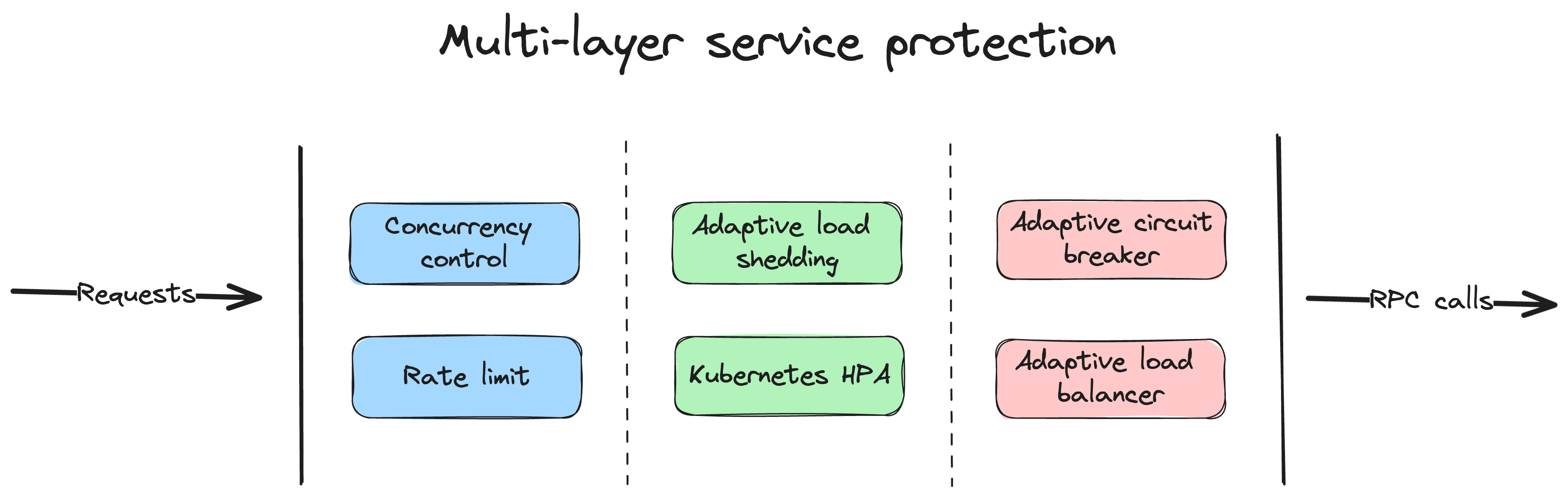
- Builtin chained timeout control, concurrency control, rate limit, adaptive circuit breaker, adaptive load shedding, even no configuration needed
- Builtin middlewares also can be integrated into your frameworks
- Simple API syntax, one command to generate a couple of different languages
- Auto validate the request parameters from clients
- Plenty of builtin microservice management and concurrent toolkits
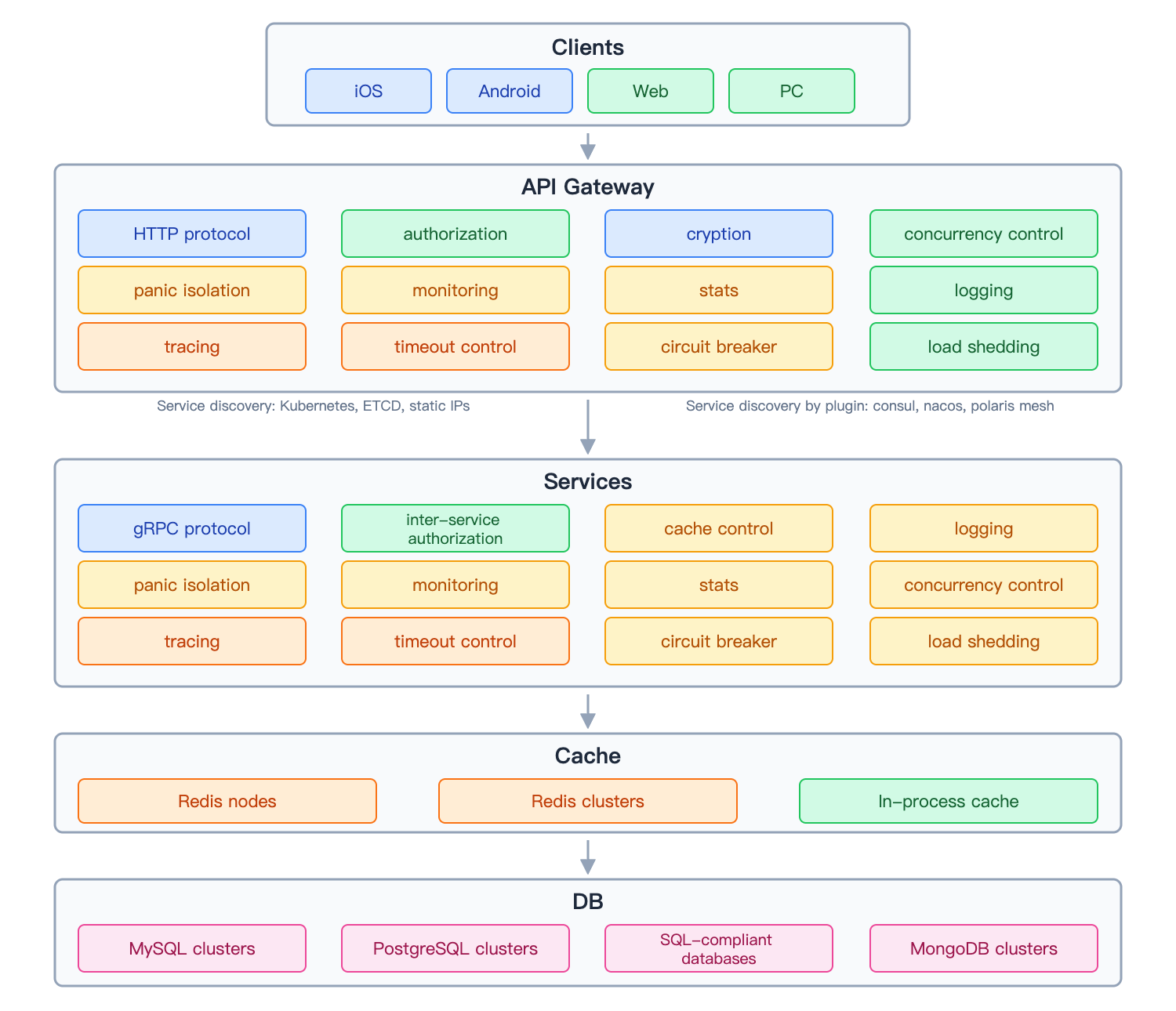
In early 2018, we embarked on a transformative journey to redesign our system, transitioning from a monolithic architecture built with Java and MongoDB to a microservices architecture. After careful research and comparison, we made a deliberate choice to:
-
Go Beyond with Golang
- Great performance
- Simple syntax
- Proven engineering efficiency
- Extreme deployment experience
- Less server resource consumption
-
Self-Design Our Microservice Architecture
- Microservice architecture facilitates the creation of scalable, flexible, and maintainable software systems with independent, reusable components.
- Easy to locate the problems within microservices.
- Easy to extend the features by adding or modifying specific microservices without impacting the entire system.
By designing the microservice architecture, we expected to ensure stability, as well as productivity. And from just the beginning, we have the following design principles:
- Keep it simple
- High availability
- Stable on high concurrency
- Easy to extend
- Resilience design, failure-oriented programming
- Try best to be friendly to the business logic development, encapsulate the complexity
- One thing, one way
After almost half a year, we finished the transfer from a monolithic system to microservice system and deployed on August 2018. The new system guaranteed business growth and system stability.
go-zero is a web and rpc framework that integrates lots of engineering practices. The features are mainly listed below:
- Powerful tool included, less code to write
- Simple interfaces
- Fully compatible with net/http
- Middlewares are supported, easy to extend
- High performance
- Failure-oriented programming, resilience design
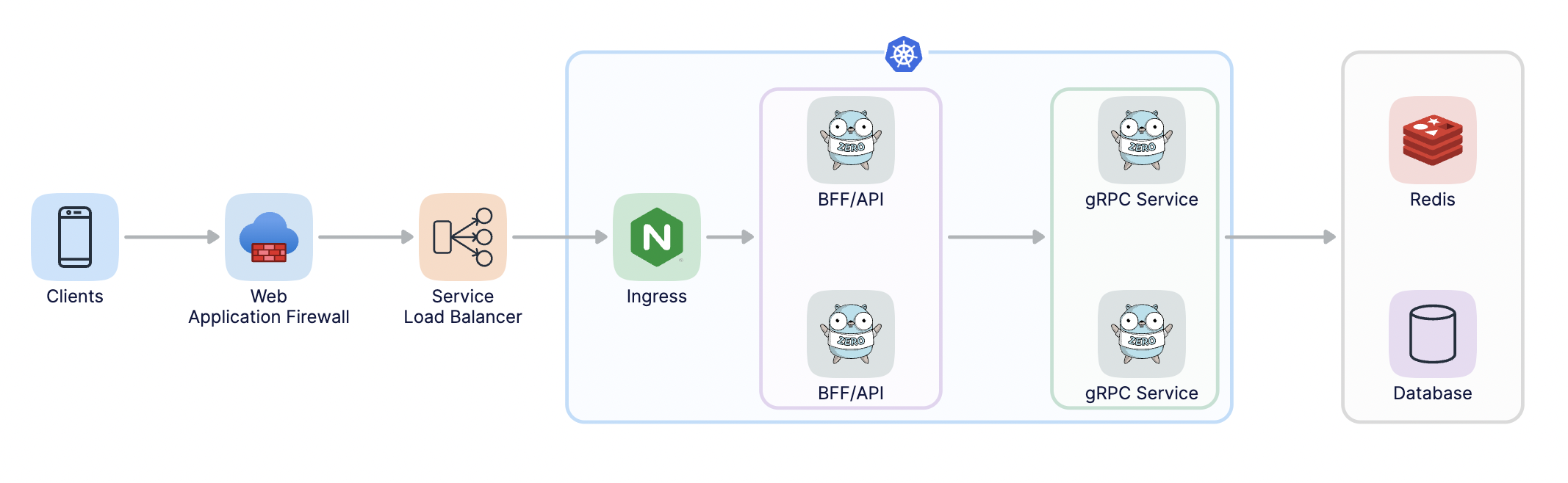
- Builtin service discovery, load balancing
- Builtin concurrency control, adaptive circuit breaker, adaptive load shedding, auto-trigger, auto recover
- Auto validation of API request parameters
- Chained timeout control
- Auto management of data caching
- Call tracing, metrics, and monitoring
- High concurrency protected
As below, go-zero protects the system with a couple of layers and mechanisms:
Run the following command under your project:
go get -u github.com/zeromicro/go-zeroMake AI assistants (Claude, GitHub Copilot, Cursor, etc.) your go-zero experts! The go-zero team provides a complete AI tooling ecosystem to generate framework-compliant code and boost your productivity.
ai-context - AI's "Workflow Guide"
- Tells AI assistants when and how to use go-zero tools
- Quick reference for code patterns and decision trees
- Optimized for GitHub Copilot via
.github/copilot-instructions.md
zero-skills - AI's "Knowledge Base"
- Provides detailed patterns with complete examples
- Shows ✅ correct patterns vs ❌ common mistakes
- Covers REST APIs, RPC, databases, and resilience patterns
mcp-zero - AI's "Runtime Tools"
- Enables AI to execute actions: generate code, analyze projects
- Based on Model Context Protocol (MCP)
- Deep integration with Claude Desktop
# Add ai-context as a submodule
git submodule add https://github.com/zeromicro/ai-context.git .github/ai-context

# Create symbolic link (macOS/Linux)
ln -s ai-context/00-instructions.md .github/copilot-instructions.md

# Windows
mklink .github\copilot-instructions.md .github\ai-context\00-instructions.md

# Update to latest version
git submodule update --remote .github/ai-context# Add ai-context as project rules
git submodule add https://github.com/zeromicro/ai-context.git .cursorrules
# Update to latest
git submodule update --remote .cursorrules# Add ai-context for Windsurf
git submodule add https://github.com/zeromicro/ai-context.git .windsurfrules
# Update to latest
git submodule update --remote .windsurfrules# Install mcp-zero
git clone https://github.com/zeromicro/mcp-zero.git
cd mcp-zero
go build -o mcp-zero main.go
# Configure Claude Desktop (macOS: ~/Library/Application Support/Claude/claude_desktop_config.json)
# Add to mcpServers:
{
"mcpServers": {
"mcp-zero": {
"command": "/path/to/mcp-zero",
"env": {
"GOCTL_PATH": "/Users/yourname/go/bin/goctl"
}
}
}
}Or use Claude CLI:
# Add mcp-zero server via CLI
claude mcp add \
  --transport stdio \
  mcp-zero \
  --env GOCTL_PATH=/Users/yourname/go/bin/goctl \
-- /path/to/mcp-zeroAI assistants use these tools together for a complete development experience:
- ai-context provides workflow guidance and quick patterns
- zero-skills supplies detailed implementations and best practices
- mcp-zero enables real-time code generation and project analysis
Example: Creating a new REST API
- AI reads ai-context → knows to use
create_api_servicetool - AI calls mcp-zero → generates project structure
- AI references zero-skills → implements handlers with correct patterns
- Result: Production-ready code following go-zero conventions ✅
-
Full examples can be checked out from below:
-
Install goctl
goctlcan be read asgo control.goctlmeans not to be controlled by code, instead, we control it. The insidegois notgolang. At the very beginning, I was expecting it to help us improve productivity, and make our lives easier.# for Go go install github.com/zeromicro/go-zero/tools/goctl@latest # For Mac brew install goctl # docker for all platforms docker pull kevinwan/goctl # run goctl docker run --rm -it -v `pwd`:/app kevinwan/goctl --help
make sure goctl is executable and in your $PATH.
-
Create the API file, like greet.api, you can install the plugin of goctl in vs code, api syntax is supported.
type (
  Request {
    Name string `path:"name,options=[you,me]"` // parameters are auto validated
  }

  Response {
    Message string `json:"message"`
  }
)

service greet-api {
  @handler GreetHandler
  get /greet/from/:name(Request) returns (Response)
}
the .api files also can be generated by goctl, like below:
goctl api -o greet.api
-
Generate the go server-side code
goctl api go -api greet.api -dir greet
the generated files look like:
├── greet
│   ├── etc
│   │   └── greet-api.yaml        // configuration file
│   ├── greet.go                  // main file
│   └── internal
│       ├── config
│       │   └── config.go         // configuration definition
│       ├── handler
│       │   ├── greethandler.go   // get/put/post/delete routes are defined here
│       │   └── routes.go         // routes list
│       ├── logic
│       │   └── greetlogic.go     // request logic can be written here
│       ├── svc
│       │   └── servicecontext.go // service context, mysql/redis can be passed in here
│       └── types
│           └── types.go          // request/response defined here
└── greet.api                     // api description file
the generated code can be run directly:
cd greet
go mod tidy
go run greet.go -f etc/greet-api.yaml
by default, it’s listening on port 8888, while it can be changed in the configuration file.
you can check it by curl:
curl -i http://localhost:8888/greet/from/you
the response looks like below:
HTTP/1.1 200 OK
Date: Sun, 30 Aug 2020 15:32:35 GMT
Content-Length: 0
-
Write the business logic code
- the dependencies can be passed into the logic within servicecontext.go, like mysql, redis, etc.
- add the logic code in a logic package according to .api file
-
Generate code like Java, TypeScript, Dart, JavaScript, etc. just from the api file
goctl api java -api greet.api -dir greet
goctl api dart -api greet.api -dir greet
...
- Documents
- Rapid development of microservice systems
- Rapid development of microservice systems - multiple RPCs
- Examples
Join the chat via https://discord.gg/4JQvC5A4Fe


go-zero enlisted in the CNCF Cloud Native Landscape.
If you like this project or are using it to learn or start your own solution, give it a star to get updates on new releases. Your support matters!


![@dependabot[bot]](https://avatars.githubusercontent.com/in/29110?s=64&v=4)


