


Helper to use vim/neovim as a terminal multiplexer
| Neovim conf '22 presentation | session switching | CLI + functionalities inside vim |
|---|---|---|

|
|
|
docker run -it yazgoo/vmux:master (more info on how to use it, based on Dockerfile)
You will need rust and cargo installed.
Install the plugin with post-update hook to install vmux crate:
with vim-plug
Plug 'yazgoo/vmux', {'do': 'cargo install vmux' }with lazy.nvim
{ 'yazgoo/vmux', build = 'cargo install vmux' }with packer.nvim
use { 'yazgoo/vmux', run = 'cargo install vmux' }Add the following to your .zshrc or .bashrc (replace <your_editor> with vim or nvim (default)).
(For vim you'll need it compiled with +clientserver flag)
with vim-plug
source ~/.config/nvim/plugged/vmux/plugin/setup_vmux.sh <your_editor>with lazy.nvim
source ~/.local/share/nvim/lazy/vmux/plugin/setup_vmux.sh <your_editor>with packer.nvim
source ~/.local/share/nvim/site/pack/packer/start/vmux/plugin/setup_vmux.sh <your_editor>Note: if you are using Fish shell, consider using bass with the following added to config.fish:
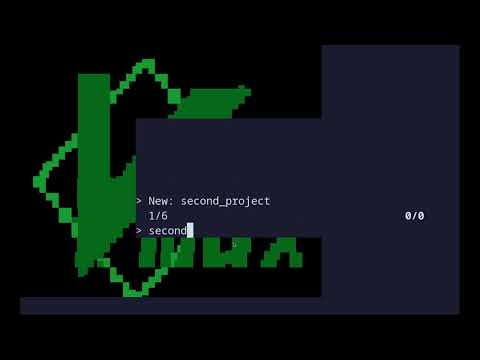
bass source <path-to-setup_vmux.sh> <your_editor>vmux new or vmux will start vmux in interactive mode. You'll be prompted to:
- create a new session (via
New: ...(pre-named), orNew(custom-named)) - exit (via
Detach) - open an existing session
You can leave current session with CTRL+g. (you can change default escape key from CTRL+g (with -e a) to CTRL+a ).
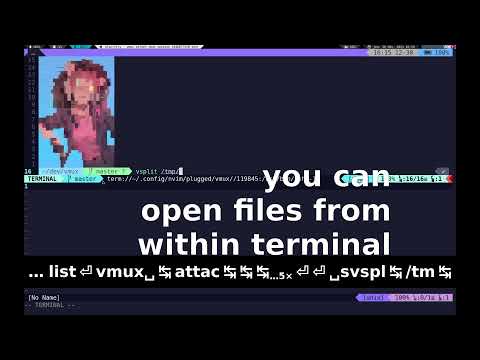
Within vim, vmux provides integration between vim and terminal.
Run :help vmux from within vim for more info.
Here is an example configuration.
vmux new <session_name>creates a new session,vmux listlist running sessions,vmux attach <full_session_name>attaches to a running session (as pervmux list)- you can group sessions with
-soption.
For an optimal experience, you should at least add
list_sessions_names and session_name hook files described below.
Both files must be executable (if they are a script, they should have a shebang).
You can define a list of new session names via ~/.config/vmux/hooks/list_sessions_names
The script just needs to output session names one per line, see this for an example.
You can define a custom way to setup a new session via ~/.config/vmux/hooks/session_name.
The script takes the session name as argument and should print environment variables of the form key=value.
For example, this script will print the content of .envrc
and set working directory to ~/dev/$1 (via PWD line).
You can put images which will be used as wallpapers inside ~/.config/vmux/wallpapers/.
You can define callbacks on attach / detach session.
For example, to share data between (n)vim instances (including registers content),
you can use shared data files (Shada), by adding in your vim conf:
function! VmuxCustomDetachCallback()
  wshada
endfunction

function! VmuxCustomAttachCallback()
  rshada
endfunction
you can get info about current session via the following env var:
VMUX_SESSION_GROUP: session group nameVMUX_DISPLAY_NAME: session display name within current groupVMUX_SESSION_NAME: full session name used to identify the session uniquely