Skip to content

Conversation

@mchowning
Copy link
Contributor

@mchowning mchowning commented May 11, 2020

Release for Gutenberg Mobile v1.28.0

Related PRs

Extra PRs that Landed After the Release Was Cut

Changes

  1. New block: Pullquote ([RNMobile] Enable Pullquote block WordPress/gutenberg#21930)
  2. Add support for changing background and text color in Buttons block (Color Settings #2096)
  3. Fix the icons and buttons in Gallery, Paragraph, List and MediaText block on RTL mode ([RNMobile] Add missing RTL support for some mobile components WordPress/gutenberg#21502)
  4. Remove Subscription Button from the Blog template since it didn't have an initial functionality and it is hard to configure for users. (Remove subscription button from blog template WordPress/gutenberg#22129
  5. [iOS] Add support for the subscript <sub> and superscript <sup>HTML elements in text blocks (Issue/update aztec ios to 1.19.0 #2226)
  6. Update page templates to use recently added blocks (Update existing templates to use new blocks #2179)

Test plan

  • Use the main WP apps to test the changes above.
  • Check WPAndroid and WPiOS PRs if there are specific tests to run.
  • Smoke test the main WP apps for general writing flow.

Release Submission Checklist

  • Release number was bumped
  • Aztec dependencies are pointing to a stable release
    • iOS: 'grep WordPressAztec-iOS RNTAztecView.podspec'
    • Android: 'grep aztecVersion react-native-aztec/android/build.gradle'
  • Gutenberg 'Podfile' and 'Podfile.lock' inside './ios/' are updated to the release number
  • Bundle package of the release is updated
  • Check if RELEASE-NOTES.txt is updated with all the changes that made it to the release

Tug and others added 30 commits March 12, 2020 14:30
# Conflicts:
#	__device-tests__/pages/editor-page.js
@chipsnyder
Copy link
Contributor

chipsnyder commented May 12, 2020

Tested on WPAndroid with this APK

DarkMode-1

  • Gallery block - Dark mode - steps
  • Shortcode block - Dark mode - steps
  • Media Text block - Dark mode - steps

DarkMode-2

  • Spacer block - Dark mode - steps
  • Buttons block - Dark mode - steps
  • Group - Dark mode - steps
  • Columns - Dark mode - steps

Group-1

  • Group - AppenderButton is rendered - steps
  • Group - Deep nesting is possible (iOS only) - steps
  • Group - Check if Group placeholder is visible for the unselected state - steps
  • Group - Check if Group placeholder is render in nested structure - steps
  • Group - Nested block have proper border styling - steps
  • Group - Nested block have proper margins values - steps
  • Group - Breadcrumbs on FloatingToolbar is properly displayed - steps
  • Group - Navigation up button works as expected - steps
  • Group - Navigation down works according to parent-first approach - steps
  • Group - Cross navigation between blocks works as expected - steps
  • Group - Ungroup button works as expected - steps
  • Group - Check if in DarkMode all components gets proper colors - steps
  • Group - Check if nested Placeholder block can be replaced - steps

Spacer-1

  • Spacer block - Spacer is rendered without crash - steps
  • Spacer block - Settings: Control spacer height using the slider - steps
  • Spacer block - Settings: Control spacer height using the text input - steps
  • Spacer block - Settings: Available height range is correct - steps
  • Spacer block - Settings: Height range extends if Spacer comes from the web is higher than 500px - steps
  • Spacer block - Spacer in horizontal layout works as expected - steps

@chipsnyder
Copy link
Contributor

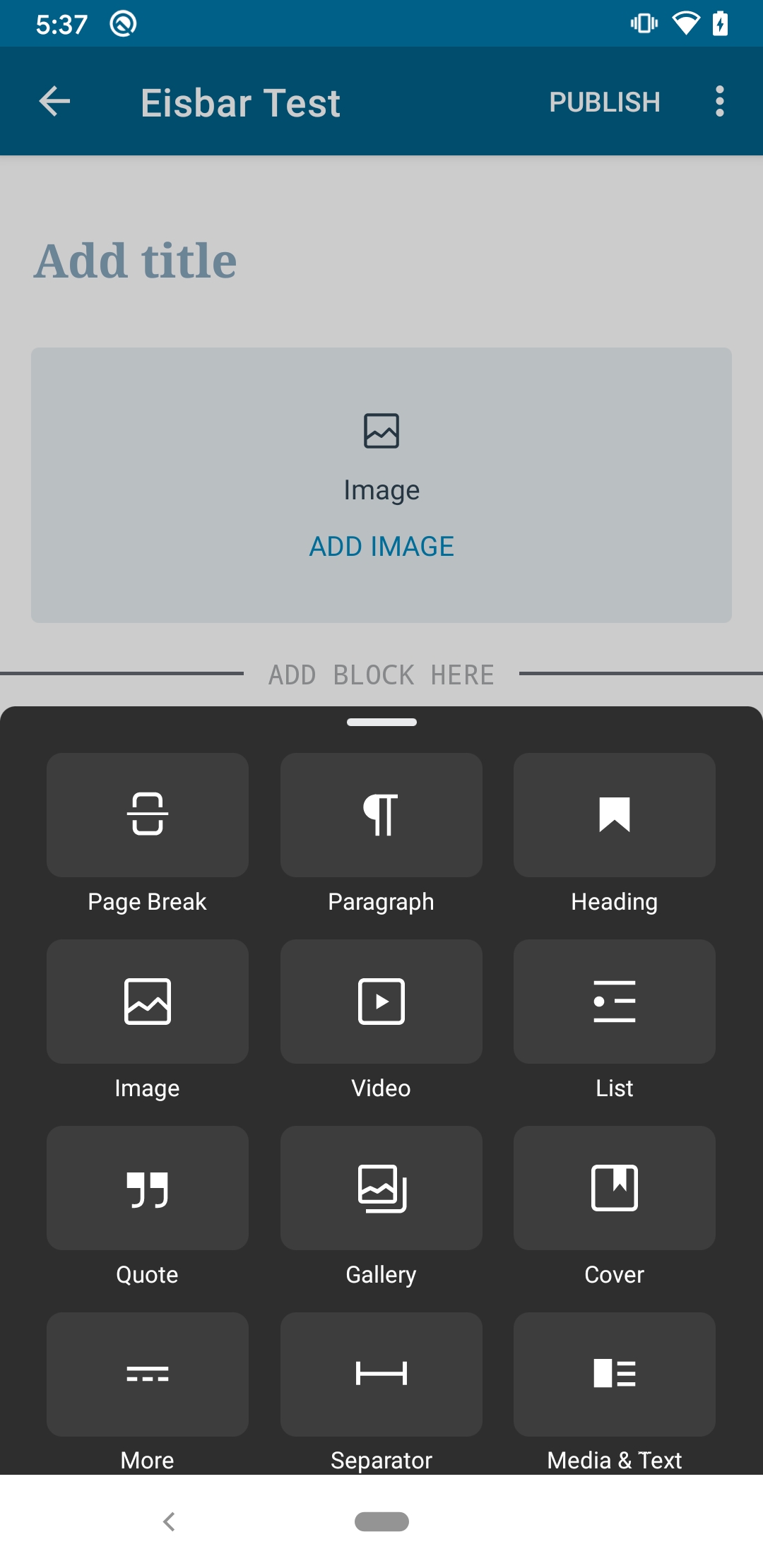
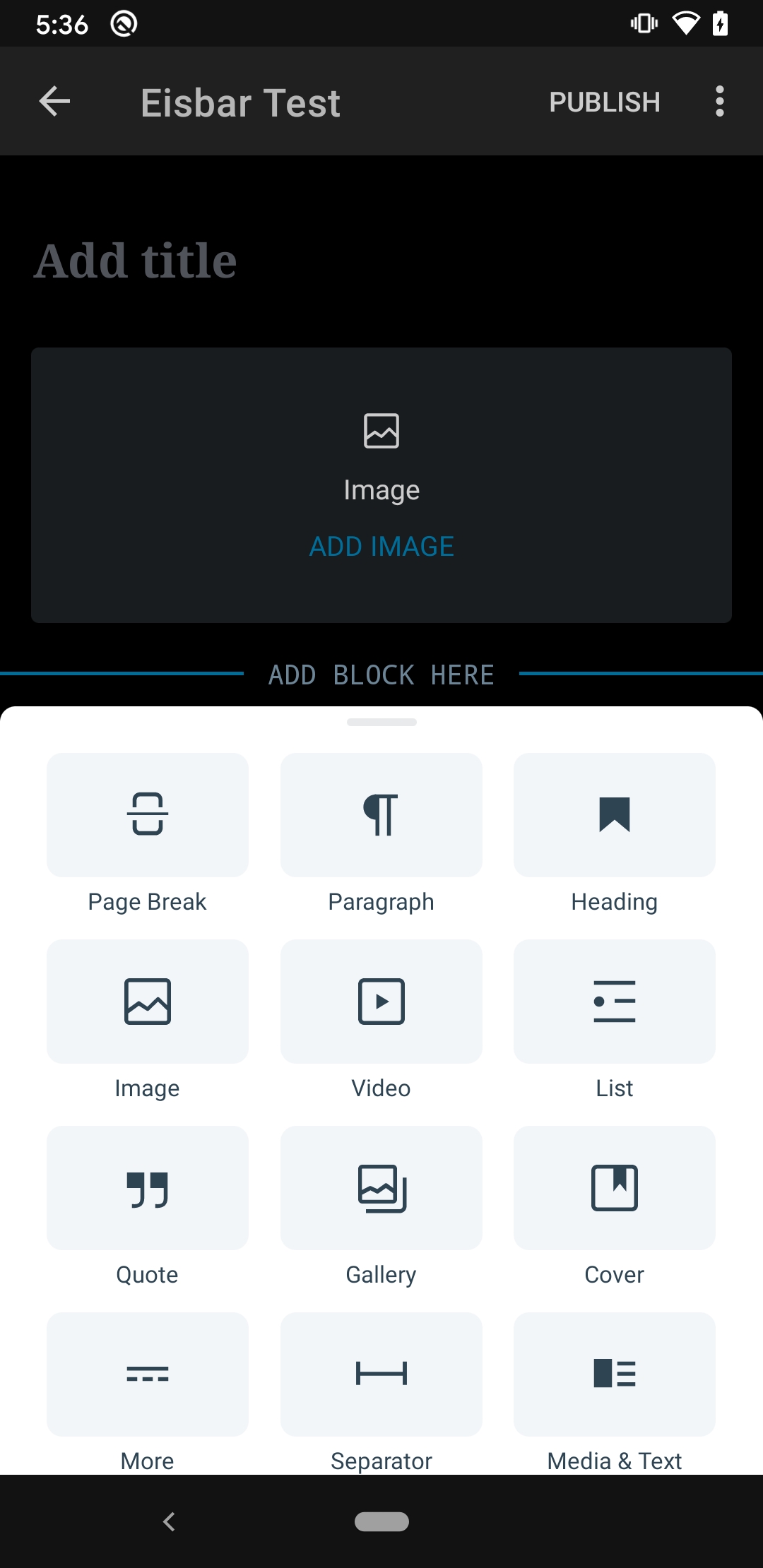
Most of the tests look good I ran into an issue with switching between dark mode:
This is on WPAndroid with this APK running on a Pixel 3a Android 10

  1. Open the editor in either mode.
  2. Navigate to settings and switch to the other mode
  3. Select the block inserter
  • Notice the block inserter is still in the other mode
Light mode Dark mode

Leaving the editor and coming back in will correct the display.

@mchowning
Copy link
Contributor Author

I ran into an issue with switching between dark mode

Thanks for catching this @chipsnyder . 🙇 Do you think this is the same as #2108 or is it a slightly different issue? Either way, I don't think this should be a blocker since it is fixed once you leave and return to the editor. Let me know if you disagree.

@chipsnyder
Copy link
Contributor

Do you think this is the same as #2108

Yup, that sounds like the same thing. I missed that one initially.

Either way, I don't think this should be a blocker since it is fixed once you leave and return to the editor

I agree this seems minor and defiantly not a blocker in my mind.

@guarani
Copy link
Contributor

guarani commented May 12, 2020

Text alignment seems broken on the Pull Quote block on both iOS and Android (cc @ceyhun).
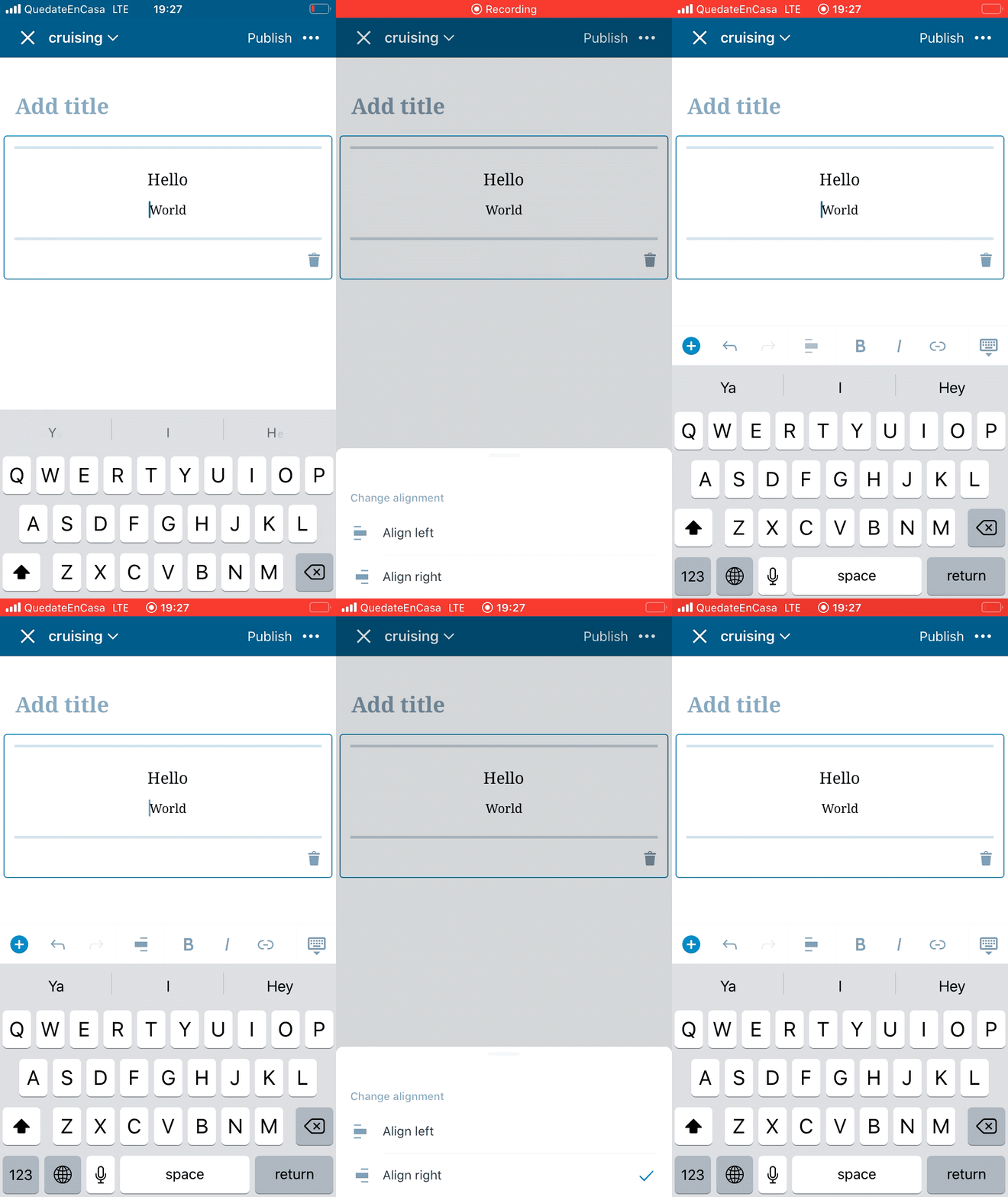
I noticed this on develop (both platforms), and came here and also tested the Android demo build for this release.

@SergioEstevao
Copy link
Contributor

Text alignment seems broken on the Pull Quote block on both iOS and Android (cc @ceyhun).
I noticed this on develop (both platforms), and came here and also tested the Android demo build for this release.

@guarani if you check the behaviour of the pullquote on the web you will see that the alignment is not for the text itself but for the position of the full pullquote when presented.

While we can improve the way we show the block on the editor I don't think it's a blocker.

@ceyhun what do you think?

@SergioEstevao
Copy link
Contributor

SergioEstevao commented May 13, 2020

Tested the Writing Flow on iOS:

  • TC001 - Block insertion flow
  • TC001 - Paste formatted text copied from website
  • TC001 - Multiline components
  • Rich Text Format
    • TC001 - Bold, Italic, strikethrough buttons
    • TC002 - Alignment buttons
    • TC003 - Alignment Split
    • TC004 - Link button works without selection
    • TC005 - Link button works with a selected word
    • TC006 - Adding a link from a copied URL
    • TC007 - Test format detection under the cursor
    • TC008 - Test formatting doesn't remove leading or trailing whitespace
  • Splitting and merging
    • TC001 - Merge after writing
    • TC002 - Merge after selection
    • TC003 - Merge after deleting text
    • TC004 - Merge after deleting all
    • TC005 - Merge multiple blocks
    • TC006 - Splitting/merge list block
  • Undo / Redo - Test Cases
    • TC001 - Undo/redo block actions
    • TC002 - Undo/redo text
    • TC003 - Undo/redo text format

@SergioEstevao SergioEstevao self-assigned this May 13, 2020
@SergioEstevao SergioEstevao self-requested a review May 13, 2020 10:19
@SergioEstevao SergioEstevao added this to the 1.28 milestone May 13, 2020
@ceyhun
Copy link
Contributor

ceyhun commented May 13, 2020

@ceyhun what do you think?

@SergioEstevao I agree it's not a blocker.
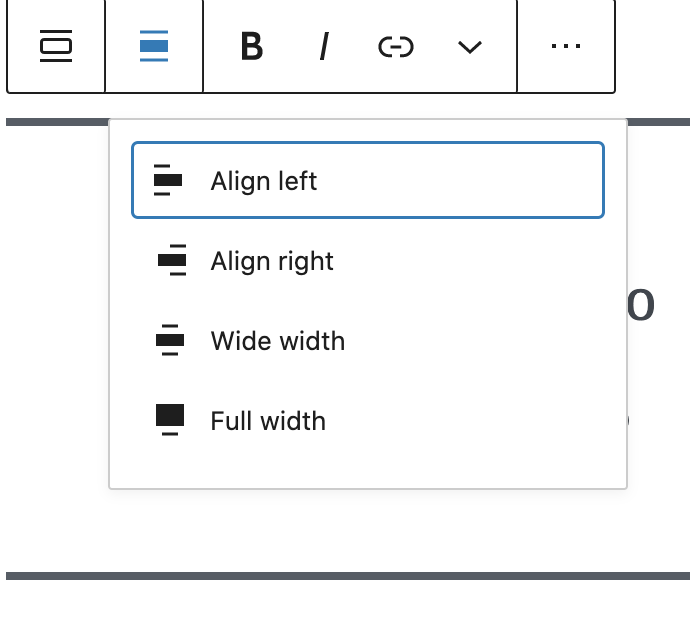
But I realised another thing. On the web there are more options for the alignment of Pullquote.

alignment

"Wide width" and "Full width" are not present on mobile.

If you create a Pullquote from web with these alignments, it is rendered without errors on mobile for, so I think it's OK for the release.

The same options are missing from Column, Media&Text, Gallery, Group blocks as well.

@mchowning
Copy link
Contributor Author

mchowning commented May 13, 2020

Writing Flow tests on Android

Issues Discovered

Issue Blocker Status
Splitting Blocks Sometimes Loses A Word... ⚠️ Not super-easy to reproduce, not a regression, but might be a blocker because it loses text? Turns out it only loses a single word, so I don't think it's a blocker since it is not a regression
Multiple undo-redo Not a regression, not a blocker

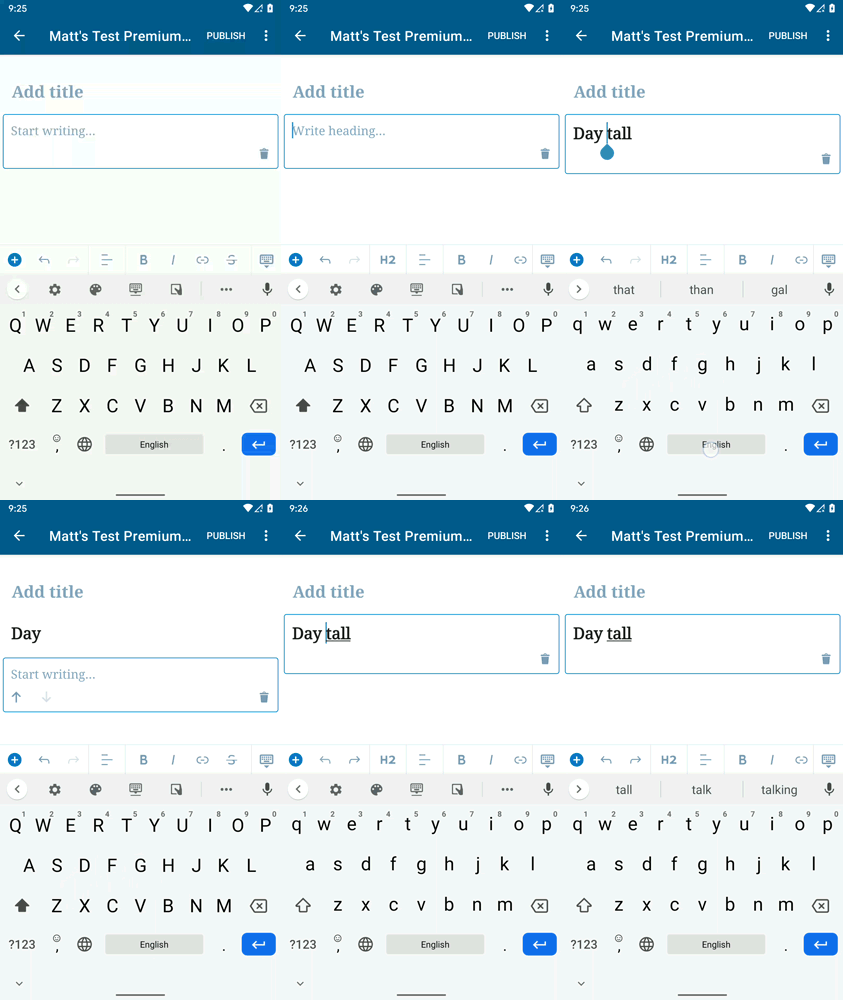
Splitting Blocks Occasionally Loses a Word After Split

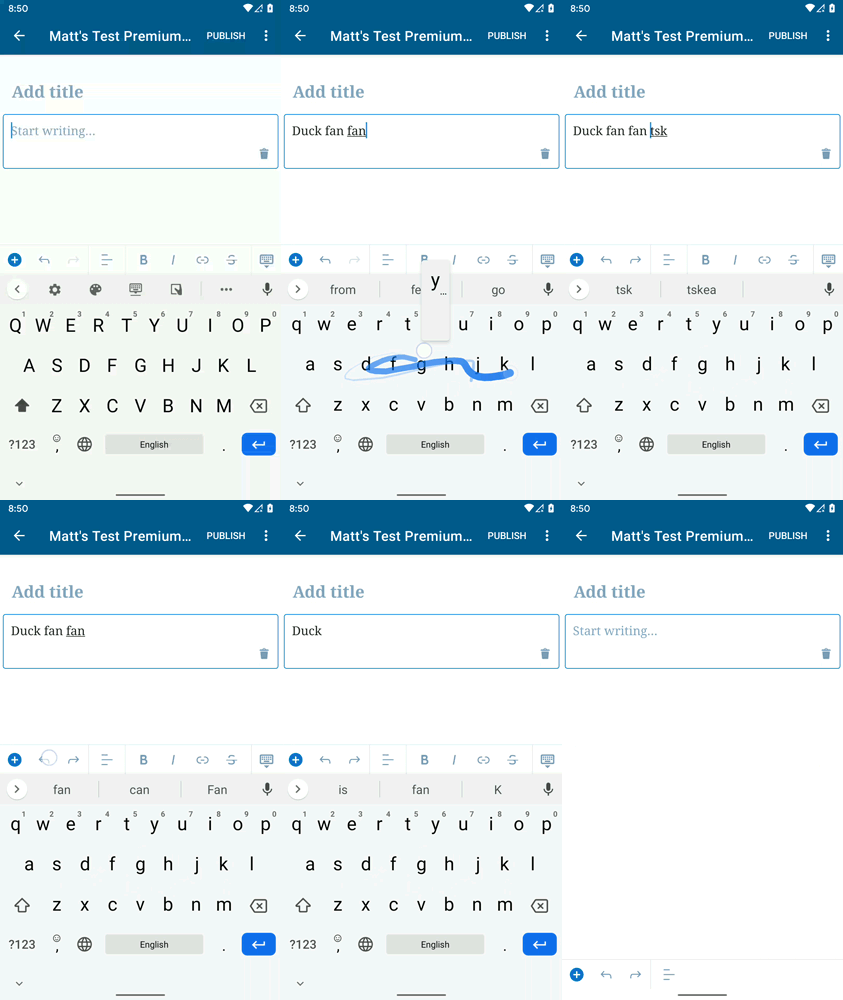
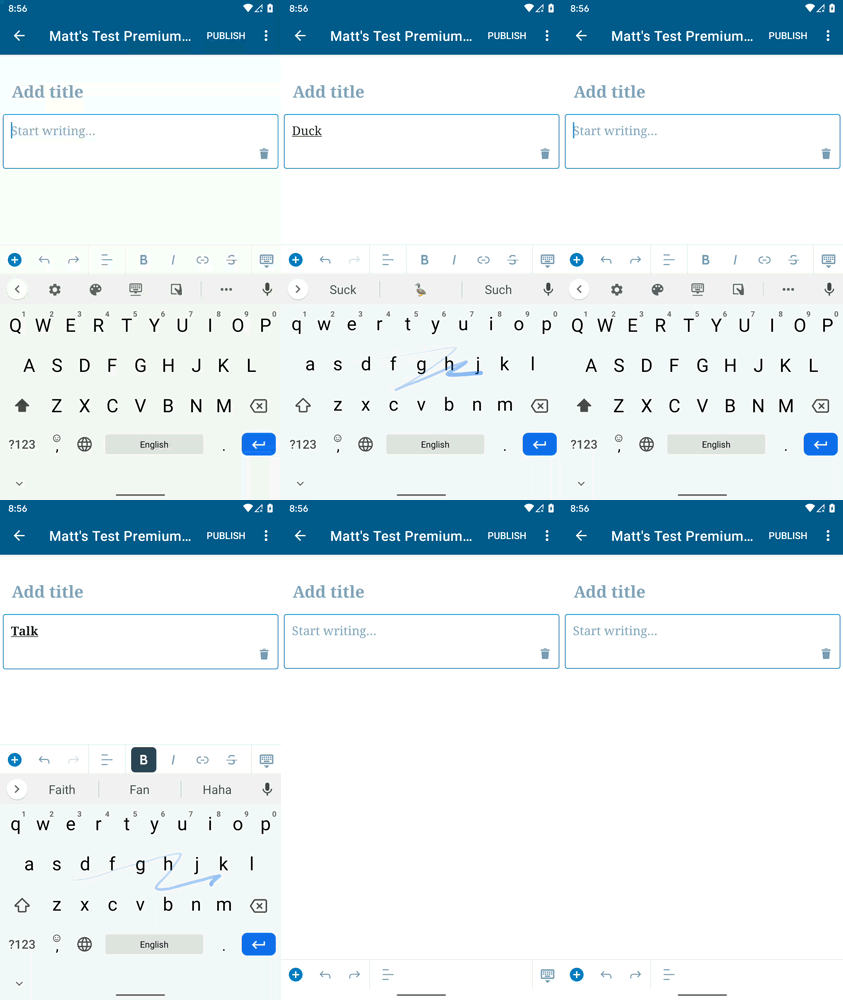
I observed splitting a heading block would lose a word immediately after the split. This did not happen consistently for me, but it seemed to happen pretty consistently if I

  1. Created a new heading block;
  2. Added text to it by swiping (this seems to not happen if you press individual letters);
  3. moved the cursor to a position in the middle of the block (a) so that a space was before the cursor; and (b) without selecting another block (selecting a different block and returning to the heading block seemed to avoid the issue);
  4. Tap the "Enter" key on the keyboard to split the block; and
  5. Observe that the word immediately after the split is lost

I can recreate the same issue with a paragraph block. I can also recreate this issue in the beta-channel release build for 14.8 (alpha-221), so this does not appear to be a regression in this release.

One thing that makes this bug a bit worse is that although you can recover the text using undo, you have to hit undo twice. The first time you press undo it just removes the new block and leaves the previous block with the missing text. This might fool a user into thinking that they have lost their text. Tapping undo a second time does bring the text back though.

Also, it is worth noting that if you split a heading block on the last word of the heading block, then the new block (which is now empty because the split lost the last word) becomes a paragraph block instead of a heading block.

I have recreated this on a Pixel and Pixel 3.

heading_undo mp4

Multiple undo-redo

I noticed that multiple undo points seem to be getting added when adding words by swiping. In other words, I have to tap undo twice to undo a single word: the first time move the cursor to the beginning of the word, and the second time removes the word.

This also seemed to happen when adding an initial word to a block, but only if the word was bold. I'm not sure if the two undo's is actually a bug there, but the cursor does get moved back to the beginning of the word when removing the bold text, which seems odd.

I can also recreate this issue in the beta-channel release build for 14.8 (alpha-221), so this does not appear to be a regression in this release. Because this is not a regression and there is nothing blocking the user here (they just have to hit undo an extra time) this does not seem like a blocker to me.

Plain Text Undoing First Word With Bold
double_undo mp4 undo_bold mp4

Tests Performed

  • TC001 - Block insertion flow
  • TC001 - Paste formatted text copied from website
  • TC001 - Multiline components
  • Rich Text Format
    • TC001 - Bold, Italic, strikethrough buttons
    • TC002 - Alignment buttons
    • TC003 - Alignment Split
    • TC004 - Link button works without selection
    • TC005 - Link button works with a selected word
    • TC006 - Adding a link from a copied URL
    • TC007 - Test format detection under the cursor
    • TC008 - Test formatting doesn't remove leading or trailing whitespace
  • Splitting and merging
    • TC001 - Merge after writing
    • TC002 - Merge after selection
    • TC003 - Merge after deleting text
    • TC004 - Merge after deleting all
    • TC005 - Merge multiple blocks
    • TC006 - Splitting/merge list block
  • Undo / Redo - Test Cases
    • TC001 - Undo/redo block actions
    • TC002 - Undo/redo text
    • TC003 - Undo/redo text format

@SergioEstevao
Copy link
Contributor

observed splitting a heading block would lose the text after the split, adding an empty paragraph block instead of a heading block with the post-split text. This did not happen consistently for me, but it seemed to happen pretty consistently if I

I tried to reproduce this on my test Android device and I couldn't, I even tried with different keyboards to see if it made any difference.

@mchowning
Copy link
Contributor Author

mchowning commented May 13, 2020

I tried to reproduce this on my test Android device and I couldn't, I even tried with different keyboards to see if it made any difference.

Thanks for testing @SergioEstevao ! Your comment helped me realize that I can only see the issue if I enter text by swiping. If I type the letters I don't see the issue. I wonder if that's the difference.

mchowning and others added 5 commits May 15, 2020 16:53
Now running `clean` will delete the current js bundle and the next build
will know to generate a new one.
In the effort to fix the "Couldn't follow symbolic link." issue reported
here:
wordpress-mobile/WordPress-Android#11921 (comment)
@mchowning
Copy link
Contributor Author

There's no need to regenerate the bundle because the just-merged jitpack changes just deal with the Android build process and do not affect the creation of the js bundle.

@mchowning mchowning merged commit fe0b27e into master May 15, 2020
@mchowning mchowning deleted the release/1.28.0 branch May 15, 2020 23:41
Sign up for free to join this conversation on GitHub. Already have an account? Sign in to comment

Projects

None yet

Development

Successfully merging this pull request may close these issues.