
This VS Code extension allows you to quickly switch or create branches across all repositories in a multi-repo workspace.

- Branch Switching: Select any existing branch to check out simultaneously across all repositories. Usage: Command Palette → "Multi-Repo Branch Switcher: Switch Branches"
- Quick Switch to Default Branch: Fast path to switch all repositories to the default branch without enumerating all refs. Usage: Command Palette → "Multi-Repo Branch Switcher: Switch to Default Branch"
- Delete Stale Local Branches: Automatically clean up old local branches based on a configurable date cutoff, with protected branch patterns. Usage: Command Palette → "Multi-Repo Branch Switcher: Delete Stale Local Branches"
- Fallback to Default Branch: If a local/remote branch doesn't exist, the extension automatically checks out the user-defined default branch in that repository.
- Branch Creation: Create a new branch in every repository at once. Usage: Command Palette → "Multi-Repo Branch Switcher: Switch Branches" → "Create New Branches for All Repos"
- Configurable Default Branch: Define your preferred default branch name (e.g.
mainormaster) in VS Code settings. Config:multiRepoBranchSwitcher.defaultBranchName - Auto Pull After Checkout: Automatically pull updates from the remote branch of each repository after successful branch switches. Config:
multiRepoBranchSwitcher.autoPullBranchUpdates(Always/Ask/Never) - Auto Reload Window: Automatically reload the window after successful branch switches. The reload prompt now appears only after all pulls have completed. Config:
multiRepoBranchSwitcher.autoReloadWindow(Always/Ask/Never)
-
Press Ctrl+Shift+P or F1 (Windows/Linux) or Cmd+Shift+P (macOS) to open the Command Palette.

-
Run Multi-Repo Branch Switcher: Switch Branches.
- The extension will get info on all local and remote branches of all repositories.
-
Choose an existing branch from the list or select Create New Branches for All Repos to define a new branch name.
-
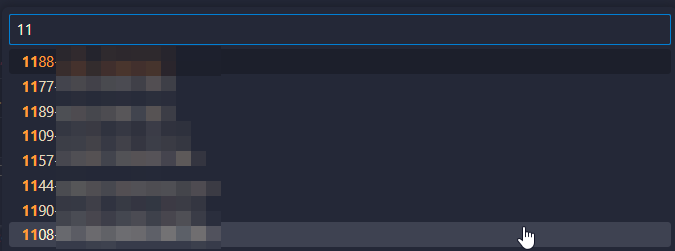
You can filter the branches by typing in the command palette input:
-
-
For each repository, the extension will:
- Check out the branch if it already exists locally.
- Check out a remote-tracking branch if it exists on
origin. - Otherwise, it will fall back to the configured default branch.
-
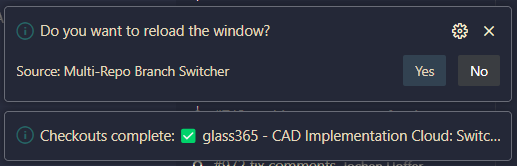
Choose whether to pull the most recent changes from each remote branch, if so configured

-
Choose whether to reload the window, if so configured.
For a faster workflow when you just want to switch all repositories to the default branch:
- Press Ctrl+Shift+P (or Cmd+Shift+P on macOS) to open the Command Palette.
- Run Multi-Repo Branch Switcher: Switch to Default Branch.
- This command skips branch enumeration and directly switches to the configured default branch (or detects it automatically).
- Handles cases where the branch exists only on remote by creating a tracking branch.
To clean up old local branches across all repositories:
- Press Ctrl+Shift+P (or Cmd+Shift+P on macOS) to open the Command Palette.
- Run Multi-Repo Branch Switcher: Delete Stale Local Branches.
- The extension will identify branches older than the configured cutoff (default: 14 days).
- Protected branches (matching patterns like
main,master,develop) are never deleted. - Repositories with uncommitted changes are skipped.
- A confirmation prompt appears before deletion (unless dry-run mode is enabled).
- Results are logged to the VS Code Output channel.
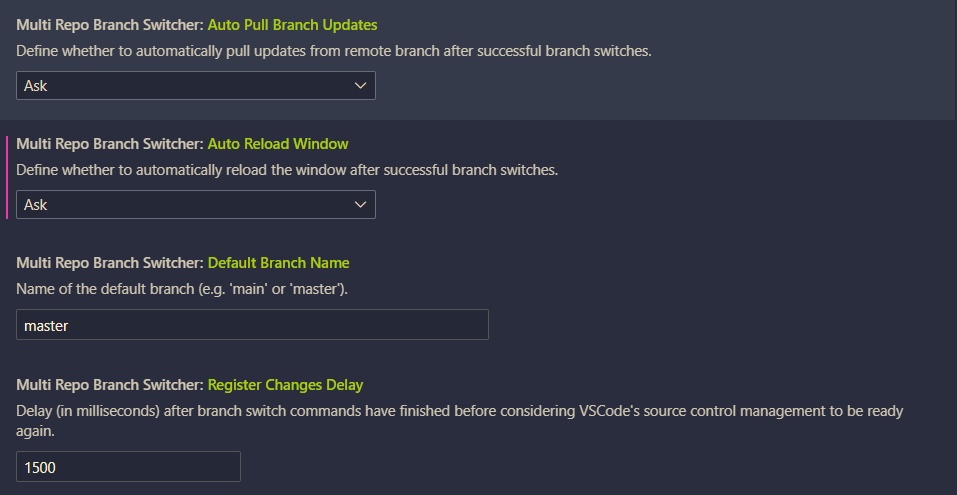
Open your VS Code settings (Settings → Extensions → Multi Repo Branch Switcher or in settings.json) and set:
{
   "multiRepoBranchSwitcher.autoPullBranchUpdates": "Ask", // "Always", "Ask", "Never"
   "multiRepoBranchSwitcher.autoReloadWindow": "Ask", // "Always", "Ask", "Never"
   "multiRepoBranchSwitcher.defaultBranchName": "main",
   "multiRepoBranchSwitcher.registerChangesDelay": 1500,
   "multiRepoBranchSwitcher.prune.cutoffDays": 14,
   "multiRepoBranchSwitcher.prune.protected": ["^(main|master|develop)$"],
   "multiRepoBranchSwitcher.prune.dryRun": false
}multiRepoBranchSwitcher.defaultBranchName: Name of the default branch (default:"master"). Used when switching to default branch or as fallback.multiRepoBranchSwitcher.registerChangesDelay: Delay in milliseconds after branch operations before considering source control ready (default:1500).multiRepoBranchSwitcher.prune.cutoffDays: Number of days after which local branches are considered stale (default:14).multiRepoBranchSwitcher.prune.protected: Array of regex patterns for branches that should never be deleted (default:["^(main|master|develop)$"]).multiRepoBranchSwitcher.prune.dryRun: Iftrue, only preview which branches would be deleted without actually deleting them (default:false).
Feel free to open an issue or pull request on the repository if you encounter a problem or have a suggestion.
Happy coding!
- Download the most recent release.
- Go to your VS Code Extensions.
- Open the "More Actions..." menu:

- Select "Install from VSIX..." and open the downloaded release file.