This repository contains a modular set of StreamElements Widgets and Overlay Extensions designed for immersive livestreaming experiences, especially IRL and GTA-style roleplay. The system is built using HTML, CSS, and JavaScript, and utilizes StreamElements counters, fieldData inputs, and SE_API for full control — without requiring OAuth.
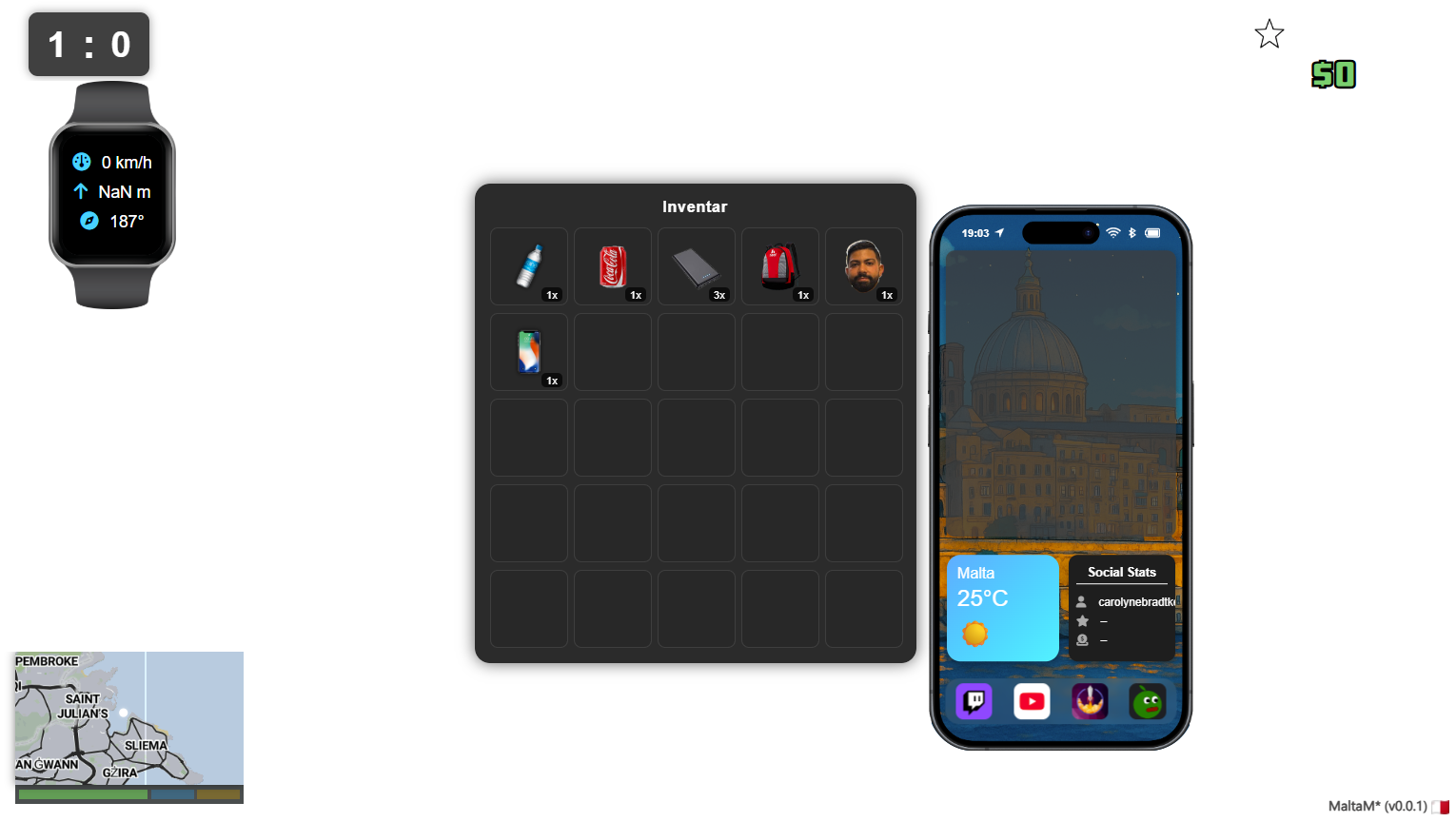
- Categorized counter viewer (Overlay, Inventory, Misc)
- Toggle & increment buttons for each counter
- Realtime log panel via
onEventReceived
- iPhone-style interface with dynamic backgrounds
- Live weather display (OpenWeatherMap API)
- Synchronized system clock
- Modes: hidden, minimized, fullscreen (controlled via
Phonecounter) - Latest follower, sub, donation stats
- Platform-independent chat notifications (Twitch, YouTube)
- GPS icon toggled by
Mapcounter - Bluetooth icon toggled by
Watchcounter - Animated popups and timer bars for alerts
- Bottom dock with customizable app icons
- Embedded black display in Apple Watch mockup
- Live metrics: speed, heading, altitude (via RTIRL JSON)
- Visibility toggled via
Watchcounter
- Leaflet map styled with Mapbox (custom or fallback)
- White GTA-style dot marker
- Follows location via RTIRL API
- Health/Stamina/Armor bars beneath map
- Slide-in/out animation, toggled via
Mapcounter
- Reverse geocoded location name (Mapbox)
- Font: Dancing Script, animated fade
- Visibility also tied to
Mapcounter
- Vertical event log (follow, sub, cheer, etc.)
- Color-coded by event type
- Transparent and mobile-optimized
- Twitch & YouTube messages combined
- Full Twitch emote rendering
- Platform icon + name + message
- Mods highlighted distinctly
- Commands (starting with
!) are ignored
onWidgetLoadinitializes all states fromSE_APIonEventReceivedhandles real-time updates- All counters controlled without OAuth (via StreamElements counters only)
- Optimized for use as OBS browser sources
/images/     → HUD icons, overlays, backgrounds (hosted via GitHub CDN)
/widgets/    → Widget modules (phone, map, chat, etc.)
- Create or edit an overlay at streamelements.com
- Add a Custom Widget to your overlay
- Paste your HTML, CSS & JS in their respective tabs
- Optionally define
fieldDatavalues for API tokens, settings, etc. - Save and position the widget in your OBS scene
Phone, PhoneBackground, Watch, Map, Scoreboard, Inventory,
Stars, Equipment, Cola, Wasserflasche, Rucksack, Bilal,
Boxhandschuhe, iPhone, Team1, Team2
- GTA-style IRL HUD for walking streams
- Twitch/YouTube hybrid overlays for mobile streamers
- Inventory toggles & map visibility during RP
- Minimal control dashboard to change stream state without chat spam
- First of all, create 2 stream elements overlays, we need one for the main content and another for the Moblin source. If you use the standard moblin overlays or even another tool for recording, you can ignore this step.
- Insert the individual sources as separate widgets within the overlay. Make sure that for widgets where *.json elements are present, API keys from Openweather or RTIRL.com may be necessary.
- Create the various counters in Streamelements itself. A list of the standard counters can be seen above. If you use the inventory, you can of course also add your own items. please note that the items must be created both in the inventory and in the notifications.
- If you have decided to use the Moblin overlay, please note that it must be configured in the same width as the widget, i.e. usually 1920x1080p.
- Go out into the world and show what you can do. <3
Author: @vnxcnt Feel free to open issues or fork to extend.
MIT — use freely, contribute openly.