A full Go implementation of the OpenAI Symphony spec — a long-running daemon that polls Linear or GitHub, spawns Claude Code agents per issue, and gives you a live Kanban dashboard + terminal UI while they work.
→ Quick Start · → WORKFLOW.md Reference · → HTTP Dashboard





| Symphony Go | |
|---|---|
| Dashboard | Live Kanban board with drag-to-move, log drilldown, token tracking |
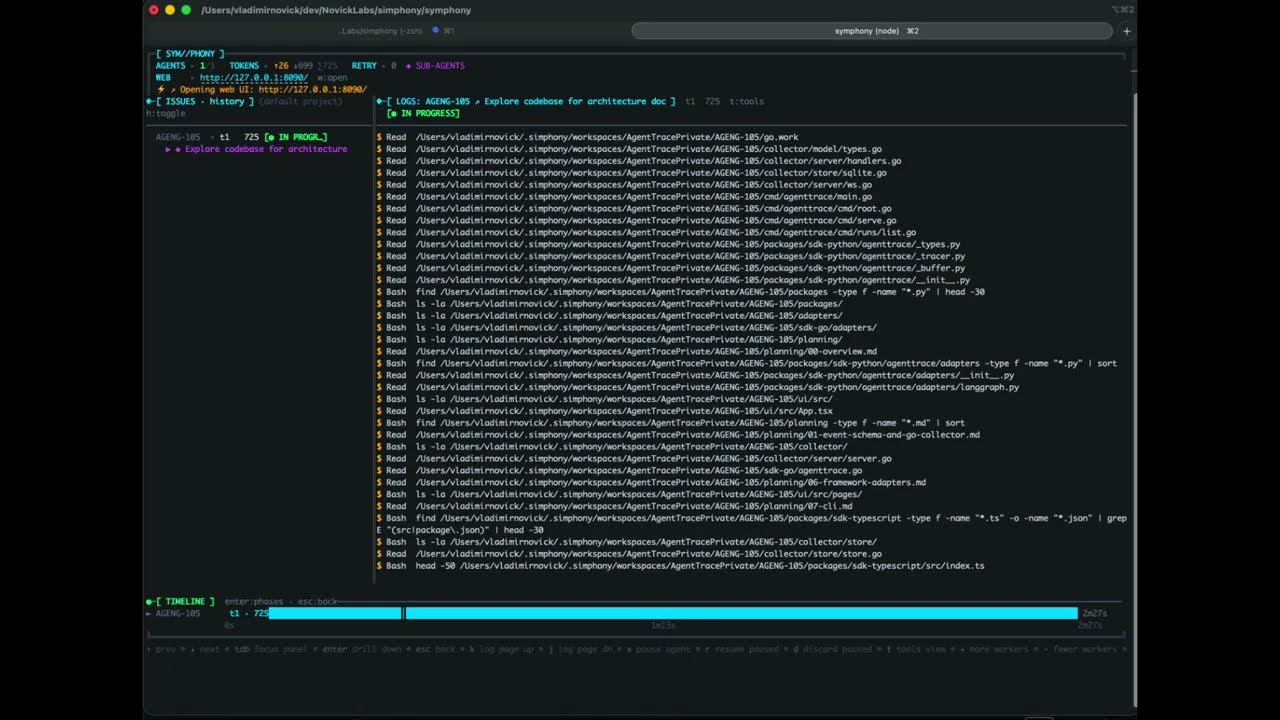
| TUI | Bubbletea split-panel — issue tree + streaming agent logs |
| Config | One WORKFLOW.md file — YAML front matter + Liquid prompt template |
| Trackers | Linear GraphQL + GitHub Issues |
| Agents | Named profiles — run different Claude models per issue type |
| Hot reload | Edit WORKFLOW.md while running — config updates without restart |
| Logs | Persistent per-issue logs — survive restarts, streamed from disk |
| Timeline | Full run history — every agent session across all issues |
| Binary | Single static Go binary — no runtime, no Docker required |
| Requirement | Version | Notes |
|---|---|---|
| Go | 1.23+ | Required to build from source |
| Claude Code CLI | latest | claude --version must succeed; must be authenticated |
| gh CLI | latest | Required for automatic PR detection and PR link comments on tracker issues |
git |
any | Must be available in PATH inside each workspace |
| Tracker | Credential | Minimum scope |
|---|---|---|
| Linear | Personal API key | Full access (read issues, write comments and state) |
| GitHub Issues | Personal Access Token or fine-grained token | repo (or issues: write + contents: read for fine-grained) |
# Terminal 1 — run symphony with the HTTP server enabled
./symphony path/to/WORKFLOW.md   # server.port: 8090 in WORKFLOW.md

# Terminal 2 — start the Vite dev server (proxies API calls to :8090)
cd web && pnpm dev # opens at http://localhost:5173| Requirement | Version |
|---|---|
| Node.js | 20+ |
| pnpm | 9+ |
The pre-built dashboard is embedded in the binary when you go install or download a release. Node.js and pnpm are only needed if you are building from source (go generate ./internal/server/).
Symphony runs a continuous orchestration loop:
┌─────────────────────────────────────────────────────────┐
│                     WORKFLOW.md                         │
│  ┌──────────────────────────────────────────────────┐   │
│  │ tracker: { kind: linear, api_key: $LINEAR_API_KEY│   │
│  │ agent:   { max_turns: 20 }                       │   │
│  ├──────────────────────────────────────────────────┤   │
│  │ You are working on {{ issue.identifier }}...     │   │
│  └──────────────────────────────────────────────────┘   │
└──────────────────────┬──────────────────────────────────┘
                       │ config + prompt template
                       ▼
┌──────────────────────────────────────────────────────────┐
│                   Orchestrator                           │
│                                                          │
│  every poll_interval_ms:                                 │
│    1. reconcile running sessions (stall check, state)    │
│    2. fetch candidate issues from tracker                │
│    3. for each eligible issue (sorted by priority):      │
│       ├─ create/reuse workspace dir                      │
│       ├─ run hooks (after_create, before_run)            │
│       ├─ render Liquid prompt template                   │
│       └─ spawn claude subprocess ──────────────────┐     │
│                                                    │     │
│  on worker exit:                                   │     │
│    ├─ success  → schedule 1s continuation retry   │     │
│    └─ failure  → exponential backoff retry        │     │
└────────────────────────────────────────────────────┼─────┘
                                                     │
                                           stream-json events
                                                     │
┌────────────────────────────────────────────────────▼─────┐
│                   Claude Code subprocess                 │
│                                                          │
│  claude -p "<rendered prompt>"                           │
│         --output-format stream-json                      │
│         --dangerously-skip-permissions                   │
│                                                          │
│  (continuation: claude --resume <session-id> ...)        │
│                                                          │
│  cwd = <workspace.root>/<issue-identifier>/              │
└──────────────────────────────────────────────────────────┘
- Single-goroutine state machine. All orchestrator state mutations happen in one goroutine. Worker goroutines communicate back via a buffered event channel — no locks needed on the hot path.
- New subprocess per turn. Claude Code uses
--resume <session-id>for session continuity instead of a persistent app-server process. Conversation history lives in Claude's server-side session. - Isolated workspaces. Each issue gets its own directory under
workspace.root. Path containment is enforced viafilepath.EvalSymlinksbefore every agent launch — symlink escape is rejected at runtime. - Live config reload.
WORKFLOW.mdis watched with a 1-second content-hash poller (mtime+size fast-path, SHA-256 fallback). Config changes hot-reload without restarting in-flight agent sessions.
See the Requirements section at the top of this document for the full list. Quick checklist:
- Go 1.23+,
git,ghCLI — all in PATH and authenticated - Claude Code CLI installed and authenticated (
claude --version) - A Linear workspace or a GitHub repository with API credentials
Homebrew (macOS / Linux):
brew install vnovick/tap/symphony-goGo install:
go install github.com/vnovick/symphony-go/cmd/symphony@latestDownload a binary from the latest release — pre-built for macOS (arm64/amd64), Linux (arm64/amd64), and Windows.
Or build from source:
git clone https://github.com/vnovick/symphony-go
cd symphony-go

# Build the web dashboard (requires Node.js 20+ and pnpm 10+)
cd web && pnpm install --frozen-lockfile && pnpm build && cd ..

# Embed the dashboard and compile the binary
go generate ./internal/server/
go build -o symphony ./cmd/symphony

# Run it
./symphony -workflow path/to/WORKFLOW.md
For contributors, make dev runs the Go server and the Vite dev server together with HMR. See CONTRIBUTING.md for the full list of make commands.
| Command | Description |
|---|---|
symphony |
Start the orchestrator (reads WORKFLOW.md in the current directory) |
symphony init --tracker <linear|github> |
Scaffold a WORKFLOW.md from your repo's metadata |
symphony clear |
Remove all workspace directories under workspace.root |
symphony clear ENG-1 ENG-2 |
Remove workspace directories for specific issues |
symphony --version |
Print version, commit, and build date |
symphony help |
Show all commands and run-mode flags |
Run-mode flags (used with the default symphony command):
| Flag | Default | Description |
|---|---|---|
-workflow |
WORKFLOW.md |
Path to your WORKFLOW.md |
-logs-dir |
log |
Directory for rotating log files |
-verbose |
false | Enable DEBUG-level logging (includes Claude output) |
symphony init flags:
| Flag | Default | Description |
|---|---|---|
--tracker |
required | linear or github |
--output |
WORKFLOW.md |
Output file path |
--dir |
. |
Directory to scan for repo metadata |
--force |
false | Overwrite existing output file |
- Generate a
WORKFLOW.mdfor your project:
# Scan the current directory and write a pre-filled WORKFLOW.md
symphony init --tracker linear    # or: --tracker github
This detects your git remote, default branch, and tech stack, then writes a
ready-to-edit WORKFLOW.md. Alternatively, create the file manually (see
WORKFLOW.md Reference below).
- Edit
WORKFLOW.mdand fill in your API key:
tracker:
api_key: $LINEAR_API_KEY # or paste the key directly- Export your credentials and run:
export LINEAR_API_KEY=lin_api_...
symphony
# or with an explicit path:
symphony -workflow path/to/WORKFLOW.mdThe file has two sections separated by --- front matter delimiters:
---
<YAML configuration>
---

<Liquid prompt template>| Field | Default | Description |
|---|---|---|
kind |
required | linear or github |
api_key |
required | API token or $ENV_VAR reference |
project_slug |
required | Linear slugId or GitHub owner/repo |
endpoint |
tracker default | Override API endpoint URL (defaults to https://api.linear.app/graphql for Linear) |
active_states |
["Todo", "In Progress"] |
Issue states to pick up and work on |
terminal_states |
["Closed", "Cancelled", "Canceled", "Duplicate", "Done"] |
States that end the agent session |
working_state |
"In Progress" |
State to transition an issue to when it is first dispatched to an agent. Set to "" to disable auto-transition. |
completion_state |
"" |
State to transition to when the agent finishes successfully (e.g. "In Review"). When set, the issue leaves active_states so Symphony stops re-dispatching it. |
backlog_states |
["Backlog"] (Linear) / [] (GitHub) |
States shown in the Backlog column of the web Kanban board. Issues here are visible but not auto-dispatched. |
| Field | Default | Description |
|---|---|---|
interval_ms |
30000 |
How often to poll the tracker (milliseconds) |
| Field | Default | Description |
|---|---|---|
command |
claude |
Claude CLI command (can include flags, e.g. claude --model claude-opus-4-6) |
max_concurrent_agents |
10 |
Global concurrency cap — max issues running simultaneously |
max_concurrent_agents_by_state |
{} |
Per-state concurrency caps. State keys are normalized to lowercase. Example: {"in progress": 3} |
max_turns |
20 |
Max turns per agent session before ending and scheduling a retry |
turn_timeout_ms |
3600000 |
Hard time limit per subprocess turn (1 hour). Set lower for faster failure detection. |
read_timeout_ms |
30000 |
Per-line idle timeout (ms). Triggers stall detection if no output is received. |
stall_timeout_ms |
300000 |
Total silence budget before a session is killed (5 min). Set 0 to disable stall detection. |
max_retry_backoff_ms |
300000 |
Caps the exponential retry backoff at this value (5 min). |
agent_mode |
"" |
Agent collaboration model. "" = solo (default). "teams" = profile role context injected into the prompt so Claude knows which specialised sub-agents are available. |
profiles |
{} |
Named agent profiles. Each profile can override command and provide a role prompt. Select per-issue from the web UI. See example below. |
reviewer_prompt |
built-in | Liquid template for AI reviewer worker dispatched via the "AI Review" button. Falls back to a built-in prompt that reviews the PR and moves the issue. |
ssh_hosts |
[] |
Optional list of "host" or "host:port" addresses. When set, agent turns are executed on these hosts via SSH in order, falling back to the next on failure. Empty = run locally. See SSH worker hosts. |
Profiles example:
agent:
  profiles:
    code-reviewer:
      command: claude --model claude-opus-4-6
      prompt: "You are a senior code reviewer. Focus on correctness and test coverage."
    fast-fixer:
      command: claude --model claude-haiku-4-5
prompt: "You are a rapid bug fixer. Move fast and write a test for each fix."When agent.ssh_hosts is set, Symphony executes each Claude turn on a remote machine over SSH instead of locally. The workspace path must exist on the remote host (e.g. via an NFS share or prior provisioning hook).
agent:
  ssh_hosts:
    - build-worker-1.internal
    - build-worker-2.internal:2222
Hosts are tried in order — if the first host fails, Symphony falls back to the next. The session continues on whichever host succeeds.
Host key requirement: Symphony uses BatchMode=yes and relies on ~/.ssh/known_hosts for host verification. You must add each worker host's key before starting Symphony, otherwise SSH will refuse to connect:
ssh-keyscan build-worker-1.internal >> ~/.ssh/known_hosts
ssh-keyscan -p 2222 build-worker-2.internal >> ~/.ssh/known_hosts| Field | Default | Description |
|---|---|---|
root |
~/.simphony/workspaces |
Root directory for per-issue workspaces. Supports ~ expansion and $ENV_VAR references. |
Shell scripts run at lifecycle events. Run via bash -lc in the workspace directory.
| Field | Default | On failure |
|---|---|---|
after_create |
— | Fatal — aborts the run attempt |
before_run |
— | Fatal — aborts the run attempt |
after_run |
— | Logged and ignored |
before_remove |
— | Logged and ignored |
timeout_ms |
60000 |
Applies to all hooks |
Example — clone a repo into a fresh workspace:
hooks:
  after_create: |
    git clone git@github.com:org/repo.git .
  before_run: |
git fetch origin && git reset --hard origin/main| Field | Default | Description |
|---|---|---|
port |
unset | HTTP server port. Disabled when absent |
host |
127.0.0.1 |
Bind address |
The prompt body is a Liquid template rendered in strict mode (unknown variables are errors).
Available variables:
| Variable | Type | Description |
|---|---|---|
issue.id |
string | Tracker-internal ID |
issue.identifier |
string | Human-readable identifier (e.g. ENG-42, #42) |
issue.title |
string | Issue title |
issue.description |
string or nil | Issue body |
issue.state |
string | Current state name |
issue.priority |
int or nil | Priority (lower = higher) |
issue.url |
string or nil | Link to the issue |
issue.branch_name |
string or nil | Suggested branch (Linear only) |
issue.labels |
array of strings | Lowercase label names |
issue.blocked_by |
array | Blocker refs: id, identifier, state |
issue.created_at |
string | RFC 3339 timestamp |
issue.updated_at |
string | RFC 3339 timestamp |
attempt |
int or nil | Retry attempt number (1-based), nil on first attempt |
- Create an API key at Settings → API → Personal API Keys
- Find your project slug in the URL:
linear.app/your-org/projects/your-project-slug/... - Set
tracker.kind: linearandtracker.api_key: $LINEAR_API_KEY
Issues are fetched from the configured project filtered by active_states. The state field in the template matches the Linear workflow state name exactly.
- Create a Personal Access Token with
reposcope (or a fine-grained token with Issues read access) - Set
tracker.project_slugtoowner/repo - Set
tracker.kind: githubandtracker.api_key: $GITHUB_TOKEN
GitHub Issues don't have named workflow states. Symphony maps them via labels:
- Open issue with an active label → eligible for dispatch
- Open issue with a terminal label → treated as done
- Closed issue → always terminal regardless of labels
tracker:
  kind: github
  api_key: $GITHUB_TOKEN
  project_slug: myorg/myrepo
  active_states: ["todo", "in-progress"]  # label names — create these in your repo
  terminal_states: ["done", "cancelled"]
  working_state: "in-progress"            # applied when agent starts; must exist as a label
  completion_state: "in-review"           # applied when agent finishes; must exist as a label
backlog_states: ["backlog"] # must be an array, not a bare stringCreate these labels in your GitHub repo before running Symphony (github.com/<owner>/<repo>/labels):
| Label | Color suggestion | Purpose |
|---|---|---|
todo |
#0075ca |
Issues ready to be picked up |
in-progress |
#e4e669 |
Issue is being worked on by an agent |
in-review |
#d93f0b |
Agent finished — PR open, awaiting review |
done |
#0e8a16 |
Work accepted and merged |
cancelled |
#cccccc |
Issue closed without action |
backlog |
#f9f9f9 |
Tracked but not yet ready |
You can create them via the GitHub CLI:
gh label create "todo"        --color "0075ca" --repo owner/repo
gh label create "in-progress" --color "e4e669" --repo owner/repo
gh label create "in-review"   --color "d93f0b" --repo owner/repo
gh label create "done"        --color "0e8a16" --repo owner/repo
gh label create "cancelled"   --color "cccccc" --repo owner/repo
gh label create "backlog"     --color "f9f9f9" --repo owner/repo
GitHub Projects v2 "Status" (the Backlog / In Progress / Done column you see in the Projects board) is completely separate from issue labels. Symphony only reads and writes labels — it does not interact with Projects v2 status fields.
If you manage work through a Projects board, use GitHub Projects automation to sync the Status field → labels:
- Status "Todo" → add label
todo - Status "In Progress" → add label
in-progress - Status "Done" → add label
done
working_state is the label Symphony applies when an agent starts working on an issue (transitions it away from todo). The default is "In Progress" — a label that does not exist in most repos.
If working_state refers to a label that doesn't exist in your repo, Symphony will delete the existing active label and fail to add the new one, leaving the issue with no state label at all. It then disappears from Symphony silently.
Fix: either create the label first (recommended — use the gh label create commands above), or set working_state: "todo" to keep the issue in its current state throughout the agent run.
backlog_states must be a YAML array, not a bare string:
# ✓ correct
backlog_states: ["backlog"]

# ✗ wrong — silently ignored, backlog panel stays empty
backlog_states: "backlog"Add server.port to your WORKFLOW.md front matter:
---
tracker:
  kind: linear
  api_key: $LINEAR_API_KEY
  project_slug: your-project
server:
  port: 8090
---
Then start symphony and open your browser:
./symphony
open http://127.0.0.1:8090
The dashboard shows a Kanban board (drag to move issues between states), a list view, live running sessions, token counts, and per-issue agent logs. It auto-refreshes, or you can hit the Refresh button to trigger an immediate poll.
| Endpoint | Description |
|---|---|
GET / |
HTML dashboard — running sessions, retry queue |
GET /api/v1/state |
Full JSON snapshot of all orchestrator state |
GET /api/v1/<identifier> |
Per-issue details (e.g. /api/v1/ENG-3) |
POST /api/v1/refresh |
Trigger an immediate tracker poll (returns 202) |
PATCH /api/v1/issues/{identifier}/state |
Move issue to a new workflow state (Kanban drag) |
POST /api/v1/issues/{identifier}/profile |
Set per-issue agent profile override |
GET /api/v1/issues/{identifier}/logs |
Stream log entries for an issue |
POST /api/v1/settings/workers |
Adjust max concurrent agents at runtime |
GET /api/v1/events |
SSE stream — push state snapshots to the browser |
The server binds 127.0.0.1 only and is not intended for public exposure.
Symphony ships with a Bubbletea split-panel TUI. No web browser required.

┌──────────────────────┬──────────────────────────────────────────────────┐
│ ▶ ENG-42  Running    │ [ENG-42] ⚙ bash — go test ./...                  │
│   t7  12.4k tokens   │ [ENG-42] ⚙ str_replace_editor — auth/handler.go  │
│ ▶ ENG-43  Running    │ [ENG-42] Claude: all tests pass, opening PR       │
│   t3   4.1k tokens   │                                                  │
│ ○ ENG-44  Queued     │                                                  │
└──────────────────────┴──────────────────────────────────────────────────┘
  ↑/↓ prev/next · enter drill down · esc back · k log up · j log dn
  x pause · r resume · d discard · t tools view · b backlog · h history
  + more workers · - fewer workers · p project filter · o open PR · w web UI · q quit
| Key | Action |
|---|---|
↑ / ↓ |
Navigate issues / timeline entries in the left panel |
space |
Expand / collapse nav item |
enter |
Drill into tool detail, timeline phase, or focus right panel |
esc |
Go back / close detail view |
tab |
Cycle focus: left panel → right panel → timeline |
j / k |
Scroll log pane down / up |
x |
Pause selected running agent |
r |
Resume a paused agent |
d |
Discard (terminate) a paused agent |
b |
Toggle backlog panel — enter to dispatch immediately |
h |
Toggle history tab |
t |
Toggle tools / logs view in right panel |
+ / - |
Increase / decrease max concurrent workers |
p |
Open project filter picker |
o |
Open PR URL in browser |
w |
Open web dashboard in browser |
q / ctrl+c |
Exit |

The Timeline page (accessible from the web dashboard) shows every agent session across all issues — including completed, failed, and retried runs.
Logs are persisted to disk under workspace.root and survive daemon restarts. When you re-open the dashboard after restarting Symphony, all previous session logs are still accessible.
| Exit condition | Next action |
|---|---|
| Clean exit (turn limit or tracker state changed) | Retry after 1 second |
| Failure or timeout | Exponential backoff: 10s × 2^(attempt-1), capped at max_retry_backoff_ms |
input_required from Claude |
Hard fail, then normal backoff retry |
| Stall timeout exceeded | Kill session, normal backoff retry |
Symphony is designed for high-trust local environments:
- Claude runs with
--dangerously-skip-permissions— it can read, write, and execute files without asking for approval. Only run against code you trust. - API tokens are never logged. Use
$ENV_VARreferences in config; the value is resolved at runtime and not written to disk. - The HTTP server binds
127.0.0.1only. - Workspace path containment is enforced via
filepath.EvalSymlinksbefore every agent launch. Symlink escapes outsideworkspace.rootare rejected. - Hook scripts are sourced from
WORKFLOW.mdand run with full shell access in the workspace directory. Treat them as trusted code. - SSH worker hosts (
agent.ssh_hosts) use standard host key verification via~/.ssh/known_hosts. Runssh-keyscan <host> >> ~/.ssh/known_hostsbefore adding a host to the list. Symphony does not disable host key checking.
Join the Discord — questions, show your WORKFLOW.md, feature requests.
Apache 2.0. See LICENSE.
