The swarm ships while you sleep.
Mozzie is a local-first desktop app that turns AI coding agents into a managed workforce. You describe what needs building — Mozzie breaks it into work items, spins up isolated git worktrees, assigns agents, manages dependencies, and queues everything for your review. Claude Code, Gemini CLI, Codex, or your own scripts — as many agents running in parallel as your machine can handle. One window. One diff review. One merge.
If you want a personal build team that runs on your machine with zero cloud dependency, this is it.
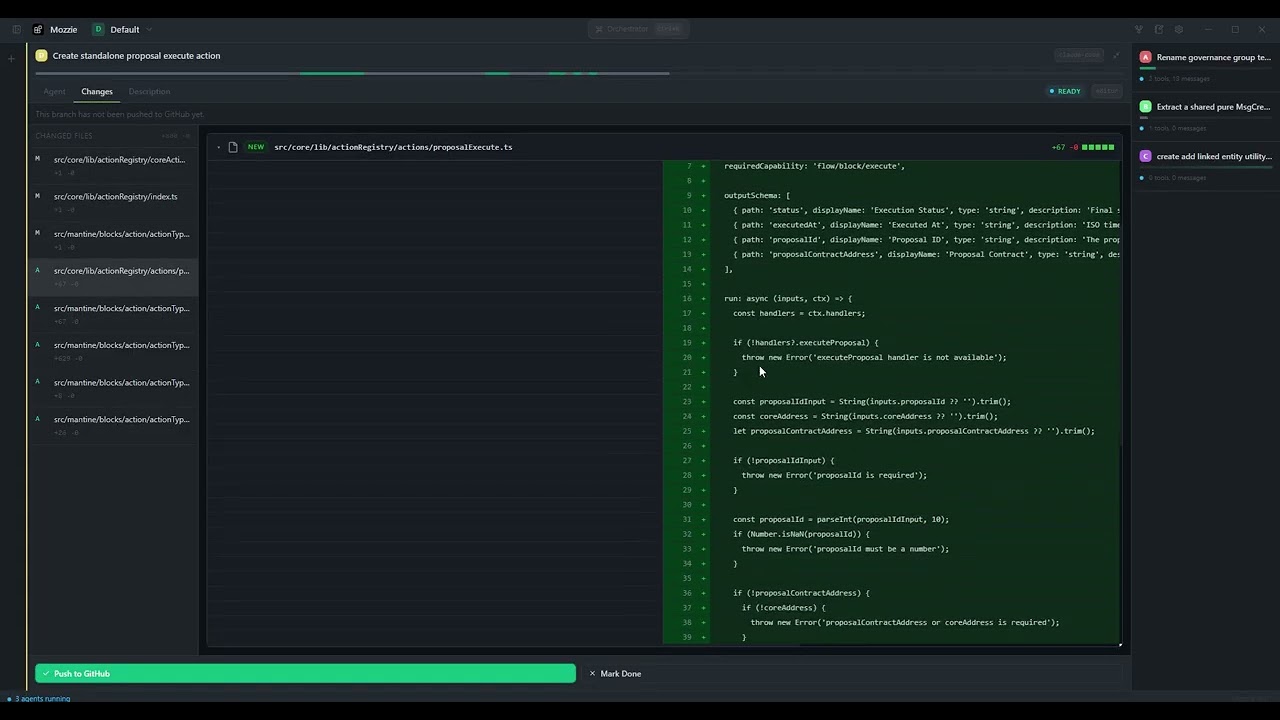
Watch Mozzie in action
Getting Started · How It Works · Features · Architecture · Development
Prerequisites: Node >= 20, pnpm >= 9, Rust (stable), platform-specific Tauri prerequisites, and at least one AI coding agent CLI installed.
git clone https://github.com/usemozzie/mozzie.git
cd mozzie
pnpm install
pnpm dev
That's it. The app opens. Create a work item, point it at a repo, assign an agent, hit play. Or skip all that and use the orchestrator.
- Open Settings (gear icon) — add API keys for your LLM orchestrator provider (OpenAI, Anthropic, or Gemini).
- Add agent configurations for the coding agents you want (Claude Code, Gemini CLI, Codex, or custom).
- Open the command bar (
Ctrl+K) — describe what you want built. The orchestrator does the rest.
You (natural language)
         │
         ▼
┌─────────────────────────────────┐
│        Orchestrator (LLM)       │
│   OpenAI · Anthropic · Gemini   │
│   "Break this into work items"  │
└──────────────┬──────────────────┘
               │
    ┌──────────┼──────────┐
    ▼          ▼          ▼
┌────────┐ ┌────────┐ ┌────────┐
│ Work   │ │ Work   │ │ Work   │
│ Item 1 │ │ Item 2 │ │ Item 3 │
│        │ │        │ │(blocked│
│ Agent: │ │ Agent: │ │ on 1)  │
│ Claude │ │ Gemini │ │        │
└───┬────┘ └───┬────┘ └────────┘
    │          │          ▲
    ▼          ▼          │ auto-launch
┌────────┐ ┌────────┐    │
│Worktree│ │Worktree│────┘
│ + ACP  │ │ + ACP  │
└───┬────┘ └───┬────┘
    │          │
    ▼          ▼
┌─────────────────────────────────┐
│        Review + Merge           │
│  Approve → push to origin      │
│  Reject  → feedback → re-run   │
└─────────────────────────────────┘
- Local-first — SQLite database, git worktrees, everything on your machine. Works fully offline.
- Multi-agent — Claude Code, Gemini CLI, Codex CLI, or any custom CLI/script. Run as many in parallel as your machine can handle.
- LLM orchestrator — describe what you want; the orchestrator creates work items, sets dependencies, assigns agents, and launches them.
- Git worktree isolation — every work item gets its own worktree and branch. Agents never conflict.
- Review workflow — approve to push, reject with feedback. Agents learn from rejection history.
- Dependency graph — work items can depend on each other. Blocked items auto-launch when deps complete. Cycle detection built in.
- Sub-work-items — stacked branches. Children merge into parent; parent pushes to origin as one PR.
- Persistent conversations — orchestrator context carries across sessions. Pick up where you left off.
- Live streaming — watch agent output with tool-call activity visualization in real time.
- Multi-workspace — manage multiple projects from one app.
draft → ready → running → review → done → archived
                  ▲          │  │
                  │          │  └→ ready (reject + feedback)
                  └──────────┘
| State | What happens |
|---|---|
| draft | Writing the work item. Context, prompt, repo path. |
| ready | Complete. Waiting for agent assignment or auto-launch. |
| running | Agent executing in isolated worktree. Live output streaming. |
| review | Agent finished. Diff, terminal replay, execution stats. |
| done | Approved. Branch pushed to origin. |
| archived | History. Kept for feedback loop. |
Reject a work item and Mozzie injects the full attempt history — including your rejection reason — into the agent's next prompt. The agent doesn't make the same mistake twice.
Mozzie ships with built-in support for major AI coding agents and lets you add your own:
| Agent | Protocol | Notes |
|---|---|---|
| Claude Code | ACP (stdio) | Primary. Full streaming support. |
| Gemini CLI | CLI | Google Gemini. |
| Codex CLI | CLI | OpenAI Codex. |
| Custom | CLI | Any command-line tool or script. |
Agents communicate via ACP (Agent Communication Protocol) over stdio transport when supported, falling back to direct CLI invocation.
- Orchestrator LLM integration (OpenAI, Anthropic, Gemini) with persistent conversation history.
- Work item CRUD with full state machine, priority, tags, and Markdown context editing (TipTap).
- Dependency management with cycle detection and cascading auto-launch.
- Sub-work-items with stacked branch lifecycle (child → parent merge → origin push).
- Feedback loop intelligence: attempt history injection on rejection.
- Multi-workspace support with workspace-scoped repos and work items.
- Floating command bar (
Ctrl+K) with conversation switcher.
- ACP session management with live event streaming.
- Agent launch, stop, and continue controls.
- Process lifecycle tracking with auto-transition on completion.
- Work item auto-transitions:
running → reviewon success,running → readyon error.
- Worktree creation, cleanup, and branch management.
- Review approve: commit pending changes + push to origin with custom branch naming.
- Review reject: cleanup worktree, store rejection reason, return to ready.
- Branch naming:
feat/,fix/,refactor/,chore/prefixes (orchestrator-generated or manual). - Parent branch management for sub-work-items (
ensure_parent_branch).
- Single-window IDE-like layout with resizable panels.
- Work item list with status-sorted cards, sidebar with repo management.
- Rich Markdown editor for work item context (TipTap).
- Settings panel for agent configuration and LLM provider setup.
- Review panel with diff viewing and approval controls.
- Dark theme.
- SQLite with sqlx (Rust) and tauri-plugin-sql (frontend).
- 11+ migrations covering work items, agents, repos, workspaces, conversations, sub-work-items.
- ULID primary keys (sortable, no coordination).
┌──────────────────────────────────────────────┐
│                  Tauri 2.0                   │
│                                              │
│  ┌──────────────────────────────────────┐    │
│  │           React Frontend             │    │
│  │  Zustand · TanStack Query · xterm.js │    │
│  │  Tailwind CSS · shadcn/ui · TipTap   │    │
│  └──────────────┬───────────────────────┘    │
│                 │ Tauri IPC                   │
│  ┌──────────────┴───────────────────────┐    │
│  │           Rust Backend               │    │
│  │  SQLite (sqlx) · Git worktrees       │    │
│  │  ACP sessions · LLM orchestrator     │    │
│  │  Process management                  │    │
│  └──────────────────────────────────────┘    │
└──────────────────────────────────────────────┘
mozzie/
├── apps/desktop/               # Tauri 2.0 desktop app
│   ├── src/                    # React frontend
│   │   ├── components/         # work-items, terminal, review, settings, sidebar, repos
│   │   ├── hooks/              # useWorkItems, useStartAgent, useAutoLaunchUnblocked...
│   │   └── stores/             # Zustand (workItemStore, etc.)
│   └── src-tauri/              # Rust backend
│       ├── src/commands/       # work_items, worktree, orchestrator, agents, repos...
│       └── migrations/         # SQLite migrations (001–011+)
├── packages/
│   ├── db/                     # Schema definitions and types
│   ├── agent-sdk/              # Agent communication protocol types
│   └── ui/                     # Shared shadcn/ui components
└── docs/                       # Spec and documentation
| Layer | Choice | Why |
|---|---|---|
| Framework | Tauri 2.0 | Native performance, small binary, Rust backend |
| Frontend | React 18 + Vite | Fast HMR, ecosystem |
| Styling | Tailwind CSS + shadcn/ui | Utility-first, own the source |
| State | Zustand + TanStack Query | Minimal + great cache invalidation |
| Terminal | xterm.js + WebGL | GPU-accelerated, industry standard |
| Editor | TipTap | Rich Markdown with extensions |
| Database | SQLite (sqlx) | Zero setup, local-first, embedded |
| IDs | ULID | Sortable by time, no coordination |
| Git | std::process::Command | More reliable than libgit2 for worktrees |
| Build | pnpm workspaces + Turborepo | Parallel builds, dependency caching |
- macOS — primary target, signed DMG builds
- Windows — supported
# Install dependencies
pnpm install

# Dev mode (hot reload frontend + Rust rebuild)
pnpm dev

# Build for production
pnpm tauri build

# Frontend only
pnpm --filter @mozzie/desktop devSee CONTRIBUTING.md for development setup and guidelines.
See SECURITY.md for information about API key storage and agent execution model.
All agents run locally on your machine. API keys are stored in the OS keychain. The orchestrator LLM call is the only network request Mozzie makes, and only when you use the command bar.
Mozzie is named after Mozzie from White Collar — the paranoid, hyper-competent sidekick who connects worlds, gets things done through unconventional means, and never fully trusts the system he's working inside. That's the vibe. Built by TSD Interactive.


