- Overview
- Live Detection Screenshot
- System Pipeline
- How It Works
- Features
- Evidence Screenshots
- Pipeline Breakdown
- Project Structure
- Installation
- How to Run
- Technical Details
- Requirements
- Connect With Me
A production-grade, autonomous AI traffic surveillance system that detects and records vehicles running red lights in real time. Using dual YOLO models for traffic signal classification and vehicle detection, combined with DeepSort multi-object tracking, the system assigns persistent unique IDs to every vehicle — and auto-saves timestamped screenshot evidence the moment a violation is detected.
No human operator needed — the AI watches, tracks, and records every violation automatically.
| Feature | Detail |
|---|---|
| 🚦 Signal Detection | Custom YOLO — Red, Green, RedRight signals |
| 🚗 Vehicle Tracking | DeepSort with MobileNet embeddings — robust across occlusions |
| 📐 ROI Zone | User-defined polygon (zebra crossing) via mouse click |
| 📸 Auto Evidence | Screenshot saved per unique violating vehicle |
| 🛣️ Multi-Lane | All vehicles across all lanes tracked simultaneously |
| ⚡ Real-Time | Frame-by-frame processing on live or recorded video |
What the system looks like in real time — vehicles at a red light, with bounding boxes, violation labels, and the zebra crossing ROI polygon drawn on screen:


Color coding on screen:
- 🔴 Red bounding box → Confirmed violation: vehicle crossed the zebra zone on red
- 🟢 Green bounding box → Tracked vehicle: not in violation zone
- 🟩 Green polygon → User-defined zebra crossing ROI
- 🔴 Top-left HUD → Live violator list + signal state + frame counter

📹 Video Input
     │
     ├──► 🚦 Traffic Light YOLO (conf=0.5)
     │         │
     │    Red Light? ──NO──► Skip Frame
     │         │ YES
     │         ▼
     │    🚗 Vehicle YOLO (conf=0.15)
     │         │
     │         ▼
     │    🔁 DeepSort Tracker ──► Persistent Track IDs
     │         │
     │         ▼
     │    📐 pointPolygonTest ──► Inside Zone?
     │         │ YES (new ID)
     │         ▼
     │    📸 Save violation_{id}.jpg
     │         │
     └──► 🖥️ Display Live Overlay
On launch, the first video frame opens. The user clicks 4 points to define the violation zone (stop line / zebra crossing). The polygon is drawn in real time and confirmed with C. Press A to reset and redraw.
Click point 1  →  Click point 2  →  Click point 3  →  Click point 4
                                                              ↓
                                                    Press 'C' to confirm
The Traffic Light YOLO model (conf=0.5) classifies the signal state:
| Signal Detected | System Behavior |
|---|---|
Red |
🔴 Violation monitoring ACTIVE — vehicle detection starts |
RedRight |
🔴 Violation monitoring ACTIVE |
Green |
🟢 Vehicle tracking PAUSED — no violations possible |
When red light is confirmed → Vehicle YOLO (conf=0.15) detects all vehicles → passed to DeepSort which assigns persistent Track IDs maintained across frames.
For each tracked vehicle, the center point is tested against the polygon:
- Inside polygon during red = VIOLATION → screenshot saved, ID flagged red
- Outside polygon = normal tracking (green box)
First-time violators (each unique ID captured only once) trigger:
- Screenshot saved:
Violation_ScreenShots/violation_{id}.jpg - ID permanently added to
violated_idsset - Red overlay + label on live feed
- Violator list updated in top-left HUD
| Feature | Description |
|---|---|
| 🎯 Dual YOLO Models | Separate specialized models for signal and vehicle detection |
| 📍 Interactive ROI | Click-to-define zone — adapts to any camera angle or intersection |
| 🔢 Persistent IDs | Same vehicle keeps same ID across frames, even through occlusion |
| 📸 Auto Evidence | Each unique violator photographed exactly once — no duplicates |
| 🔴 State-Aware | Tracking only activates on red — zero false positives on green |
| 🛣️ Multi-Lane | Simultaneous monitoring across all lanes |
| 🖥️ Live Overlay | Bounding boxes, Track IDs, signal state, violator list in real time |
| 🔄 Occlusion Handling | max_age=70 — track survives up to 70 frames without detection |
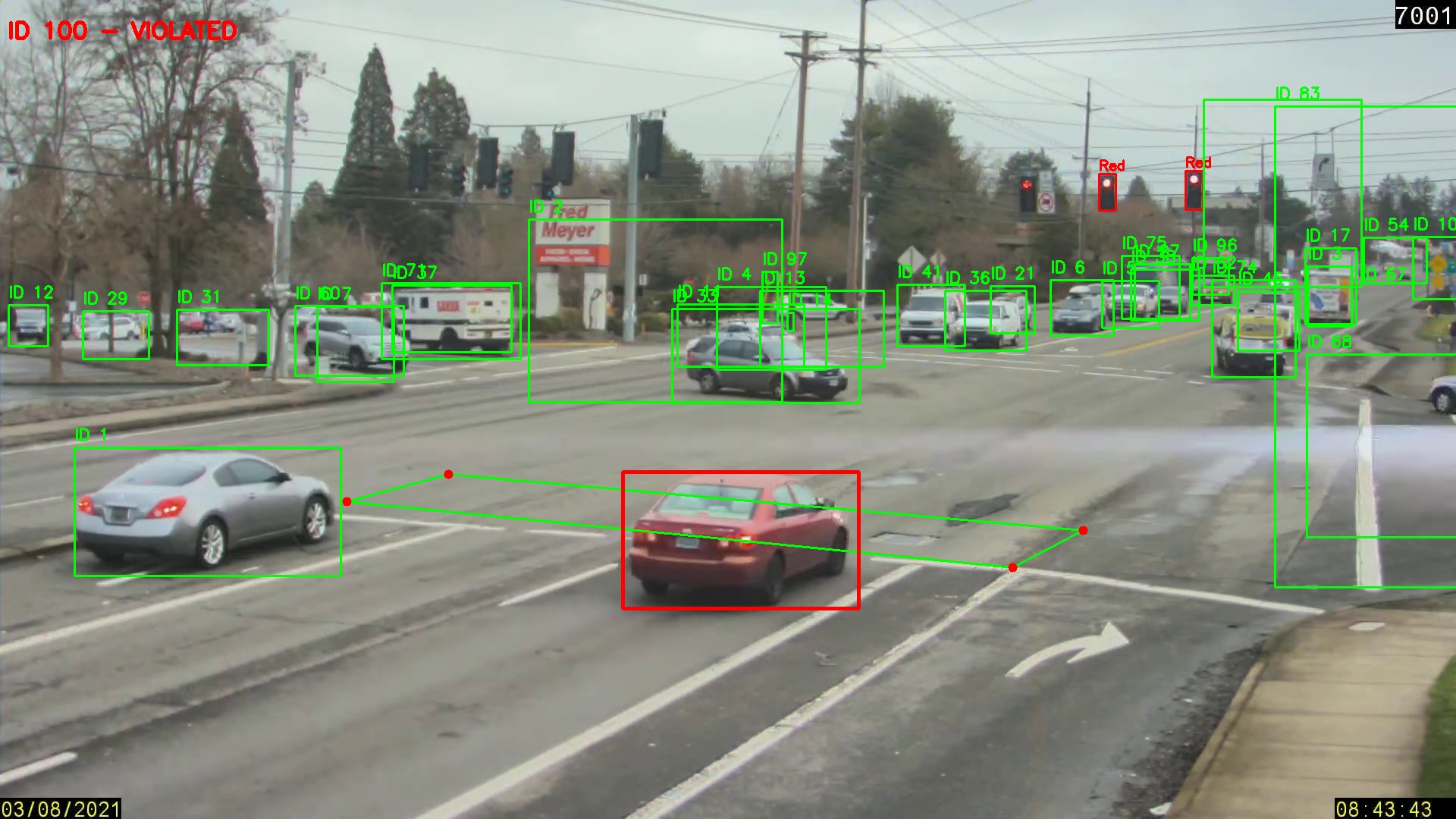
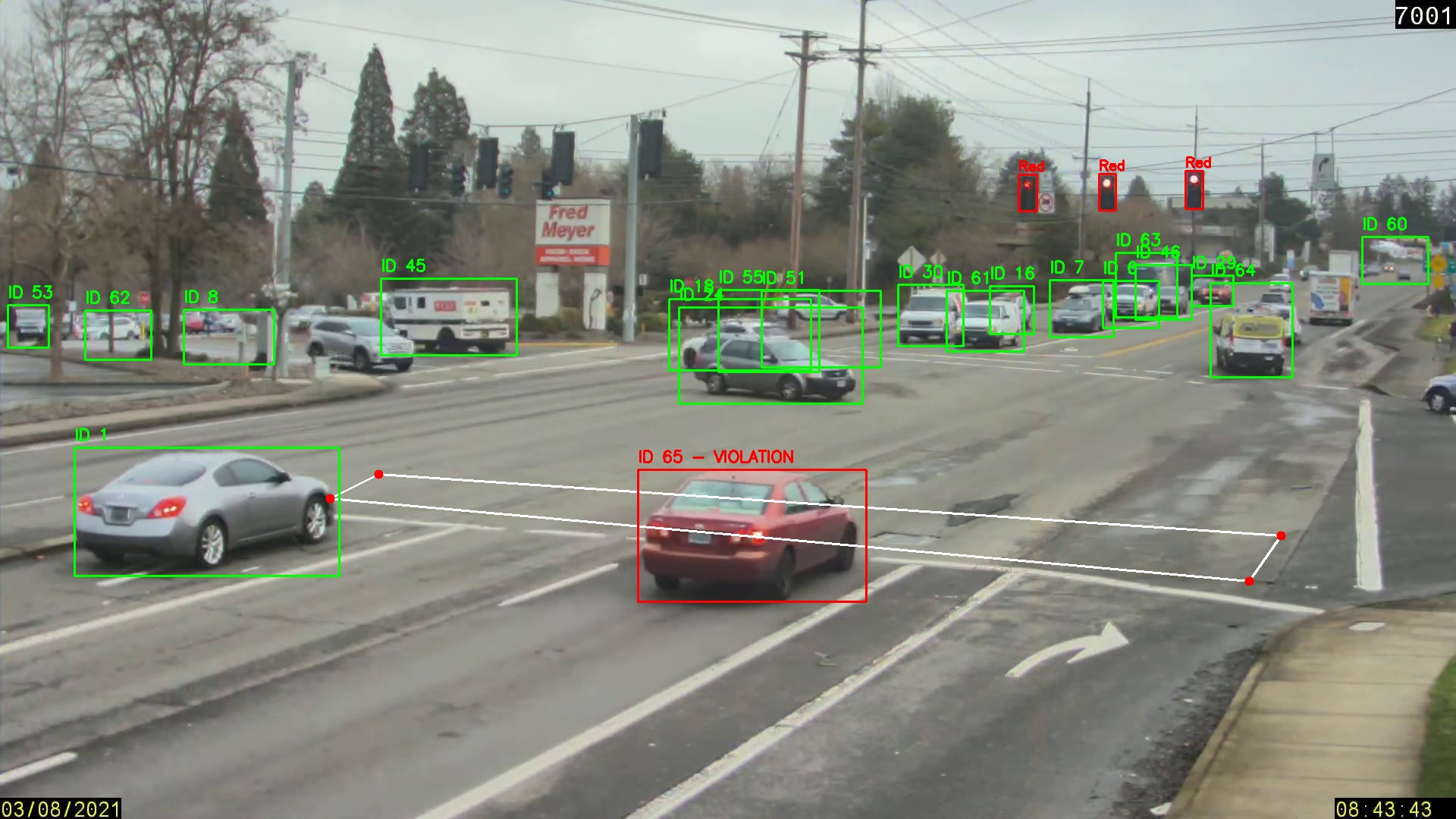
The system auto-saves evidence like this for every detected violation:
Violation_ScreenShots/
├── violation_100.jpg                    ← Vehicle ID 100 — caught crossing on red
├── violation_vehicle_65_frame158.jpg    ← Vehicle ID 65  — caught at frame 158
└── ...
Each screenshot contains:
- Full frame at the exact moment of violation
- Red bounding box drawn around the violating vehicle
- Text overlay:
"ID {track_id} - VIOLATED" - All surrounding vehicles visible for context
| 🚗 Violation — ID 100 | 🚗 Violation — Vehicle 65, Frame 158 |
|---|---|
 |
 |
def zebra_crossing_roi(video_path, display_width=1280, display_height=720):
    # Shows first frame at display resolution
    # User clicks 4 points → mapped back to original video coordinates
    scale_x = display_width / orig_width
    scale_y = display_height / orig_height

    # On every click — reverse the scaling
    orig_x = int(x / scale_x)
    orig_y = int(y / scale_y)
    # Press 'c' to confirm | 'a' to reset | 'q' to quit
return np.array(points) # Shape: (4, 2)traffic_results = traffic_light_model.predict(frame, conf=0.5, verbose=False)
for r in traffic_results:
for box_obj in r.boxes:
label = r.names[int(box_obj.cls[0])]
if label in ['Red', 'RedRight']:
red_light = True # Activate violation monitoring# Format YOLO detections for DeepSort: [x, y, w, h]
detections.append(([x1, y1, x2-x1, y2-y1], conf, "vehicle"))
# DeepSort assigns and maintains persistent Track IDs
tracks = tracker.update_tracks(detections, frame=frame)DeepSort Configuration:
tracker = DeepSort(
    max_age=70,             # Keep track alive 70 frames without detection
    n_init=5,               # Confirm track after 5 consecutive detections
    max_iou_distance=0.5,   # IoU threshold for track association
    embedder="mobilenet"    # MobileNet appearance embeddings for re-id
)def is_vehicle_crossing(box, polygon_points):
x_center = int((box[0] + box[2]) / 2)
y_center = int((box[1] + box[3]) / 2)
# >= 0 → inside or on border = VIOLATION
return cv2.pointPolygonTest(polygon_points, (x_center, y_center), False) >= 0
# In main loop:
if is_vehicle_crossing([x1,y1,x2,y2], polygon_points):
if track_id not in violated_ids:
violated_ids.add(track_id) # Permanent — capture once only
ss = frame.copy()
cv2.rectangle(ss, (x1,y1),(x2,y2),(0,0,255),3)
cv2.putText(ss, f"ID {track_id} - VIOLATED", (10,50),
cv2.FONT_HERSHEY_SIMPLEX, 1, (0,0,255), 3)
cv2.imwrite(f"Violation_ScreenShots/violation_{track_id}.jpg", ss)Traffic_Signal_Violation_Detection/
│
├── 📂 NoteBook/
│ └── main.py # Main detection pipeline
│
├── 📂 Models/
│ ├── vehicle_detection.pt # Custom YOLO vehicle model
│ └── Traffic_Light_Detection.pt # Custom YOLO traffic light model
│
├── 📂 Violation_ScreenShots/ # Auto-generated evidence folder
│ ├── violation_100.jpg
│ ├── violation_vehicle_65_frame158.jpg
│ └── ...
│
├── 📂 assets/ # README images & diagrams
│ ├── violation_demo.svg # Live detection demo screenshot
│ └── pipeline_diagram.svg # System architecture diagram
│
└── README.md
- Python 3.9+
- GPU recommended (NVIDIA CUDA) for real-time performance
- Video file (CCTV footage / MP4)
git clone https://github.com/uqasha524/Traffic_Signal_Violation_Detection.git
cd Traffic_Signal_Violation_Detectionpython -m venv venv
# Windows
venv\Scripts\activate
# Linux / macOS
source venv/bin/activatepip install ultralytics deep-sort-realtime opencv-python numpyModels/
├── vehicle_detection.pt ← Trained YOLO vehicle detection model
└── Traffic_Light_Detection.pt ← Trained YOLO traffic light model
⚠️ Model weights are not included due to file size. Train using YOLO or contact the author.
Open NoteBook/main.py and update:
video_path = r"path/to/your/video.mp4"cd NoteBook
python main.py| Key | Action |
|---|---|
| Left Click × 4 | Define zebra crossing polygon on first frame |
C |
Confirm drawn zone — start processing |
A |
Reset polygon — redraw from scratch |
Q |
Quit at any time |
Screenshot saved: .\Violation_ScreenShots\violation_100.jpg
Screenshot saved: .\Violation_ScreenShots\violation_vehicle_65_frame158.jpg
Dense urban traffic has many partially occluded vehicles. Lower confidence ensures:
- Partially visible vehicles detected early
- Vehicles at frame edges are captured
- No missed violations due to partial visibility
The n_init=5 DeepSort parameter acts as the quality filter — only vehicles confirmed across 5 consecutive frames get a stable Track ID.
DeepSort uses visual appearance features alongside IoU matching:
- Vehicles that disappear temporarily are re-identified visually — same ID maintained
- Critical for multi-lane scenarios where vehicles cross each other's paths
max_age=70means a vehicle can be hidden for ~2.3 seconds (30fps) and still recover its ID
# Uses VEHICLE CENTER POINT — not corners
# Prevents false triggers from adjacent vehicles
x_center = (x1 + x2) / 2
y_center = (y1 + y2) / 2
cv2.pointPolygonTest(polygon, (x_center, y_center), False) # >= 0 = insideDisplay resolution ≠ video resolution. All clicks are mapped back accurately:
scale_x = display_width / orig_width    # e.g., 1280/1920 = 0.667
scale_y = display_height / orig_height  # e.g.,  720/1080 = 0.667

orig_x = int(click_x / scale_x)        # Reverse scale on click
orig_y = int(click_y / scale_y) # Polygon accurate at any display sizeultralytics>=8.0
deep-sort-realtime>=1.3
opencv-python>=4.8
numpy>=1.24
- License plate OCR for vehicle registration identification
- Timestamp + GPS overlay on violation screenshots
- Violation report export as CSV / PDF
- Live RTSP IP camera stream support
- Speed estimation alongside red-light detection
- Multi-camera intersection coverage
- Web dashboard for reviewing all violations


| Project | Description | Link |
|---|---|---|
| ⚡ PowerGuard AI | Dual-stage deep learning SCADA for electricity theft detection in Pakistan's power grid | 🤗 Live Demo |
| 🕹️ Action Recognition | Real-time gaming interface via full-body gestures — 99.69% accuracy | GitHub |
| 👁️ Facial Attendance | AI biometric attendance system deployed for 100+ users | GitHub |
Built with ❤️ using Python · YOLO · DeepSort · OpenCV


