A modern real-time chat application built with Android Jetpack Compose and Firebase, enabling users to create chat rooms and communicate seamlessly across multiple devices.
Watch the app in action with two phones communicating with each other:
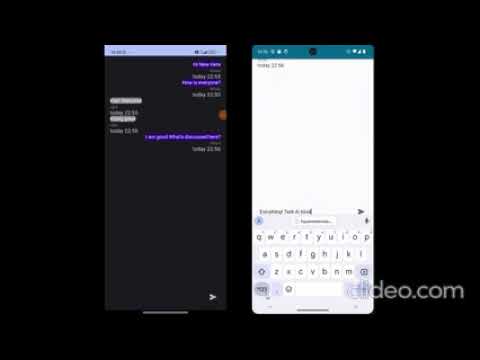
This section will showcase:
- User registration and login on both devices
- Creating and joining chat rooms
- Real-time message exchange between two phones
- Live synchronization of messages across devices
- User Registration: Create new accounts with email and password
- User Login: Secure authentication using Firebase Auth
- User Profiles: First name and last name support
- Real-time Messaging: Instant message delivery using Firebase Firestore
- Multiple Chat Rooms: Create and join different chat rooms
- Room Management: Add new chat rooms dynamically
- Message History: Persistent message storage and retrieval
- User Identification: Messages show sender information and timestamp
- Jetpack Compose: Modern declarative UI framework
- Material Design 3: Clean and intuitive interface
- Responsive Design: Optimized for different screen sizes
- Real-time Updates: Live data synchronization across all connected devices
The app follows MVVM (Model-View-ViewModel) architecture pattern with the following components:
app/src/main/java/com/testdir/chatroomapp/
├── data/
│   ├── Injection.kt          # Dependency injection
│   ├── Result.kt             # Result wrapper for operations
│   └── User.kt               # User data model
├── Screen/
│   ├── ChatRoomListScreen.kt # Room listing and creation
│   ├── ChatScreen.kt         # Individual chat interface
│   ├── LogInScreen.kt        # User login
│   ├── SignInScreen.kt       # User registration
│   └── RoomItem.kt           # Room list item component
├── ui/theme/                 # App theming
├── ViewModels/
│   ├── AuthViewModel.kt      # Authentication logic
│   ├── MessageViewModel.kt   # Message handling
│   └── RoomViewModel.kt      # Room management
├── Repositories/
│   ├── MessageRepository.kt  # Message data operations
│   ├── RoomRepository.kt     # Room data operations
│   └── UserRepository.kt     # User data operations
├── Models/
│   ├── Message.kt            # Message data class
│   └── Room.kt               # Room data class
├── MainActivity.kt           # Entry point
└── Navigation.kt             # App navigation setup
- Firebase Authentication: Secure user management
- Firebase Firestore: Real-time database for messages and rooms
- Jetpack Compose: Modern UI toolkit
- Navigation Component: Seamless screen transitions
- LiveData & ViewModel: Reactive data management
- Android Studio (Arctic Fox or newer)
- Android SDK (API level 24+)
- Google account for Firebase setup
- Kotlin support enabled
-
Clone the Repository
git clone https://github.com/yourusername/ChatRoomApp.git cd ChatRoomApp -
Firebase Configuration
- Go to Firebase Console
- Create a new project or use existing one
- Add an Android app with package name:
com.testdir.chatroomapp - Download
google-services.jsonand place it inapp/directory - Enable Authentication (Email/Password provider)
- Enable Cloud Firestore database
-
Open in Android Studio
- Open the project in Android Studio
- Wait for Gradle sync to complete
- Ensure all dependencies are downloaded
-
Build and Run
- Connect your Android device or start an emulator
- Click Run or press
Ctrl+R(Windows/Linux) /Cmd+R(Mac)
To test real-time communication between devices:
-
Install on Multiple Devices
- Build the APK:
./gradlew assembleDebug - Install on 2+ Android devices or emulators
- Build the APK:
-
Create User Accounts
- Register different users on each device
- Log in with respective credentials
-
Join Same Chat Room
- Create a room from one device
- Join the same room from other devices
- Start messaging and observe real-time sync
| Technology | Purpose |
|---|---|
| Kotlin | Primary programming language |
| Jetpack Compose | Modern UI framework |
| Firebase Auth | User authentication |
| Cloud Firestore | Real-time database |
| Navigation Component | App navigation |
| ViewModel & LiveData | Data management |
| Material Design 3 | UI components and theming |
| Coroutines | Asynchronous programming |
- Launch → Sign Up/Login Screen
- Authentication → Enter credentials or create account
- Chat Room List → View available rooms or create new ones
- Join Room → Enter selected chat room
- Real-time Chat → Send and receive messages instantly
- Multi-device Sync → Messages appear on all connected devices
- Firebase Authentication: Secure user management
- Data Validation: Input sanitization and validation
- Firestore Security Rules: Database access control
- Encrypted Communication: All data transmitted securely
- Clean Interface: Minimalist design following Material Design principles
- Intuitive Navigation: Easy-to-use navigation between screens
- Real-time Indicators: Live message delivery status
- Responsive Layout: Adapts to different screen sizes
- Dark/Light Theme: Supports system theme preferences
Built with ❤️ using Android Jetpack Compose and Firebase