Train Route Mapper
Train Route Mapper is a Flask-based web application that allows users to visualize train routes on an interactive map. By entering a station code, users can see the routes of trains passing through that station, along with additional details such as train names, starting and terminating stations.
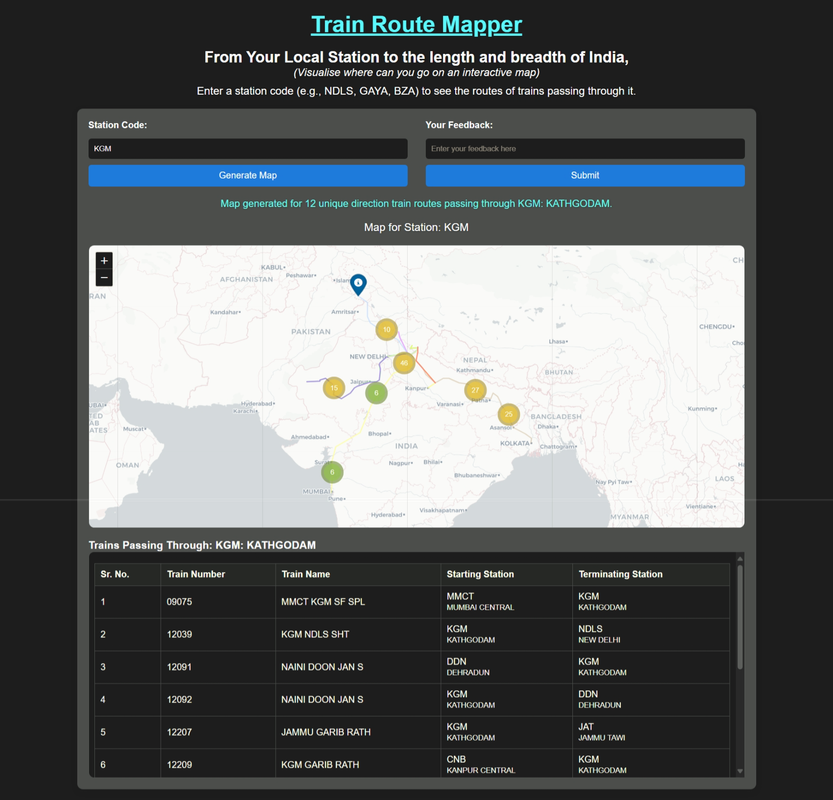
The main and most useful feature of this project the map visualisation of all train routes that pass through your station. In a second you get the infomation that what extenet of india in length and breadth you can cover from your nearest local station.
- Interactive Map: Displays train routes using Folium with MarkerCluster for better visualization.
- Station Search: Enter a station code (e.g., NDLS, GAYA, BZA) to fetch train routes.
- Train Details: View train numbers, names, and their starting/terminating stations in a scrollable table.
- Feedback Submission: Users can submit feedback directly through the website.
- Caching: Optimized with caching to improve performance for repeated queries.
- Concurrency: Uses multithreading to fetch train data efficiently.
- Backend: Flask
- Frontend: HTML, CSS, Jinja2 templates
- Mapping: Folium (Leaflet.js)
- Data Handling: Pandas, BeautifulSoup
- Deployment: Gunicorn
The website is publicly accessible at:
http://13.61.27.152:5000/
https://train-route-mapper.fly.dev/
- Station Code Input: Users enter a station code in the input field.
- Train Route Fetching: The app fetches train data from
etrain.infoand processes it. - Map Generation: Routes are plotted on an interactive map using Folium.
- Train Details Table: A table displays train details for the selected station.
- Feedback: Users can submit feedback, which is saved on the server.
train-route-mapper/
├── app.py                # Main Flask application
├── templates/
│   └── index.html        # HTML template for the web interface
├── requirements.txt      # Python dependencies
├── Procfile              # Deployment configuration for Gunicorn
├── stations.xlsx         # Station coordinates data
└── feedback.txt          # Stores user feedback
-
Clone the repository:
git clone https://github.com/your-username/train-route-mapper.git cd train-route-mapper -
Install dependencies:
pip install -r requirements.txt
-
Run the application:
python app.py
-
Access the app locally at
http://127.0.0.1:5000/.
The app is configured to run with Gunicorn. The Procfile specifies the command:
web: gunicorn --timeout 120 app:app
We welcome your feedback! Use the feedback form on the website to share your thoughts.
Enjoy exploring train routes with Train Route Mapper! 🚆