Getting started Part 3
MQTT-SN requires a MQTT-SN Gateway which acts as a protocol converter to convert MQTT-SN messages to MQTT messages. MQTT-SN client (UDP) can not communicate directly with MQTT broker(TCP/IP). In Part 3, we will created a MQTT-SN Gateway to allow communication between client and broker. We will also be monitoring transmission log, which will be output to ring buffer on shared memory.
Device such as RaspberryPi has no HDD, and Flash memory files has the disadvantage of memory life. To be safe, we will output to ring buffer on SRAM.
- Linux machine for a client and C++ development environment
- Linux machine for a gateway and C++ development environment
step1. Prepare source codes
In home directory, download library from Github
$ git clone https://github.com/ty4tw/AsyncMQTT-SN.git
You can find the source codes for Gateway in AsyncMQTT-SN/AsyncGateway/src and required library in AsyncMQTT-SN/AsyncGateway/src/lib.
step2. Compile source codes
$ cd AsyncMQTT-SN/AsyncGateway
$ make DEFS=-DNETWORK_UDP
If there is no compile error, copy Gateway.
$ make install
Execution module TomyGateway will be copied to the home directory.
step3. Create configuration file for Gateway
Create /usr/local/etc/tomygateway/config/param.conf
Contents are follows:
BrokerName=test.mosquitto.org
BrokerPortNo=1883
SecureConnection=NO
#BrokerPortNo=8883
#SecureConnection=YES
StableNetwork=YES
GatewayID=1
GatewayName=TomyGateway-01
KeepAlive=900
#LoginID=
#Password=
SerialDevice=/dev/ttyUSB0
BroadcastIP=225.1.1.1
GatewayPortNo=2000
BroadcastPortNo=1883
BrokerName to specify domain name for Broker, and BrokerPortNo for port. If Broker is connected to TLS, make BrokerPortNo=8883 and SecureConnection=YES. Using G3 modem or when response is slow or unstable, set StableConnection=NO will change the CONNECT operation. StableConnection=NO will result in longer time to CONNECT.
step4. Create key files for ring buffer
Create the following 3 empty files as key files.
- /usr/local/etc/tomygateway/config/rbmutex.key
- /usr/local/etc/tomygateway/config/ringbuffer.key
- /usr/local/etc/tomygateway/config/semaphore.key
step5. Invoke Gateway.
This must not be the same machine as the Client. If nothing strange happened then it is working.
$ ./TomyGateway
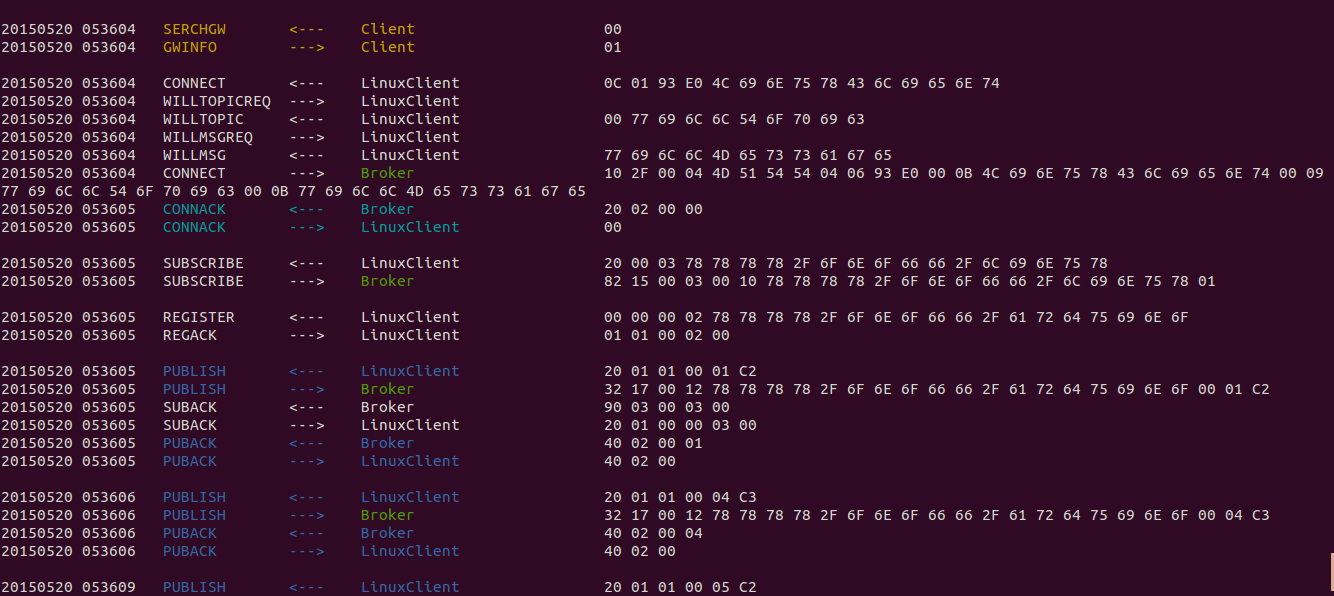
Check the transmission log to make sure.
step1. Build Log Monitor
$ cd AsyncMQTT-SN/LogMonitor
$ make
If there is no compile error, copy LogMonitor.
$ make install
Execution module LogMonitorwill be copied to the home directory.
step2. Invoke Log Monitor
`$ cd '$ ./LogMonitor
Log should appear.
Start Linux Client at this point. You should be able to see the exchanged messages between Client, Gateway, and Broker.