This project enables you to easily include the power of Forter's Trusted Identities in your Auth0 authentication and registration flows, via the Auth0 Action capability.
Forter's Trusted Identities is the most effective way to prevent ATO attempts against your end-users, and to ensure that users who create accounts are trustworthy (not bots or fraudsters).
In a registration context, Forter will recommend that the registration attempt be approved or declined.
In the authentication flow, based on its evaluation of the user context, Forter will recommend one of three actions:
- Approve (allow the user to continue authenticating without further action)
- Decline (do not allow the user to authenticate)
- Verify (challenge the user with a 2nd factor)
With the accuracy of Forter's AI-based decisions, you can greatly reduce the frequency of your MFA challenges, which of course reduces friction for your end-users.
You can thus reduce friction for your end-users while also increasing the confidence that successful authentications and registrations are not bad actors.
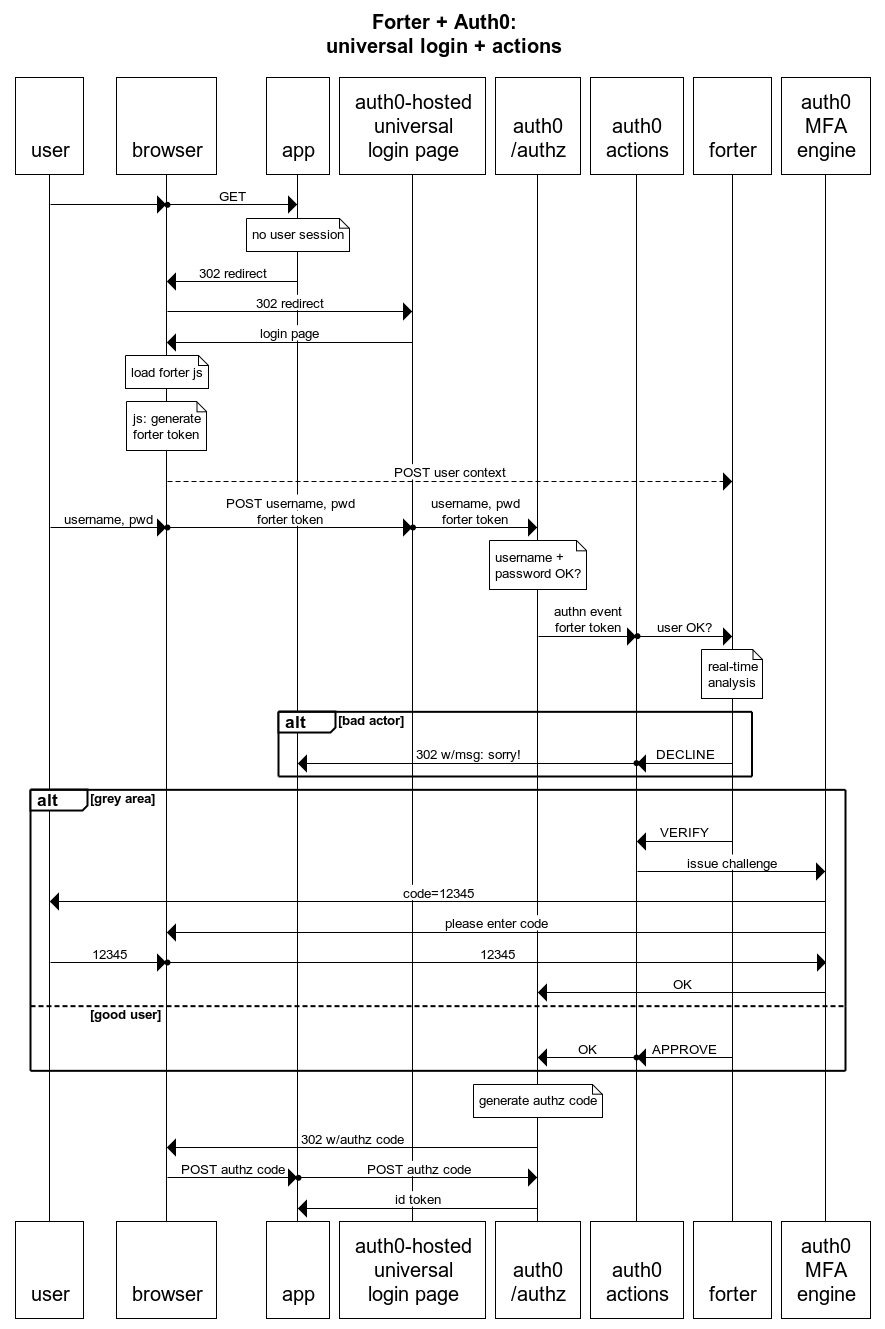
You can see a step-by-step depiction of authentication the flow here.
These decisions work in both "traditional" user registration/login flows, as well as social registration/login flows.
There are several technical elements that make this combination of Auth0 and Forter especially powerful:
- The Auth0
lock.jslibrary allows you to include Forter's js snippet on the front end to collect user context. - Auth0 can host the login/reg page, offloading that responsibility from your application.
- Auth0 Actions allows you to host the Forter + MFA logic in Auth0, again, offloading that responsibility from your application, but also giving you simple, direct access to the front-end user context and the Auth0 MFA engine.
-
An Auth0 tenant, with MFA enabled if you want to use MFA.
-
An Auth0 client_id and client_secret for the Management API. This client will be used to set user status =
blockedwhere appropriate. -
A Forter tenant with the following APIs enabled:
Account Login API
Account Signup API
Account Authentication Attempt API
The front end of this solution uses the Auth0 hosted login/registration page.
In your Auth0 tenant, go to Branding->Universal Login->Login.
Enable "customize login page" and select "lock" as the default template.
Note: The Auth0 "New Universal Login" does not support this approach.
In the login.html page included in this repo, replace the string <!--FORTER JS SNIPPET HERE--> with the js snippet from your Forter tenant.
Copy and paste the contents of login.html into the HTML window of your Auth0 Customize Login Page screen.
Note: see the description of the approach below if you are curioius about the technical "why" of this particular approach.
Create a new action in your Auth0 tenant:
Actions->Library->Build Custom
Name = Forter ATO prevention
Trigger = Login / Post Login
Copy and paste the contents of action.js into the action screen.
In the Action, add the following "secrets" (environment variables).
Note: not all of these values are secrets - some are just plain old environment variables - but you should certainly store your Forter key and Auth0 client_secret as secrets.
FORTER_KEY {your Forter API key}
FORTER_TENANT_ID {example value: 63bf0782ae27}
AUTH0_CLIENT_ID {your Auth0 client_id}
AUTH0_CLIENT_SECRET {your Auth0 client secret}
AUTH0_TENANT {example value: https://dev-paq-xqhq.us.auth0.com}
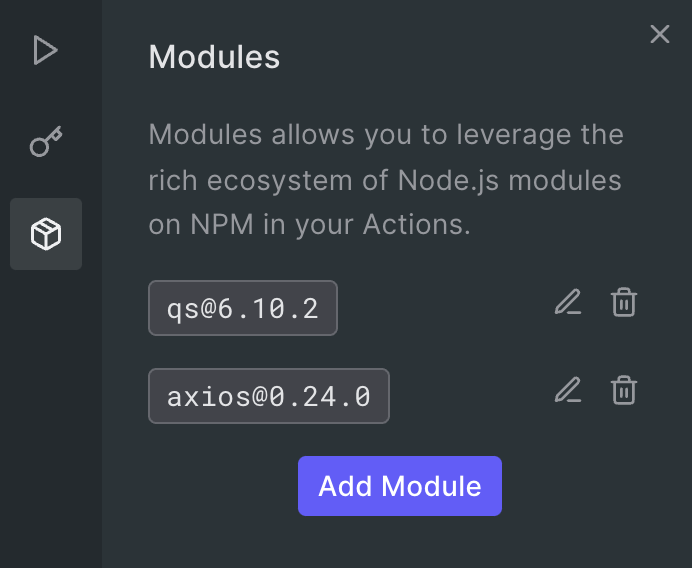
And, add two NPM modules:
- axios
- qs
Add the action to your login flow:
Flows->Login
To see if your flow works end-to-end, copy the "try" URL from you Auth0 tenant:
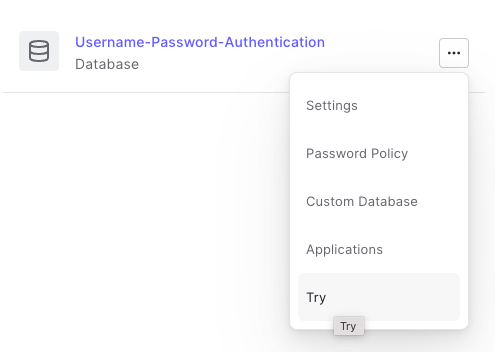
Authentication->Database
Left-click on the three-dot icon that corresponds to your user directory
Right-click on "Try"->Copy link address
Paste the address into a text editor. It should look something like this:
You can use this URL as-is in an incognito window to test.
A successful authentication will result in a redirection to the Auth0 test site with an authorization code in the URL. (But you will see a "forbidden" on the page.)
If you want to use a different client_id and/or redirect_uri, you can update the values in the URL (assuming that you have set up the client_id and redirect_uri in the client.)
For sign-up and login flows, the default decision from Forter (in test mode) is 'NOT_REVIEWED'.
To test decisions from Forter, include a keyword in the user's email address:
'APPROVE' -> 'approve' (examples: gandalf@approve.com, approve123@test.com) 'DECLINE' -> 'decline'
For the sign-in flow, you can also test for an MFA challenge decision:
'VERIFICATION_REQUIRED' -> 'verify'
To get the most out of the integration, make sure that you update Forter with the results of every MFA challenge.
Forter's precision ensures that very few users are challenged for MFA.
Forter becomes even more precise when you update Forter with the results of every MFA challenge.
The best way to do this from Auth0 is to pull down the Auth0 logs periodically and look for user events like:
gd_auth_failed
gd_auth_rejected
gd_auth_succeed
These log event type codes can be found [here] (https://auth0.com/docs/deploy-monitor/logs/log-event-type-codes).
Send these events to the [Forter Account Authentication Attempt API] (https://portal.forter.com/app/developer/api/api/services-and-apis/account-authentication-api) to ensure that good users are challenged even less often, and fraudsters are identified more definitively.
Anyone somewhat familiar with the Auth0 Actions capability might ask a question at this point: Why don't we take advantage of the Auth0 Pre User Registration (or even Post User Registration) trigger?
The answer is relatively simple:
- A social registration does not fire the Pre User Registration event.
- The Pre User Registration event does not have access to the
config.internalOptionsobject from the front end. This object carries the Forter front-end token and is required for Forter decisions.