This is a Non official custom integration for Home Assistant via HACS to surface REC BMS (Battery Management System)
This allows you home assistant to connect to REC BMS sensor and display:
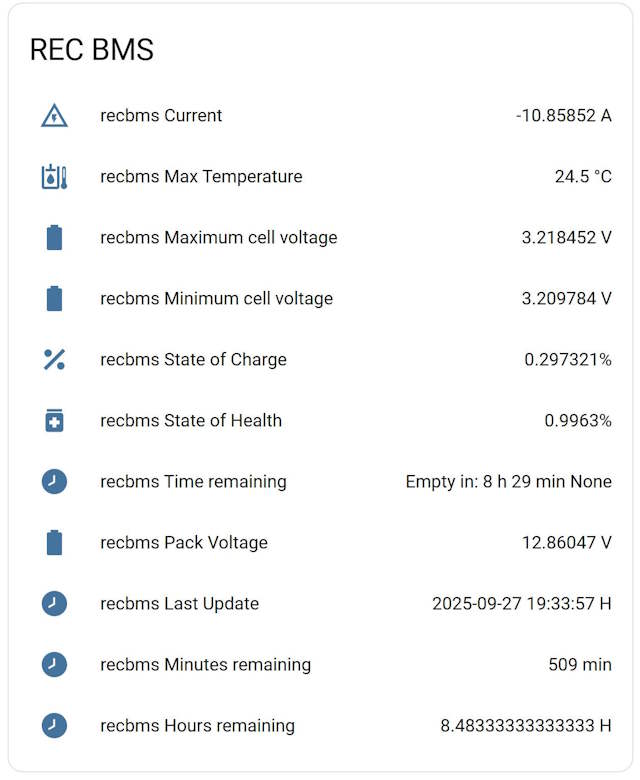
- Time remaining (Hours)
- Minimum cell voltage (Voltage)
- Maximum cell voltage" (Voltage)
- Battery current (Amps)
- Max Temperature (C)
- Pack Voltage" (Voltage)
- State of Charge (Percent)
- State of Health (Percent)
Example in Lovelave when using the sensors out of the box:


- The installation is done inside HACS (Home Assistant Community Store). If you don't have HACS, you must install it before adding this integration. Installation instructions here.
- Once HACS is installed, search for
recbms- Navigate to the 'Integrations' tab in HACS, click
explore & Downloadand search for the 'recbms' integration there. On the next screen, select "Download". Once fully downloaded, restart HomeAssistant.
- Navigate to the 'Integrations' tab in HACS, click
- In the sidebar, click 'Configuration', then 'Devices & Services'. Click the + icon to add "recbms" to your Home Assistant installation.
- Enter the host or IP of your RECBMS websocket (the ip or host and it ends with "/ws")
- Enter the name you want to show for your REC BMS
You need to suply the URL for the websocket that REC wifi exposes. You can use any tool (ex: postman) to directly connect to the websocket. For example "ws://192.168.8.2:80/ws" it should return two types of messages
Example of messages that are sent by REC BMS websocket and parsed by the home assistant integration are below
{"type":"status","bms_array":{"master":{"time_remaining":"Full in:<br> 31h 00 min","st_naprav":1,"time":"","date":"28.09.2025","mincell":3.304808,"maxcell":3.319811,"ibat":7.456289,"tmax":22.5,"vbat":13.2439,"soc":0.285054,"soh":0.9963,"erro":{"present":0,"addr":0,"st":0,"con_st":0},"error":""},"slave":{"0":{"address":2,"st_temp":1,"temp_bms":28.66577,"st_celic":4,"temp":{"0":22.5},"res":{"0":0.00195,"1":0.003093,"2":0.002179,"3":0.001809},"nap":{"0":3.304808,"1":3.319811,"2":3.310808,"3":3.308474},"bal":{"0":true,"1":false,"2":false,"3":false}}}}}
{"type":"settings","cmin":3,"cmax":3.65,"tmax":55,"bvol":3.58,"bmin":3.45,"tbal":55,"tmin":-10,"capa":320,"char":3.58,"ioff":0,"chis":0.25,"razl":0.25,"maxh":0.25,"minh":0.1,"bmth":2,"ioja":0.019531,"soch":0.05,"op2l":3.55,"op2h":0.15,"re1h":0.15,"chac":0.5,"dchc":0.5,"maxc":150,"maxd":150,"clow":3.1,"socs":0.284956,"cycl":37,"cans":2,"chem":3,"strn":2,"re1t":1979711486,"op2t":380239933,"re1v":3.30481,"op2v":3.31648,"cfvc":0.1,"rsbr":2,"err":{"p":0,"num":0},"nnc":{"bms":2,"cell":1},"vnc":{"bms":2,"cell":2},"toor":{"bms":2,"cell":1},"baud":{"lcd":56000,"com":115200},"mcu_date":"28.09.2025","bms_name":"1A-2261","addr":64,"tunit":0,"Ah":227,"cur":7.20264,"new_log_every_midnight":true,"out":false}
You have issue with the integration? Please open an Issue.