

Control WS2812 RGB & RGBW pixels from Alexa using a NodeMCU ESP8266.
This code was tested on a HiLetgo NodeMCU ESP8266 board. You need some WS2812B LEDs (e.g. NeoPixel) connected to 5V and GND and a data pin of the ESP8266. I used an 74AHCT125 level-shifter in my project but I've found that it will do fine without one.
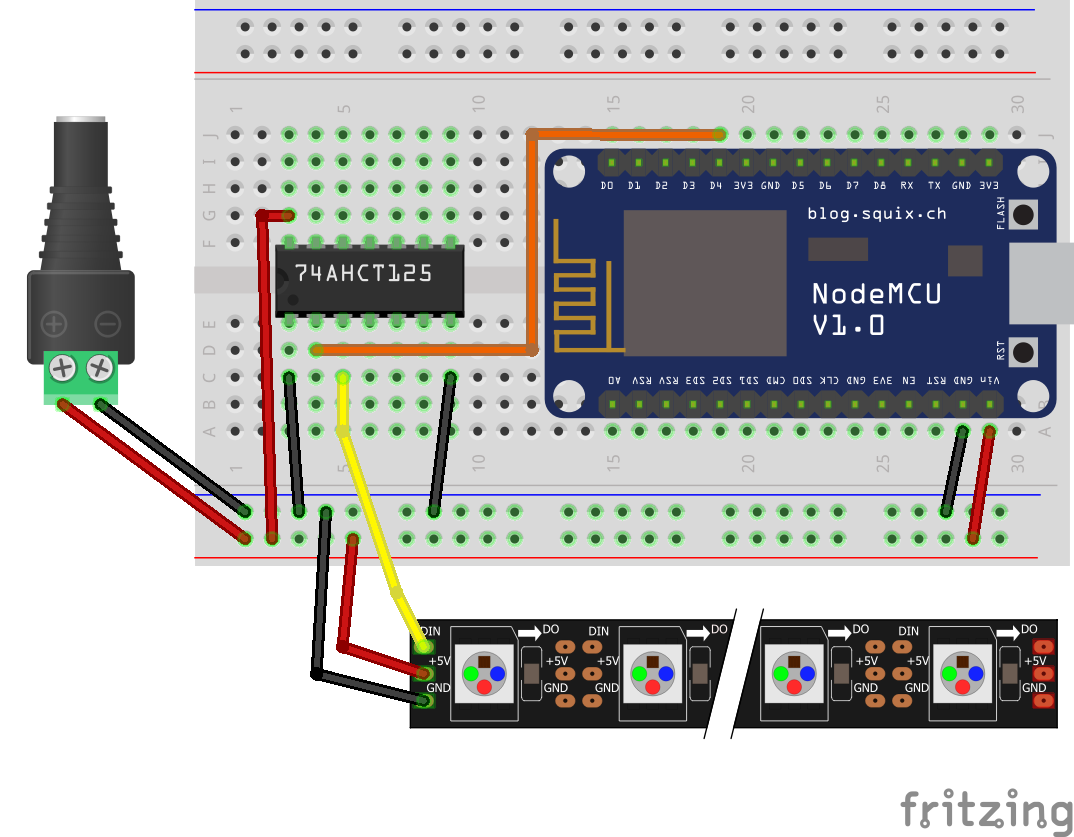
You need to install the following additional libraries to compile the code:
Adafruit_NeoPixel: https://github.com/adafruit/Adafruit_NeoPixel
ESPAsyncTCP: https://github.com/me-no-dev/ESPAsyncTCP
ESPAsyncWebServer: https://github.com/me-no-dev/ESPAsyncWebServer
FauxmoESP: https://bitbucket.org/xoseperez/fauxmoesp
WS2812FX: https://github.com/kitesurfer1404/WS2812FX
- Update the
credentials.hwith your WIFI_SSID & WIFI_PASS
#define WIFI_SSID "EnterYourSSID"
#define WIFI_PASS "EnterYourPASS"- Update the
LED_COUNT&LED_PINvariables. - Compile and run on your NodeMCU
- Execute the Discover Devices option from your Alexa app or tell Echo/Dot to do it.
- You should see several new "WeMo Switch" devices that the fauxmoESP has created.