- Tran Cong Thinh
- Nguyen Hoang Phuc
- Chau Hoang Tu
- Vu Thi Quynh Nga
- Preprocessing the input data
- building the model
Step 1: Resize the images into the size of 128x128
Step 2: Enhance the images' quality by using a trained autoencoder model
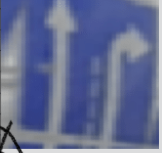
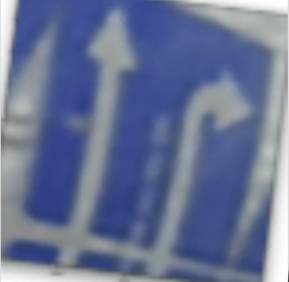
Step 3: Augment images by using Albumentations’ s functions After using an autoencoder model, we saw an increase in 2 percent in the test accuracy (from 96 → more than 98)
Step 3: Augment images by using Albumentations’ s functions We used 5 below Albumentations’ s functions to augment our image dataset
- OpticalDistortion
- ColorJitter
- Rotate
- RandomShadow
- Cutout
Step 4: Convert labels to fit with the multi-label model
Because there are 7 unique labels according to the given json file, and a maximum of 5 different attributes in one image, we decide to convert the labels in a special way to fit with the multi-label model.
- The 7 unique labels : “straight” , ”left”, “right”, “entrance to the ring”, “slightly to the left”, “slightly on the right”, “to the right followed by the left turn”.
- The 5 attributes representing for the maximum of 5 lanes in an image.
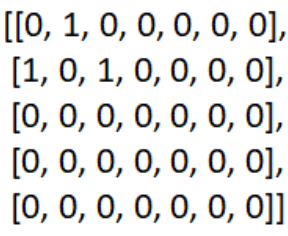
As you can see on the screen, this is a 5x7 matrix representing the label “left, right+straight” on the dataset. Since the maximum of attributes/lanes in an image is 5, there are 5 rows in this matrix. Similarly, as there are 7 types of basic attributes in the json file, this matrix also has 7 columns.
After that, we flatten the matrix to fix it in our multi-label model.
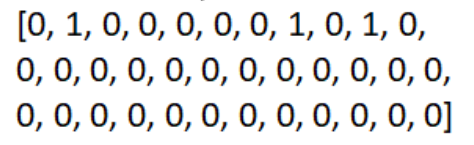
In the second stage of the solution, we train our multi-label model. Below is the structure of our best model so far.
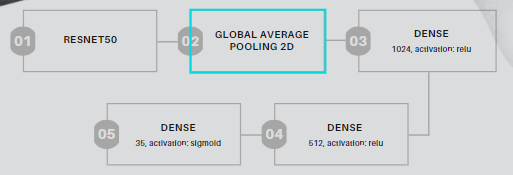
Attention to our output layer, which has 35 nodes and a sigmoid activation, not softmax.
After many trials-and-errors, we choose to use the ROC-AUC score since the normal accuracy metrics did not work well in this case. We also use binary cross-entropy loss to train this model.
Link the web deployment: Web deployment
We have used Flask in order to deploy the model and W3CSS to style the web appearance. We also have made the web responsive to any changes so this appearance will be perfect on every type of screen.
-
Open your browser to https://labs.play-with-docker.com/
-
Click Login and then select docker from the drop-down list.
-
Connect with your Docker Hub account.
-
Once you’re logged in, click on the ADD NEW INSTANCE option on the left side bar. If you don’t see it, make your browser a little wider. After a few seconds, a terminal window opens in your browser.
-
In the terminal, start your freshly pushed app.
docker run -dp 5000:5000 vvai1710/babyshark-aiijc2021:web_v2ordocker run -dp 5000:5000 vvai1710/babyshark-aiijc2021:web_v1_api -
Click on the 5000 badge when it comes up and you should see the app with your modifications! Hooray! If the 5000 badge doesn’t show up, you can click on the “Open Port” button and type in 5000.

Using the labels’ converted 5x7 matrix, we can label the directions of traffic on the lanes from left to right, and easily distinguish the combinated attribute (for example,left+straight) of the image.
Compared to the normal classification model (which takes the whole label as a new class). Our model is:
Able to break the labels into its most basic parts while still retaining its spatial information: For instance, we don’t take “left, right+straight” as one single, seperate class. Rather, we divide them into “left” on the first attribute, “straight” and “right” on the second attribute.
→ Be more flexible in practical situations: Since in reality, the model may encounter a sign that it hasn’t been trained on.
The other advantage : our model’s accuracy is also high on the public dataset (more than 98%), and can return the prediction results in a relatively short time.
Our current disadvantage: our model’s weight is still big → cannot publish the web online. We will try fixing this problem in the future.
- Lack of time: We didn’t know about the new task until three days ago. So, we have to finish our solution in a rush
- Low images’ quality: the images in the new dataset the organizers provide us are in bad quality and random sizes
- Too many directions to try: despite we only have 3 days to finish our project, we have many different approaches to try on (such as: ocr models, normal classification, ….), and many models to train to pick out the best one.
- Need many experiments to get the threshold: we also have to submit multiple csv files with various thresholds to pick out the one that has the best accuracy on the test set.
-
We will try to find ways to make the web online
-
We will try to improve the accuracy by retraining the model; perhaps we can also try more new approaches
-
We will also try to make a real-time system to cooperate with cameras on various type of vehicles.
Check here for more : https://drive.google.com/drive/folders/1OgEm-CF21uqxOFEjyOhmhbyXiL6PlJXa?usp=sharing