Basic Usage
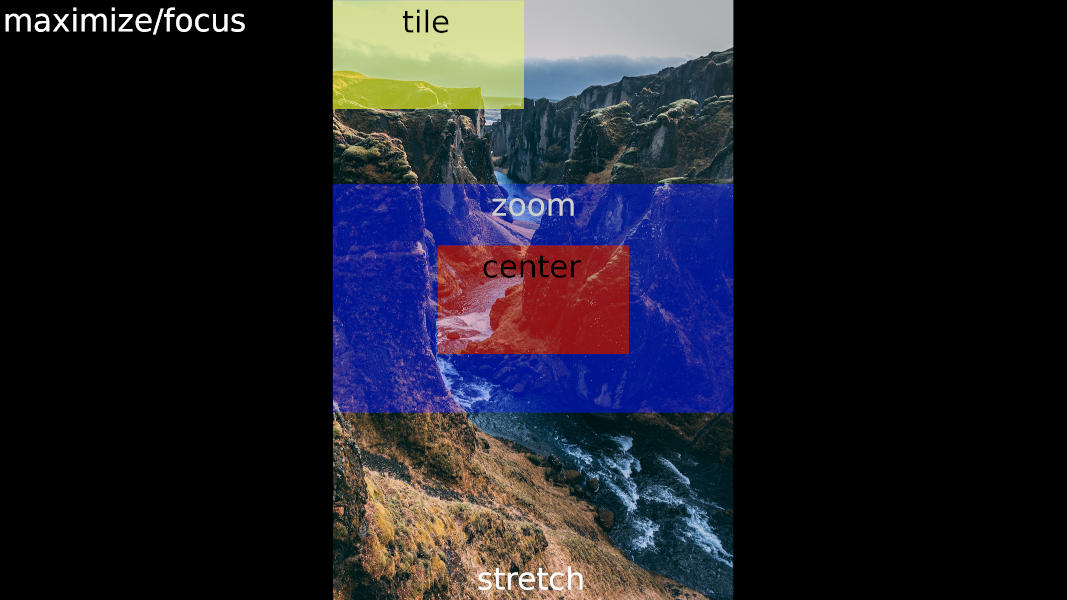
Setting wallpapers with xwallpaper happens in six distinct modes which have to be supplied as command line arguments. In order to graphically show how wallpapers are placed on the screen, let's assume a single 1080p monitor, i.e. a monitor with a resolution of 1920x1080 pixels.
To highlight the actual effects of these modes, let's further assume a wallpaper with dimensions of 4000x6000 pixels.
$ xwallpaper --center image.jpg
The middle of the image is drawn on the output device without any form of zooming or other translations. In terms of X geometry, you will see pixels within 1920x1080+1040+2460. If the image would have smaller dimensions than your monitor's resolution, then black pixels would surround the image.
$ xwallpaper --focus image.jpg
Guarantees that the trimbox will be fully visible on monitor. By default, the whole image is considered to be the trim box and therefore --focus will be behave exactly as --maximize. The whole image is visible, but zoomed out. Black pixels will occur on the left hand and right hand side.
$ xwallpaper --maximize image.jpg
Zooms in or out as much as possible to show the whole image on screen. In terms of X geometry, 4000x6000+0+0 is shown on 1920x1080. As the aspect ratios do not match, black pixels will occur on the left hand and right hand side.
$ xwallpaper --stretch image.jpg
Scales width and height of input to match the aspect ratio of the monitor's resolution. Talking in X geometry, 4000x6000+0+0 is shown on your monitor. Height of the image is compressed (or width stretched) to match the aspect ratio of 1920x1080.
$ xwallpaper --tile image.jpg
Image is repeated on X and Y axis until screen is filled. This mode basically only makes sense if your input file is small and visually repeatable. Because of the high resolution of 4000x6000 only the left top corner is shown. In terms of X geometry that means 1920x1080+0+0.
$ xwallpaper --zoom image.jpg
Zooms image in or out to fill the monitor's output without triggering black pixels around the image. In this scenario, it means that 4000+4202+0+899 is drawn on the output. Compared to --maximize this means that upper and lower hand pixels are dismissed from the input when necessary.
This showcase uses a wallpaper available from pexels.com to graphically represent the operational modes. Please note that stretch will use the whole input picture but compresses vertically, which means that the visible aspect ratio is different from the input file.