


The stash-native package makes it simple to add Stash in-app purchases (IAPs) and webshops to your game or app. It delivers seamless, native-like payment flows and selection dialogs, which appear as system dialogs on Android and iOS through lightweight embedded webviews, while providing direct callbacks to your application.
Overview
Setup
API
Reference
| Platform | Description |
|---|---|
| Android | Android library (AAR). |
| iOS | iOS framework (XCFramework). |
If you're using one of the game engines listed below, we offer dedicated wrappers for this library. These wrappers provide ready-to-use interfaces for integrating Stash features into your project, along with added development tools such as full flow testing directly in the Engine Editor.
| Engine | Repository | Compatibility | |
|---|---|---|---|
 |
Unity | stash-unity | Unity 2019.4+ (LTS recommended) |
 |
Unreal Engine 5 | stash-unreal (main) | Unreal Engine 5.0+ |
|
Unreal Engine 4 | stash-unreal (4.27-plus) | Unreal Engine 4.27-plus |
Latest pre-built binaries are always available on Releases Page:
- Android:
stashnative-release.aar(orStashNative-<tag>.aarfrom releases) - iOS:
StashNative.xcframework.zip
Both platforms include sample apps under ./Android/sample/ and ./iOS/Sample/ (open StashNativeSample.xcodeproj in Xcode). Run the Android sample with ./gradlew :sample:installDebug from the Android/ directory.
Note: Android emulator (Apple Silicon): On arm64-v8a AVDs, the default GPU mode (
auto) can yield an emptyGL_VERSIONand crash the WebView GPU thread. Useswangle(-gpu swangleorhw.gpu.mode=swanglein~/.android/avd/<your-avd>.avd/config.ini).
Or try in the browser emulators via Appetize:
- Download
StashNative-<tag>.aarfrom GitHub Releases and add it to your project (e.g.libs/). - In your app's
build.gradle:
dependencies {
    implementation files('libs/StashNative-<tag>.aar')
    implementation 'androidx.appcompat:appcompat:1.6.1'
    implementation 'androidx.browser:browser:1.7.0'
}
To build the AAR locally: cd Android && ./gradlew :stashnative:assembleRelease (output in stashnative/build/outputs/aar/).
XCFramework (recommended): Download StashNative.xcframework.zip from GitHub Releases, unzip it, add StashNative.xcframework to your Xcode project, and under Frameworks, Libraries, and Embedded Content set it to Embed & Sign.
Swift Package Manager: In Xcode choose File → Add Packages... and add https://github.com/stashgg/stash-native.git, then select the StashNative package for your target.
Manual integration: Copy all files from StashNative/Sources/StashNative/ into your project, add them to your target, and link SafariServices.framework and WebKit.framework.
The library exposes three ways to open Stash URLs (Stash Pay & Stash Webshop): openCard (sheet / drawer), openModal (centered popup), and openBrowser (Chrome Custom Tabs / SFSafariViewController). Use openCard or openModal for full in-app experience; use openBrowser for a standard browser-based flows.
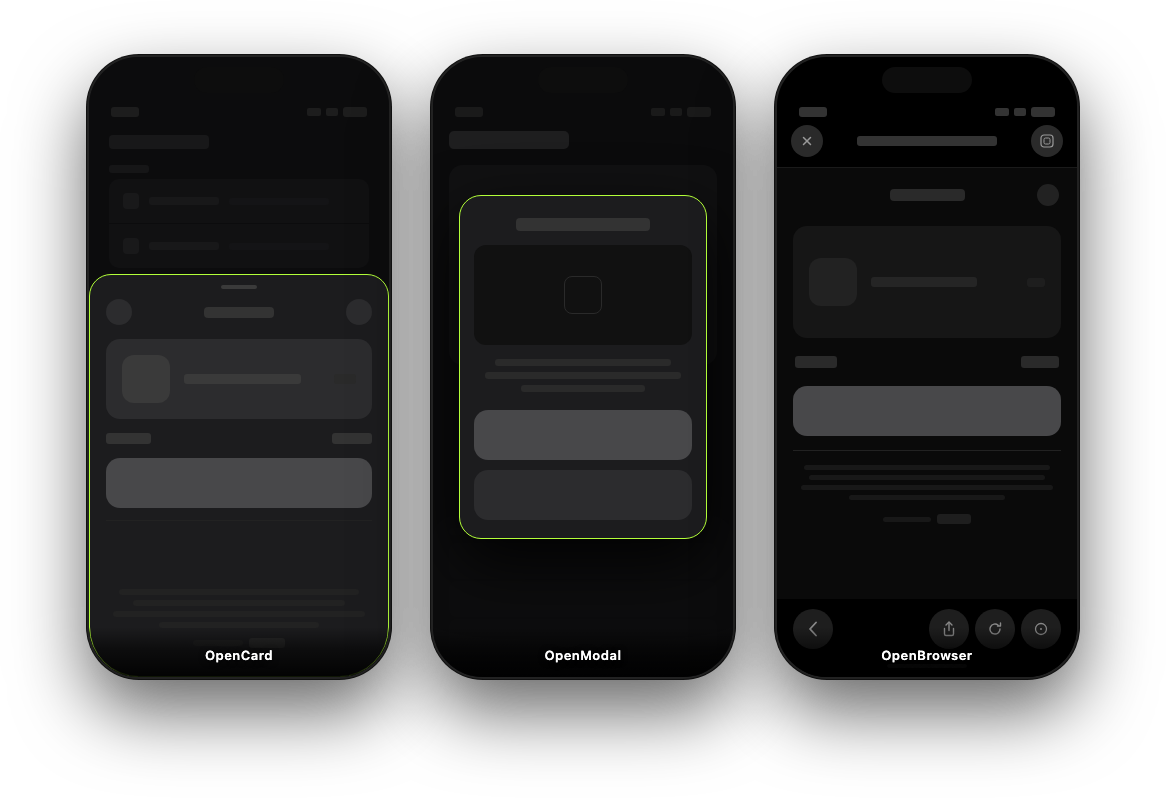
Drawer-style card: slides up from the bottom on phones, centered on tablets (Mimics native Apple Pay, Google Pay experience). Suited for Stash Pay payment links or channel selection. Integrating Stash Pay
Android
StashNativeCard.CardConfig config = new StashNativeCard.CardConfig();  // or null for defaults
StashNativeCard.getInstance().openCard("https://testcard.stashpreview.com", config);
iOS (Swift)
let config = StashNativeCardConfig()  // or nil for defaults
StashNativeCard.sharedInstance().openCard(withURL: "https://testcard.stashpreview.com", config: config)
iOS (Objective-C)
StashNativeCardConfig *config = [[StashNativeCardConfig alloc] init];  // or nil for defaults
[[StashNativeCard sharedInstance] openCardWithURL:@"https://testcard.stashpreview.com" config:config];Pass a CardConfig (or nil/null) to configure presentation. Pass nil/null for defaults.
| Aspect | Description |
|---|---|
| forcePortrait | true: card opens portrait-locked (separate activity on Android, portrait-only on iOS). false (default): card appears in current orientation as an overlay. |
| Phone | cardHeightRatioPortrait, cardWidthRatioLandscape, cardHeightRatioLandscape (0.1–1.0). |
| Tablet | tabletWidthRatioPortrait, tabletHeightRatioPortrait, tabletWidthRatioLandscape, tabletHeightRatioLandscape (0.1–1.0). |
| backgroundColor | Color hex string (e.g. #RRGGBB). When set, the sheet background follows that color instead of system light/dark. Keep unset for best experience. |
Background color: Use
backgroundColoronly when you need the native shell to match Stash Pay with a custom theme. For the default Stash theme, leave it unset so the standard light/dark experience stays aligned with the system.
Portrait Rotation: If using
forcePortrait, ensure your app supports portrait or can unlock to portrait while the card is shown.
Android
StashNativeCard.CardConfig config = new StashNativeCard.CardConfig();
config.forcePortrait = false;
config.cardHeightRatioPortrait = 0.68f;
// ... tabletWidthRatioPortrait, tabletHeightRatioPortrait, etc. (see table above)
stashNative.openCard(url, config);
iOS (Swift)
let config = StashNativeCardConfig()
config.forcePortrait = false
config.cardHeightRatioPortrait = 0.68
// ... tabletWidthRatioPortrait, tabletHeightRatioPortrait, etc. (see table above)
stashNative.openCard(withURL: url, config: config)| Event | Description |
|---|---|
| Payment Success | Called when the payment completes successfully. Includes detail about order in the callback payload. |
| Payment Failure | Called when the payment fails. |
| Dialog Dismissed | Called when the user dismisses the dialog. |
| External payment | Some payment methods requires transacting outside the app (Klarna, Bitcoin etc.). This callback fires when external payment flow has started. |
| Opt-In Response | Called when a channel selection response is received. |
| Page Loaded | Called when the page finishes loading (with load time in ms). |
| Network Error | Called when the page load fails (no connection, HTTP error, timeout). |
Set a listener (Android) or delegate (iOS) before calling openCard or openModal. Same callback interface is used for both.
Android — implement StashNativeCardListener (or extend StashNativeCardListenerAdapter to override only the callbacks you need):
StashNativeCard.getInstance().setActivity(this);
StashNativeCard.getInstance().setListener(new StashNativeCard.StashNativeCardListener() {
    @Override
    public void onPaymentSuccess(String order) {
        // Handle successful payment
    }

    @Override
    public void onPaymentFailure() {
        // Handle failed payment
    }

    @Override
    public void onDialogDismissed() {
        // User closed the card/modal
    }

    @Override
    public void onOptInResponse(String optinType) {
        // Channel selection response (e.g. "stash_pay", "native_iap")
    }

    @Override
    public void onPageLoaded(long loadTimeMs) {
        // Page finished loading
    }

    @Override
    public void onNetworkError() {
        // Load failed (no connection, HTTP error, or timeout)
    }

    @Override
    public void onExternalPayment(String url) {
        // Checkout opened an external URL (Such as Gpay, Klarna, Crypto.)
        // This means that the payment will be finalized in browser or other app and user will be redirected back using deeplinks.
    }
});
iOS (Swift) — set the delegate and implement StashNativeCardDelegate (all methods are optional):
StashNativeCard.sharedInstance().delegate = self
// In your class (e.g. ViewController):
extension YourViewController: StashNativeCardDelegate {
    func stashNativeCardDidCompletePayment(withOrder order: String?) {
        // Handle successful payment
    }
    func stashNativeCardDidFailPayment() {
        // Handle failed payment
    }
    func stashNativeCardDidDismiss() {
        // User closed the card/modal
    }
    func stashNativeCardDidReceiveOpt(in optinType: String) {
        // Channel selection response
    }
    func stashNativeCardDidLoadPage(_ loadTimeMs: Double) {}
    func stashNativeCardDidEncounterNetworkError() {
        // Load failed (no connection, HTTP error, or timeout)
    }
    func stashNativeCardDidRequestExternalPayment(with url: String) {
        // Checkout opened an external URL (Such as Gpay, Klarna, Crypto.)
        // This means that the payment will be finalized in browser or other app and user will be redirected back using deeplinks.
    }
}
iOS (Objective-C) — set the delegate and implement the optional protocol methods:
[StashNativeCard sharedInstance].delegate = self;

// In your class:
- (void)stashNativeCardDidCompletePaymentWithOrder:(NSString *)order {
    // Handle successful payment
}
- (void)stashNativeCardDidFailPayment {
    // Handle failed payment
}
- (void)stashNativeCardDidDismiss {
    // User closed the card/modal
}
- (void)stashNativeCardDidReceiveOptIn:(NSString *)optinType {
    // Channel selection response
}
- (void)stashNativeCardDidLoadPage:(double)loadTimeMs {}
- (void)stashNativeCardDidEncounterNetworkError {
    // Load failed
}
- (void)stashNativeCardDidRequestExternalPaymentWithURL:(NSString *)url {
    // Checkout opened an external URL (Such as Gpay, Klarna, Crypto.)
   // This means that the payment will be finalized in browser or other app and user will be redirected back using deeplinks.
}Centered modal on all devices. Same layout on phone and tablet; resizes on rotation. Suited for channel selection or an alternative checkout style. Stash Pay Opt-In
Android
StashNativeCard.ModalConfig config = new StashNativeCard.ModalConfig();  // or null for defaults
StashNativeCard.getInstance().openModal("https://testcard.stashpreview.com", config);
iOS (Swift)
let config = StashNativeModalConfig()  // or nil for defaults
StashNativeCard.sharedInstance().openModal(withURL: "https://testcard.stashpreview.com", config: config)
iOS (Objective-C)
StashNativeModalConfig *config = [[StashNativeModalConfig alloc] init];  // or nil for defaults
[[StashNativeCard sharedInstance] openModalWithURL:@"https://testcard.stashpreview.com" config:config];Pass a ModalConfig (or nil/null) to control dismiss behavior and sizing. Pass nil/null for defaults.
| Aspect | Description |
|---|---|
| Behavior | allowDismiss (default true). |
| Phone | phoneWidthRatioPortrait, phoneHeightRatioPortrait, phoneWidthRatioLandscape, phoneHeightRatioLandscape (0.1–1.0). |
| Tablet | tabletWidthRatioPortrait, tabletHeightRatioPortrait, tabletWidthRatioLandscape, tabletHeightRatioLandscape (0.1–1.0). |
| backgroundColor | Same optional HTML hex as on CardConfig / StashNativeCardConfig. Omit for SDK defaults. |
Android
StashNativeCard.ModalConfig config = new StashNativeCard.ModalConfig();
config.allowDismiss = true;
// ... phoneWidthRatioPortrait, phoneHeightRatioPortrait, tablet ratios, etc. (see table above)
stashNative.openModal(url, config);
iOS (Swift)
let config = StashNativeModalConfig()
config.allowDismiss = true
// ... phoneWidthRatioPortrait, phoneHeightRatioPortrait, tablet ratios, etc. (see table above)
stashNative.openModal(withURL: url, config: config)Same as openCard: same events and the same listener/delegate. Set it once as shown in the Callbacks section under openCard; it receives events for both card and modal calls.
Opens the URL in the platform browser (Chrome Custom Tabs on Android, SFSafariViewController on iOS). No in-app UI, no config, no callbacks. Use when you only need a simple browser view. openBrowser can also be used as a fall-abck method for openCard and openModal.
Android
StashNativeCard.getInstance().openBrowser("https://testcard.stashpreview.com");Optional: Keep-alive service (low-memory Android / Android Go devices)
When the user leaves your app for Chrome Custom Tabs or the system browser, Android may kill your app on memory pressure. You can opt in to a short foreground service that shows a low-priority notification and improves survival on budget / Android Go–class devices:
StashNativeCard.getInstance().setKeepAliveEnabled(true);
StashNativeCard.KeepAliveConfig cfg = new StashNativeCard.KeepAliveConfig();
cfg.notificationTitle = "Payment in progress";
cfg.notificationText = "Tap to return to the app";
cfg.notificationIconResId = R.drawable.ic_notification; // optional; use 0 for library default
StashNativeCard.getInstance().setKeepAliveConfig(cfg);- Default: keep-alive is off; no behavior change for existing apps.
- Manifest: the library merges
FOREGROUND_SERVICE,FOREGROUND_SERVICE_SHORT_SERVICE, and a non-exportedStashKeepAliveServicewithforegroundServiceType="shortService". You do not need to add these by hand. On Android 14+,shortServicehas a system-enforced time limit (about three minutes); the service is stopped when the user returns to your app (Activityresume). - Opt out of the merged service (e.g. policy reasons): in your app manifest, remove the library component, for example:
tools:node="remove"oncom.stash.stashnative.StashKeepAliveService(withxmlns:toolson the manifest root). - Notifications: the library does not add
POST_NOTIFICATIONS; on Android 13+ the notification may be hidden until your app requests that permission, but the foreground service can still run.
iOS (Swift)
StashNativeCard.sharedInstance().openBrowser(withURL: "https://testcard.stashpreview.com")
// Optionally dismiss when handling a deeplink:
StashNativeCard.sharedInstance().closeBrowser()
iOS (Objective-C)
[[StashNativeCard sharedInstance] openBrowserWithURL:@"https://testcard.stashpreview.com"];
// Optionally dismiss when handling a deeplink:
[[StashNativeCard sharedInstance] closeBrowser];
On iOS, closeBrowser() dismisses the Safari view. On Android, closeBrowser() is a no-op (Chrome Custom Tabs cannot be closed by the app).
Requirements, OS coverage, vendor notes, and edge cases for each platform are below.
| Attribute | Requirement |
|---|---|
| Minimum SDK | API 21 (Android 5.0 Lollipop) |
| Target SDK | API 34 (Android 14) |
| Compile SDK | 34 |
| Java Version | Java 8 (source/target), JDK 17 for build |
| Architecture | armeabi-v7a, arm64-v8a, x86, x86_64 |
| Android Version | API Level | Status | Compatibility Notes |
|---|---|---|---|
| Android 14 (Upside Down Cake) | 34 | Full | Target SDK |
| Android 13 (Tiramisu) | 33 | Full | |
| Android 12/12L | 31-32 | Full | |
| Android 11 | 30 | Full | Enhanced window insets (For phones with notch/camera cut-out) |
| Android 10 | 29 | Full | Added automatic dark mode support |
| Android 9 (Pie) | 28 | Full | |
| Android 8/8.1 (Oreo) | 26-27 | Full | |
| Android 7/7.1 (Nougat) | 24-25 | Full | |
| Android 6 (Marshmallow) | 23 | Full | |
| Android 5/5.1 (Lollipop) | 21-22 | Full | Minimum SDK |
| Android 4.4 and below | <=20 | Not Supported |
| Vendor / Skin | Compatibility | WebView Source | Notes |
|---|---|---|---|
| Google Pixel / Stock Android | Full | Google WebView (Play Store updates) | Reference implementation |
| Samsung (One UI / TouchWiz) | Full | Samsung Internet / Chrome WebView | No known issues |
| Xiaomi (MIUI) | Full | Chrome WebView | Some MIUI versions show "battery optimization" warnings, during browser flows. |
| OnePlus (OxygenOS) | Full | Chrome WebView | Stock-like behavior |
| Oppo (ColorOS) | Full | Chrome WebView | |
| Vivo (Funtouch OS) | Full | Chrome WebView | |
| Realme (Realme UI) | Full | Chrome WebView | |
| Huawei (EMUI, pre-2019) | Full | Google WebView | Huawei devices with Google Mobile Services |
| Huawei (HarmonyOS/EMUI, 2019+) | Partial | Huawei WebView | No Google Mobile Services; Chrome Custom Tabs unavailable; in-app WebView works |
| Honor (post-Huawei) | Full | Chrome WebView | Devices with GMS |
| Nokia (Android One) | Full | Google WebView | Stock Android, use keep-alive service recommended. |
| Motorola | Full | Chrome WebView | Near-stock Android |
| LG | Full | Chrome WebView | Legacy devices supported, use keep-alive service recommended. |
| Sony Xperia | Full | Chrome WebView | |
| ASUS (ZenUI) | Full | Chrome WebView | |
| Android Go Edition | Supported | Chrome WebView | Limited memory; may experience slower load times, use keep-alive service. |
| Amazon Fire OS | Partial | Amazon WebView | Non-standard WebView; openCard/openModal work; openBrowser falls back to system browser |
| Dependency | Version | Required | Purpose |
|---|---|---|---|
| androidx.appcompat:appcompat | 1.6.1+ | Yes | Activity/Fragment support |
| androidx.browser:browser | 1.7.0+ | Yes | Chrome Custom Tabs support (openBrowser) |
Core functionality (slide-up card, modal, WebView, animations, payment callbacks) works identically across all supported Android versions (API 21+). The following features have graceful fallbacks on older Android versions:
API 21-28 (Android 5.0-9.0)
- Dark mode: Not automatically detected. Light mode used as fallback.
- Window insets: Uses legacy status bar handling, there might be slight overlaps with menu/status bar on some devices or visual artefacts.
| Attribute | Requirement |
|---|---|
| Minimum iOS | iOS 13.0 |
| Swift Version | 5.5+ |
| Xcode | 13.0+ |
| Architecture | arm64, arm64e (devices), x86_64 (simulator) |
| iOS Version | Status | Notes |
|---|---|---|
| iOS 18.x | Full | Latest |
| iOS 17.x | Full | |
| iOS 16.x | Full | |
| iOS 15.x | Full | |
| iOS 14.x | Full | |
| iOS 13.x | Full | Minimum version |
| iOS 12 and below | Not Supported |
| Device Type | Status | Notes |
|---|---|---|
| iPhone (all models iOS 13+) | Full | Portrait/landscape, card slides from bottom |
| iPad | Full | Centered presentation, all orientations |
| iPad (Split View / Slide Over) | Full | Responsive layout |
| Mac (Catalyst) | Untested | Should work; not officially tested yet |
We test this library using BrowserStack App Automate devices. Supported environments are listed in the App Automate list of browsers and platforms.
Android
- Huawei (2019+ without GMS): openBrowser uses system browser instead of Chrome Custom Tabs; other features work normally.
- Android Go: Performance may vary on low-memory devices (<1GB RAM), please use the keep-alive service.
- WebView updates: Devices without Play Store may have outdated WebView.
- Android emulator (arm64-v8a, Apple Silicon): see Sample apps (GPU /
swanglenote)
iOS
- iOS 13: Automatic theme detection not available on iOS 13.0-13.3. Fixed in iOS 13.4
This package follows Semantic Versioning (major.minor.patch):
- Major: Breaking changes
- Minor: New features (backward compatible)
- Patch: Bug fixes
- Documentation: https://docs.stash.gg
- Email: developers@stash.gg