
The '''Daikin Emura FTXG-L''' air conditioner comes with a wifi module preinstalled that allows you to control it via internet. The solution provided by Daikin is a mobile app (very well designed) that allows you to control the air conditioner even remotely, exploiting the REST API of the wifi module.
Even if the system works, there are some problems:
- It is no possible to control the AC from a web browser. You must use the official mobile application. If your device is not supported or you are from a computer you can not control your air conditioner over the internet.
- To control your AC remotely from outside your lan, your requests must go through the Daikin server. The device response is slow because the system is based on polling request. (you can't set the ip of the AC on the mobile application)
- Even if the remote management system involves the use of an account with password, there is a big security issue, password and username can be accessed from inside your LAN with a GET request. (try basic_info request)
This project aims to provide 2 main things:
- unoffcial documentation of Daikin API needed to control the air conditioner
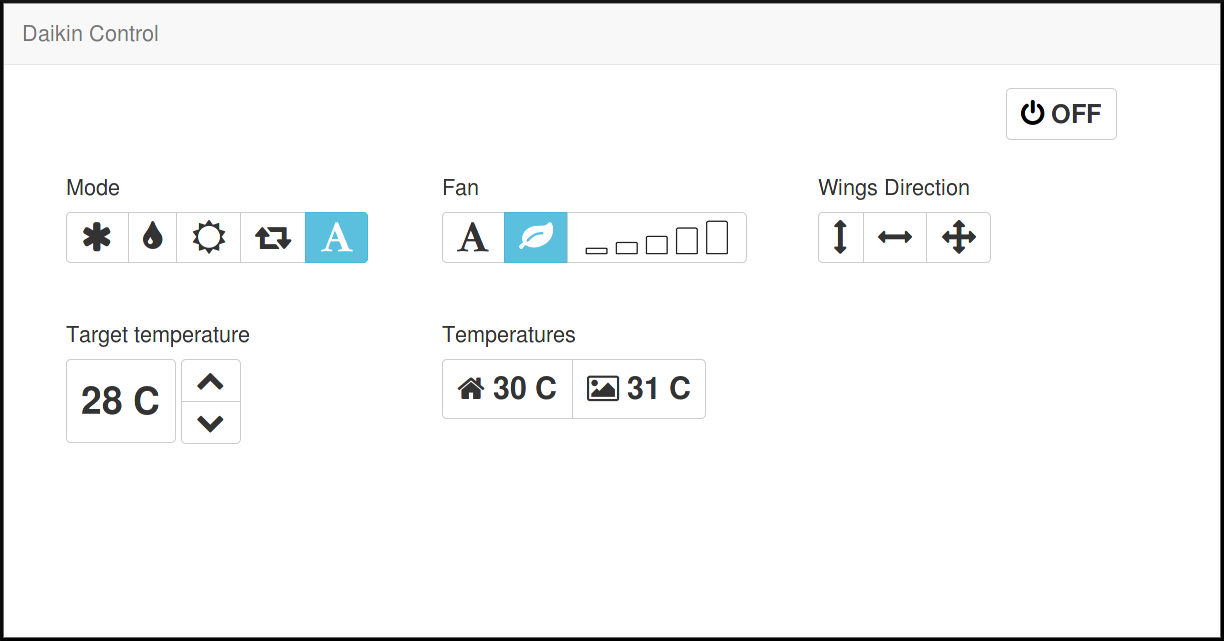
- web interface to manage air conditioner settings
##Tested Hardware
Throughout this document is to be considered valid for the following hardware configurations
Configuration A
ModelName:          Daikin Emura FTXG-L
ModelID:            FTXG35LV1BW
WifiControllerID:   BRP069A41 4P358711-2C
Software version:   1.4.3
Configuration B
ModelName:          Daikin FTXG
ModelID:            FTXJ50MW
WifiControllerID:   BRP069A41
Software version:   2.6.0
Please contact me if you try new configurations.
##API System
Daikin original API use REST.
When using configuration A, You can use GET http request to retrive informations and POST http request to apply new settings, in configuration B instead, you can use either GET or POST http requests both to read and write settings.
| Uri | GET (A) | POST (A) | GET/POST (B) | desc |
|---|---|---|---|---|
| /common/basic_info | X | X | Provides Daikin account information (security issue!), software version, mac address and generic info | |
| /common/get_remote_method | X | X | Provides information about polling system | |
| /common/set_remote_method | X | X | Set information on the polling system (reduce remote time update ??) | |
| /aircon/get_model_info | X | X | Provides model informarion | |
| /aircon/get_control_info | X | X | Main Uri to request all current status parameters | |
| /aircon/set_control_info | X | X | Main Uri to set status parameters ( control almost all) | |
| /aircon/get_sensor_info | X | X | Provides information on temperatures and sensors | |
| /aircon/get_timer | X | X | ? | |
| /aircon/set_timer | X | X | ? | |
| /aircon/get_price | X | X | ? | |
| /aircon/set_price | X | X | ? | |
| /aircon/get_target | X | X | ? | |
| /aircon/set_target | X | X | ? | |
| /aircon/get_week_power | X | X | Provides weekly runtime information | |
| /aircon/get_year_power | X | X | Provides yearly runtime information | |
| /aircon/get_program | X | X | ? | |
| /aircon/set_program | X | X | ? | |
| /aircon/get_scdltimer | X | X | Provides information about on/off weekly timer | |
| /aircon/set_scdltimer | X | X | Set information about on/off weekly timer | |
| /common/get_notify | X | X | ? | |
| /common/set_notify | X | X | ? | |
| /common/set_regioncode | X | X | ? | |
| /common/set_led?led=0 | X | X | Turns off/on the leds on the wireless adapter of the AC | |
| /common/reboot | X | X | reboot the AP | |
| /common/get_datetime | ? | ? | X | Gets information about date, time and DST settings |
| /aircon/get_scdltimer_info | ? | ? | X | Gets general informations about timer schedule on the AC |
| /aircon/set_scdltimer_info | ? | ? | X | Sets general informations about timer schedule on the AC |
| /aircon/get_scdltimer_body?target=1 | ? | ? | X | Gets detailed informations about timer schedule on the AC |
| /aircon/set_scdltimer_body?target=1 | ? | ? | X | Gets detailed informations about timer schedule on the AC |
| /aircon/get_day_power_ex?days=2 | ? | ? | X | Gets the power consumption of the last 2 days (in 0.1 kWh) |
| /aircon/get_week_power_ex | ? | ? | X | Gets the power consumption of current and last week (in 0.1 kWh) |
| /aircon/get_year_power_ex | ? | ? | X | Gets the power consumption of current and last year (in 0.1 kWh) |
| /aircon/set_special_mode | ? | ? | X | Sets special modes on the AC |
##Parameters ###Common parameters param name : lpw description: password to access the configuration ###"/common/set_control_info"
####Power param name : pow
description: represents the power state of the device
| value | desc |
|---|---|
| 0 | OFF |
| 1 | ON |
####Mode param name : mode
description: represents the operating mode
| value | desc |
|---|---|
| 2 | DEHUMDIFICATOR |
| 3 | COLD |
| 4 | HOT |
| 6 | FAN |
| 0-1-7 | AUTO |
####Temp param name : stemp
description: represents the target temperature
general accepted range 10-41
| mode | accepted range |
|---|---|
| AUTO | 18-31 |
| HOT | 10-31 |
| COLD | 18-33 |
device memorize last target temp state for each mode under dft* (dft1,dft2...) parameters. You can't set directly these.
####Fan rate param name : f_rate
description: represents the fan rate mode
| value | desc |
|---|---|
| A | auto |
| B | silence |
| 3 | lvl_1 |
| 4 | lvl_2 |
| 5 | lvl_3 |
| 6 | lvl_4 |
| 7 | lvl_5 |
device memorize last fan rate state for each mode under dfr* (dfr1,dfr2...) parameters. You can't set directly these.
####Fan direction param name : f_dir
description: represents the fan direction
| value | desc |
|---|---|
| 0 | all wings stopped |
| 1 | vertical wings motion |
| 2 | horizontal wings motion |
| 3 | vertical and horizontal wings motion |
device memorize last fan rate state for each mode under dfd* (dfd1,dfd2...) parameters. You can't set directly these.
####Humidity param name : shum
description: represents the target humidity
Daikin Emura FTXG-L does not support humidity related functionality.
device memorize last humidity state for each mode under dh* (dh1,dh2...) parameters. You can't set directly these.
Posting to set_control_info you can omit these param:
- adv
- dt*
- dh*
- dfr*
- dfd*
- b_mode
- b_stemp
- b_shum
- b_f_rate
- b_f_dir
- alert
minimal request example: pow=1&mode=1&stemp=26&shum=0&f_rate=B&f_dir=3
###"/common/set_led" ####Led Turns ON/OFF the leds on the WiFi controller (Power, Run, AP)
param name: led
| value | desc |
|---|
- | set to '0' (same as '0' value) 0 | Turns OFF the leds 1 | Turns ON the leds
###"/common/get_datetime" example response:
ret=OK,sta=2,cur=2016/12/11 12:0:33,reg=eu,dst=1,zone=313
###"/aircon/get_scdltimer_info" example response:
ret=OK,format=v1,f_detail=total#18;_en#1;_pow#1;_mode#1;_temp#4;_time#4;_vol#1;_dir#1;_humi#3;_spmd#2,scdl_num=3,scdl_per_day=6,en_scdltimer=1,active_no=1,scdl1_name=,scdl2_name=,scdl3_name=
Return parameters: param name: format should be 'v1' param name: f_detail Is 'total' param name: scdl_num The number of timer actions stored param name: scdl_per_day Is 6 in configuration B param name: en_scdltimer 0: timers are disabled 1: timers are enabled param name: active_no Number of target actually active (1, 2 or 3), the official app seems to use just target 1 param name: scdl1_name name of target 1 (the official app doesn't display and clears this field) param name: scdl2_name name of target 2 (the official app doesn't display and clears this field) param name: scdl3_name name of target 3 (the official app doesn't display and clears this field) ###"/aircon/set_scdltimer_info" for parameters, see get_scdltimer_info. It is possible to set: en_scdltimer, active_no, scdl1_name, scdl2_name or scdl3_name ###"/aircon/get_scdltimer_body" param name: target description: number of the set of timer to retrieve (between 1 and 3) example response:
ret=OK,format=v1,target=1,en_scdltimer=0,moc=0,tuc=0,wec=0,thc=0,frc=0,sac=0,suc=0
(no timers)
ret=OK,format=v1,target=1,en_scdltimer=1,moc=2,mo1=10-----0510-------,mo2=11423.00480A----10,tuc=0,wec=0,thc=0,frc=0,sac=0,suc=0
(2 timers: turn on on monday at 8:00, heating mode, 23°C, fan Auto, then turn off on monday at 8:30)
param name: moc, tuc, wec, thc, frc, sac, suc description: number of timer entries configured repectively for monday, tuesday, wednesday, thursdat, friday, saturday and sunday param name: XXY where XX can be chosen between 'mo', 'tu', 'we', 'th', 'fr', 'sa' and Y is an integer between 1 and 6. examples: mo1, mo2, fr1. description: shows the configuration of the timer Y on day XX. The configuration is composed as follows:
| Character # | Value |
|---|---|
| 1 | '0'=timer entry not active '1'=timer entry active |
| 2 | '0'=turn off AC '1'=turn on AC |
| 3 | mode: '1'->automatic '2'->dry '3'->cold '4'->heat '6'->vent |
| 4-7 | temperature (for heat, cold e auto) es. 25.0, for other modes: '----' |
| 8-11 | minutes from midnight on the specified day when the entry will be executed |
| 12 | fan speed: 'A'->automatic, 'B'->indoor silent mode '3'->level 1 '4'->level 2 '5'->level 3 '6'->level 4 '7'->level 5 (- when no fan is needed) |
| 13-16 | '----' (not used?) |
| 17-18 | '--' when turning off the AC, '10' when turning it on |
| ###"/aircon/set_scdltimer_body" | |
| sets the configuration of timers. Parameter meaning is the same as get_scdltimer_body. Needed parameters are: format (v1), target (1 if you want to be compatible with the official app), moc, tuc, wec, thc, frc, sac, suc. If count on any day is different from 0, there must be one configuration of type XXY for each entry (e.g. if suc=2, you must define both su1 and su2). Note that each time the command is executed, it overwrites the previous configuration for the target: there doesn't seem to be a way to modify an entry (for instance to enable/disable it). | |
| examples: |
/aircon/set_scdltimer_body?format=v1&target=1&moc=0&tuc=0&wec=0&thc=0&frc=0&sac=0&suc=0
(deletes all timer entries)
aircon/set_scdltimer_body?format=v1&target=1&moc=0&tuc=0&wec=0&thc=0&frc=0&sac=0&suc=2&su1=112----0015A----10&su2=101----0045-------
(sets 2 timer entries: on sunday at 00:15, turn on in dry mode; on sunday at 00:45, turn off. Both entries are enabled)
aircon/set_scdltimer_body?format=v1&target=1&moc=0&tuc=0&wec=0&thc=0&frc=0&sac=0&suc=1&su1=11424.00015A----10
(sets 1 timer entry on sunday at 00:15 it turns on the AC in heating mode with temperature of 24.0 °C, fan speed: AUTO)
aircon/set_scdltimer_body?format=v1&target=1&moc=2&tuc=0&wec=0&thc=0&frc=0&sac=0&suc=0&mo1=11325.01200A----10&mo2=00-----1230-------
(Sets 2 timer entries: on monday at 20:00, turn on in cool mode with temperature of 25.0 °C, fan speed: AUTO. On monday at 20:30, turn off; the second entry is disabled so it will not be executed).
###"/aircon/get_day_power_ex" param name: days description: the number of days for which power consumption will be returned, can be from 2 to 7. Different values will return the power for current and last day. Return parameters: param name: curr_day_cool, curr_day_heat, prev_1day_cool, prev_1day_heat, prev_2day_cool, prev_2day_heat, prev_3day_cool, prev_3day_heat, prev_4day_cool, prev_4day_heat, prev_5day_cool, prev_5day_heat, prev_6day_cool, prev_6day_heat description: returns the power consumption in 0.1 kWh for current to 6 day ago for cooling and heating, divided by hour, from 0 to 23. Example response:
ret=OK,curr_day_heat=0/0/0/0/0/0/0/0/0/0/0/0/3/6/1/0/0/0/0/0/0/0/0/0,prev_1day_heat=0/0/0/0/0/0/0/0/0/0/0/0/0/0/0/0/0/0/0/0/0/0/0/0,curr_day_cool=0/0/0/0/0/0/0/0/0/0/0/0/0/0/0/0/0/0/0/0/0/0/0/0,prev_1day_cool=0/0/0/0/0/0/0/0/0/0/0/0/0/0/0/0/0/0/0/0/0/0/0/0
(today's consumption for heating is 0.3 kWh between 12:00 and 13:00, 0.6 kWh between 13:00 and 14:00 and 0.1 kWh between 14:00 and 15:00) ###"/aircon/get_week_power_ex" return parameters: param name: s_dayw description: today's weekday (0 for sunday, 1 for monday and so on) param name: week_heat, week_cool description: returns the power consumption in 0.1 kWh for today and for 13 past days separated between heating and cooling example response:
ret=OK,s_dayw=0,week_heat=10/0/0/0/0/0/1/0/0/0/1/0/0/0,week_cool=0/0/0/0/0/0/0/0/0/0/0/0/0/0
###"/aircon/get_year_power_ex" param name: curr_year_heat, prev_year_heat, curr_year_cool, prev_year_cool returns the power consumption in 0.1 kWh for current and last year, separated by month, both for heating and for cooling. example response:
ret=OK,curr_year_heat=0/0/0/0/0/0/0/0/0/40/55/13,prev_year_heat=0/0/0/0/0/0/0/0/0/0/0/0,curr_year_cool=0/0/0/0/0/24/237/53/41/4/0/0,prev_year_cool=0/0/0/0/0/0/0/0/0/0/0/0
(Consumption for heating this year is 4 kWh in October, 5.5 kWh in November and 1.3 kWh in December, whereas consumption for cooling is 2.4 kWh in June, 23.7 kWh in July, 5.2 kWh in August, 4.1 kWh in September and 0.4 kWh in October, no power consumption last year). ###"/aircon/set_special_mode" This command can be used either specifying set_spmode and spmode_kind or specifying en_streamer. parameter: set_spmode description: if set to 0, the selected special mode is disabled, if set to 1, it is enabled parameter: spmode_kind description: selects which special mode should be enabled/disabled. Possible values for configuration B are:
| Value | Mode | Adv code |
|---|---|---|
| 1 | Power mode | ADV 2 |
| 2 | Econo mode | ADV 12 |
| parameter: en_streamer | ||
| description: enables ion streamer | ||
| Value | Mode | Adv code |
| :----: | ----- | - |
| 1 | Streamer enabled | ADV 13 |
| 0 | Streamer disabled | |
| Command examples: |
/aircon/set_special_mode?set_spmode=0&spmode_kind=1
Disables both econo and power modes
/aircon/set_special_mode?set_spmode=1&spmode_kind=1
Enables power mode
/aircon/set_special_mode?set_spmode=1&spmode_kind=2
Enables econo mode
/aircon/set_special_mode?en_streamer=1
Enables streamer
##Unsupported settings This list show which hardware functionality are not supported by API
- led brightness switch
##Useful resource
##Control Info Examples
Switched Off
ret=OK,pow=0,mode=7,adv=,stemp=24.0,shum=0,dt1=24.0,dt2=M,dt3=25.0,dt4=25.0,dt5=25.0,dt7=24.0,dh1=0,dh2=50,dh3=0,dh4=0,dh5=0,dh7=0,dhh=50,b_mode=7,b_stemp=24.0,b_shum=0,alert=255,f_rate=4,f_dir=0,b_f_rate=4,b_f_dir=0,dfr1=4,dfr2=5,dfr3=7,dfr4=5,dfr5=5,dfr6=5,dfr7=4,dfrh=5,dfd1=0,dfd2=0,dfd3=3,dfd4=0,dfd5=0,dfd6=0,dfd7=0,dfdh=0
Auto 25C ( CONFORT AIR ) ( INTELLIGENT EYE )
ret=OK,pow=1,mode=7,adv=,stemp=25.0,shum=0,dt1=25.0,dt2=M,dt3=22.0,dt4=25.0,dt5=25.0,dt7=25.0,dh1=0,dh2=50,dh3=0,dh4=0,dh5=0,dh7=0,dhh=50,b_mode=7,b_stemp=25.0,b_shum=0,alert=255,f_rate=A,f_dir=0,b_f_rate=4,b_f_dir=0,dfr1=4,dfr2=5,dfr3=4,dfr4=5,dfr5=5,dfr6=5,dfr7=4,dfrh=5,dfd1=0,dfd2=0,dfd3=0,dfd4=0,dfd5=0,dfd6=0,dfd7=0,dfdh=0
ret=OK,pow=1&dh2=50&dfd4=0&b_stemp=25.0&alert=255&f_dir=0&b_shum=0&dh4=0&dfd3=0&dh3=0&dfd2=0&dfr2=5&dfr7=B&dfr4=5&dfd7=0&dfrh=5&dt3=25.0&dfdh=0&adv=&dh5=0&dh1=0&dfr6=5&dt5=25.0&dfr1=B&stemp=25.0&shum=0&dfd6=0&f_rate=A&b_f_dir=0&dt1=25.0&dhh=50&dfd1=0&dfr3=5&dh7=0&mode=1&dfd5=0&b_mode=7&dt4=25.0&b_f_rate=A&dt7=25.0&dt2=M&dfr5=5
Hot 25c ( AIR silence )
ret=OK,pow=1,mode=4,adv=,stemp=25.0,shum=0,dt1=25.0,dt2=M,dt3=22.0,dt4=25.0,dt5=25.0,dt7=25.0,dh1=0,dh2=50,dh3=0,dh4=0,dh5=0,dh7=0,dhh=50,b_mode=4,b_stemp=25.0,b_shum=0,alert=255,f_rate=B,f_dir=0,b_f_rate=B,b_f_dir=0,dfr1=B,dfr2=B,dfr3=B,dfr4=B,dfr5=B,dfr6=B,dfr7=B,dfrh=5,dfd1=0,dfd2=0,dfd3=0,dfd4=0,dfd5=0,dfd6=0,dfd7=0,dfdh=0