$ cd tmux
$ ./setup.sh$ cd fish
$ ./setup$ cd zsh
$ ./setup- Mac save .bash_profile into home directory: /home/user/.bash_profile
- Linux save .bashrc into home directory: /home/user/.bashrc
Terminal colors can be picked from:
- (4-bit colors) http://ciembor.github.io/4bit/
- (8-bit colors) http://vim.wikia.com/wiki/Xterm256_color_names_for_console_Vim
- http://misc.flogisoft.com/bash/tip_colors_and_formatting
Below terminal colors stolen from: http://misc.flogisoft.com/bash/tip_colors_and_formatting
- Foreground Text Color
[38;5;<ColorNumber>m
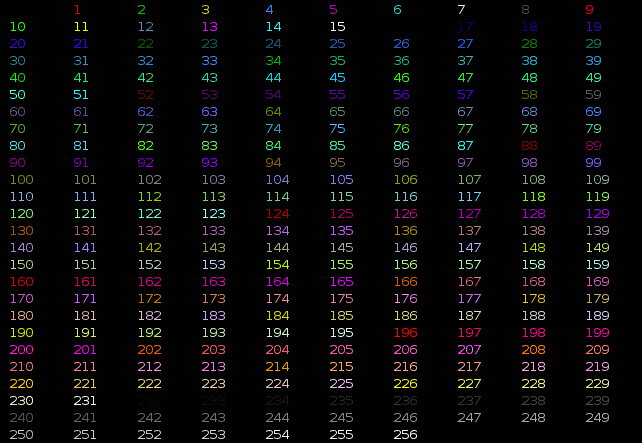
- Background Text Color
[48;5;<ColorNumber>m
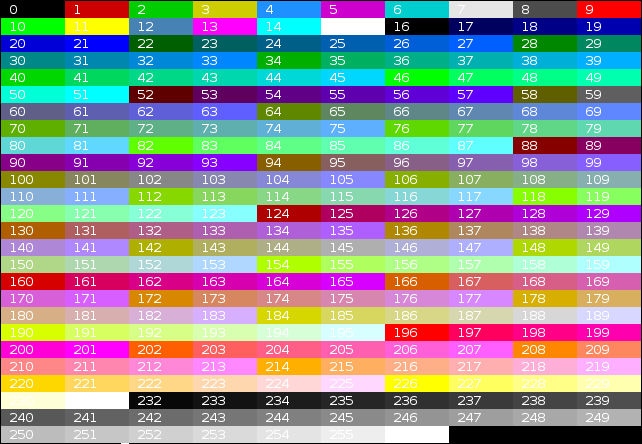
- Combine foreground and background
[38;5<ForegroundColorNumber>;48;5<BackgroundColorNumber>m
- Display all terminal colors
$ ./colors.shuse this script to show full colors
$ ./fullcolors.py$ sudo apt-get install most$ export PAGER="most"
or
$ export PAGER="/usr/bin/most -s"