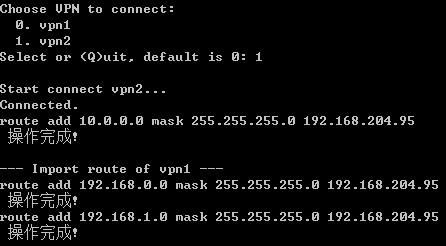
L2tp/pptp VPN on Windows will forward all packets to peer by default, which may be improper for normal flows. This program can connect VPN and add specific routes to remote peer. It tested with PYTHON3 on Windows.
Install packages.
pip install psutil xmltodict IPy
Create the vpn network adapter first. The name of adapter will be used in config file.

Uncheck the default route to peer.

Edit and save content blew to config file "vpninfo.xml".
<?xml version="1.0" encoding="utf-8"?>
<info>
    <vpn name="vpn1" server="x.x.x.x" username="username1" password="password1">
        <route>192.168.0.0/24</route>
        <route desc="description">192.168.1.0/24</route>
        <route disable="1">192.168.2.0/24</route>
    </vpn>
    <vpn name="vpn2" server="y.y.y.y" username="username2" password="password2" type="pptp" include_route='vpn1,vpn3'>
        <route>10.0.0.0/24</route>
    </vpn>
    <vpn name="vpn3" server="z.z.z.z" username="username3" password="password3" type="l2tp" disable="1">
        <route>172.16.0.0/24</route>
    </vpn>
</info>