This repository is archived and will no longer receive updates or maintenance.
Most of the features and ongoing work were done by noname08662, and development may continue in his repository instead: https://github.com/noname08662/awesome_wotlk
If you’re interested in future updates or improvements, follow that project.
- Optionally enables smooth, vector-based font rendering, reducing pixelation for text such as damage numbers or unit names.
- BugFix: clipboard issue when non-english text becomes "???"
- Auto Login (Through cmdline/shortcuts, Usage:
Wow.exe -login "LOGIN" -password "PASSWORD" -realmlist "REALMLIST" -realmname "REALMNAME")- Changing cameras FOV
- Improved nameplates sorting
- Backported
cursormacro conditional- Implemented
playerlocationmacro conditional- Fixed client bug where client couldnt cast second ability after changing form or stance, now
/cast battle stance /cast chargeworks in a single click- New API:
- C_NamePlate.GetNamePlates
- C_NamePlate.GetNamePlateForUnit
- C_NamePlate.GetNamePlateByGUID
- C_NamePlate.GetNamePlateTokenByGUID
- C_VoiceChat.SpeakText
- C_VoiceChat.StopSpeakingText
- C_VoiceChat.GetTtsVoices
- C_VoiceChat.GetRemoteTtsVoices
- C_TTSSettings.GetSpeechRate
- C_TTSSettings.GetSpeechVolume
- C_TTSSettings.GetSpeechVoiceID
- C_TTSSettings.GetVoiceOptionName
- C_TTSSettings.SetDefaultSettings
- C_TTSSettings.SetSpeechRate
- C_TTSSettings.SetSpeechVolume
- C_TTSSettings.SetVoiceOption
- C_TTSSettings.SetVoiceOptionByName
- C_TTSSettings.RefreshVoices
- UnitIsControlled
- UnitIsDisarmed
- UnitIsSilenced
- GetInventoryItemTransmog
- FlashWindow
- IsWindowFocused
- FocusWindow
- CopyToClipboard
- UnitOccupations
- UnitOwner
- UnitTokenFromGUID
- GetSpellBaseCooldown
- GetItemInfoInstant
- QueueInteract- New events:
- NAME_PLATE_CREATED
- NAME_PLATE_UNIT_ADDED
- NAME_PLATE_UNIT_REMOVED
- NAME_PLATE_OWNER_CHANGED
- VOICE_CHAT_TTS_PLAYBACK_STARTED
- VOICE_CHAT_TTS_PLAYBACK_FINISHED
- VOICE_CHAT_TTS_PLAYBACK_FAILED
- VOICE_CHAT_TTS_SPEAK_TEXT_UPDATE (unused)
- VOICE_CHAT_TTS_VOICES_UPDATE- New CVars:
- nameplateDistance
- nameplateStacking
- nameplateXSpace
- nameplateYSpace
- nameplateUpperBorder
- nameplateOriginPos
- nameplateSpeedRaise
- nameplateSpeedReset
- nameplateSpeedLower
- nameplateHitboxHeight
- nameplateHitboxWidth
- nameplateFriendlyHitboxHeight
- nameplateFriendlyHitboxWidth
- interactionMode
- interactionAngle
- nameplateStackFriendly
- nameplateStackFriendlyMode
- nameplateMaxRaiseDistance
- nameplateExtendWorldFrameHeight
- nameplateUpperBorderOnlyBoss
- enableStancePatch
- cameraIndirectVisibility
- cameraIndirectAlpha
- ttsVoice
- ttsSpeed
- ttsVolume
- MSDFMode- New Interaction Keybind:
- It loots mobs, skins mobs, interacts with near object like veins, chairs, doors, etc, mailboxes, etc.
- You can keybind this in options menu like any other keybind (Requires Interaction Addon, bundled in release rar)
- You can macro this using /interact, interact should also support some modifiers like @mouseover - /interact [@mouseover], blizzard rules apply- New Nameplate Stacking:
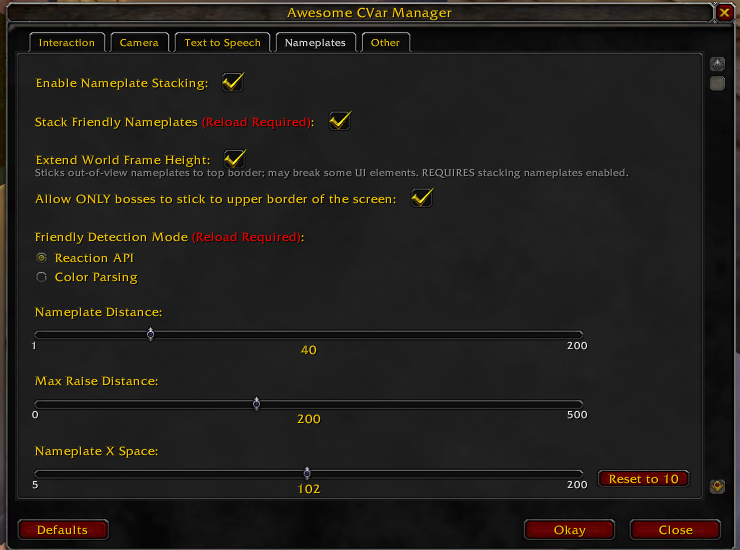
- enable stacking nameplates by doing /console nameplateStacking 1 - /reload recommended after both disabling or enabling
- remember to delete this weakaura https://wago.io/AQdGXNEBH if you are using it and restarting client before using this feature
- see docs for more cvar details
- everything configurable in /awesome (addon)
See Docs for details
Recommended to use AwesomeCVar addon and use ingame command /awesome to configure all cvars
AwesomeCVar Addon
- Download latest release
- Unpack files to root game folder
- Launch
AwesomeWotlkPatch.exe, you should get a message (or drag wow.exe on top of AwesomeWotlkPatch.exe) - To update just download and replace dll