Malware NotPetya
when analyzing the traffic when the malware tries to exploit a vulnerable machine by using the security flaw ms17-10, i observed something interesting :

Here the string "\123.12.31.2\IPC$", maybe its static
when finding this string in the source of malware, effectively i found that the malware uses that string during the first scan for vulnerable machine (a null session of smbv1).
"u)u)uDuGuFu[uDuGu[uFuDu[uGu)u<u%u6uQuuuJJJJJu" xor 0x75 => "\ \ 1 2 3 . 1 2 . 3 1 . 2 \ I P C $ ?????"
the dns resolution of 123.12.31.2 gives "hn.kd.ny.adsl", its impossible for having a null session to that domain inside a network ????
So in order to detect the exploit used by notpetya, you can create a rule in IDS or IPS or any equipement that can detect the string "\123.12.31.2\IPC$" during a null session :)
Hi all,
Its the first time i write a small tutorial on a malware; i would like to share with you all the information that i did on the sample of petya that i believe you have already heard a little about that recently.
I analysed the malware and here i provide you the actions of this malware in chronological order : (combine with some informations that i got from the article published by Microsoft)
-
first, check the presence of file having the same name of the payload but without extension. For ex: if the malware is launched avec an account admin like : rundll32 c:..\temp\perfc.dat,#168, the malware will check if there is a file "perfc" in the c:\windows, if there is, it stops its execution
==>>>>>>>>>>>>>> the kill switch is here :) so the kill switch is the original name of payload but without extension :)
-
second, create a scheduled task that will shutdown the computer in nearly one hour
-
third, the propagation or infection : i provide you the pcap file that logged the traffic passed from an infected machine. you will understand right away how this malware does its propagation :)
- use psexec/wmi to install and launch the same payload on the machine found by using NetServerEnum or GetIpNetTable :) . if it fails, it waits for some minutes before using the 2 exploits Eternalbue and ETERNALROMANCE.
- at the same time, it scans the local network like "192.168.56.1" "192.168.56.2" .. "192.168.56.255" to find another target:
-
third, the encryption :
- first, it erase the MBR (master boot record) and overwrite with the code that will be executed once the machine is shutdown :), this taks will fail if the payload is not run as admin.
- second, it replace the file with the specific extensions with the encrypted content without changing the file name :) (AES 128), and only data on the static disk are concerned, no on usb or network disks
So, the kill switch is just a check of its presence before launching the attack :) but its an effective counter measure for this malware :)
file is downloaded from here https://github.com/sieutruc/malware
result_folder.txt is the changement of file/folder inside c:\windows if the kill switch is not implemented on the machine to test. in this case you see all the files that were created by the malware on the machine to test
result_folder_1.txt is the changement of file/folder inside c:\windows if the kill switch is implemented on the machine to test. in this case only the payload is created by the malware and there is no infection :)
here i tested with the payload named pet1.dll :)) (rundll32 pet1.dll,#1), you can test with the name as you like.
For information conerning about how to find kill switch: open the payload in idapro and assume that i launch the malware as "rundll32.exe c:\temp\perfc.dat,#1"
perfc_1 is the name of the function "ordinal 1"
take a look and we land at this function :
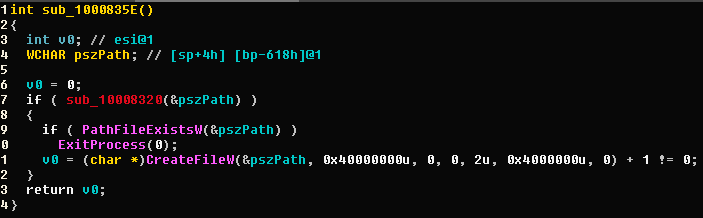
so if sub_10008320(&pszPath) returns true and PathFileExistsW(&pszPath) return also true, the malware will stop the execution.
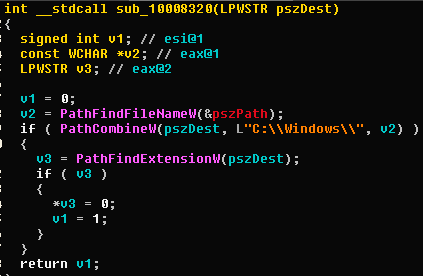
Look at sub_10008320 with the argument pszPath="c:\temp\perfc.dat"
- concatenate "c:\windows" with the filename of payload , here is "perfc.dat"; so we have "c:\windows\perfc.dat"
- check the filename has extension
- if yes, assign the "0x00" to get only the filename without extension and return true
- if no, keep the filename and return false so in my case, after that function pszPath gets the value "c:\windows\perfc" that is passed to the function "PathFileExistsW"
So the killswith is the check whether the malware run already :)))
if i run the payload like "rundll32.exe c:\temp\toto.dat,#1" , the kill switch will be the presence of the file "c:\windows\toto"
if i run the payload like "rundll32.exe c:\temp\toto,#1" , the kill switch does not work.