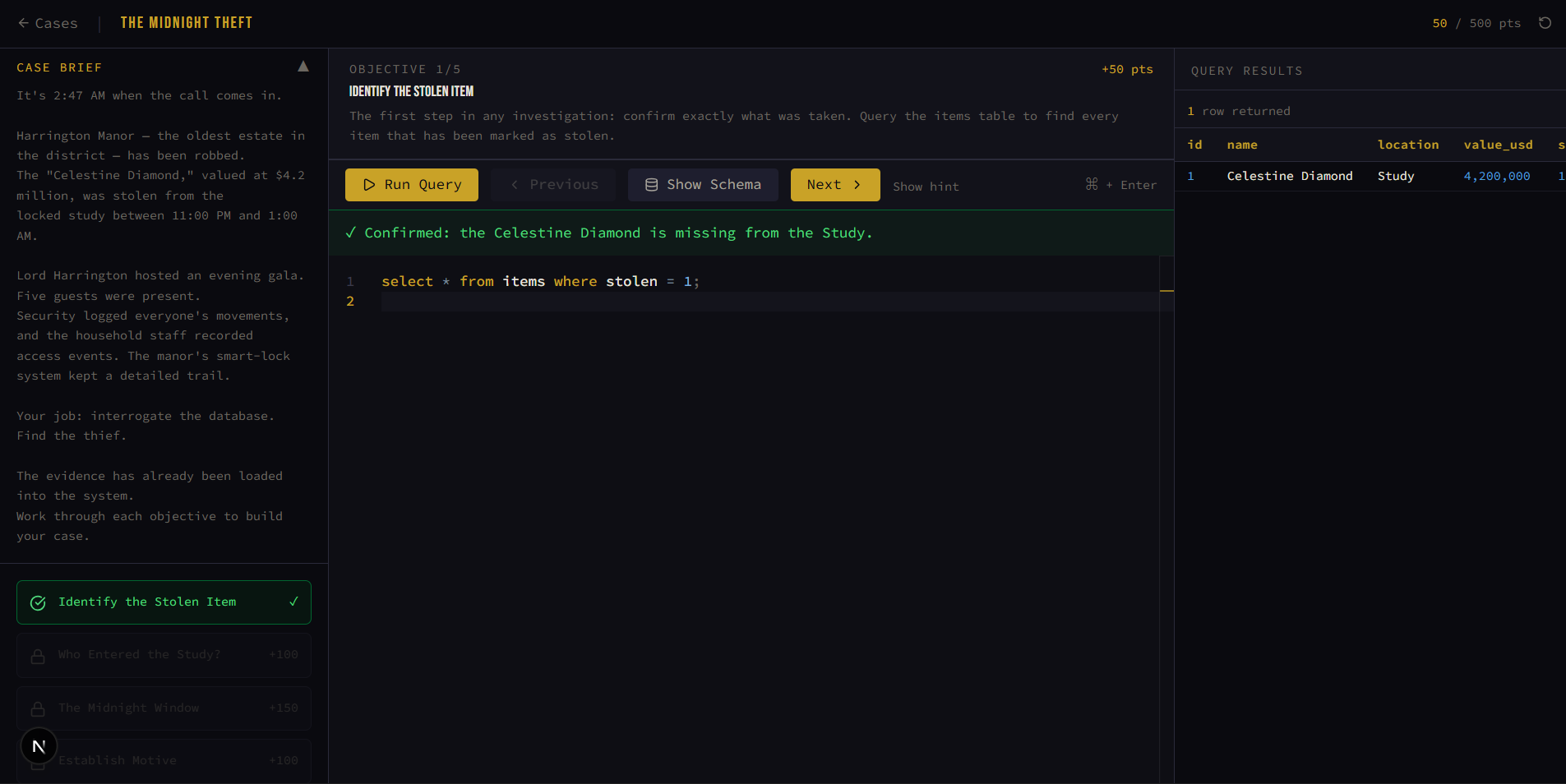
A gamified SQL learning platform built with Next.js 15 (App Router), sql.js, and Monaco Editor. Players solve police cases by writing SQL queries against an in-browser SQLite database.
- Gamified Learning: Engage players with interactive police cases.
- SQL Query Practice: Write SQL queries to solve crimes.
- In-Browser Database: Use sql.js for an in-browser SQLite database.
# 1. Install dependencies
npm install

# 2. Copy the sql.js WASM file so it's served at /sql.js/sql.wasm
mkdir -p public/sql.js
cp node_modules/sql.js/dist/sql.wasm public/sql.js/sql.wasm

# 3. Run dev server
npm run dev
# → http://localhost:3000
Why the WASM copy? sql.js needs its WebAssembly binary at runtime. Next.js serves everything under
public/as static assets, so copying it there is the simplest way to make it available without a custom webpack loader.
src/
├── app/
│   ├── layout.tsx            # Root layout — fonts, dark class, globals.css
│   ├── page.tsx              # Landing page — case board grid
│   ├── globals.css           # Tailwind v4 + shadcn vars + noir theme
│   └── case/
│       └── [caseId]/
│           └── page.tsx      # Dynamic case route (server component)
│
├── components/
│   ├── GameShell.tsx         # Main game orchestrator (client)
│   ├── MonacoEditor.tsx      # Lazy-loaded Monaco with custom noir theme
│   ├── ResultsTable.tsx      # Query result renderer
│   ├── MissionPanel.tsx      # Sidebar mission card
│   └── VictoryModal.tsx      # Case-solved overlay
│
├── data/
│   └── cases.ts              # All case definitions (schema, seed, missions)
│
├── hooks/
│   └── useSqlDatabase.ts     # sql.js lifecycle hook (init, run, reset)
│
└── lib/
    └── utils.ts              # shadcn cn() utility
┌─────────────────────────────────────────────────────┐
│  Next.js App Router                                  │
│                                                      │
│  / (page.tsx)          → Case Board (static)         │
│  /case/[caseId]        → Server resolves case data   │
│       └── GameShell    → Client boundary             │
│            ├── useSqlDatabase  (sql.js hook)         │
│            ├── MonacoEditor    (code input)          │
│            ├── ResultsTable    (output display)      │
│            ├── MissionPanel    (sidebar progress)    │
│            └── VictoryModal    (completion)          │
└─────────────────────────────────────────────────────┘

Data flow:
  Player types SQL → Monaco → GameShell.handleRun()
       → useSqlDatabase.run() → sql.js (in-memory SQLite)
       → QueryResult → ResultsTable (display)
                      → mission.validate() → feedback banner
                      → if pass → advance mission / show victory
| Decision | Why |
|---|---|
| sql.js (not better-sqlite3) | Runs entirely in the browser — no backend, no API routes, instant feedback. |
| Monaco lazy-loaded | @monaco-editor/react is heavy (~2 MB). Dynamic import() keeps the initial page load fast. |
| Case data as pure TS | No database or CMS needed. Cases are just typed objects — easy to version-control, fork, and extend. Validators run client-side. |
| Single dark theme | The noir aesthetic is core to the brand. No light mode toggle needed. |
| Tailwind v4 + shadcn | CSS variables make theming trivial. shadcn components can be added as needed (npx shadcn add <component>). |
- Open
src/data/cases.ts - Define a new
CaseDataobject following the existing pattern:- Write
schema(CREATE TABLE statements) - Write
seedData(INSERT statements) — include planted clues - Define
missions[]— each has abriefing,hint,requiredColumns,minRows, and avalidatefunction
- Write
- Push it into the
casesarray - Unlock it on the landing page (currently only index 0 is clickable — adjust the
isLockedlogic inpage.tsx)
The validate function receives the query result as an array of plain objects:
validate: (rows) => {
  // rows = [{ name: "Alice", age: 30 }, ...]
  const found = rows.some(r => r.name === "Alice");
  return {
    pass: found,
    feedback: found ? "Found Alice!" : "Alice should be in your results."
  };
}- Keep validators lenient — accept multiple valid query approaches
- Use
requiredColumnsfor a quick structural check before the custom logic runs - Award partial credit by splitting complex objectives into smaller missions
The noir palette is defined as CSS custom properties in globals.css:
| Variable | Value | Usage |
|---|---|---|
--primary |
#c9a227 |
Gold — headlines, active states, CTA buttons |
--accent |
#d94f4f |
Blood red — clue highlights, time values |
--background |
#0a0a0f |
Deep black |
--card |
#12121a |
Panels, editor background |
--muted-foreground |
#6b6760 |
Body text, placeholders |
Monaco's theme (sql-noir) mirrors these variables so the editor feels native to the app.
| Package | Role |
|---|---|
next 15 |
Framework (App Router, RSC) |
sql.js |
In-browser SQLite via WebAssembly |
@monaco-editor/react |
Code editor with SQL syntax highlighting |
tailwindcss v4 |
Utility-first CSS |
shadcn/ui |
Accessible UI primitives |
lucide-react |
Icon set |
typescript |
Type safety |