



Tracker Blocker is a browser extension which works across multiple browsers to prevent online trackers from tracking your activity across your web visits. For more details read the technical spec based on which this product was built and the flow diagram of the product.
Also refer to the technical deviations from tech spec section below to take a note of the changes which were done in implementation phase and the reasons for them.
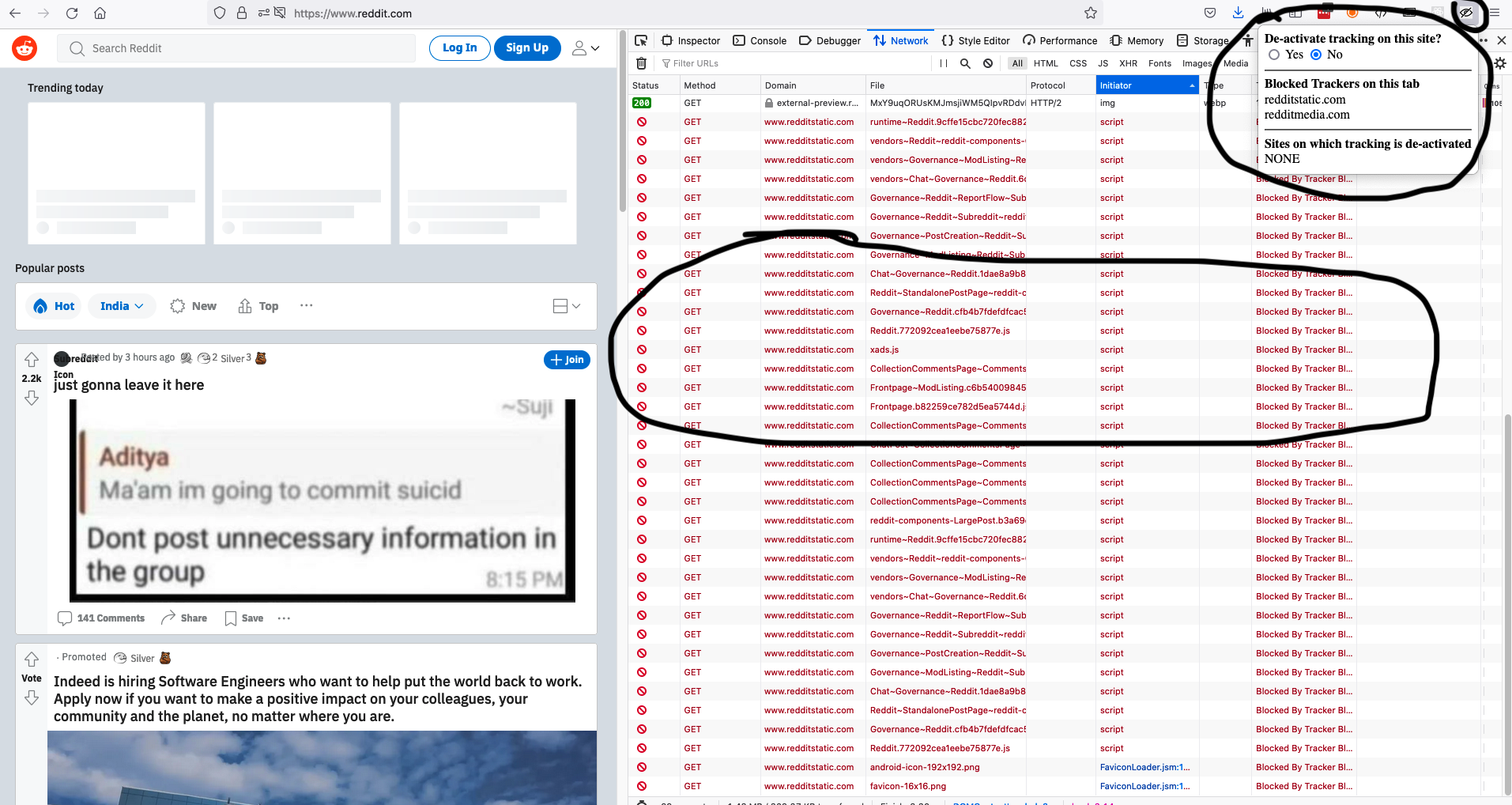
Watch the video of this extension running on Firefox.
- Clone the project from github
- Run
npm install - Run
npm run build-dev - Open the browser you want to run the extension in and load unpacked files from dist folder. In case of firefox a zip file is needed which can be found in the builds folder as build.zip. For details of running the extension in a particular browser, see below documentation.
To create the production build (optimised) run - npm run build-prod
Follow the below documentation to run the extension in different browsers
npm run build-dev- To run webpack develoment buildnpm run build-prod- To run webpack production buildnpm run test- To run jest unit testsnpm run lint- To run eslint onsrcfoldernpm run format- To run prettier onsrcfolder
This project needs node versions >= 12.x.x and npm >= 7.x.x
- Currently the blocked trackers are internally tracked and displayed to the user in the extension popup at a
tablevel. Hence if user is navigating to multiple sites in the same tab, user will see the entire blocked tracker history of that tab. Can add a feature for user to see which trackers are blocked on the currently opened site. - Edge case where fetch request for tracker list fails is not handeld. Need to add a retry mechanism in this case which can retry the fetch request periodically for fixed number of times in case of failure.
- The build is not tested in Safari since running a local build in Safari needs a Xcode build (macOS / iOS app). However since this project uses the standard WebExtensions APIs which are supported in Safari (>= 14), the code can be extended to create a build for Safari.
- This extension is tested in Firefox, Chrome, Edge browsers. However, an exhaustive testing across different versions of these browsers needs to be done by using tools like BrowserStack.
- Currently
beacontype requests are not intercepted. This is because chromium based browser usepingand do not supportbeacon. A conditional browser based check needs to be added to supportbeaconrequest on Firefox. - This extensions has not been tested on mobile version of browsers.
Technical deviations from tech spec and reasons
- Jest is used as the testing framework instead of Karma and Jasmine which was originally proposed in the tech spec. This decision was taken because of easier and quicker setup of Jest and also faster running of tests in node environment rather than spawning a browser.
- Tracker matching function made as a utility (
utils/trackerUtils.js) rather than making it part of tracker model (models/trackers.js). This decision was taken so as to keep the matching utility pure and avoid any class variables / external dependencies (like tracker list) / side effects (like updating tracker logs etc). This makes the utility pure and easily testable by providing a range of inputs (utils/trackerUtils.test.js). Since this logic is the core functionality of the extension, it is critical to keep it easily testable. Currently unit tests are written for various scenarios (14 scenarios currently). Adding more logic and scenarios in this utility needs these tests to be executed (they are auto executed in pre-commit hook and in github actions) to ensure that none of the existing conditions are breaking. background.jsis split intoevents.jsandalarms.jsfor more modularity and readability.
- Javascript (ES6 with babel transpilation)
- Build process using webpack and loaders (babel-loader) and plugins (terser-webpack-plugin, filemanager-webpack-plugin, copy-webpack-plugin)
- ESlint with airbnb plugin to follow standard coding guidelines
- Prettier to follow standard code formatting
- Unit tests for core utilities with Jest and babel-jest plugin
- Github actions integration to run unit tests
- Pre-commit checks using husky and lint-staged to prevent accidental commits without linting / formatting / testing.
- Tracker list is currently hosted via github pages. In production environment, this needs to be moved to a more scalable system like CDN backed by a highly availabile and scalable storage like S3.
- Need to add a script which can be automated to run periodically to fetch trackers from tracker-radar-data and upload them to tracker list.
- Add Commit lint for standardizing commit messages and auto updating package version based on commit type.
- Add Semantic release for managing versions of package.
- Enhance unit test coverage of
models/trackers.js,utils/tabUtils.js,events.js,alarms.js,popup.js. - Add test coverage reports through Jest.
- Setup end to end tests using Selenium, Codecept or Cypress.
- Add JSDoc integration with Github actions to collate all documentation from the source code into a separate folder.
- Use integrations with cross browser testing tools like BrowserStack to automatically test the extension in multiple browser environments.
- Integrate with open source tools like self hosted Sentry for error monitoring
- Integrate with a backend service to capture logs like blocked tracker logs, performance logs and user events for analytics purposes.
- The
regenerator-runtime/runtimescript needs to be added as entry script in webpack rather than importing it in all files. This script is needed to support features likeasync awaitin certain browsers.
- https://developer.mozilla.org/en-US/docs/Mozilla/Add-ons/WebExtensions/API
- https://developer.mozilla.org/en-US/docs/Mozilla/Add-ons/WebExtensions/API/webRequest
- https://github.com/duckduckgo/duckduckgo-privacy-extension
- https://github.com/EFForg/privacybadger
This project was developed in VS Code IDE. However any IDE can be used for further contributions. The extensions used for ease of development are listed below. As a further step the .vscode config folder can be committed to the github repository to follow a uniform development environment across contributors of the project.
Further improvements can be done to enhance privacy of users by preventing fingerprinting, disabling FLoC API, click to load feature for social widgets, using surrogate scripts to prevent sites from breaking, allowing user to report broken pages etc. These are listed in the Future Scope section in the technical document.