(EN)
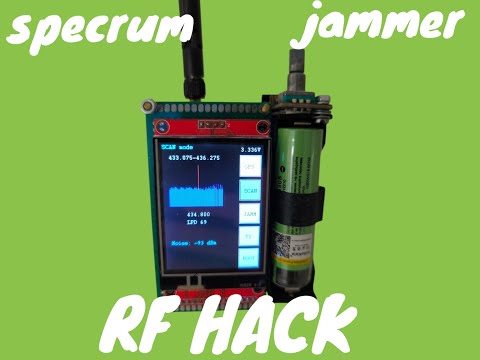
A platform for testing wireless transmission and radio interfaces
Currently supports:
- Sub-GHz CC1101 TI transceiver
- GPS module GY-NEO-6M-V2
- 2.4GHz NRF24L01+ (under implementation)
Interaction with the software takes place through the ILI9341 display + xpt2046 touchscreen + encoder or CLI interface
Performs:
- reception with GPS coordinates display;
- transmission and reception in the Sub-GHz range of the test string;
- range scanning mode with spectrum output on the display
(РУС)
Платформа для тестирования беспроводной передачи и радиоинтерфейсов
На текущий момент поддерживает:
- Sub-GHz приёмопередатчик СС1101 TI
- GPS модуль GY-NEO-6M-V2
- 2.4 ГГц nrf24l01+ (в процессе реализации)
Взаимодействие с ПО происходит через дисплей ILI9341 + тачскрин xpt2046 + энкодер мли CLI.
Осуществляет:
- прием и отображение GPS-координат;
- передачу и прием в Sub-GHz диапазоне тестовой строки;
- режим сканирования диапазона с выводом спектра


Video on youtube:
STM32F401CC, High-performance access line, Arm Cortex-M4 core with DSP and FPU, 256 Kbytes of Flash memory, 84 MHz CPU, ART Accelerator
Batch Runner - to run from VSCode
How to enable float support for std withdrawal: https://stackoverflow.com/questions/54534700/enabling-floating-point-emulation-in-gcc-arm-none-eabi
The frequency of the APB1 (SPI2) bus was reduced four times, otherwise there were problems with the transmission power of CC1101 (the frequency of exchange with CC1101 is no more than 10 Mhz)
GCC (gcc-arm-none-eabi) version 5.4.1 20160919
-
Download GNU Arm Embedded Toolchain https://developer.arm.com/downloads/-/gnu-rm#:~:text=The%20GNU%20Arm%20Embedded%20Toolchain,Arm%20Cortex%2DR%20processor%20families or https://launchpad.net/gcc-arm-embedded/+download
-
Download Windows Build Tools binaries (Make, cp, rm, echo, sh...) https://github.com/xpack-dev-tools/windows-build-tools-xpack/releases/
-
Add paths to the PATH environment variable in Windows
Detailed article: https://habr.com/ru/articles/673522/
Prototreads AD v1.4
VS Code file Pac-ManGame.code-workspace
The build can be started via VSCode Tasks
To make the release project run makeProject.bat (OR make -j cmd command)
To make the debug project run makeProjectDebug.bat (OR make -j1 debug cmd command)
To clean the project run makeClean.bat (OR make clean)
Connect ST-Link V2 to SWD connector. Run programFlash.bat
UART CLI-> BOOT command to launch the system bootloader. Connect to PC via USB Type C. Run updateFirmware.cmd or launch STM32CubeProgrammer (select the desired COM-port and download the firmware).
USB-UART 115200 Baud rate
Terminal configuration file: utils\TERATERM.INI
Enter help command
Cppcheck 2.10 https://cppcheck.sourceforge.io/
Run RunStaticAnalysisCODE.cmd
It is possible to output the analysis result to a file
- Black pill STM32F401CC
- CC1101 module
- GY-NEO-6M-V2 GPS module
- 2.8 TFT SPI 240x320 display (ILI9341)
- TP4056 charge module with protection
- Battery 18650 li-ion
- CH340N USB-UART module (Optional for updating firmware via USB Type-C and working with CLI)
- P-MOSFET for power switch

Work in the repository is carried out through the Git-flow branching model
Run the generateRelease.bat to automatically generate an archive with the software