


This is an n8n community node for integrating SendZen with your workflows.
SendZen provides an API on top of the official WhatsApp Cloud API, so you can send messages (session + templates) and receive inbound WhatsApp messages via webhooks.
- Website: https://www.sendzen.io
- Docs: https://sendzen.io/docs
- Overview
- Installation
- Authentication
- Features
- How to Use the SendZen Action Node
- How to Use the SendZen Trigger Node
- Common Use Cases
- Best Practices
- Troubleshooting
- Compatibility
- Resources
- Running Locally
- Contributing
- Support
- License
SendZen helps developers and software platforms use WhatsApp reliably without dealing with all the Meta Cloud API complexity directly.
With this n8n node, you can:
- Send session messages (within 24-hour customer care window)
- Send template messages (for business-initiated conversations)
- Mark messages as read
- Show typing indicator
- Receive inbound messages via webhook trigger
Follow the installation guide in the n8n community nodes documentation.
To use this node, you need a SendZen API Key.
- Sign up at https://www.sendzen.io
- Go to your dashboard and generate an API key (Dashboard → API Keys)
- Connect your WhatsApp Business Account (WABA) inside SendZen (required to send messages)
Note: Keep your API key secure and never commit it to code or share it publicly.
- This node sends message content, recipient phone numbers, template names, and template variables to SendZen to deliver WhatsApp messages.
- Store your SendZen API key only in n8n Credentials.
- For inbound messages, enable webhook signature verification (recommended) to prevent spoofed requests.
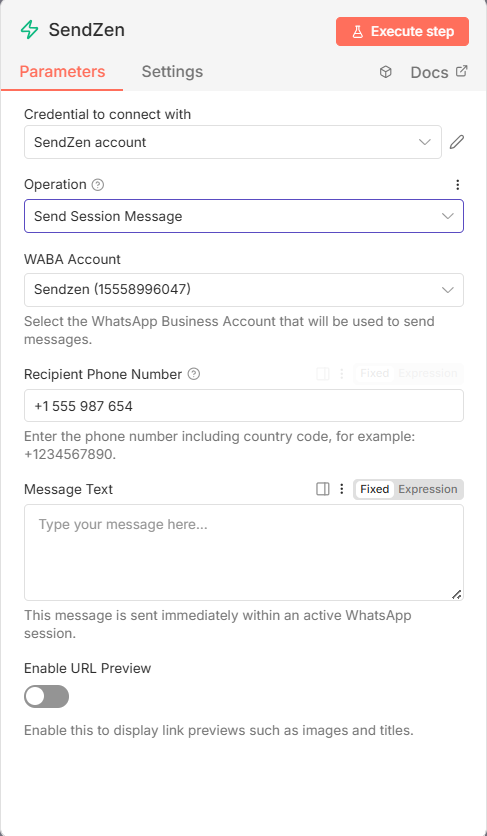
- Send Session Message
- Send free-form text messages within the active 24-hour window
- Supports URL previews and E.164 validation
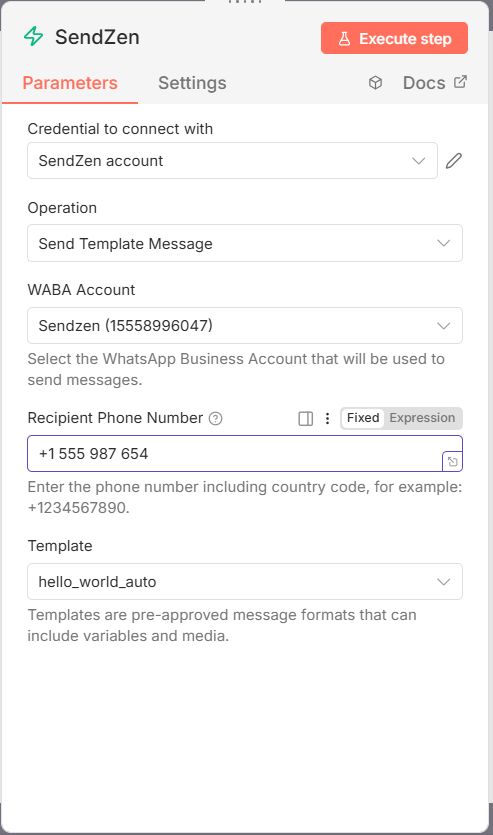
- Send Template Message
- Send pre-approved templates to start conversations
- Dynamic template + variable mapping (body, header, buttons)
- Supports media headers (image, video, document, audio)
- Supports CTA and quick reply buttons
- Mark as Read
- Mark inbound messages as read (useful for UX and analytics)
- Auto-detects message identifiers when connected from the trigger
- Show Typing Indicator
- Show “Typing…” to make automations feel more natural
- Receive inbound WhatsApp messages in real time via webhook
- Outputs full message payload (text, media, location, contacts)
- Simple webhook setup: copy URL from node → paste in SendZen dashboard
- A SendZen account
- A connected WhatsApp Business Account (WABA) in SendZen
- Access to n8n
-
Create your SendZen API key
- Open SendZen dashboard
- Go to API Keys
- Copy the key and store it securely
-
Connect your WABA
- Complete the WABA connection flow in SendZen
- Ensure at least one phone number is connected and active
- Create a new workflow in n8n
- Add any trigger (Webhook, Schedule, CRM trigger, etc.)
- Add SendZen node
- In SendZen node:
- Select Credentials → Create New
- Choose SendZen API
- Paste your API key
- Save
- Choose an operation and fill required fields
- Click Test Step
- Save and activate your workflow
- A SendZen account
- A connected WABA phone number
- Access to n8n
SendZen signs every webhook payload using HMAC-SHA256 and includes the signature in the X-Hub-Signature-256 header in this format:
X-Hub-Signature-256: sha256=<hex>
To enable signature verification in n8n:
- In the SendZen dashboard webhook settings, set a Secret Key (recommended).
- In n8n, create credentials:
- Credentials type: SendZen Webhook API
- Set Secret Key to the same value you configured in SendZen.
- In the SendZen Trigger node, select those SendZen Webhook API credentials.
If credentials are set, the trigger will return 401 for missing/invalid signatures.
Important: signature verification requires hashing the raw request body. Avoid any middleware/proxies that reformat/pretty-print the JSON payload. If you run n8n behind Cloudflare / nginx / API gateway, ensure it does not modify request body (no pretty-print, no re-encoding)
- Get your webhook URL from n8n
- Add SendZen Trigger node in your workflow
- At the top of the node, find Webhook URLs
- Copy the Production URL
Tip: Use the Test URL while testing in the editor. After activating the workflow, set the Production URL in SendZen for live traffic.
-
Add webhook URL in SendZen
- Open SendZen dashboard webhook settings
- Paste the Production URL
- Save changes
-
Test and activate
- In n8n, click Test Step
- Send a WhatsApp message to your connected number to verify the trigger fires
- Save workflow and toggle Active
-
Lead capture + instant reply: Trigger on inbound message, capture details, respond with next steps
-
Order updates: Trigger on order status change, send template message
-
Appointment reminders: Scheduled trigger, send template reminders
-
Support automation: Trigger on inbound support message, route based on keywords, reply
-
Payment reminders: Trigger from billing system, send WhatsApp template
Trigger: CRM/New form submission → Send Template Message → Log result.
SendZen Trigger → IF keyword contains "pricing" → Send Session Message → Create lead in CRM.
- Use template messages to start conversations (business-initiated).
- Use session messages only within the active 24-hour window.
- Keep API keys only inside n8n Credentials.
- For production workflows, log failures and add retries (for example using IF + Wait + Retry patterns).
- When using templates, prefer mapping variables explicitly so workflows remain readable.
- 401 / auth error: Re-check API key and credential selected in the node
- No WABA accounts listed: Confirm WABA is connected inside SendZen
- Trigger not firing:
- Ensure webhook URL is saved in SendZen
- Confirm the URL is publicly reachable
- Confirm workflow is active in n8n
- Template missing: Ensure template exists and is approved in your WhatsApp Business Manager
- n8n: 1.0.0+ (tested on 1.89.2+)
- Node.js: >= 18.10
- SendZen Documentation: https://sendzen.io/docs
- WhatsApp Cloud API Reference: https://developers.facebook.com/docs/whatsapp
- n8n Community Nodes: https://docs.n8n.io/integrations/community-nodes/
- Robustness: Added comprehensive Jest test suite for Triggers, Actions, and Template Builders.
- Optimization: Reduced package size by excluding development files.
- Initial release
- Support for Session Messages, Templates, Mark as Read, Typing Indicators.
- Webhook Trigger support.
- Auto-discovery for WABA Accounts and Templates.
If you want to contribute or modify this node:
- Clone:
git clone https://github.com/sendzen-io/n8n-nodes-sendzen.git - Install:
pnpm install - Build:
pnpm build - Test:
pnpm test(Runs the Jest test suite) - Link: Follow the n8n custom node guide to link
distto your local n8n instance.
We welcome contributions! Please follow these steps:
- Fork the repository.
- Create a feature branch.
- Run Tests: Ensure
pnpm testpasses. - Submit a Pull Request.
- Email: milan@sendzen.io
- Issues: use GitHub Issues in this repository