Give AI agents real jobs in real business systems.
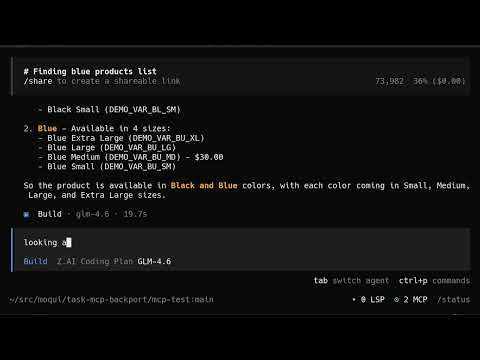
Moqui MCP connects AI agents to Moqui Framework, an open-source ERP platform. Through MCP (Model Context Protocol), agents can browse screens, fill forms, execute transactions, and query data - the same operations humans perform through the web interface.
This isn't a chatbot bolted onto an ERP. It's AI with direct access to business operations.
- Browse the complete application hierarchy - catalog, orders, parties, accounting
- Search products, customers, inventory with full query capabilities
- Create orders, invoices, shipments, parties, products
- Update prices, quantities, statuses, relationships
- Execute workflows spanning multiple screens and services
All operations respect Moqui's security model. Agents see only what their user account permits.
ERP systems are the operational backbone of business. They contain:
- Real data: Actual inventory levels, customer records, financial transactions
- Real processes: Order-to-cash, procure-to-pay, hire-to-retire workflows
- Real constraints: Business rules, approval chains, compliance requirements
Moqui provides all of this as open-source software with a uniquely AI-friendly architecture:
- Declarative screens: XML definitions with rich semantic metadata
- Service-oriented: Clean separation between UI and business logic
- Artifact security: Fine-grained permissions on every screen, service, and entity
- Extensible: Add AI-specific screens and services without forking
Enterprise screens are built for humans with visual context. AI agents need structured semantics. We solved this with MARIA (MCP Accessible Rich Internet Applications) - a JSON format based on W3C accessibility standards.
MARIA transforms Moqui screens into accessibility trees that LLMs naturally understand:
{
  "role": "document",
  "name": "FindParty",
  "children": [
    {
      "role": "form",
      "name": "CreatePersonForm",
      "children": [
        {"role": "textbox", "name": "First Name", "required": true},
        {"role": "textbox", "name": "Last Name", "required": true},
        {"role": "combobox", "name": "Role", "options": 140},
        {"role": "button", "name": "createPerson"}
      ]
    },
    {
      "role": "grid",
      "name": "PartyListForm",
      "rowcount": 47,
      "columns": ["ID", "Name", "Username", "Role"],
      "children": [
        {"role": "row", "name": "John Sales"},
        {"role": "row", "name": "Jane Accountant"}
      ],
      "moreRows": 45
    }
  ]
}
The insight: AI agents are a new kind of accessibility-challenged user. They can't see pixels or interpret visual layout - they need structured semantics. This is exactly the problem ARIA solved for screen readers decades ago. But ARIA has no JSON serialization, and screen readers access accessibility trees via local OS APIs, not network protocols. MARIA fills this gap: the ARIA vocabulary, serialized as JSON, transported over MCP.
Because humans and agents interact through the same semantic model, they can explain actions to each other in the same terms. "I selected 'Shipped' from the Order Status dropdown" means the same thing whether a human or an agent did it - no translation layer needed.
Tools like Playwright MCP let agents control browsers by capturing screenshots and accessibility snapshots. This works, but it's the wrong abstraction for enterprise systems:
| Aspect | Playwright/Browser | Integrated MARIA |
|---|---|---|
| Latency | Screenshot → Vision model → Action | Direct JSON-RPC round-trip |
| Token cost | Images + DOM snapshots burn tokens | Semantic-only payload |
| State access | Limited to visible DOM | Full server-side context |
| Security | Browser session = full UI access | Fine-grained artifact authorization |
| Reliability | CSS changes break selectors | Stable semantic contracts |
| Batch operations | One click at a time | Bulk actions in single call |
MARIA delivers the accessibility tree directly from the source - no browser rendering, no vision model, no DOM scraping. The agent gets exactly the semantic structure it needs with none of the overhead.
| Mode | Output | Use Case |
|---|---|---|
aria |
MARIA accessibility tree | Structured agent interaction |
compact |
Condensed JSON summary | Quick screen overview |
mcp |
Full semantic state | Complete metadata access |
text |
Plain text | Simple queries |
html |
Standard HTML | Debugging, human review |
Agent: moqui_browse_screens(path="PopCommerce/PopCommerceAdmin/Catalog/Product/FindProduct")

Server: {
  "summary": "20 products. Forms: NewProductForm. Actions: createProduct",
  "grids": {"ProductsForm": {"rowCount": 20, "columns": ["ID", "Name", "Type"]}},
  "actions": {"createProduct": {"service": "create#mantle.product.Product"}}
}

Agent: I need to create a new product with variants.
       moqui_browse_screens(
         path="PopCommerce/PopCommerceAdmin/Catalog/Product/FindProduct",
         action="createProduct",
         parameters={"productName": "Widget Pro", "productTypeEnumId": "PtVirtual"}
       )

Server: {
  "result": {"status": "executed", "productId": "100042"},
  "summary": "Product created. Navigate to EditProduct to add features."
}
# Clone with submodules
git clone --recursive https://github.com/moqui/moqui-mcp

# Build and load demo data
./gradlew load

# Start server
./gradlew run

# MCP endpoint: http://localhost:8080/mcp| Tool | Purpose |
|---|---|
moqui_browse_screens |
Navigate screens, execute actions, render content |
moqui_search_screens |
Find screens by name |
moqui_get_screen_details |
Get field metadata, dropdown options |
┌─────────────────┐     ┌──────────────────┐     ┌─────────────────┐
│   AI Agent      │────▶│   MCP Servlet    │────▶│  Moqui Screen   │
│                 │◀────│  (JSON-RPC 2.0)  │◀────│   Framework     │
└─────────────────┘     └──────────────────┘     └─────────────────┘
                                │
                        ┌───────┴───────┐
                        ▼               ▼
                ┌──────────────┐ ┌──────────────┐
                │    MARIA     │ │  Wiki Docs   │
                │  Transform   │ │  (Guidance)  │
                └──────────────┘ └──────────────┘
- MCP Servlet: JSON-RPC 2.0 protocol, session management, authentication
- Screen Framework: Moqui's rendering engine with MCP output mode
- MARIA Transform: Converts semantic state to accessibility tree format
- Wiki Docs: Screen-specific instructions with path inheritance
- Purchasing agents negotiating with supplier catalogs
- Inventory agents reordering based on demand forecasts
- Pricing agents adjusting margins in real-time
- Customer service agents with full order history access
- Sales agents generating quotes from live pricing
- Warehouse agents coordinating picks and shipments
- Financial agents querying actuals vs. budgets
- Operations agents identifying bottlenecks
- Compliance agents auditing transaction trails
Production deployments should:
- Create dedicated service accounts for AI agents
- Use Moqui artifact authorization to limit permissions
- Enable comprehensive audit logging
- Consider human-in-the-loop for sensitive operations
- Start with read-only access, expand incrementally
This is an active proof-of-concept. Working:
- Screen browsing and discovery
- Form submission and action execution
- MARIA/compact/MCP render modes
- Wiki documentation with inheritance
- Artifact security integration
Roadmap:
- Entity-level queries (beyond screen context)
- Service direct invocation
- Real-time notifications (ARIA live regions)
- Multi-agent coordination patterns
Contributions welcome:
- Test coverage and edge cases
- Additional ARIA role mappings
- Performance optimization
- Documentation and examples
- Integration patterns for other MCP clients
Public domain under CC0 1.0 Universal plus Grant of Patent License, consistent with Moqui Framework.