


Add customers directly from invoice, estimate, and proposal pages—no more switching tabs!
Features • Installation • Usage • Screenshots • Contributing
The Quick Customer module streamlines your workflow by allowing you to create new customers directly from invoice, estimate, and proposal creation pages via a convenient modal popup. No more navigating away to the customers section—stay focused on your work.
Perfect for:
- Sales teams who need to create invoices, estimates, and proposals quickly
- Accountants managing multiple client documents
- Businesses with high-volume customer onboarding
- Anyone who values workflow efficiency
- Quick Add Button - Adds a "Quick Add" button next to the customer dropdown on invoice, estimate, and proposal pages
- Modal Form - Clean, comprehensive modal form for customer creation
- Full Customer Data - Capture company info, contact details, billing and shipping addresses
- Auto-Select - Automatically selects the newly created customer in the document
- Auto-Fill Billing - Updates billing/shipping information immediately
- Permission Aware - Respects Perfex CRM's customer creation permissions
- No Database Changes - Pure functionality module, no schema modifications
- Bootstrap 3 Compatible - Matches Perfex CRM's UI/UX perfectly
- Translation Ready - Easy to translate into any language
- Responsive Design - Works on desktop and tablet devices
- Perfex CRM 2.3.0 or higher
- PHP 8.1 or higher
- Administrator access to Perfex CRM
- Staff permission to create customers
Option A: Download from Releases (Recommended)
Download the latest release from Releases. The release archive is pre-configured with the correct folder name (quick_customer).
Option B: Clone Repository
git clone https://github.com/sajdoko/perfex-quick-customer.git quick_customerNote: Use quick_customer as the target folder name, not perfex-quick-customer.
- Navigate to your Perfex CRM installation directory
- Go to
modules/folder - Upload the entire
quick_customerfolder
quick_customer (not perfex-quick-customer or perfex-quick-customer-1.1.0).
Your structure should look like:
modules/
└── quick_customer/
    ├── quick_customer.php
    ├── install.php
    ├── assets/
    │   ├── quick_customer.js
    │   └── quick_customer.css
    ├── controllers/
    │   └── Quick_customer.php
    ├── language/
    │   └── english/
    │       └── quick_customer_lang.php
    └── views/
        └── customer_modal.php
- Login to Perfex CRM as Administrator
- Go to Setup → Modules
- Find Quick Customer in the list
- Click Activate
- Go to Sales → Invoices (or Sales → Estimates or Sales → Proposals)
- Click Create New Invoice (or Create New Estimate or Create New Proposal)
- You should see a blue "Quick Add" button next to the customer dropdown
Note: For detailed installation instructions, see INSTALL.md
-
Navigate to Document Creation
- Go to Sales → Invoices → Create New Invoice
- OR Sales → Estimates → Create New Estimate
- OR Sales → Proposals → Create New Proposal
-
Click Quick Add Button
- Click the blue "Quick Add" button next to the customer dropdown
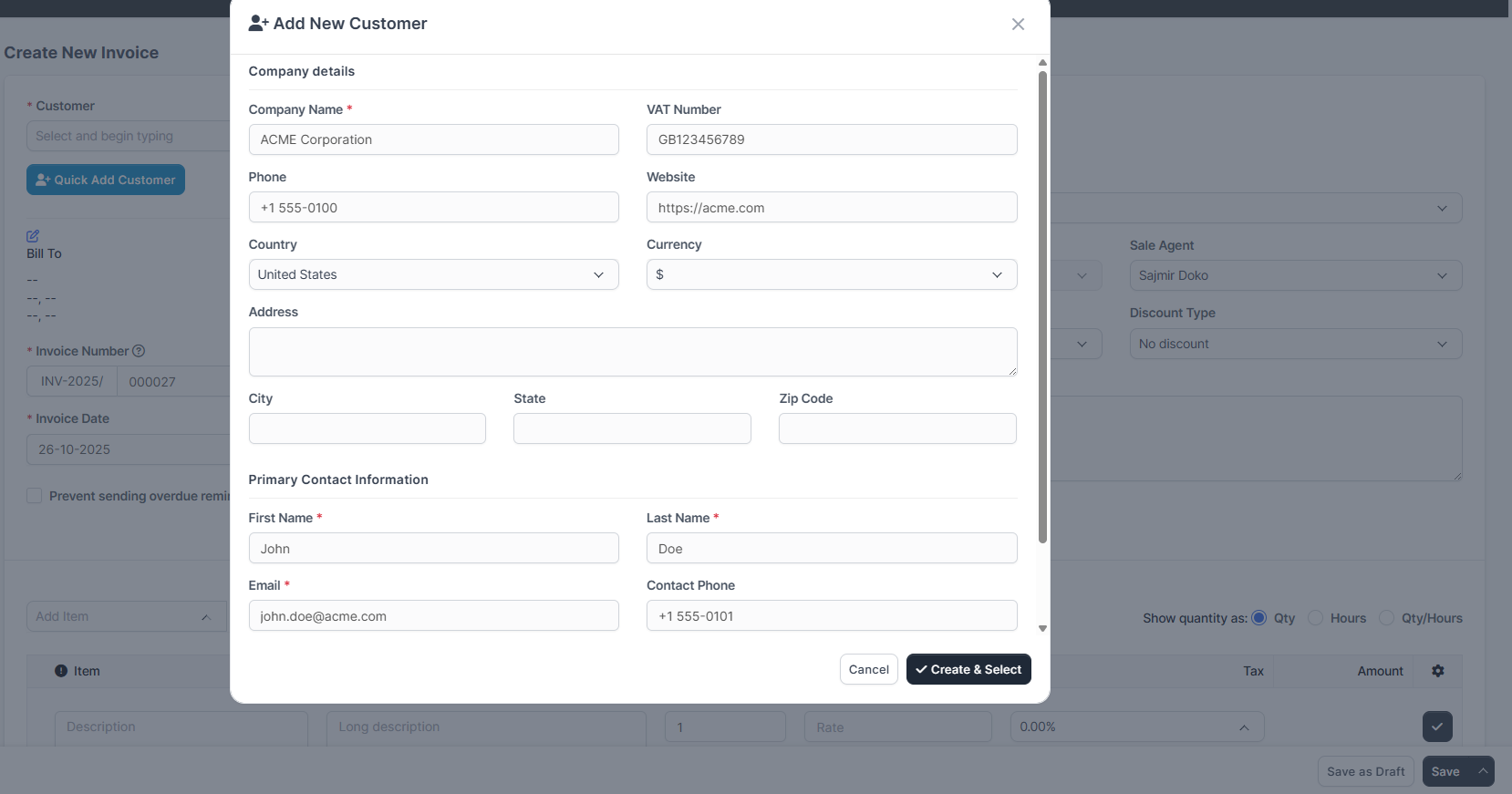
- The customer creation modal will open
-
Fill Customer Information
- Company Name* (required)
- VAT Number
- Phone & Website
- Address (Street, City, State, Zip, Country)
- Currency
-
Add Primary Contact (required)
- First Name*
- Last Name*
- Email*
- Contact Phone
-
Configure Billing Address
- By default, uses company address
- Uncheck "Use company address for billing" to specify separate billing address
-
Add Shipping Address (optional)
- Check "Add shipping address" to enable shipping fields
- Fill in shipping details if needed
-
Create & Select
- Click "Create & Select" button
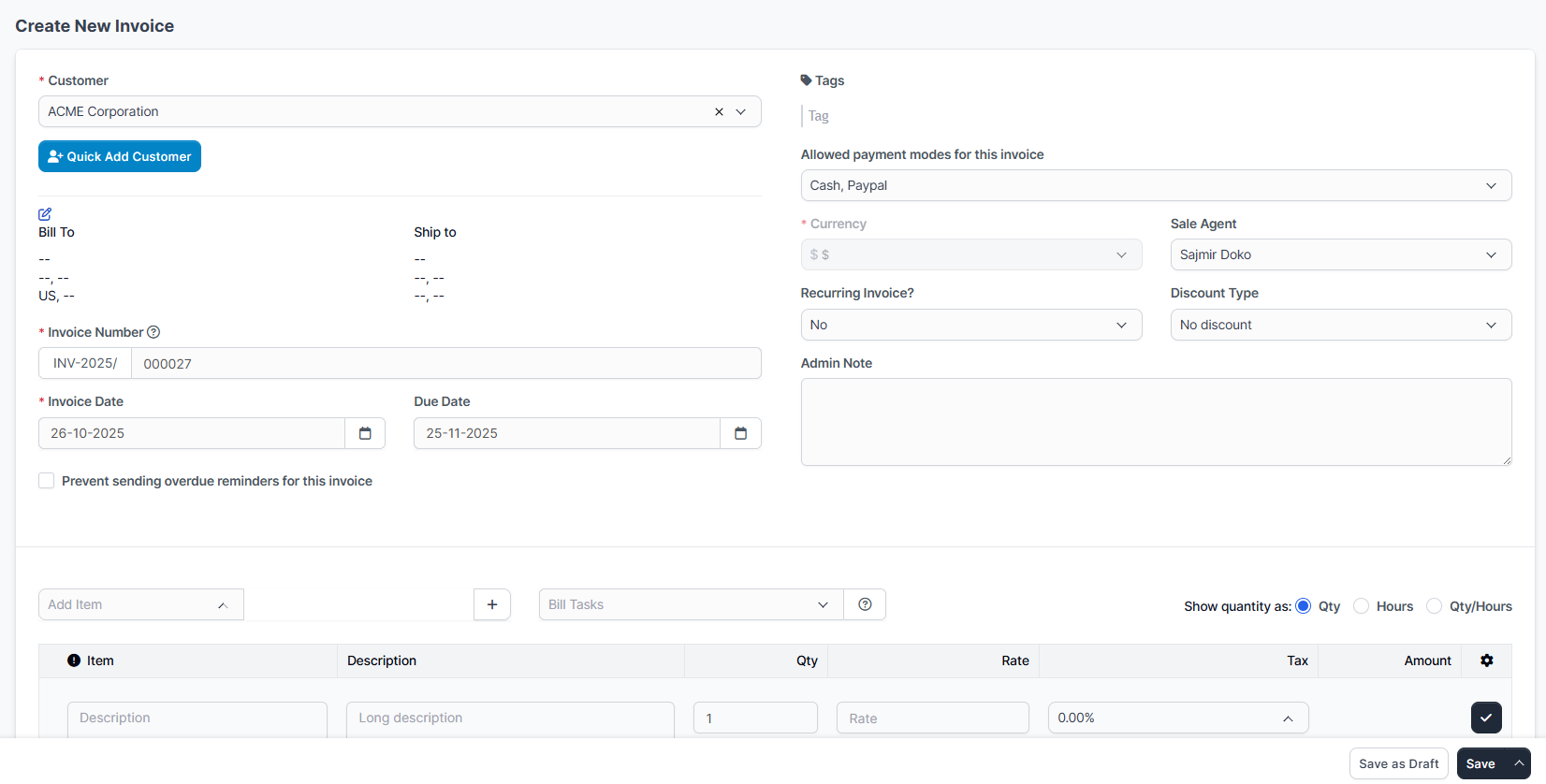
- Customer is created and automatically selected in the document
- Billing/shipping information is populated automatically
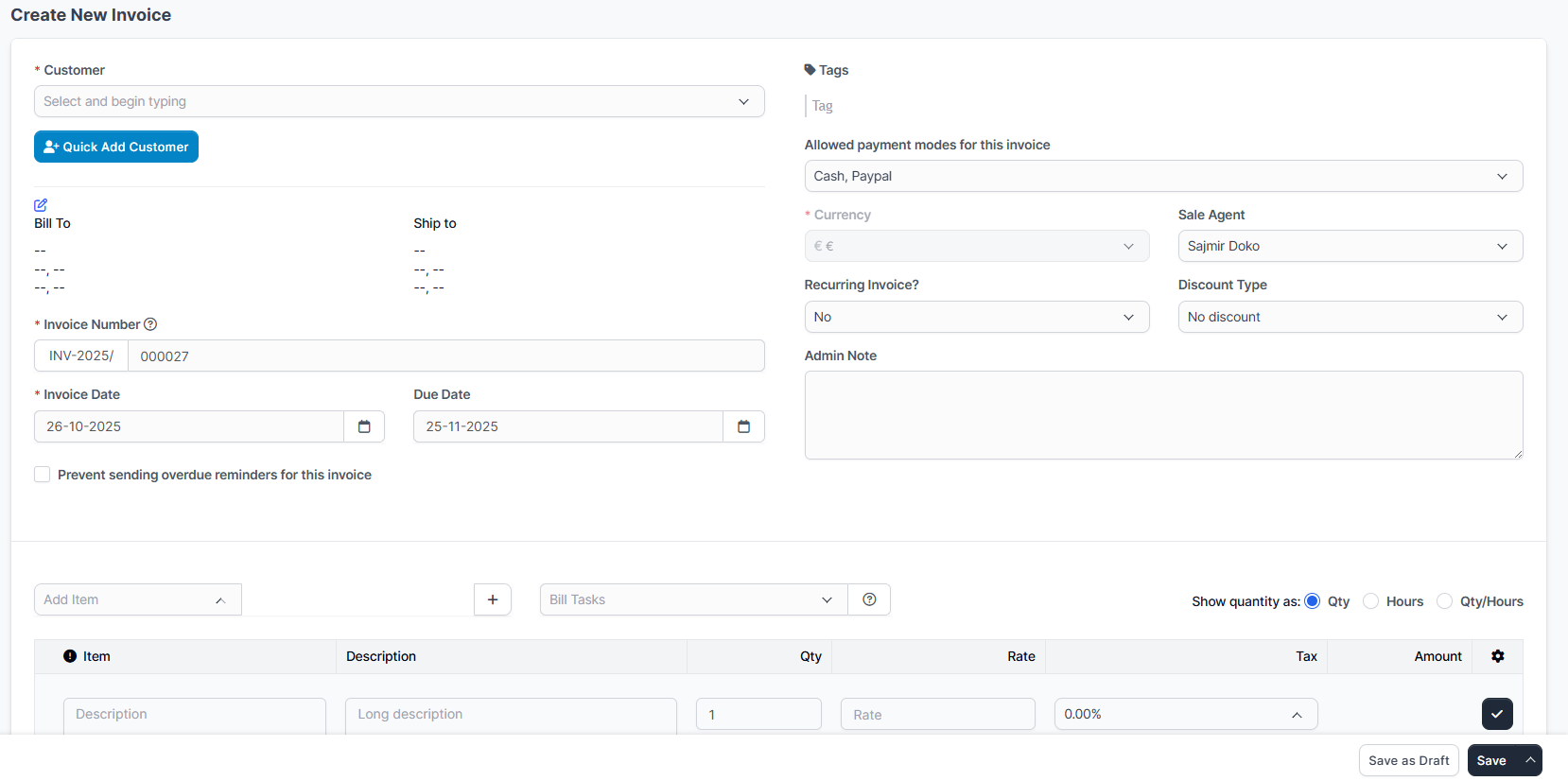
The Quick Add button appears on invoice, estimate, and proposal pages next to the customer dropdown.
Want to contribute screenshots? See Contributing section below!
- Registers the module with Perfex CRM
- Defines hooks for injecting assets and modal
- Loads on invoice, estimate, and proposal pages for performance
- Runs when module is activated
- Currently logs activation (no database changes needed)
- Handles AJAX customer creation
- Validates permissions
- Creates customer with contact
- Returns customer data for auto-fill
- Bootstrap 3 modal markup
- Form fields for customer data
- Integrated with Perfex CRM's styling
- Injects "Quick Add" button into DOM
- Handles modal show/hide
- Processes form submission via AJAX
- Updates customer dropdown and document fields
- Supports invoices, estimates, and proposals
-
Custom styling for button and modal
-
Ensures proper layout and spacing
-
English language strings
-
Easily translatable to other languages
Create a language file in modules/quick_customer/language/{language}/:
<?php
// modules/quick_customer/language/spanish/quick_customer_lang.php
$lang['quick_customer_add_new'] = 'Añadir Cliente Rápido';
$lang['quick_customer_modal_title'] = 'Agregar Nuevo Cliente';
// ... add all translationsEdit assets/quick_customer.js line ~11:
// Change button color from info (blue) to success (green)
var quickBtn = '<button type="button" class="btn btn-success tw-ml-2" ...>';

// Change button text
'<i class="fa fa-user-plus"></i> Add New Customer' +To add custom fields to the modal, edit views/customer_modal.php and controllers/Quick_customer.php:
In customer_modal.php:
<div class="col-md-6">
    <div class="form-group">
        <label for="qc_custom_field">Custom Field</label>
        <input type="text" class="form-control" name="custom_field" id="qc_custom_field">
    </div>
</div>
In Quick_customer.php controller:
$customer_data['custom_field'] = $data['custom_field'] ?? '';Edit views/customer_modal.php to change which fields are required:
<!-- Remove * and required attribute to make optional -->
<label for="qc_company"><?= _l('quick_customer_company_name'); ?></label>
<input type="text" class="form-control" name="company" id="qc_company">Edit views/customer_modal.php to change which fields are required:
<!-- Remove * and required attribute to make optional -->
<label for="qc_company"><?= _l('quick_customer_company_name'); ?></label>
<input type="text" class="form-control" name="company" id="qc_company">Solution: Clear browser cache and Perfex CRM cache
- Setup → Settings → Clear Cache
- Hard refresh browser (Ctrl+F5)
Solution: Ensure user has "Create Customers" permission
- Setup → Staff → Select Staff Member → Permissions
- Enable "Customers - Create"
Solution: Check browser console for JavaScript errors
- Open Developer Tools (F12)
- Check Console tab
- Report errors for support
Solution: Ensure jQuery and select2 are loaded
- Module requires Perfex CRM's default assets
- Don't remove or modify invoice form scripts
Solution: Check for CSS conflicts
- Ensure no custom CSS is overriding module styles
- Clear browser cache
admin_init- Initialize module on admin loadapp_admin_head- Inject CSS/JS assets into page head (on invoice, estimate, and proposal pages)app_admin_footer- Inject modal HTML into page footer (on invoice, estimate, and proposal pages)
URL: admin/quick_customer/quick_customer/create
Method: POST
Returns: JSON with customer data
Request Payload:
{
  "company": "Company Name",
  "vat": "VAT123",
  "phonenumber": "+1234567890",
  "website": "https://example.com",
  "address": "123 Main St",
  "city": "New York",
  "state": "NY",
  "zip": "10001",
  "country": "US",
  "default_currency": "1",
  "firstname": "John",
  "lastname": "Doe",
  "email": "john@example.com",
  "contact_phone": "+1234567890"
}
Response:
{
  "success": true,
  "customer_id": "123",
  "company": "Company Name",
  "vat": "VAT123",
  "billing_street": "123 Main St",
  "billing_city": "New York",
  "billing_state": "NY",
  "billing_zip": "10001",
  "billing_country": "US",
  "shipping_street": "",
  "shipping_city": "",
  "shipping_state": "",
  "shipping_zip": "",
  "shipping_country": ""
}- Bootstrap 3 (included in Perfex CRM)
- jQuery (included in Perfex CRM)
- Bootstrap Select (included in Perfex CRM)
- Perfex CRM's
Clients_model
- Chrome 60+
- Firefox 60+
- Safari 12+
- Edge 79+
We welcome contributions from the community! Here's how you can help:
- Check if the issue already exists in Issues
- Create a new issue with:
- Clear title and description
- Steps to reproduce
- Expected vs actual behavior
- Screenshots (if applicable)
- Perfex CRM version
- PHP version
- Open an issue with the
enhancementlabel - Describe the feature and use case
- Explain why it would be useful
- Fork the repository
- Create a feature branch (
git checkout -b feature/amazing-feature) - Make your changes
- Test thoroughly on a Perfex CRM installation
- Commit your changes (
git commit -m 'Add amazing feature') - Push to the branch (
git push origin feature/amazing-feature) - Open a Pull Request
- Follow PSR-12 coding standards for PHP
- Use meaningful variable and function names
- Comment complex logic
- Test on Perfex CRM 2.3.0+ before submitting
We need help translating the module! To add a language:
- Copy
language/english/quick_customer_lang.php - Create folder
language/{your_language}/ - Translate all strings
- Submit a pull request
Needed translations: Spanish, French, German, Portuguese, Italian, Dutch, and more!
- Add support for estimates and proposals pages
- Add customer templates/presets
- Bulk customer import from modal
- Integration with other Perfex modules
- Enhanced field validation
- Customer duplicate detection
- Custom field support in modal
- Mobile app compatibility
Vote for features or suggest new ones in Issues!
See CHANGELOG.md for detailed version history.
Current Version: 1.1.0
- Added support for estimates and proposals pages
- Quick customer creation now works on invoice, estimate, and proposal pages
- Enhanced JavaScript to support multiple customer dropdown selectors
This project is licensed under the MIT License - see the LICENSE file for details.
- Built for Perfex CRM
- Inspired by the need for streamlined invoice workflows
- Thanks to all contributors and users!
Need help? Here are your options:
- Report a Bug
- Request a Feature
- Star this repo if you find it useful!
- Star this repository to stay updated
- Watch for new releases
- Fork to contribute
Made with ❤️ for Perfex CRM users
