


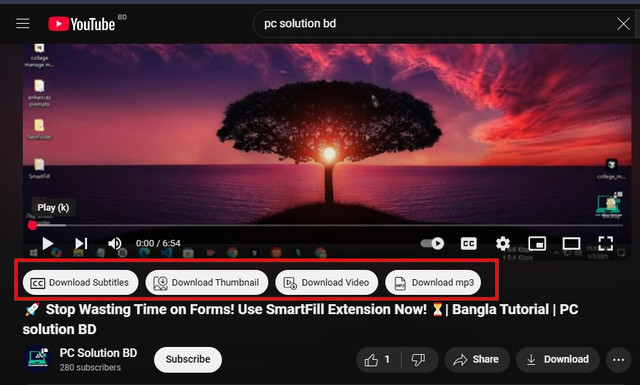
YT-Downloader is a powerful browser extension that enables users to download YouTube videos, audio (MP3), subtitles, and thumbnails effortlessly.
- 📥 Download the extension files or clone this repository.
- 🌐 Open your browser and go to
chrome://extensions/(for Chrome-based browsers) orabout:addons(for Firefox). - 🛠️ Enable "Developer Mode" (for Chrome-based browsers).
- 📂 Click on "Load unpacked" and select the extension folder.
- ✅ The extension will be installed and ready to use.
- 🎥 Download YouTube videos in various resolutions.
- 🎵 Extract and save audio as MP3 files.
- 📝 Download subtitles in multiple languages.
- 🖼️ Save video thumbnails easily.
- ⚡ User-friendly and seamless integration with YouTube.
- 🔎 Open any YouTube video.
- 🛑 You will see download options below the video player.
- ⬇️ Click on the respective button to download subtitles, thumbnails, video, or MP3 audio.
This project is built using the following technologies:
- HTML – For structuring the UI.
- CSS – For styling and design.
- JavaScript – For handling interactions and logic.
- JSON – For storing extension metadata and configurations.
This extension is for educational purposes only. Downloading copyrighted content without permission may violate YouTube's terms of service.
This project is licensed under the MIT License.