A lightweight, reusable animated number component built with vanilla JavaScript. Perfect for clocks, counters, finance dashboards, and any interface where you want visually appealing digit transitions.
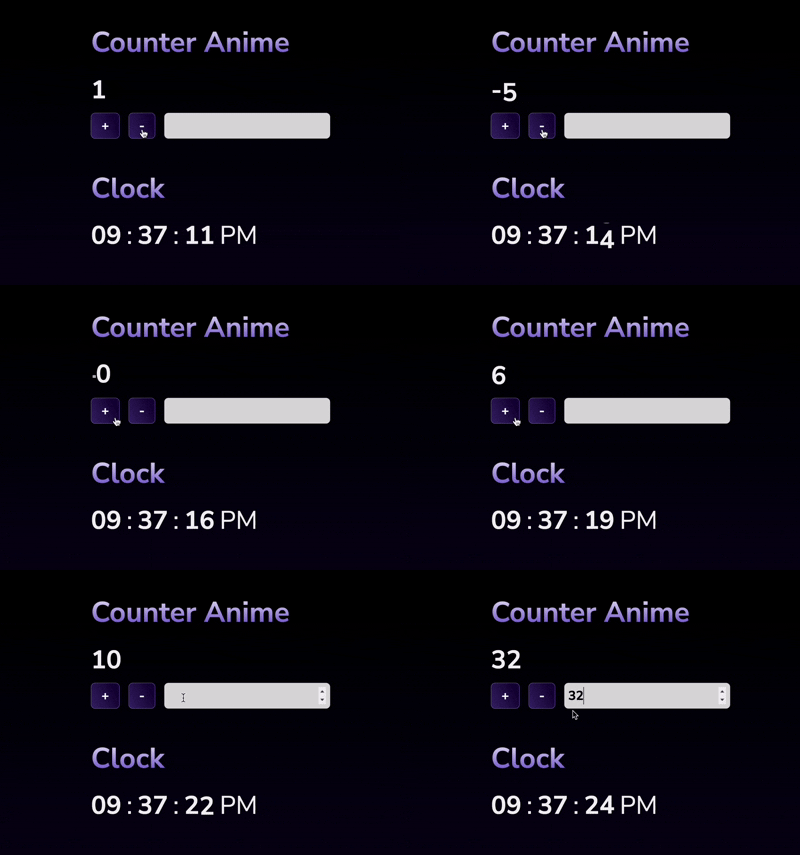


- ✅ Animates digit changes with smooth sliding
- ✅ Supports arbitrarily large numbers using
BigInt - ✅ Handles negative values
- ✅ Optional zero-padding (e.g.,
01,001) - ✅ Easily pluggable anywhere in your UI
- ✅ Pure JavaScript (no dependencies)
<script src="https://sadhinvr.github.io/counterAnimeVanillaJS/dist/counterAnime.min.js"></script>

<link rel="stylesheet" href="https://sadhinvr.github.io/counterAnimeVanillaJS/dist/style.css">const container = document.querySelector(".counter");
const counter = new CounterAnime(123, container, 2); // pad to 5 digitscounter.increment();
counter.decrement();
counter.setNumber("999999999");const hour = new CounterAnime(0, document.querySelector('.hour'), 2);
const min = new CounterAnime(0, document.querySelector('.min'), 2);
const sec = new CounterAnime(0, document.querySelector('.sec'), 2);
const ampm = document.querySelector('.ampm');
function updateClock() {
const now = new Date();
let h = now.getHours();
ampm.textContent = h >= 12 ? "PM" : "AM";
h = h % 12 || 12;
hour.setNumber(h);
min.setNumber(now.getMinutes());
sec.setNumber(now.getSeconds());
}
updateClock();
setInterval(updateClock, 1000);new CounterAnime(initialValue = 0n, parentElement, padLength = 0)| Parameter | Type | Description |
|---|---|---|
initialValue |
BigInt |
Starting number value |
parentElement |
Element |
DOM element to append the counter to |
padLength |
number |
Minimum digits (pads with zeros if needed) |
Make sure you add CSS to support transitions. Example:
.numberAnimation * {
    margin: 0px;
    padding: 0px;
    box-sizing: border-box;
}

.numberAnimation {
    font-size: 50px;
    font-weight: 700;
    line-height: 1em;
    display: flex;
}

.numberSlideWrapper {
    width: 0px;
    height: 1em;
    overflow: hidden;
    display: inline-flex;
    transition: width .2s ease-in-out;
}

.numberSlide {
    display: flex;
    flex-direction: column;
    transition: transform .4s ease-in-out;
}

.minus {
    overflow: hidden;
    max-width: 0px;
    opacity: 0%;
    transition: max-width .5s ease-in-out, opacity 1s ease-in-out;
}

.minus.active {
    opacity: 100%;
    max-width: 1em;
}
You can customize .num, .numberAnimation, .minus, etc., as needed.
MIT — feel free to use and modify.
Made with ❤️ by @sadhinvr
keywords: counter animated counter number animation digit slider animated digits vanilla JS counter javascript counter count up count down slide counter smooth number transition custom counter component clock counter countdown timer animated clock UI counter component number scroller number ticker javascript ticker digit animation vanilla javascript javascript class reusable component lightweight component number component javascript animation big number counter javascript UI widget animated component zero padded counter pure js component DOM animation custom UI component frontend widget html css js dashboard widget finance dashboard stock ticker real-time counter clock ui timer component statistics counter analytics counter leaderboard counter game ui counter digital display scoreboard counter no dependencies es6 class responsive counter digit rolling animation UI/UX animation css transitions animated UI element minimal js library html number display custom number renderer