
A smart personal assistant designed for small local models, recommended for GPUs with at least 8GB of VRAM. Runs locally using Ollama. Available as a Telegram bot and TUI interface.
- 💬 Local LLM chat - No external API dependencies
- 🧠 Vector Memory (RAG) - Remembers facts and conversations using embeddings
- 📚 Document Store - Indexed PDF/TXT search for context awareness
- 📷 Image analysis - Describe and understand images with vision model
- 🎙️ Audio transcription - Convert voice messages to text with Whisper
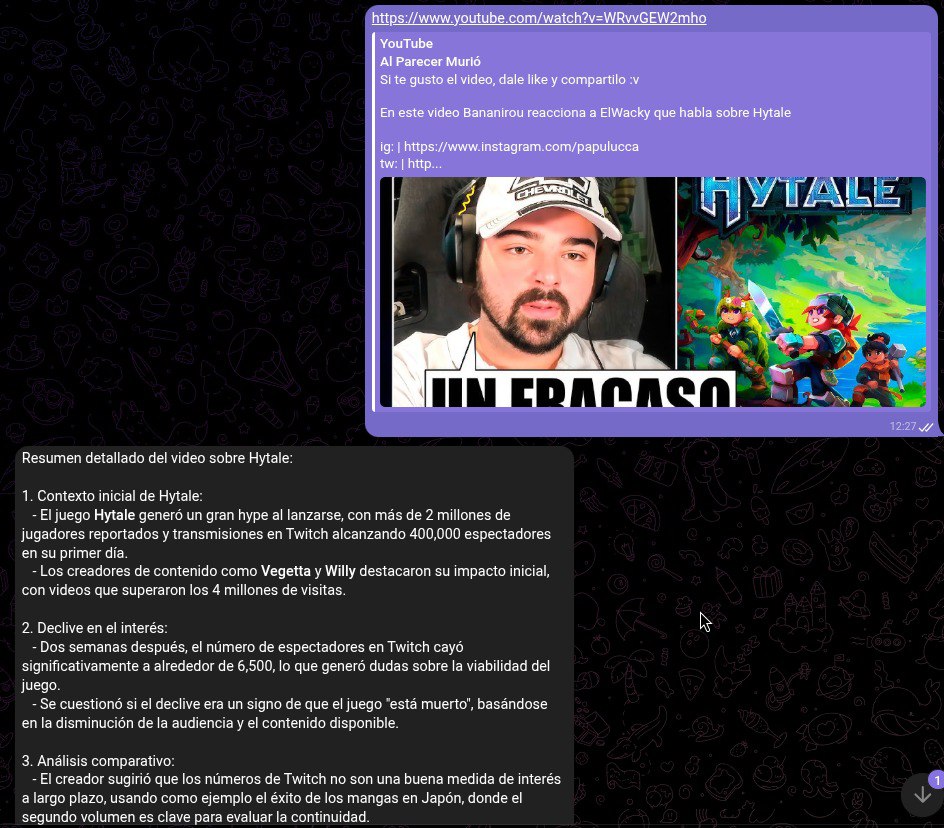
- 🎥 YouTube summaries - Send a link and get a summary
- 🐦 Twitter/X downloader - Download videos/images directly
- 🔍 Web search - Brave Search integration
- 🖼️ Image search - Search for images on the web
- 📄 Document reading - Analyze and chat with PDF or text files
- 📧 Email digest - Read and summarize emails from Gmail
- ⏰ Reminders - Schedule cron tasks that notify you in chat
- 💡 Smart lights - Control WIZ lights via chat
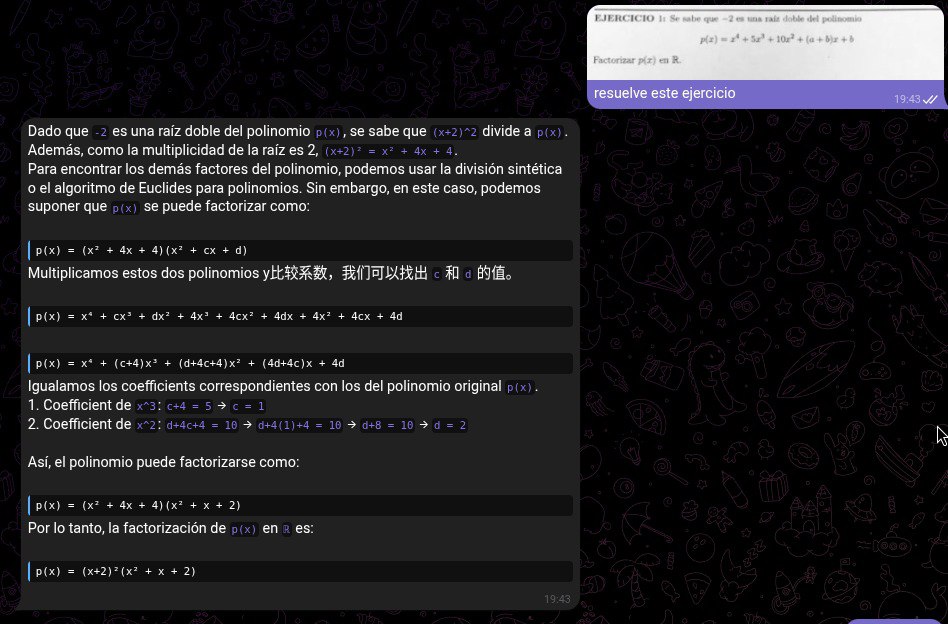
- 🧮 Math solver - Solve complex equations and symbolic math problems
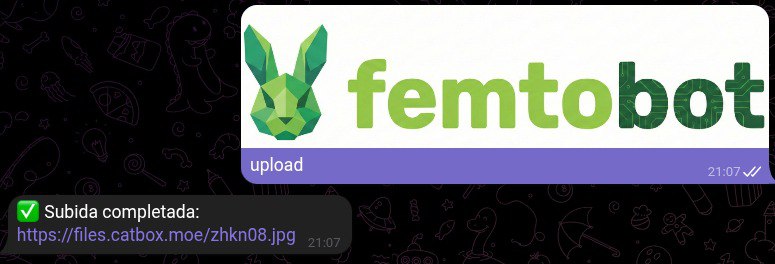
- 📤 File upload - Upload files to Catbox.moe
Catbox.moe
| FemtoBot | Cloud Bots (Claude, GPT) | |
|---|---|---|
| 💰 Cost | Free | $20+/month or pay per use |
| 🔒 Privacy | Your data never leaves your PC | Your chats go to external servers |
| ⚡ Speed | Small models = instant responses | Depends on API and your plan |
| 🌐 Internet | Works offline | Requires constant connection |
| 🎛️ Control | You choose model, context, everything | Limited to what they offer |
| 🏠 Smart Home | Control your lights, all local | Not available |
Ideal for:
- Using small and fast models (7B-14B params)
- Keeping your privacy at 100%
- Not paying monthly subscriptions
- Having a personal assistant that runs on YOUR hardware
FemtoBot/
├── config.yaml              # Main configuration
├── .env                     # Environment variables (tokens)
├── requirements.txt         # Python dependencies
├── run.sh                   # Run script (setup + run)
│
├── src/                     # Source code
│   ├── telegram_bot.py      # Main Telegram bot (Entry Point)
│   ├── tui.py              # TUI interface
│   ├── client.py           # Ollama client
│   ├── constants.py        # Global constants
│   ├── services/           # Business Logic Services
│   │   ├── rag_service.py      # RAG & Context Management
│   │   ├── media_service.py    # Twitter/YouTube handling
│   │   └── command_service.py  # Internal bot commands
│   ├── handlers/           # Message handlers
│   │   ├── commands.py     # Bot slash commands
│   │   ├── voice.py        # Voice messages
│   │   ├── audio.py        # Audio files
│   │   ├── photo.py        # Images
│   │   └── document.py     # Documents
│   ├── jobs/               # Background jobs
│   │   ├── events.py       # Event notifications
│   │   ├── inactivity.py   # Auto-unload models
│   │   ├── cleanup.py      # Cleanup old data
│   │   └── email_digest.py # Email summary
│   ├── middleware/         # Middleware
│   │   └── rate_limiter.py # Rate limiting
│   ├── state/              # State management
│   │   └── chat_manager.py # Chat history
│   └── memory/             # Long-term Memory
│       └── vector_store.py # ChromaDB wrapper
│
├── utils/                   # Utility modules
│   ├── audio_utils.py       # Whisper transcription
│   ├── youtube_utils.py     # YouTube audio download
│   ├── twitter_utils.py     # Twitter/X downloads
│   ├── search_utils.py      # Brave search
│   ├── cron_utils.py        # Crontab management
│   ├── document_utils.py    # PDF/DOCX extraction
│   ├── email_utils.py       # Gmail integration
│   ├── wiz_utils.py         # WIZ smart lights
│   ├── telegram_utils.py    # Telegram helpers
│   └── config_loader.py     # YAML config loader
│
├── tests/                   # Test suite
│   ├── conftest.py
│   └── unit/
│
├── docs/                    # Documentation
│   ├── architecture.md
│   └── troubleshooting.md
│
├── data/                    # Data files
│   ├── instructions.md      # LLM instructions
│   ├── memory.md            # User memory
│   └── events.txt           # Notification queue
│
└── assets/                  # Resources
    └── styles.tcss          # TUI styles
┌─────────────────────────────────────────────┐
│         User Interfaces                     │
│  ┌──────────────┐    ┌─────────────────┐    │
│  │   Telegram   │    │   TUI (Textual) │    │
│  │    Bot       │    │   (Terminal)    │    │
│  └──────┬───────┘    └────────┬──────── ┘   │
└─────────┼─────────────────────┼─────────────┘
          │                     │
          └──────────┬──────────┘
                     │
┌────────────────────┴────────────────────────┐
│          Message Processing Layer           │
│  - Queue-based sequential processing        │
│  - Command parsing (:::command:::)          │
│  - Media handling (voice, photo, docs)      │
└────────────────────┬────────────────────────┘
                     │
┌────────────────────┴────────────────────────┐
│          LLM Integration (Ollama)           │
│  - Streaming chat API                       │
│  - Vision model for image analysis          │
│  - Context management with pruning          │
└────────────────────┬────────────────────────┘
                     │
┌────────────────────┴────────────────────────┐
│           Utility Services                  │
│  ┌─────────┐ ┌─────────┐ ┌─────────────┐    │
│  │ Whisper │ │  Brave  │ │  YouTube    │    │
│  │(Speech) │ │ Search  │ │  Download   │    │
│  └─────────┘ └─────────┘ └─────────────┘    │
│  ┌─────────┐ ┌─────────┐ ┌─────────────┐    │
│  │  WIZ    │ │  Cron   │ │  Gmail      │    │
│  │ Lights  │ │ Jobs    │ │  IMAP       │    │
│  └─────────┘ └─────────┘ └─────────────┘    │
│  ┌─────────┐ ┌─────────┐ ┌─────────────┐    │
│  │   OCR   │ │  Math   │ │  Catbox     │    │
│  │ Service │ │ Solver  │ │  Uploads    │    │
│  └─────────┘ └─────────┘ └─────────────┘    │
│  ┌─────────┐ ┌─────────┐ ┌─────────────┐    │
│  │   RAG   │ │  Docs   │ │  Calendar   │    │
│  │ System  │ │ Reader  │ │   Events    │    │
│  └─────────┘ └─────────┘ └─────────────┘    │
└─────────────────────────────────────────────┘
- Python 3.12 (Strictly required)
- Ollama installed and running
- FFmpeg (for audio transcription)
- ChromaDB (installed automatically)
- Clone the repository:
git clone https://github.com/rocopolas/FemtoBot.git
cd FemtoBot- Setup & install CLI:
chmod +x run.sh && ./run.sh # Creates venv + installs deps + starts botOnce the venv is ready, install the femtobot command system-wide:
chmod +x scripts/install_cli.sh
./scripts/install_cli.sh # Requires sudo- Use from anywhere (no venv activation needed):
# Bot management
femtobot serve     # Start bot (foreground)
femtobot start     # Start bot (background daemon)
femtobot stop      # Stop the daemon
femtobot restart   # Restart the daemon
femtobot status    # Show bot + Ollama status
femtobot logs      # Show recent logs
femtobot logs -f   # Follow logs in real-time
femtobot tui       # Launch TUI interface

# Configuration & setup
femtobot config    # Show current configuration
femtobot setup     # Download Ollama models from config.yaml
femtobot update    # Git pull + reinstall dependencies
femtobot doctor    # Run full diagnostic checks

# Memory (RAG)
femtobot memory status           # Show memory stats
femtobot memory search "query"   # Search vector memory

# Backup & restore
femtobot backup              # Backup data + config to ~/.femtobot/
femtobot restore backup.tar.gz   # Restore from backup
Installing from a release:
pip install https://github.com/rocopolas/FemtoBot/releases/download/v1.0.0/femtobot-1.0.0-py3-none-any.whl- Configure environment variables:
cp .env.example .env
# Edit .env with your tokens (Telegram, Brave, Gmail)- Download Models:
# Chat Model
ollama pull qwen3:8b

# Vision Model
ollama pull qwen3-vl:2b

# Math Model
ollama pull qwen2-math:7b

# OCR Model
ollama pull glm-ocr:latest

# Embedding Model (Required for RAG)
ollama pull nomic-embed-text
# (You may need to update config.yaml if using a different embedding model)TELEGRAM_TOKEN=your_botfather_token
AUTHORIZED_USERS=123456789 # Your Telegram ID
NOTIFICATION_CHAT_ID=123456789
BRAVE_API_KEY=your_api_key # Optional, for searches
GMAIL_USER=your_email@gmail.com # Optional, for email digest
GMAIL_APP_PASSWORD=xxxx xxxx xxxx xxxxMODEL: "llama3.1:latest"
VISION_MODEL: "qwen3-vl:2b"
CONTEXT_LIMIT: 200000
WHISPER_LANGUAGE: "es"
WHISPER_MODEL_VOICE: "base"
WHISPER_MODEL_EXTERNAL: "medium"
INACTIVITY_TIMEOUT_MINUTES: 5
# RAG / Memory Configuration
RAG:
EMBEDDING_MODEL: "nomic-embed-text" # Must match ollama pull
CHUNK_SIZE: 1000
SIMILARITY_THRESHOLD: 0.4 # Lower = looser matching
MAX_RESULTS: 3./run.shsource venv_bot/bin/activate
python src/main.pyTUI Features:
- 💾 Persistent History: Conversations saved automatically
- 📂 Session Management: Save/load multiple sessions
- 📄 Export: Export conversations to markdown
- 🔔 Notifications: Receive cron notifications in TUI
- ⌨️ Slash Commands: Quick access to functions
TUI Commands:
/status         - View token usage and model status
/new, /clear    - Start new conversation
/save [name]    - Save current session
/load [name]    - Load saved session
/sessions       - List all saved sessions
/export [file]  - Export to markdown file
/unload         - Unload models from RAM
/help           - Show all commands
# Install test dependencies
pip install pytest pytest-asyncio pytest-cov

# Run all tests
pytest tests/ -v

# With coverage
pytest tests/ --cov=src --cov=utils| Command | Description |
|---|---|
/start |
Start conversation |
/new |
New conversation (clears history) |
/status |
View context and token usage |
/unload |
Unload all models from RAM |
- Send a photo → Vision model describes it, text model responds
- Send photo + caption → Bot considers both for response
- Send a voice message → Transcribed and answered
- Send an audio file → Transcription only (larger model)
- Send a YouTube link → Bot downloads, transcribes and summarizes (Default)
- Send link + "download" → Bot sends you the video file
- Send a Twitter/X link and ask to "download" or "bajar"
- The bot will download the video/image and send the file to you
- Subida Directa: Envía una foto o video con el mensaje "sube a catbox" o "dame el link".
- Respuesta: Responde a cualquier imagen o video (tuyo o del bot) con "sube esto" y el bot te devolverá un enlace directo permanente.
- Ask: "Give me a photo of [something]" or "Search for an image of [something]"
- The LLM decides to search for an image and uses the command
:::foto...:::. - The bot searches Brave Images, then uses its Vision Model to look at the candidates.
- It only sends the image if the AI confirms it matches your request!
- Automatic Detection: Ask any math problem (algebra, calculus, matrices, etc.).
- The bot detects the intent and automatically switches to a Specialized Math Model (configured in
config.yaml). - Formatted Response: You receive a step-by-step solution with perfect LaTeX rendering in Telegram.
- Examples:
- "Solve the integral of x^2 dx"
- "Find the roots of 2x^2 + 5x - 3 = 0"
- "Calculate the eigenvalues of the matrix..."
- Send a PDF, DOCX, or TXT file → Bot extracts text and responds.
- Automatic OCR: If the document is scanned (text density < 15 words/page), the bot automatically:
- Converts pages to high-res images.
- Uses the Vision Model (
glm-4vby default) to read the content. - Formats Mathematical Formulas (LaTeX) into readable text (e.g., converts
$x^2$tox²).
- Math Support: Detects and beautifully renders complex math formulas from academic papers.
- Send document + caption → Bot considers both for response.
Ask the bot things like:
- "Remind me to drink water every hour"
- "Notify me tomorrow at 9am about my meeting"
The bot uses a local vector database (ChromaDB) to remember facts and conversations.
To learn new things:
- Just tell it: "My mom is Jessica" → Auto-saved if deemed important.
- Force save:
:::memory Data to save:::
To forget:
:::memory_delete Data to forget:::- Detects the most similar memory (>85% match) and deletes it.
To view usage:
- Look for "🧠 RAG..." status when the bot is searching its memory.
If Gmail is configured, the bot will:
- Run at 4:00 AM daily
- Read emails from the last 24 hours
- Use LLM to identify important emails
- Send you a summary on Telegram
Control WIZ lights via natural language:
- "Turn off the bedroom lights"
- "Set brightness to 50%"
- "Change color to red"
- "Turn off all lights"
Configuration in config.yaml:
WIZ_LIGHTS:
  bedroom:  # Single light
    - "192.168.0.121"
  living:   # Multiple lights (group)
    - "192.168.0.63"
- "192.168.0.115"Requires: pip install pywizlight
The project uses a modular architecture:
- Handlers: Separate modules for different message types
- Jobs: Background tasks (cleanup, notifications)
- State: Thread-safe chat history management
- Middleware: Rate limiting and other cross-cutting concerns
See docs/architecture.md for detailed information.
- Create the module in
utils/ - Import it in appropriate handler
- Add instructions in
data/instructions.md
Edit config.yaml:
MODEL: "your-model:tag"See docs/troubleshooting.md for common issues and solutions.
Common problems:
- Ollama connection refused → Check if
ollama serveis running - Whisper not installed → Run
pip install faster-whisper - Rate limit exceeded → Wait 60 seconds between messages
- Model not found → Download with
ollama pull model-name
MIT License Copyright 2026 Rocopolas
Permission is hereby granted, free of charge, to any person obtaining a copy of this software and associated documentation files (the "Software"), to deal in the Software without restriction, including without limitation the rights to use, copy, modify, merge, publish, distribute, sublicense, and/or sell copies of the Software, and to permit persons to whom the Software is furnished to do so, subject to the following conditions:
The above copyright notice and this permission notice shall be included in all copies or substantial portions of the Software.
THE SOFTWARE IS PROVIDED "AS IS", WITHOUT WARRANTY OF ANY KIND, EXPRESS OR IMPLIED, INCLUDING BUT NOT LIMITED TO THE WARRANTIES OF MERCHANTABILITY, FITNESS FOR A PARTICULAR PURPOSE AND NONINFRINGEMENT. IN NO EVENT SHALL THE AUTHORS OR COPYRIGHT HOLDERS BE LIABLE FOR ANY CLAIM, DAMAGES OR OTHER LIABILITY, WHETHER IN AN ACTION OF CONTRACT, TORT OR OTHERWISE, ARISING FROM, OUT OF OR IN CONNECTION WITH THE SOFTWARE OR THE USE OR OTHER DEALINGS IN THE SOFTWARE.
Hecho con 🧉 en Argentina